

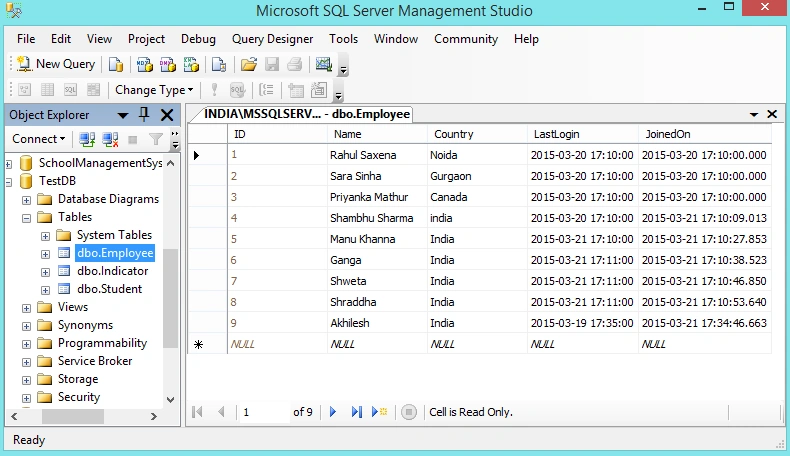
The following is my SQL Server Data Table:
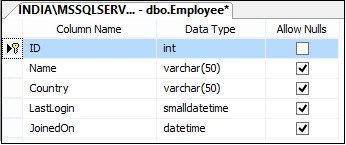
The script of the table is:
- CREATE TABLE [dbo].[Employee](
- [ID] [int] IDENTITY(1,1) NOT NULL,
- [Name] [varchar](50) NULL,
- [Country] [varchar](50) NULL,
- [LastLogin] [smalldatetime] NULL,
- [JoinedOn] [datetime] NULL
- ) ON [PRIMARY]
- GO
- SET ANSI_PADDING OFF
- GO
- ALTER TABLE [dbo].[Employee] ADD CONSTRAINT [DF_Employee_LastLogin] DEFAULT (getdate()) FOR [LastLogin]
- GO
- ALTER TABLE [dbo].[Employee] ADD CONSTRAINT [DF_Employee_JoinedOn] DEFAULT (getdate()) FOR [JoinedOn]
- GO
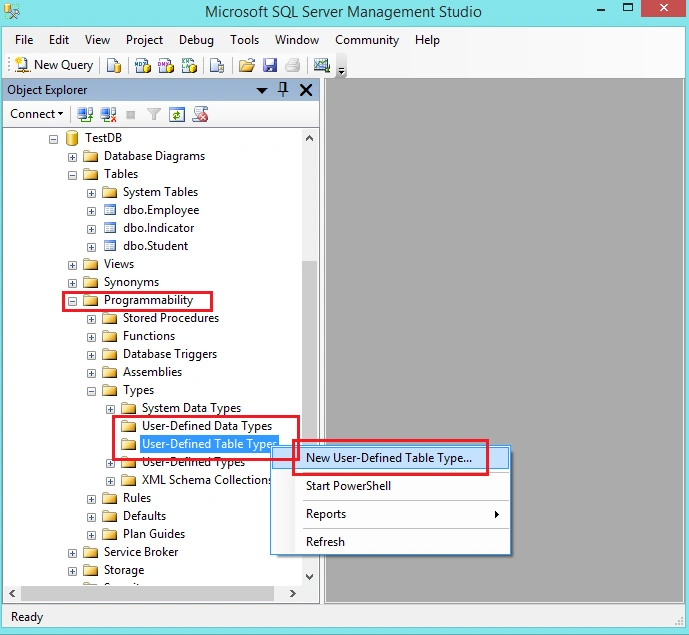
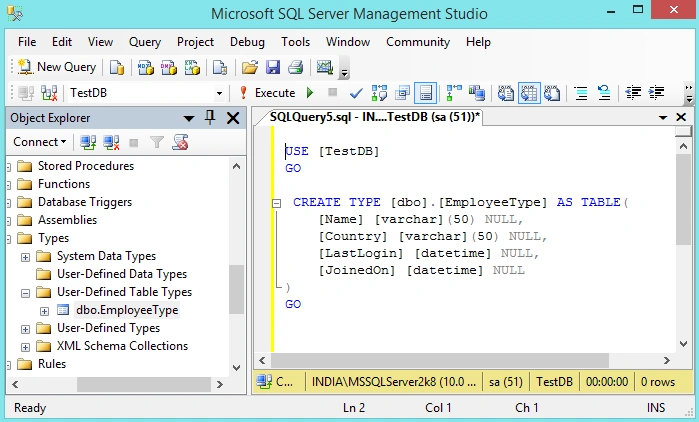
- USE [TestDB]
- GO
- CREATE TYPE [dbo].[EmployeeType] AS TABLE(
- [Name] [varchar](50) NULL,
- [Country] [varchar](50) NULL,
- [LastLogin] [datetime] NULL,
- [JoinedOn] [datetime] NULL
- )
- GO
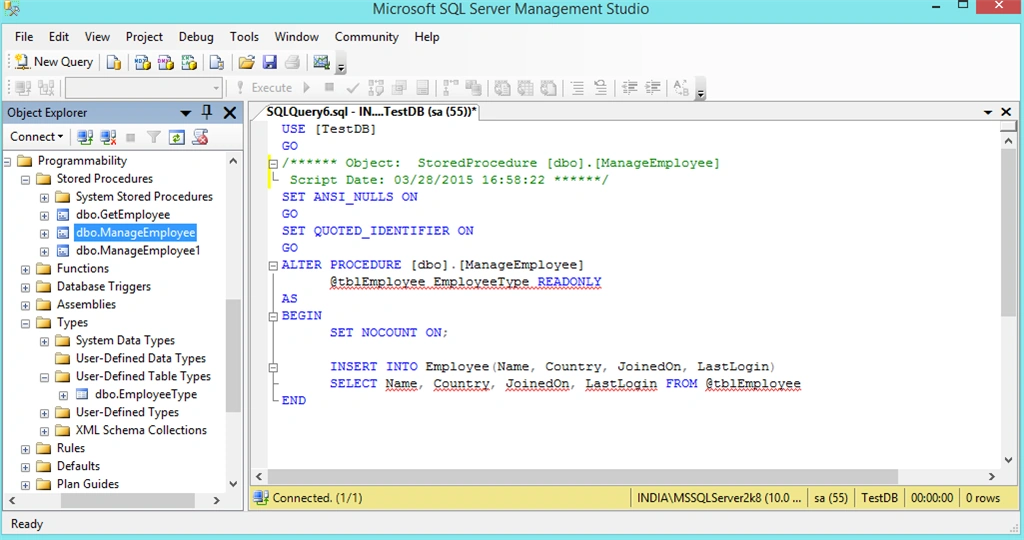
- USE [TestDB]
- GO
- /****** Object: StoredProcedure [dbo].[ManageEmployee]
- Script Date: 03/28/2015 16:58:22 ******/
- SET ANSI_NULLS ON
- GO
- SET QUOTED_IDENTIFIER ON
- GO
- ALTER PROCEDURE [dbo].[ManageEmployee]
- @tblEmployee EmployeeType READONLY
- AS
- BEGIN
- SET NOCOUNT ON;
- INSERT INTO Employee(Name, Country, JoinedOn, LastLogin)
- SELECT Name, Country, JoinedOn, LastLogin FROM @tblEmployee
- END
The following is My Employee.xml:
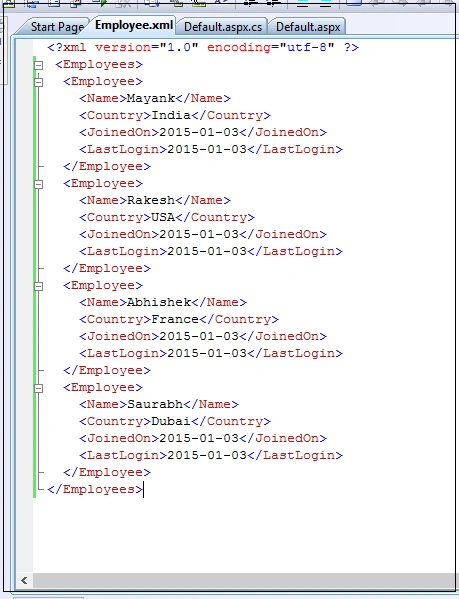
- <?xml version="1.0" encoding="utf-8" ?>
- <Employees>
- <Employee>
- <Name>Mayank</Name>
- <Country>India</Country>
- <JoinedOn>2015-01-03</JoinedOn>
- <LastLogin>2015-01-03</LastLogin>
- </Employee>
- <Employee>
- <Name>Rakesh</Name>
- <Country>USA</Country>
- <JoinedOn>2015-01-03</JoinedOn>
- <LastLogin>2015-01-03</LastLogin>
- </Employee>
- <Employee>
- <Name>Abhishek</Name>
- <Country>France</Country>
- <JoinedOn>2015-01-03</JoinedOn>
- <LastLogin>2015-01-03</LastLogin>
- </Employee>
- <Employee>
- <Name>Saurabh</Name>
- <Country>Dubai</Country>
- <JoinedOn>2015-01-03</JoinedOn>
- <LastLogin>2015-01-03</LastLogin>
- </Employee>
- <%@ Page Language="C#" AutoEventWireup="true" CodeFile="Default.aspx.cs" Inherits="_Default" %>
- <!DOCTYPE html PUBLIC "-//W3C//DTD XHTML 1.0 Transitional//EN" "http://www.w3.org/TR/xhtml1/DTD/xhtml1-transitional.dtd">
- <html xmlns="http://www.w3.org/1999/xhtml">
- <head runat="server">
- <title>Table Value Parameter</title>
- </head>
- <body>
- <form id="form1" runat="server">
- <div>
- <asp:GridView ID="GridViewEmployee" runat="server" AutoGenerateColumns="false">
- <Columns>
- <asp:TemplateField>
- <ItemTemplate>
- <asp:CheckBox ID="CheckBox1" runat="server" />
- </ItemTemplate>
- </asp:TemplateField>
- <asp:BoundField DataField="Name" HeaderText="Name" ItemStyle-Width="150" />
- <asp:BoundField DataField="Country" HeaderText="Country" ItemStyle-Width="150" />
- <asp:BoundField DataField="JoinedOn" HeaderText="Joined On" ItemStyle-Width="150" />
- <asp:BoundField DataField="LastLogin" HeaderText="Last Login" ItemStyle-Width="150" />
- </Columns>
- </asp:GridView>
- <br />
- <asp:Button ID="btninsert" Text="Insert Records" runat="server" OnClick="btninsert_Click" />
- </div>
- </form>
- </body>
- </html>
- using System;
- using System.Collections.Generic;
- using System.Linq;
- using System.Web;
- using System.Web.UI;
- using System.Web.UI.WebControls;
- using System.Data;
- using System.Data.SqlClient;
- using System.Configuration;
- public partial class _Default : System.Web.UI.Page
- {
- protected void Page_Load(object sender, EventArgs e)
- {
- if (!this.IsPostBack)
- {
- GetData();
- }
- }
- private void GetData()
- {
- DataSet ds = new DataSet();
- ds.ReadXml(Server.MapPath("~/Employee.xml"));
- GridViewEmployee.DataSource = ds.Tables[0];
- GridViewEmployee.DataBind();
- }
- protected void btninsert_Click(object sender, EventArgs e)
- {
- DataTable dt = new DataTable();
- dt.Columns.AddRange(new DataColumn[4]
- {
- new DataColumn("Name", typeof(string)),
- new DataColumn("Country",typeof(string)),
- new DataColumn("JoinedOn", typeof(DateTime)),
- new DataColumn("LastLogin", typeof(DateTime))
- });
- foreach (GridViewRow row in GridViewEmployee.Rows)
- {
- if ((row.FindControl("CheckBox1") as CheckBox).Checked)
- {
- string name = row.Cells[1].Text;
- string country = row.Cells[2].Text;
- DateTime joinedDate = DateTime.Parse(row.Cells[3].Text);
- DateTime lastLogin = DateTime.Parse(row.Cells[4].Text);
- dt.Rows.Add(name, country, joinedDate, lastLogin);
- }
- }
- if (dt.Rows.Count > 0)
- {
- InsertRecordsToDB(dt);
- }
- }
- protected void InsertRecordsToDB(DataTable dt)
- {
- using (SqlConnection con = new SqlConnection(@"Server=INDIA\MSSQLServer2k8;database=TestDB;UID=sa; pwd=india;"))
- {
- using (SqlCommand cmd = new SqlCommand("ManageEmployee"))
- {
- cmd.CommandType = CommandType.StoredProcedure;
- cmd.Connection = con;
- cmd.Parameters.AddWithValue("@tblEmployee", dt);
- con.Open();
- cmd.ExecuteNonQuery();
- con.Close();
- }
- }
- }
- }
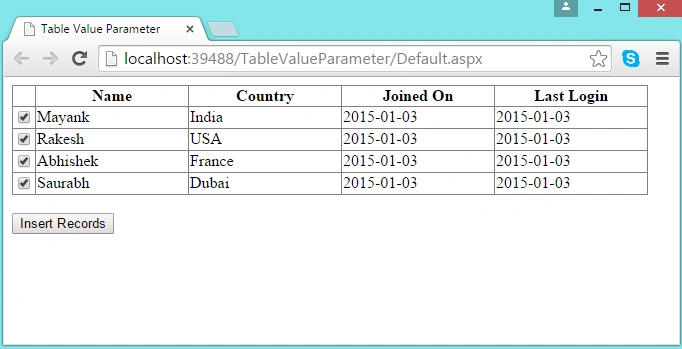
Now run the application. Select Records and click on the Insert button.
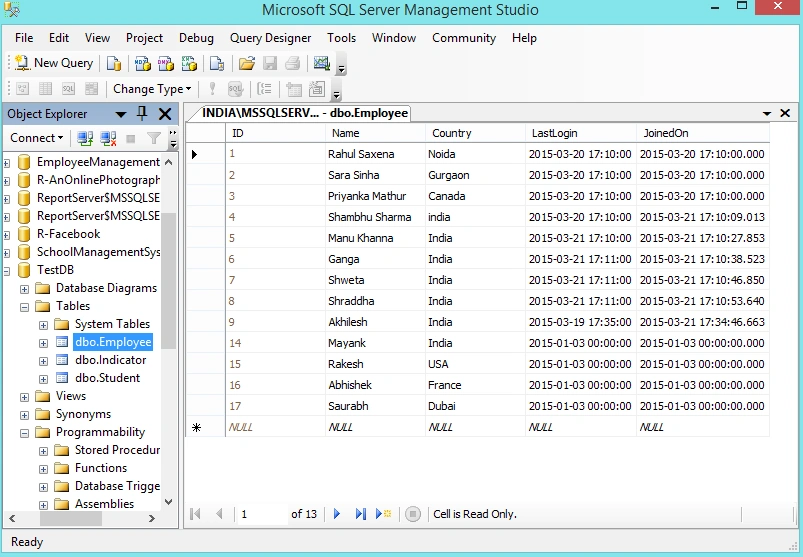
Now see the records in the table.
Rahul Kumar SaxenaPosted Mar 30, 2015, 9:12 PM
thanks gowtham rajamanivkam
Rahul Kumar SaxenaPosted Mar 30, 2015, 9:12 PM
Thanks tom mohan
Gowtham RajamanickamPosted Mar 30, 2015, 10:12 AM
nice one..
Tom MohanPosted Mar 30, 2015, 4:42 AM
Nice explanation .
Rahul Kumar SaxenaPosted Mar 30, 2015, 12:51 AM
Thanks Syed Shanu
Rahul Kumar SaxenaPosted Mar 30, 2015, 12:50 AM
Thanks Rakesh
Syed ShanuPosted Mar 29, 2015, 9:11 PM
Nice and Useful as always Rahul.
RakeshPosted Mar 29, 2015, 8:58 PM
nice article Rahul Saxena
Rahul Kumar SaxenaPosted Mar 29, 2015, 1:01 PM
Thank u Vithal Wadje
Vithal WadjePosted Mar 29, 2015, 12:50 PM
nice article