Introduction
Table-valued parameters are like parameter arrays that can be used to send multiple rows of data to a Transact-SQL statement or a routine such as a stored procedure or a function, avoiding needing to create a temporary table or using many parameters. In this article, I present how to use a Table-Valued parameter in a stored procedure using Microsoft SQL Server.
Table-valued parameters are declared by using User-Defined Table Types, which are tables whose purpose is to be used to store temporary data. So, for example, if you have a procedure that needs to receive a list of products as a parameter, you can create a Type Table for that and pass it as a parameter.
For demonstration purposes, I created a table of products that will be used in the following examples. This is the structure of the Products table.
CREATE TABLE Products (
	Id INT NOT NULL,
	Name NVARCHAR(100) NULL,
	Description NVARCHAR(200) NULL,
	CreatedDate DATETIME2 NOT NULL CONSTRAINT [DF_Products_CreatedDate] DEFAULT GETUTCDATE(),
	CreatedBy NVARCHAR(150) NOT NULL,
	CONSTRAINT PK_Product PRIMARY KEY(Id)
 );
Inserting a Single Product
Think of a scenario where your user accesses your application and needs to register a single product in your app. And for that, you need to have a procedure to add this product to the database. In order to do that, you need to create a procedure to add a single product to the products table. This procedure should receive as parameters the ID, Name, Description, and the user who created the product.
CREATE PROCEDURE InsertProduct (
		@Id INT,
		@Name NVARCHAR(100),
		@Description NVARCHAR(200),
		@User NVARCHAR(150)
	)
AS
BEGIN
	INSERT INTO Products (
		Id,
		Name,
		Description,
		CreatedBy
	)
	VALUES (
		  @Id,
		  @Name,
		  @Description,
		  @User
	);
END
For testing this procedure, we can run some scripts adding aBEGIN TRANSACTIONwith aROLLBACKin the end (this is useful when testing to avoid needing to delete/change/revert the data on each test that is made), and inside of that, we can execute the statements to insert the products.
BEGIN TRANSACTION
	SELECT * FROM Products;
	EXEC InsertProduct 1, 'Galaxy S22', 'Smartphone Samsung Galaxy S22', 'Henrique';
	EXEC InsertProduct 2, 'iPhone 14 Pro', 'Smartphone Apple iPhone 14 Pro', 'Henrique';
	EXEC InsertProduct 3, 'iPhone 13 Pro', 'Smartphone Apple iPhone 13 Pro', 'Henrique';
	SELECT * FROM Products;
ROLLBACK
- On line 1, there is the BEGIN transaction statement, and this is to allow us to revert the changes at the end of the execution.
- On line 3, we run aSELECTquery to check the data in the products table.
- On lines 5 up to 7, we run the InsertProductprocedure to insert the products. Note that in order to insert three products, we needed to execute the procedure three times, once for each product.
- On line 9, we run a new select query to check the data in the products table.
- On line 11, there is the rollback statement, to revert the changes that were made.
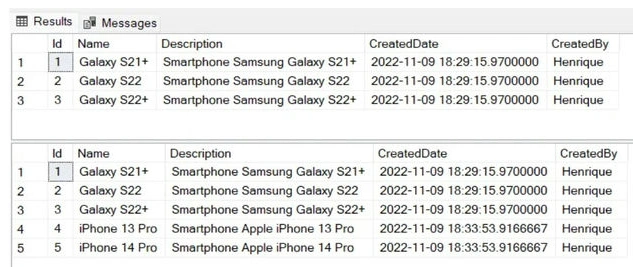
This is the result.
Inserting a Bulk of Products
Now, think of a scenario where instead of adding a single product, you will receive a list of products to be added to the product table. In this case, the procedure should contain a Table Type as a parameter (which will work as a kind of an array of products).
The Type Table should contain as columns, the same properties that will be included in the products table, in this example, the type table will have the, Name, and Description.
CREATE TYPE ProductType AS TABLE (
	Id INT NOT NULL,
	Name NVARCHAR(100) NULL,
	Description NVARCHAR(200) NULL,
	PRIMARY KEY(Id)
);
Once the Type Table is created, it’s possible to see it here.
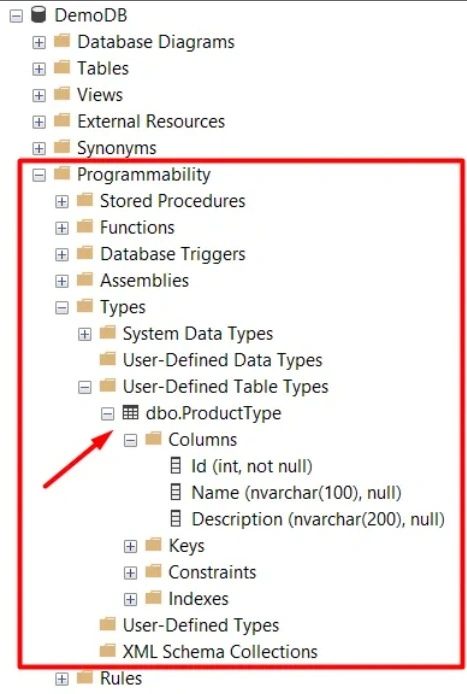
Let’s create then a new procedure namedInsertProducts(plural), this procedure will have two parameters: the type table and the user who is adding the records. This is the Insert Products procedure.
CREATE PROCEDURE InsertProducts (
		@Products ProductType READONLY,
		@User NVARCHAR(150)
	)
AS
BEGIN
	INSERT INTO Products (
		Id,
		Name,
		Description,
		CreatedBy
	)
	SELECT
		prd.Id,
		prd.Name,
		prd.Description,
		@User
	FROM @Products prd
END
- On line 2, there is the parameter@Productsof typeProductType, and it must have theREADONLYkeyword.
- On line 3, there is the parameter@CreatedByof typeNVARCHAR, which is for saving the name of the user who runs the procedure to insert products. Note: this second parameter is here only to demonstrate that even when a procedure has a type table as a parameter, is still possible to use more parameters of different types — in case you need to get the user who executed the SQL script, you can use theSYSTEM_USERin the SQL Script, instead of receiving the user as a parameter.
- On line 7, the INSERT statement begins.
- On line 13, there is the select query, which will read the data from the table type that was received as a parameter (@Products), and it will use the data to insert it into the product table.
Let’s test the procedure now. For that, let’s use the TRANSACTION with aROLLBACKin the end, as we did before, and for testing, we will add some data into the type table and execute the procedure by sending this type table as a parameter.
BEGIN TRANSACTION
	SELECT * FROM Products;
	DECLARE @Products ProductType;
	INSERT INTO @Products
	SELECT 1, 'Galaxy S22+', 'Smartphone Samsung Galaxy S22+'
	UNION ALL
	SELECT 2, 'iPhone 14 Pro', 'Smartphone Apple iPhone 14 Pro'
	UNION ALL
	SELECT 3, 'iPhone 13 Pro', 'Smartphone Apple iPhone 13 Pro';
	EXEC InsertProducts @Products, 'Henrique';
	SELECT * FROM Products;
ROLLBACK
- On line 1, a new transaction is started.
- On line 3, we first run select to check the data we have in the product table before running the procedure.
- On line 5, the variable of typeProductTypeis declared.
- On lines 7 up to 12, three records are inserted into the@Productsvariable.
- On line 14, the procedure to insert products is executed and receives as parameters the Type table variable (@Products) and a user ('Henrique').
- On line 16, a new selection, the Productstable is executed, and the three records are expected to be inserted into the table.
- On line 18, a rollback is executed to revert the changes.
This is the result.
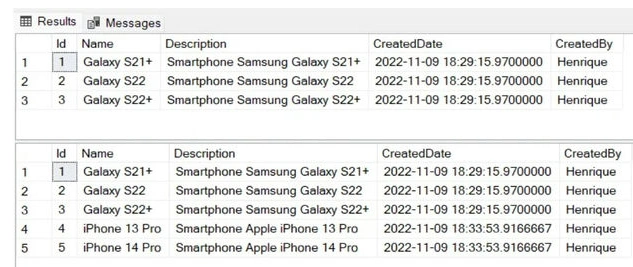
The first select query did not return any data (as expected since it is a new table). In the second select query (that was executed after the insert procedure was executed), the three products were added to the product table.
Let’s make another test for cases when there are records in the product table. For that let’s insert some data into the table.
INSERT INTO Products (Id, Name, Description, CreatedBy)
	VALUES (1, 'Galaxy S21+', 'Smartphone Samsung Galaxy S21+', 'Henrique'),
	        (2, 'Galaxy S22', 'Smartphone Samsung Galaxy S22', 'Henrique'),
		(3, 'Galaxy S22+', 'Smartphone Samsung Galaxy S22+', 'Henrique');
Now, let’s do another test, adding new records using the InsertProductsprocedure.
BEGIN TRANSACTION
	SELECT * FROM Products;
	DECLARE @Products ProductType;
	INSERT INTO @Products
	SELECT 4, 'iPhone 13 Pro', 'Smartphone Apple iPhone 13 Pro'
	UNION ALL
	SELECT 5, 'iPhone 14 Pro', 'Smartphone Apple iPhone 14 Pro';
	EXEC InsertProducts @Products, 'Henrique';
	SELECT * FROM Products;
ROLLBACK
- On line 3, the first SELECT will return the records that were previously added to the products table.
- On line 5, the variable of typeProductTypeis declared.
- On lines 7 up to 10, two products are added to theProductTypetable, which will be used as a parameter to the procedure.
- On line 12, the procedureInsertProductsis executed.
- On line 14, a second selects executed, to return the products.
This is the result.
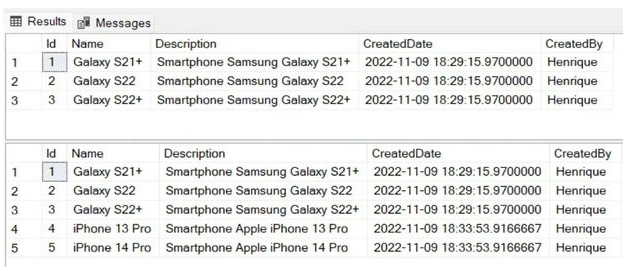
As expected, the new records with Id 4 and 5 were added to the product table.
Conclusion
When you have a stored procedure or a function that needs to receive as a parameter a list of data, it’s possible to implement it by using Tabled-Valued Parameters, declaring User-Defined Table Types. This way, instead of needing to execute the procedure many times (one time for each data), it’s possible to do a single call sending a bulk of data at once.


Join the conversation! Your thoughts help the community grow.