

These are the reference list..
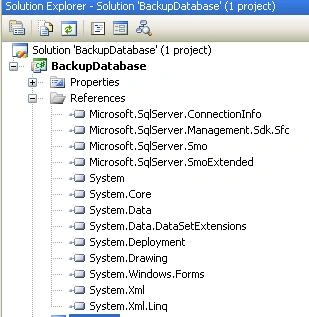
Image 1.
This is my c# code
- using System;
- using System.Collections.Generic;
- using System.ComponentModel;
- using System.Data;
- using System.Drawing;
- using System.Linq;
- using System.Text;
- using System.Windows.Forms;
- using Microsoft.SqlServer.Server;
- using Microsoft.SqlServer.Management.Smo;
- using Microsoft.SqlServer.Management;
- using System.IO;
- namespace WindowsFormsApplication1
- {
- public partial class Form1 : Form
- {
- public Form1()
- {
- InitializeComponent();
- }
- private void Form1_Load(object sender, EventArgs e)
- {
- GetAllServer();
- }
- //To Get All Server
- private void GetAllServer()
- {
- DataTable dt = SmoApplication.EnumAvailableSqlServers(false);
- if (dt.Rows.Count > 0)
- {
- foreach (DataRow dr in dt.Rows)
- {
- comboBoxServer.Items.Add((dr["Name"]));
- }
- }
- }
- //To Get All DataBase of a Selected Server
- private void GetAllDataBase()
- {
- System.Data.SqlClient.SqlConnection SqlCon = new System.Data.SqlClient.SqlConnection("server=" + comboBoxServer.SelectedItem.ToString() + ";uid=" + textBoxUid.Text + ";pwd=" + textBoxPassword.Text + ";");
- SqlCon.Open();
- System.Data.SqlClient.SqlCommand SqlCom = new System.Data.SqlClient.SqlCommand();
- SqlCom.Connection = SqlCon;
- SqlCom.CommandType = CommandType.StoredProcedure;
- SqlCom.CommandText = "sp_databases";
- System.Data.SqlClient.SqlDataReader SqlDR;
- SqlDR = SqlCom.ExecuteReader();
- while (SqlDR.Read())
- {
- comboBoxDatabaseList.Items.Add(SqlDR.GetString(0));
- }
- }
- //To Take Backup
- private void TakeBackUp(string BackupDBName, string FileNamePath)
- {
- try
- {
- if (textBoxUid.Text != "" && textBoxPassword.Text != "")
- {
- Server sqlServerInstance = new Server(new Microsoft.SqlServer.Management.Common.ServerConnection(new System.Data.SqlClient.SqlConnection("Data Source=" + comboBoxServer.SelectedItem.ToString() + ";Initial Catalog=" + comboBoxDatabaseList.SelectedItem.ToString() + "; uid=" + textBoxUid.Text + "; pwd=" + textBoxPassword.Text + ";")));
- Backup objBackup = new Backup();
- objBackup.Devices.AddDevice(FileNamePath, DeviceType.File);
- objBackup.Database = BackupDBName;
- objBackup.Action = BackupActionType.Database;
- objBackup.SqlBackup(sqlServerInstance);
- MessageBox.Show("The backup of database " + "'" + BackupDBName + "'" + " completed sccessfully", "Microsoft SQL Server Management Studio", MessageBoxButtons.OK, MessageBoxIcon.Information);
- }
- else
- {
- MessageBox.Show("Please enter userId and password");
- }
- }
- catch (Exception ex)
- {
- MessageBox.Show(ex.Message);
- }
- }
- private void button1_Click(object sender, EventArgs e)
- {
- if (comboBoxDatabaseList.SelectedIndex > 0)
- {
- if (textBoxBackFileName.Text != "")
- {
- TakeBackUp(comboBoxDatabaseList.SelectedItem.ToString(), "D:\\" + textBoxBackFileName.Text + ".bak");
- }
- else
- {
- MessageBox.Show("Please type a name for backup file");
- }
- }
- else
- {
- MessageBox.Show("Please select a database to backup");
- }
- }
- private void button2_Click(object sender, EventArgs e)
- {
- this.Dispose();
- }
- private void comboBoxServer_SelectedIndexChanged(object sender, EventArgs e)
- {
- comboBoxDatabaseList.Items.Clear();
- textBoxUid.Text = "";
- textBoxPassword.Text = "";
- MessageBox.Show("Enter UserId And Password to connect this DataSource.");
- }
- private void buttonConnectDb_Click(object sender, EventArgs e)
- {
- if (comboBoxServer.SelectedIndex > 0)
- {
- if (textBoxUid.Text != "" && textBoxPassword.Text != "")
- {
- GetAllDataBase();
- MessageBox.Show("Successfully Connected.");
- }
- else
- {
- MessageBox.Show("Please enter userId and password");
- }
- }
- else
- {
- MessageBox.Show("Please select a Server to connect");
- }
- }
- }
- }
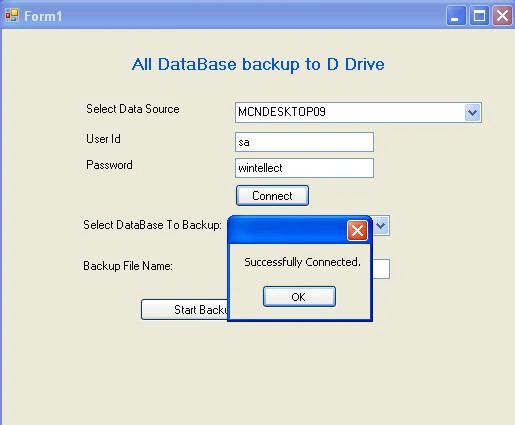
After successfully connecting select database and type the name of backup file this backup file will save in D Drive(You can change the location).
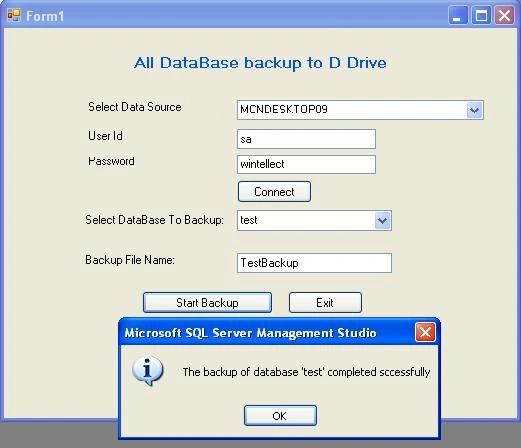
Image 3.
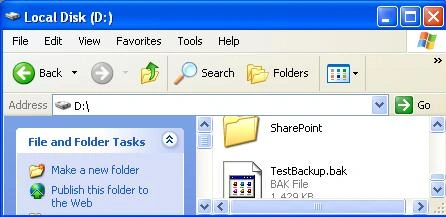
Image 4.
Cat nguyenPosted Nov 9, 2015, 2:47 AM
Please help me: im download this source and run it, when to run and click v?o button "Start Backup" one messagebox "Backup failed for server"
Sushovan JanaPosted May 26, 2015, 8:37 AM
Error 1 The name 'sqlServerInstance' does not exist in the current contextSir, pls solve it
Rahul Kumar SaxenaPosted Dec 1, 2014, 1:17 PM
Thanks Sri Harsha...
Sri HarshaPosted Nov 26, 2014, 8:03 AM
nice article
sateesh sirikiPosted Oct 29, 2013, 8:05 AM
what we write code sp_databases please explain...
Venkat TPosted Nov 19, 2010, 7:32 AM
Hi, It seems very good. when i wqas trying to exicute this it is saying missing .dll files, when can i down load and attached those 4 dll's. I am using vs 2008 & sql server 2005 Please advice. Thanks, Venkat
WoutereditedPosted Jul 13, 2010, 3:47 AMEdited Jul 13, 2010, 4:15 AM
Hi Rahul, Thanks, but I am missing the references in the project and can't find them on my laptop. I think i need to reinstall Sql Server SDK to solve the problem. UPDATE Problem solved with: http://www.sqldbatips.com/showarticle.asp?ID=35
WouterPosted Jul 13, 2010, 3:20 AM
Seems nice and usefull, only it seems that there are some missing references (Microsoft.SqlServer.ConnectionInfo, ... )in your project. Is it posible to publish again with all the references. Thanks