

Here's a scenario that's probably happened to you at least once in the last few months. You ask Claude Code to “add an endpoint that returns the department's payroll summary.” Thirty seconds later, you've got a clean, working GET endpoint. It compiles. It returns the right data. And it has absolutely no [Authorize] attribute on it, because nothing told the AI that payroll data is supposed to be locked down to the Finance department and the Admin role.
You catch it in review. You add the attribute. You move on. Multiply that by every endpoint your team asks Claude to generate over a few months, and you start to see the actual problem: Claude doesn't know your authorization model, so it's making decisions it was never qualified to make.
I've written before about implementing claims-based authorization with JWT in ASP.NET Core, and separately about how CLAUDE.md files act as the “hidden brain” behind every Claude Code session. This article sits at the intersection of those two because it turns out one is the answer to the other.
The Gap Nobody Talks About
Most CLAUDE.md guidance out there focuses on code style nullable reference types, async patterns, naming conventions, project structure. That's useful, but it treats CLAUDE.md as a linter's wish list. It rarely touches something far more consequential: your application's security model.
Claude Code can read your entire solution, understand your Program.cs, and infer a lot about your architecture. What it genuinely cannot infer is business intent which claim maps to which department, which role should touch which controller, and which endpoints are supposed to be locked down versus public. That context lives in your head, in a design doc somewhere, or scattered across old pull request comments. Claude has none of it unless you write it down.
So it guesses. Sometimes it adds a generic [Authorize] with no policy, which technically “requires login” but enforces nothing meaningful. Sometimes it skips authorization entirely because the prompt didn't explicitly ask for it. Either way, you've now got a security decision made by autocomplete.
What Changes When You Document It
The fix isn't complicated, and that's the point. If you already have claims and policies defined — the way I set them up in the JWT article, where a Department claim gates one method and an Admin role gates another you already did the hard part. What's missing is translating that into something CLAUDE.md can hand to Claude Code as ground truth.
Here's roughly what that section of a CLAUDE.md file looks like in practice:
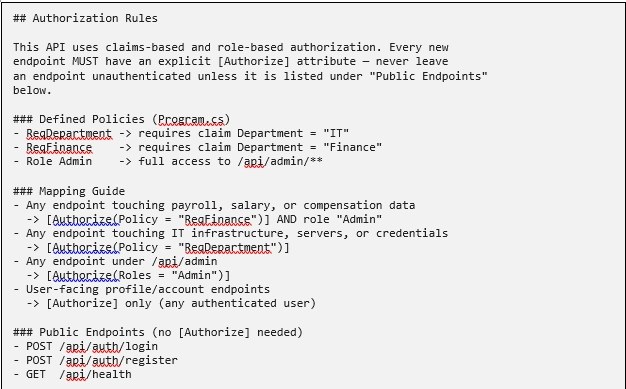
That's it. That's the whole trick. You're not teaching Claude what claims-based authorization is as it already knows the mechanics of ASP.NET Core policies cold. You're teaching it the one thing it can't derive on its own: what your business considers sensitive, and which rule applies where.
Seeing It Work
With that section in place, try the same prompt again: “Add an endpoint that returns the department's payroll summary.”
Instead of a bare GET endpoint, Claude Code now generates something like this on the first pass:

No prompting for security as an afterthought. No back-and-forth in review explaining that payroll data isn't the same as, say, a public product catalog. Claude matched “payroll” against the mapping guide in CLAUDE.md and applied the right policy, the same way a developer who'd read your team's security wiki would.
Ask it for something under /api/admin, and it reaches for Roles = "Admin" without being told again. Ask it for a login endpoint, and it correctly leaves off [Authorize] entirely, because you told it that one's meant to be public.
Where This Actually Pays Off
This pattern isn't just a neat trick — it solves real, recurring friction on teams using AI coding tools seriously:
Faster reviews. Security-related review comments — “this needs the Finance policy,” “why is this endpoint open” — mostly disappear because the AI got it right the first time.
Consistency across a large codebase. Every developer's Claude Code session reads the same CLAUDE.md, so authorization decisions don't drift based on who prompted for the endpoint.
Faster onboarding, for people and for AI. New developers (and every fresh Claude Code session) get an instant, accurate picture of the authorization model instead of reverse-engineering it from old controllers.
A living document instead of a stale wiki page. Unlike a security design doc that goes stale, a CLAUDE.md file gets exercised every time someone builds a feature, so mistakes in it surface quickly.
Where I'd Draw the Line
A few honest caveats, because this isn't a silver bullet:
Don't treat AI-applied authorization as your only line of defense. Code review and automated security testing still matter — CLAUDE.md reduces mistakes, it doesn't eliminate the need to check for them.
Keep the mapping guide close to your actual Program.cs policies. If someone adds a new policy and forgets to update CLAUDE.md, you're back to guessing. Treat this section like code — review it in PRs when the auth model changes.
Be specific, not clever. “Anything sensitive needs authorization” is too vague for Claude to act on consistently. “Anything touching payroll, salary, or compensation” is concrete enough to match against.
This works best when your policies are already clean. If your authorization model is inconsistent or ad hoc in the code itself, documenting it just formalizes the inconsistency. Fix the model first, then teach it.
Wrapping Up
Most teams either give Claude Code free rein and clean up the security gaps afterward, or they don't trust it with authorization-sensitive code at all. There's a better middle ground: give it the same context you'd give a new hire on their first day. Here's how we handle access control, here's what's sensitive, here's what's public and let it apply that consistently across every endpoint it touches.
You already did the hard work when you designed your claims and policies. CLAUDE.md is just the place to finally write it down somewhere Claude can actually read it.
Jasen FiciPosted Aug 12, 2026, 1:10 PM
Thanks for sharing this — we included it in DotNetNews here: https://dotnetnews.co/archive/the-net-news-daily-issue-517/