

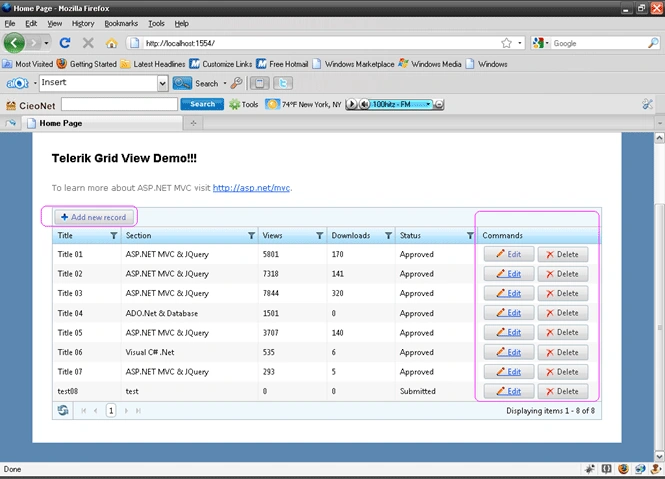
This article will demonstrate the Insert, Update and Delete Operations in a Telerik Grid View.
It is a continuation of my earlier article - Telerik Grid View in ASP.NET MVC2- Part 1 (
http://www.c-sharpcorner.com/uploadfile/2124ae/9566/ ) - in which I
have shown how to display data in a Telerik Grid.
So if you are coming directly to this article - I would recommend you go
through Telerik
Grid View - Part 1. I will be using the project I created in Part 1
So you can download it and follow the below steps to include the Insert , Update
and Delete functionality in Telerik Grid View.
1. Model - Update Repsitory Class
- Open Models-> DataRepository.cs
- Include the below lines of Code for Insert
operations.
//Insert Record from Telerik Grid View
public int MyArticles_InsertRecord(IndexTelerikGridViewModel tempVM)
{
try
{
entities.MyArticles.AddObject(new
MyArticle()
{
Title = tempVM.sTitle,
Section = tempVM.sSection,
Views = tempVM.iViews,
Downloads = tempVM.iDownloads,
Status = tempVM.sStatus
});
entities.SaveChanges();
return 1;
}
catch (Exception
ex)
{
return 0;
}
}
-
Include the below lines of Code for Update operations.
//Update Record from Telerik Grid View
public int MyArticles_UpdateRecord(IndexTelerikGridViewModel tempVM)
{
try
{
var toUpdate = (from MyArticle in entities.MyArticles where MyArticle.ArticleID == tempVM.iArticleID select MyArticle).FirstOrDefault();
if (toUpdate != null)
{
toUpdate.Title=tempVM.sTitle;
toUpdate.Section=tempVM.sSection;
toUpdate.Views=tempVM.iViews;
toUpdate.Downloads=tempVM.iDownloads;
toUpdate.Status = tempVM.sStatus;
}entities.SaveChanges();
return 1;
}catch(Exception ex)
{
return 0;
}
}
-
Include the below lines of Code for Delete operations.
//Delete Record from Telerik Grid View
public int MyArticles_DeleteRecord(IndexTelerikGridViewModel tempVM)
{
try
{
var toDelete = (from MyArticle in entities.MyArticles where MyArticle.ArticleID == tempVM.iArticleID select MyArticle).FirstOrDefault();
if (toDelete != null)
{
entities.DeleteObject(toDelete);
entities.SaveChanges();
}return 1;
}catch (Exception ex)
{
return 0;}
}
2. Controller - Include methods for Insert, Update and Delete Action
-
Open Controllers-> HomeController.cs
-
In part 1 - we have defined one action which populated our Telerik Grid based from the database.
-
Here we will add 3 more actions which would respond for Insert, Update and Delete operations.
-
Action for Insert
//Telerik GridView-Insert Action
[AcceptVerbs(HttpVerbs.Post)]
public ActionResult ArticlesTGVInsert()
{
IndexTelerikGridViewModel objArticles = new IndexTelerikGridViewModel();
//route
values defining the grid state - current page, sort expression, filter etc.
RouteValueDictionary
routeValues=this.GridRouteValues();
if (TryUpdateModel(objArticles))
{
int success_Insert =
objRepository.MyArticles_InsertRecord(objArticles);
if (success_Insert == 1)
{
TempData["UploadValidationMessage_Success"]
= "Insert Operation Succeded!!";
}
else
{
TempData["UploadValidationMessage_Failure"]
= "Insert Operation Failded!!";
}
}
return RedirectToAction("Index",routeValues);
Sujono SiauwPosted Apr 8, 2013, 11:49 PM
Hello there, can u add : using telerik.web.mvc.extentions in homecontroller in your example above. Thx.
sunil patelPosted Nov 16, 2011, 9:53 AM
Binding ComboBox inside Grid when click edit button Like this http://demos.telerik.com/aspnet-mvc/grid/clientedittemplates
sunil pateleditedPosted Nov 16, 2011, 9:51 AMEdited Nov 21, 2011, 2:01 AM
Binding ComboBox inside Grid when click edit button