Introduction
Today, in this article let's play around with another interesting concepts of Telerik RadControls.
Question: What is RadTextbox?
In simple terms "The RadTextBox control extends the standard TextBox and provides additional functionality like header and watermark. It also has two buttons: Clear Button and Action Button".
I think we are now good to go and implement this wonderful concept.
Step 1: The complete code of MainPage.xaml looks like this:
<phone:PhoneApplicationPagex:Class="RadTextBoxApplication.MainPage"xmlns="http://schemas.microsoft.com/winfx/2006/xaml/presentation"xmlns:x="http://schemas.microsoft.com/winfx/2006/xaml"xmlns:phone="clr-namespace:Microsoft.Phone.Controls;assembly=Microsoft.Phone"xmlns:shell="clr-namespace:Microsoft.Phone.Shell;assembly=Microsoft.Phone"xmlns:d="http://schemas.microsoft.com/expression/blend/2008"xmlns:mc="http://schemas.openxmlformats.org/markup-compatibility/2006"mc:Ignorable="d" d:DesignWidth="480" d:DesignHeight="768"FontFamily="{StaticResource PhoneFontFamilyNormal}"FontSize="{StaticResource PhoneFontSizeNormal}"Foreground="{StaticResource PhoneForegroundBrush}"SupportedOrientations="Portrait" Orientation="Portrait"shell:SystemTray.IsVisible="True" xmlns:telerikPrimitives="clr-namespace:Telerik.Windows.Controls;assembly=Telerik.Windows.Controls.Primitives" Loaded="MainPage1_Loaded">
<!--LayoutRoot is the root grid where all page content is placed-->
<Grid x:Name="LayoutRoot" Background="Transparent">
<Grid.RowDefinitions>
<RowDefinition Height="Auto"/>
<RowDefinition Height="*"/>
</Grid.RowDefinitions>
<!--TitlePanel contains the name of the application and page title-->
<StackPanel x:Name="TitlePanel" Grid.Row="0" Margin="12,17,0,28">
<TextBlock x:Name="ApplicationTitle" Text="RadTextBox-Application" Style="{StaticResource PhoneTextNormalStyle}"/>
<TextBlock x:Name="PageTitle" Text="Windows 7 Phone" Margin="9,-7,0,0" Style="{StaticResource PhoneTextTitle1Style}"/>
</StackPanel>
<!--ContentPanel - place additional content here-->
<Grid x:Name="ContentPanel" Grid.Row="1" Margin="12,0,12,0">
<telerikPrimitives:RadTextBox HorizontalAlignment="Left" Margin="77,20,0,478" Width="311" Name="radTxtBox1" Header="Please Enter First Number:" FontFamily="Verdana" FontSize="22" ActionButtonVisibility="Visible" />
<telerikPrimitives:RadTextBox Height="118" HorizontalAlignment="Left" Margin="63,135,0,0" VerticalAlignment="Top" Width="340" Name="radTxtBox2" Header="Please Enter Second Number:" FontFamily="Verdana" FontSize="22" ActionButtonVisibility="Visible" />
<Button Content="Addition" Height="72" HorizontalAlignment="Left" Margin="122,272,0,0" VerticalAlignment="Top" Width="238" Click="Button1_Click" FontFamily="Verdana" FontSize="22"/>
<Button Content="Substraction" Height="72" HorizontalAlignment="Left" Margin="122,350,0,0" VerticalAlignment="Top" Width="238" Click="Button2_Click" FontFamily="Verdana" FontSize="22"/>
<Button Content="Multiplication" Height="72" HorizontalAlignment="Left" Margin="122,428,0,0" VerticalAlignment="Top" Width="238" Click="Button3_Click" FontFamily="Verdana" FontSize="22"/>
<Button Content="Division" Height="72" HorizontalAlignment="Left" Margin="122,506,0,0" VerticalAlignment="Top" Width="238" Click="Button4_Click" FontFamily="Verdana" FontSize="22"/>
</Grid>
</Grid>
</phone:PhoneApplicationPage>
Step 2: The complete code of Arthmetic.cs looks like this:
namespace RadTextBoxApplication
{
public class Arthmetic
{
public double Add(double a, double b)
{
return a + b;
}
public double Sub(double a, double b)
{
return a - b;
}
public double Mul(double a, double b)
{
return a * b;
}
public double Div(double a, double b)
{
return a / b;
}
}
}
Step 3: The complete code of MainPage.xaml.cs looks like this:
using System;
using System.Collections.Generic;
using System.Linq;
using System.Net;
using System.Windows;
using System.Windows.Controls;
using System.Windows.Documents;
using System.Windows.Input;
using System.Windows.Media;
using System.Windows.Media.Animation;
using System.Windows.Shapes;
using Microsoft.Phone.Controls;
using Telerik.Windows.Controls;namespace RadTextBoxApplication
{
public partial class MainPage : PhoneApplicationPage
{
// Constructorpublic MainPage()
{
InitializeComponent();
}
public void MainPage1_Loaded(object sender, RoutedEventArgs e)
{
radTxtBox1.Focus();
}
public void Button1_Click(object sender, RoutedEventArgs e)
{
if
(string.IsNullOrEmpty(radTxtBox1.Text) || string.IsNullOrEmpty(radTxtBox2.Text))
{
RadMessageBox.Show("Please Enter Some Values", MessageBoxButtons.OKCancel,null,null,false,false,HorizontalAlignment.Center, VerticalAlignment.Center);
}
else
{
double add = _objArthmetic.Add(double.Parse(radTxtBox1.Text), double.Parse(radTxtBox2.Text));
RadMessageBox.Show("Addition Result is: " + Convert.ToString(add), MessageBoxButtons.OKCancel,"RadTextBox-Application", null, false, false, HorizontalAlignment.Center,VerticalAlignment.Center, null);
radTxtBox1.Text = string.Empty;radTxtBox2.Text = string.Empty;
}
}
public void Button2_Click(object sender, RoutedEventArgs e)
{
if (string.IsNullOrEmpty(radTxtBox1.Text) || string.IsNullOrEmpty(radTxtBox2.Text))
{
RadMessageBox.Show("Please Enter Some Values", MessageBoxButtons.OKCancel, null, null, false, false, HorizontalAlignment.Center, VerticalAlignment.Center);
}
else
{
double sub = _objArthmetic.Sub(double.Parse(radTxtBox1.Text), double.Parse(radTxtBox2.Text));
RadMessageBox.Show("Substraction Result is: " + Convert.ToString(sub), MessageBoxButtons.OKCancel,"RadTextBox-Application", null, false, false, HorizontalAlignment.Center,VerticalAlignment.Center, null);
radTxtBox1.Text = string.Empty;radTxtBox2.Text = string.Empty;
}
}
public void Button3_Click(object sender, RoutedEventArgs e)
{
if (string.IsNullOrEmpty(radTxtBox1.Text) || string.IsNullOrEmpty(radTxtBox2.Text))
{
RadMessageBox.Show("Please Enter Some Values", MessageBoxButtons.OKCancel, null, null, false, false, HorizontalAlignment.Center, VerticalAlignment.Center);
}
else
{
double mul = _objArthmetic.Mul(double.Parse(radTxtBox1.Text), double.Parse(radTxtBox2.Text));
RadMessageBox.Show("Multiplication Result is: " + Convert.ToString(mul), MessageBoxButtons.OKCancel,"RadTextBox-Application", null, false, false, HorizontalAlignment.Center,VerticalAlignment.Center, null);
radTxtBox1.Text = string.Empty;radTxtBox2.Text = string.Empty;
}
}
public void Button4_Click(object sender, RoutedEventArgs e)
{
if (string.IsNullOrEmpty(radTxtBox1.Text) || string.IsNullOrEmpty(radTxtBox2.Text))
{
RadMessageBox.Show("Please Enter Some Values", MessageBoxButtons.OKCancel, null, null, false, false, HorizontalAlignment.Center, VerticalAlignment.Center);
}
else
{
double div = _objArthmetic.Div(double.Parse(radTxtBox1.Text), double.Parse(radTxtBox2.Text));
RadMessageBox.Show("Division Result is: " + Convert.ToString(div), MessageBoxButtons.OKCancel,"RadTextBox-Application", null, false, false, HorizontalAlignment.Center,VerticalAlignment.Center, null);
radTxtBox1.Text = string.Empty;radTxtBox2.Text = string.Empty;
}
}
#region Instance Variablesprivate readonly Arthmetic _objArthmetic = new Arthmetic();
#endregion
}
}
Step 4: The output of the application looks like this:
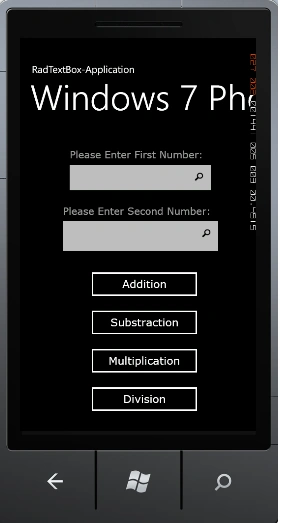
Step 5: The output of the nothing entered application looks like this:
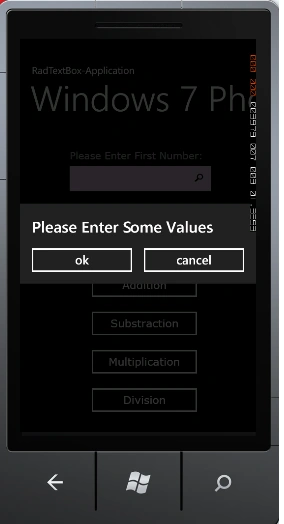
Step 6: The output of the addition operation application looks like this:
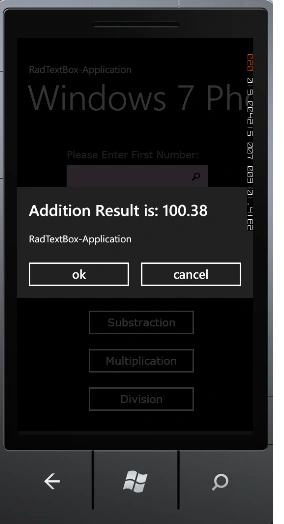
Step 7: The output of the multiplication operation application looks like this:
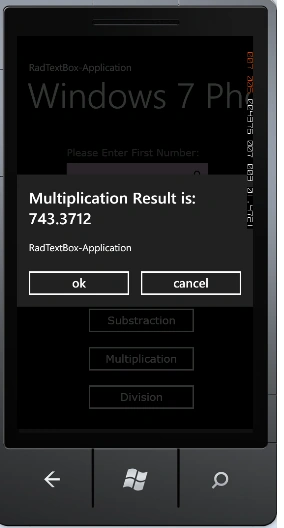
I hope this article is useful for you.


Join the conversation! Your thoughts help the community grow.