

Introduction
In my previous article I told you about Ternary Operator in GridView, Repeater and DataList.
In this article I will tell you how to use Ternary Operators in AngularJS.
As the name suggests, the Ternary Operator contains three expressions. The Ternary Operator works like an if and else condition, if it finds the condition to be true then the first expression will be executed otherwise the second will be executed.
It has two main operators, in other words "?" (question) and ":" (colon). The "?" checks whether or not the condition is true and the ":" separates the expressions to be executed.
It's syntax is as in the following manner:
condition ? first_expression : second_expression;
Now I will create an example that will help you understand this syntax clearly.
Step 1
First of all you need to add an external Angular.js file to your application, in other words "angular.min.js".
For this you can go to the AngularJS official Site or can download my source code and then fetch it or you can click on this link to download it: ANGULARJS.
After downloading the external file you need to add this file to the Head section of your application.
<head runat="server">
<title></title>
<script src="angular.min.js"></script>
</head>
Step 2
Now after adding the external JS file the first thing you need to do is to add ng-app in the <HTML> Tag otherwise your application will not run.
<html ng-app xmlns="http://www.w3.org/1999/xhtml">
Now I will work on the JavaScript of this application.
Write this code in the head section:
<script>
var app = angular.module('app', []);
function x($scope) {
$scope.TernaryInAngular = false;
$scope.checkConditions = function (value) {
$scope.TernaryInAngular = !$scope.TernaryInAngular;
};
}
</script>
Here I created a variable in which the angular.module is defined.
After this a function is created named as "x", in this function a variable is declared named "TernaryInAngular", this variable is made Boolean and it is set to false initially.
After this another function is created to check the condition whether to make the variable active or inactive.
Now our work on JavaScript is completed and we can move towards the design section of this application.
Step 3
Write this code in the body section:
<form id="form1" runat="server">
<div ng-controller="x">
<label ng-class=" TernaryInAngular ? 'class1' : 'class2' " >Hello Everyone, You can see the changes in me</label>
<br />
<br />
<input type="button" value="Chnage Class" ng-click="checkConditions()" ng-class=" TernaryInAngular ? 'class1' : 'class2' "></input>
</div>
</form>
Here the first div is bound to the function "x" using the ng-controller.
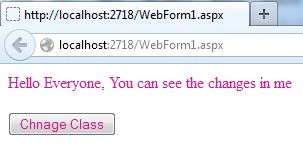
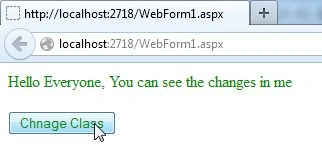
In this div a button and one label are taken, in both of these ng-class is used to bound them with two CSS classes, in other words "class1 and class2", these are bounded using the Ternary Operator. If the condition is found to be true then the first expression will be executed else the second expression will be executed.
The Click event of the button is bound to the function "checkCondition" that will change the class.
Step 4
Write the following code in the head section to define the two classes, in other words "class1 and class2":
Join the conversation! Your thoughts help the community grow.