

Overview
Automation of testing has become a fundamental part of the software development lifecycle as organizations embrace Agile, DevOps, and Continuous Delivery. When deploying changes to production, high-quality test automation provides fast feedback, reduces manual effort, and increases confidence.
Among the many end-to-end (E2E) testing frameworks available today, Microsoft Playwright has established itself as one of the most powerful and reliable solutions for modern web application testing. With Playwright, developers and testers can automate Chromium, Firefox, and WebKit browsers using a single, consistent API.
Unlike traditional browser automation frameworks that often require extensive synchronization logic, Playwright features intelligent auto-waiting, built-in assertions, isolated browser contexts, powerful debugging capabilities, and first-class parallel execution support. Developer productivity is significantly improved by these features, while flaky tests are significantly reduced.
Also included in Playwright are enterprise-grade tools such as:
Cross-browser automation
Code generation
Trace Viewer
Playwright Inspector
Browser Context isolation
Network interception
API testing
Playwright CLI
Rich HTML reports
Seamless CI/CD integration
With these capabilities, engineering teams can build enterprise-ready automation frameworks that are scalable, maintainable, and reliable.
This article explores the most important Playwright best practices that every Software Engineer, QA Engineer, Automation Tester, SDET, and Engineering Lead should follow when building modern automation solutions.
Why Choose Microsoft Playwright?
Playwright has become the preferred choice for many engineering teams, before diving into best practices.
The Playwright provides the following services:
Reliable end-to-end browser automation
Cross-browser testing from a single codebase
Automatic waiting for elements
Built-in retry mechanisms
Fast parallel execution
Isolated browser sessions
Excellent debugging tools
Rich reporting
Strong TypeScript, JavaScript, Python, Java, and .NET support
Playwright is particularly well suited for enterprise applications that require reliability, scalability, and maintainability.
1. Use User-Centric Locators
Fragile selectors are one of the most common causes of flaky UI tests.
Don't rely on:
Deep CSS selectors
XPath expressions
Auto-generated element IDs
DOM hierarchy selectors
Whenever the layout of an application changes, these locator strategies often fail.
Rather, Microsoft recommends using accessibility-focused locators that reflect how real users interact with the application.
Among the preferred locator methods are:
getByRole()
getByLabel()
getByPlaceholder()
getByText()
getByTestId()
Rather than relying on presentation details, these locators rely on semantic information.
Code Example
await page
    .GetByRole(
        AriaRole.Button,
        new() { Name = "Submit" })
    .ClickAsync();
Benefits
Improved readability
Better accessibility compliance
Reduced maintenance
Fewer broken tests
Best Practice:
Automated tests are usually better when an application is designed with accessibility in mind.
2. Never Use Hard-Coded Waits
Arranged delays are one of the biggest anti-patterns in UI automation.
Don't do:
await page.WaitForTimeoutAsync(5000);Tests become less reliable as a result of hard waits.
Use Playwright's intelligent auto-waiting feature instead.
await Expect(page
    .GetByText("Success"))
    .ToBeVisibleAsync();
When elements are ready, Playwright automatically waits:
Visible
Stable
Enabled
Ready for interaction
Tests become faster and more reliable as a result.
Best Practice
Wait for business outcomes rather than elapsed time.
3. Implement the Page Object Model (POM)
Code organization becomes increasingly important as automation projects grow.
UI interaction logic is separated from test logic in the Page Object Model.
The structure of a typical project might look like this:
Tests/
Pages/
Components/
Fixtures/
TestData/
Utilities/
Configurations/
Code Example:
public class LoginPage
{
    private readonly IPage _page;

    public LoginPage(IPage page)
    {
        _page = page;
    }

    public Task LoginAsync(string email, string password)
    {
        return Task.WhenAll(
            _page.GetByLabel("Email").FillAsync(email),
            _page.GetByLabel("Password").FillAsync(password),
            _page.GetByRole(AriaRole.Button,
                new() { Name = "Login" }).ClickAsync());
    }
}
Benefits
Centralized locators
Reduced duplication
Improved readability
Easier maintenance
Better scalability
4. Ensure Every Test Is Independent
Automated tests should be able to run independently.
There should never be a dependency between a test and another test.
A poor example is:
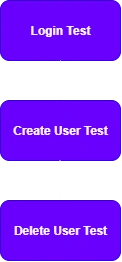
Better approach:
Each test:
Creates its own data
Performs its own login
Cleans up afterwards
Benefits include:
Reliable execution
Easier debugging
Parallel execution support
Reduced cascading failures
Join the conversation! Your thoughts help the community grow.