
Introduction
Here we going to calculate Rating for Shop using various methods. For this we may need to try different methods over time to have validation against the test method.
Let’s start step by step:
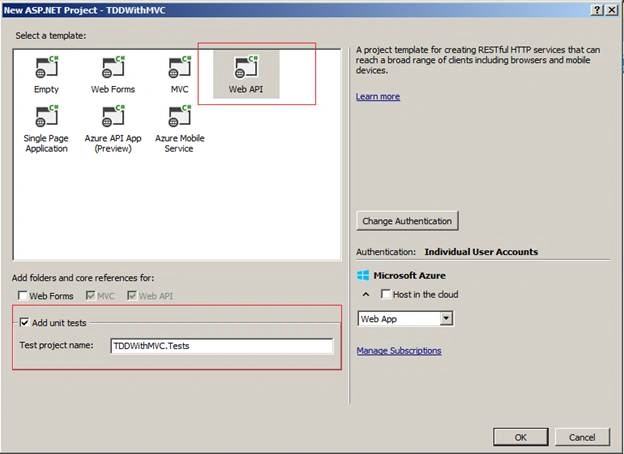
- Create ASP.NET Test Project - Test Project "TDDWithMVC.Tests".
- Adding / testing default test methods.
- Adding a Test class.
- Working with Test class and test methods.
- Adding Features classes.
- Calling the Features classes and test unit test methods.
- Refactoring Unit test and business class code.
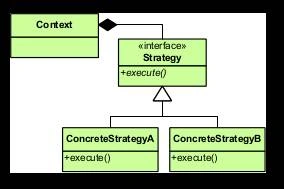
- Also how to use Strategy Design Pattern.
Create the project
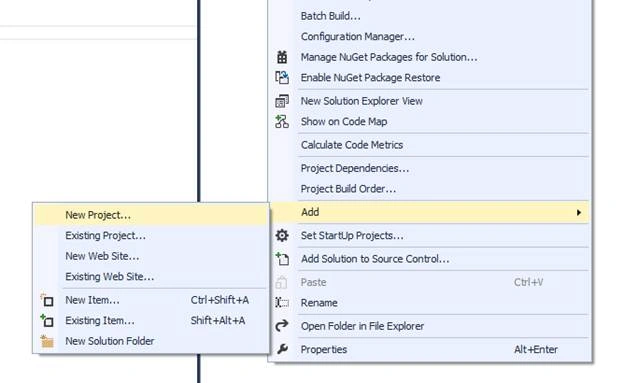
Right click on Solution and add a new project.
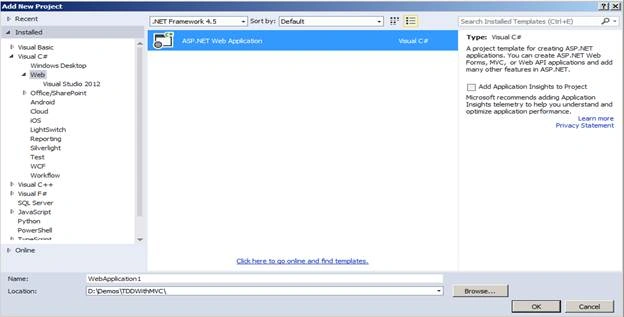
Select a template Web API.
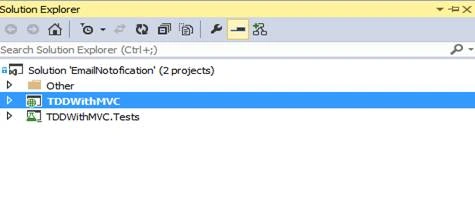
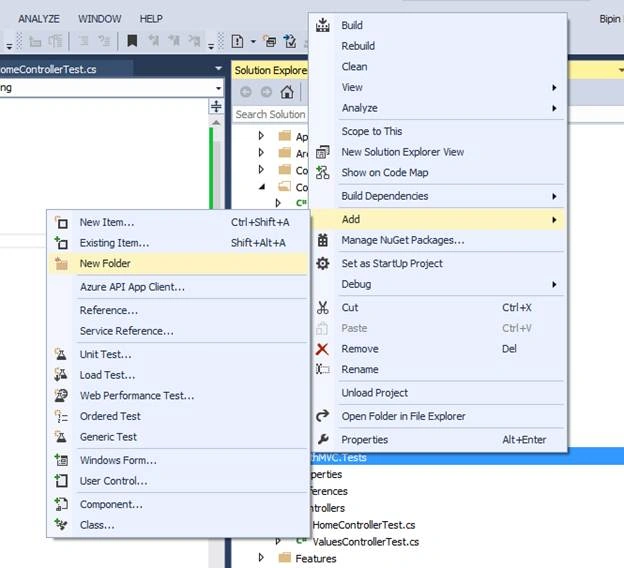
Add new folder Name as “Features”.
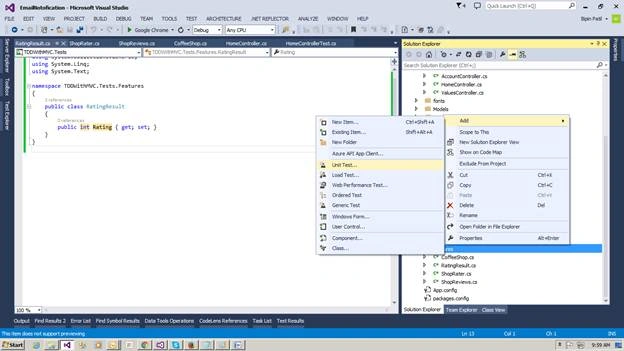
Now add a Test Class to Test Project “TDDWithMVC.Tests” Names as “UnitTest1.cs”
Replace code with following code
- using System;
- using Microsoft.VisualStudio.TestTools.UnitTesting;
- using System.Collections.Generic;
- // Calculate Rating using various methods
- // for this we may need to try diffrent methods over time to have validation againts test method
- //
- // 1. Values or reviews for 'n' number of values
- // 2. Reviews for Weighted Rating
- // 3. Reviews for top n no of reviews
- //
- // business senariao to discribe approch when to use TDD : when we do not know how to design any feature for this TDD is grate design tool we can say.
- namespace TDDWithMVC.Tests.Features
- {
- [TestClass]
- public class UnitTest1
- {
- [TestMethod]
- public void TestMethod1()
- {
- var data = new CoffeeShop();
- data.Reviews = new List < ShopReviews > ();
- data.Reviews.Add(new ShopReviews()
- {
- ratings = 4
- });
- var rateIndicator = new ShopRater(data);
- var result = rateIndicator.ComputeRating(10);
- Assert.AreEqual(4, result.Rating);
- }
- }
- }
Now we need to create classes and methods which we are using in Test class. Right now we are considering Namespace for classes,
- Right click or Ctrl + . on CoffeeShop and add new class,
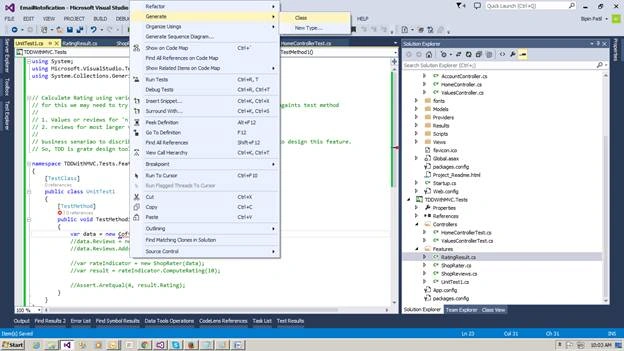
- Add class ShopReviews as below,
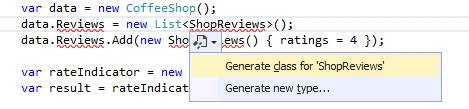
- Generate Property as below,
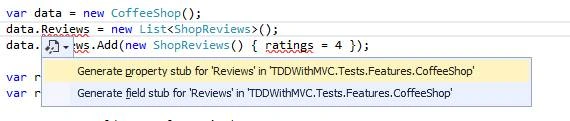
- Add property for Rating,

- In the same way add class ShopRater and add new method as ComputeRating. Now we can find the following classes added to Features folder,
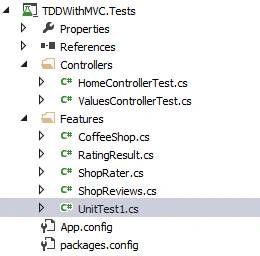
Now we will find below code to the classes,- using System.Collections.Generic;
- namespace TDDWithMVC.Tests.Features
- {
- public class CoffeeShop
- {
- public List < ShopReviews > Reviews
- {
- get;
- set;
- }
- }
- }
- namespace TDDWithMVC.Tests.Features
- {
- public class ShopReviews
- {
- public int ratings
- {
- get;
- set;
- }
- }
- }
- namespace TDDWithMVC.Tests.Features
- {
- class ShopRater
- {
- private CoffeeShop data;
- public ShopRater(CoffeeShop data)
- {
- // TODO: Complete member initialization
- this.data = data;
- }
- public RatingResult ComputeRating(int p)
- {
- return new RatingResult();
- }
- }
- }
- Now Build the project as it is stable to build the code.
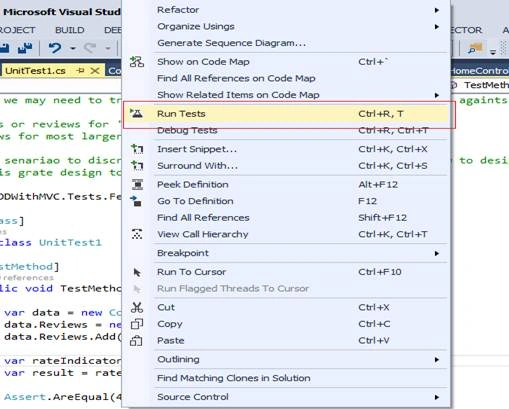
- It’s time to Run the Unit test as it is not going to pass but as it is our first step to create TDD .
- Right click on Test method and Run test.
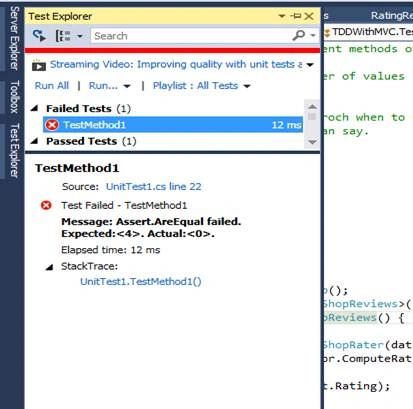
- Test has failed; you can see result into Test Explorer.
- Now we will add login to pass the Unit test to fulfill business logic,
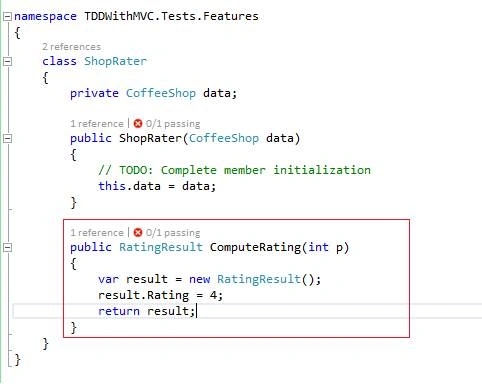
- public RatingResult ComputeRating(int p)
- {
- var result = new RatingResult();
- result.Rating = 4;
- return result;
- }
- Run the test and here we go,
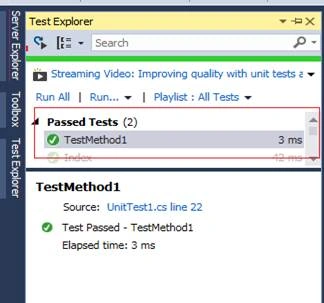
Test has passed
But this is killing me as we have hard coding computation to just pass the Unit test. Every time we cannot ask to change values as input changes As tenant we can add more tests and test conditions and for that we need to change the ComputeRating code to work correctly. Going forward we need to insure that we are adding code, condition, and features and that we are not breaking the code; that is what is the real value of the test.
Now change the clean code and do the necessary changes to follow coding conventions.- namespace TDDWithMVC.Tests.Features
- {
- class ShopRater
- {
- private CoffeeShop _coffeeShop;
- public ShopRater(CoffeeShop coffeeShop)
- {
- // TODO: Complete member initialization
- this._coffeeShop = coffeeShop;
- }
- public RatingResult ComputeRating(int numberOfReviews)
- {
- var result = new RatingResult();
- result.Rating = 4;
- return result;
- }
- }
- }
- Add a new method to check multiple rating,
- [TestMethod]
- public void Compute_ResultFor_OneReview()
- {
- // Arrange
- var data = new CoffeeShop();
- data.Reviews = new List < ShopReviews > ();
- data.Reviews.Add(new ShopReviews()
- {
- ratings = 4
- });
- var rateIndicator = new ShopRater(data);
- // Act
- var result = rateIndicator.ComputeRating(10);
- // Assert
- Assert.AreEqual(4, result.Rating);
- }
- [TestMethod]
- public void Compute_ResultFor_TwoReview()
- {
- // Arrange
- var data = new CoffeeShop();
- data.Reviews = new List < ShopReviews > ();
- data.Reviews.Add(new ShopReviews()
- {
- ratings = 4
- });
- data.Reviews.Add(new ShopReviews()
- {
- ratings = 8
- });
- var rateIndicator = new ShopRater(data);
- // Act
- var result = rateIndicator.ComputeRating(10);
- // Assert
- Assert.AreEqual(4, result.Rating);
- }
- Now refector code the code in ShopRater.cs to pass both the Test,Add Namespace using System.Linq;
- public RatingResult ComputeRating(int numberOfReviews)
- {
- var result = new RatingResult();
- result.Rating = (int) _coffeeShop.Reviews.Average(x => x.ratings);
- return result;
- }
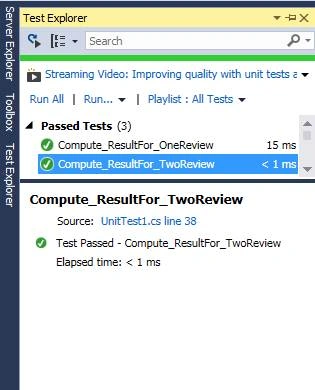
Now it’s time to reactor the test code as test code is also as important as business code,- using System;
- using Microsoft.VisualStudio.TestTools.UnitTesting;
- using System.Collections.Generic;
- using System.Linq;
- // Calculate Rating using various methods
- // for this we may need to try diffrent methods over time to have validation againts test method
- //
- // 1. Values or reviews for 'n' number of values
- // 2. reviews for most larger values
- //
- // business senariao to discribe approch when to use TDD : i do not know how to design this feature.
- // So, TDD is grate design tool we can say.
- namespace TDDWithMVC.Tests.Features
- {
- [TestClass]
- public class UnitTest1
- {
- [TestMethod]
- public void Compute_ResultFor_OneReview()
- {
- // Arrange
- //var data = new CoffeeShop();
- //data.Reviews = new List<ShopReviews>();
- //data.Reviews.Add(new ShopReviews() { ratings = 4 });
- // Arrange
- var data = BuildReview(rating: 4);
- var rateIndicator = new ShopRater(data);
- // Act
- var result = rateIndicator.ComputeRating(10);
- // Assert
- Assert.AreEqual(4, result.Rating);
- }
- [TestMethod]
- public void Compute_ResultFor_TwoReview()
- {
- // Arrange
- //var data = new CoffeeShop();
- //data.Reviews = new List<ShopReviews>();
- //data.Reviews.Add(new ShopReviews() { ratings = 4 });
- //data.Reviews.Add(new ShopReviews() { ratings = 8 });
- // Arrange
- var data = BuildReview(rating: new []
- {
- 4,
- 8
- });
- var rateIndicator = new ShopRater(data);
- // Act
- var result = rateIndicator.ComputeRating(10);
- // Assert
- Assert.AreEqual(6, result.Rating);
- }
- private CoffeeShop BuildReview(params int[] rating)
- {
- var coffeeShop = new CoffeeShop();
- coffeeShop.Reviews = rating.Select(x => new ShopReviews
- {
- ratings = x
- })
- .ToList();
- return coffeeShop;
- }
- }
- }
Now we can consider more test scenarios for negative reviews or how to deal with odd numbers, But we will mainly focus on Design (TDD is primarily).
Now add a new test to calculate weighted average of two reviews.
Add new test method as follows
- [TestMethod]
- public void Compute_ResultFor_WeightedReview()
- {
- // Arrange
- var data = BuildReview(3, 9);
- var rateIndicator = new ShopRater(data);
- // Act
- var result = rateIndicator.WeightedReviewRating(10);
- // Assert
- Assert.AreEqual(5, result.Rating)
- }
Add do implementation to class “ShopRater” so that test passes code as follows,
- public RatingResult WeightedReviewRating(int numberOfReviews)
- {
- var review = _coffeeShop.Reviews.ToArray();
- var result = new RatingResult();
- var counter = 0;
- var toatl = 0;
- for (int i = 0; i < review.Count(); i++)
- {
- if (i < review.Count() / 2)
- {
- counter += 2;
- toatl += review[i].ratings * 2;
- } else
- {
- counter += 1;
- toatl += review[i].ratings;
- }
- }
- result.Rating = toatl / counter;
- return result;
- }
So now we are going to relay on ShopRater to compute actual rating.
So ComputeResult is relay on IShopRaterAlgorithm which is passed as a parameter which looks as follows,
- using System;
- using System.Collections.Generic;
- using System.Linq;
- namespace TDDWithMVC.Tests.Features
- {
- public interface IShopRaterAlgorithm
- {
- RatingResult Compute(IList < ShopReviews > shopReviews);
- //RatingResult ComputeRating(int numberOfReviews);
- //RatingResult WeightedReviewRating(int numberOfReviews);
- }
- public class SimpleRatingAlgorithm: IShopRaterAlgorithm
- {
- public RatingResult Compute(IList < ShopReviews > reviews)
- {
- var result = new RatingResult();
- result.Rating = (int) reviews.Average(x => x.ratings);
- return result;
- }
- }
- public class WeightedRatingAlgorithm: IShopRaterAlgorithm
- {
- public RatingResult Compute(IList < ShopReviews > reviews)
- {
- var review = reviews.ToArray();
- var result = new RatingResult();
- var counter = 0;
- var toatl = 0;
- for (int i = 0; i < review.Count(); i++)
- {
- if (i < review.Count() / 2)
- {
- counter += 2;
- toatl += review[i].ratings * 2;
- } else
- {
- counter += 1;
- toatl += review[i].ratings;
- }
- }
- result.Rating = toatl / counter;
- return result;
- }
- }
- }
- And ShopRater.cs like
- using System.Collections.Generic;
- using System.Linq;
- namespace TDDWithMVC.Tests.Features
- {
- public class ShopRater
- {
- private CoffeeShop _coffeeShop;
- public ShopRater(CoffeeShop coffeeShop)
- {
- // TODO: Complete member initialization
- this._coffeeShop = coffeeShop;
- }
- public RatingResult ComputeResult(IShopRaterAlgorithm algorithm, int noOfReviewsToUse)
- {
- var filterReviews = _coffeeShop.Reviews.Take(noOfReviewsToUse);
- return algorithm.Compute(filterReviews.ToList());
- }
- }
- }
- var result = rateIndicator.ComputeResult(new SimpleRatingAlgorithm(), 10);
- Or
- var result = rateIndicator.ComputeResult(new WeightedRatingAlgorithm(), 10);
In short:
- So I have moved code from ShopRater and to Algorithm classes which is assigning specific responsibility to specific classes. So I have algorithm which focuses on computing result.
- ShopRater which has code needed to reproduce that result.
- So Test class does not require us to determine which method to call; we always call CompteResult and we pass algorithm which requires to perform computation. Important thing is that we can introduce a new algorithm without changing code inside ShopRater or any of the existing algorithms so that we can extend.
Now add a method which will compute the average of the first few reviews,Then got to ShopRater and change method as below,- [TestMethod]
- public void Compute_ResultFor_Top_n_No_Of_Review()
- {
- // Arrange
- var data = BuildReview(3, 3, 3, 5, 9, 9);
- var rateIndicator = new ShopRater(data);
- // Act
- var result = rateIndicator.ComputeResult(new SimpleRatingAlgorithm(), 3);
- // Assert
- Assert.AreEqual(3, result.Rating);
- }
Run the test cases- public RatingResult ComputeResult(IShopRaterAlgorithm algorithm, int noOfReviewsToUse)
- {
- var filterReviews = _coffeeShop.Reviews.Take(noOfReviewsToUse);
- return algorithm.Compute(filterReviews.ToList());
- }
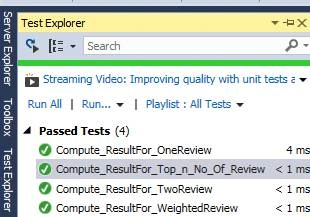
We are through and also we can move classes and business code to specific projects and folder structures.
Read more articles on MVC:
Pradeep SahooPosted Mar 18, 2016, 9:55 AM
Good Information .Can you please show me how to test a static method.
Sibeesh VenuPosted Mar 17, 2016, 11:16 AM
Nice Share
Vignesh ManiPosted Mar 16, 2016, 5:57 PM
Good start