
Introduction
This article describes a simple approach to determining whether or not a logged in user is a member of a group within the context of an asp.net web based application. The approach shown is based on the use of Windows based authentication in conjunction with a web site configured to deny anonymous authentication and to require Windows based authentication.
The example shown would be useful on a company intranet site in which it was, for example, necessary to restrict access to certain parts of the available functionality based upon the member's role. For example, you might be working with an application that has administrative and general users; the administrative users might have additional application rights such as the ability to delete records. If one were to check for group membership in the administrator's group, the application can show or hide such functionality by getting the currently logged in user and checking whether or not that user is a group member.
There are other ways to accomplish the same sort of thing and to accomplish control level locking and the other approaches can be a bit more surgical; however, this is approach is quite easy and may be used to good effect.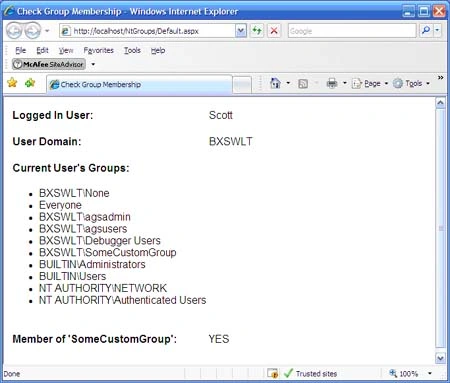
Figure 1: Example Web Site showing results of a Group Membership Test
Getting Started:
In order to get started, unzip the included project and save it. Open IIS and create a virtual directory for the project and then, once it exists, right click on the web site and select "Properties". When the properties dialog box open, select the Directory Security tab and then click on the button called, "Edit"(Figure 2); this will open the "Authentication Methods"dialog box (Figure 3).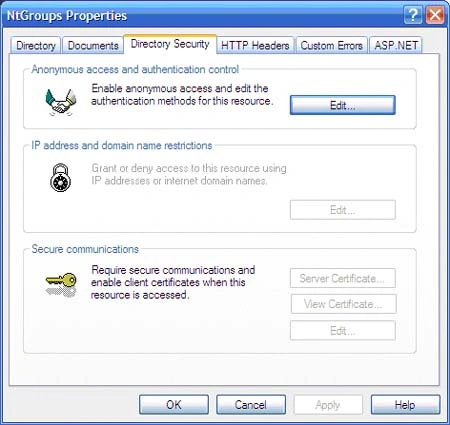
Figure 2: Edit the Anonymous Access and Authentication Settings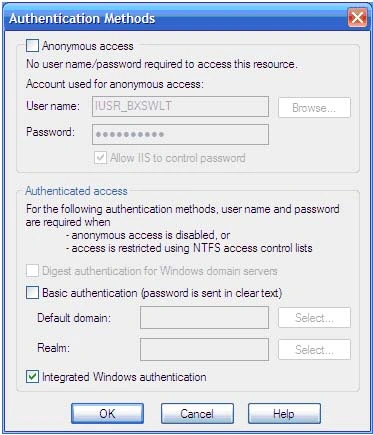
Figure 3: Authentication Methods
From the "Authentication Methods"dialog box, remove the check mark from "Anonymous Access"to disable the feature and check "Integrated Windows Authentication". This will force the site to require Windows Authentication which in most instances is transparent but running the application from a test instance on your local server will likely result in the display of a login dialog.
Once the settings are made, you can OK the dialog and close up the IIS control panel.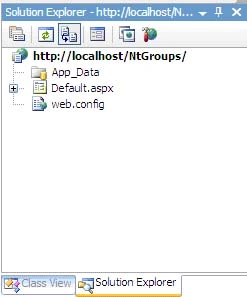
Figure 4: Solution Explorer
The solution contains a single web application project called "Default". In this case, all of the code necessary to run the demo is contained in the Default page's code behind file.
Code: Default Page
The default page contains a simple table used to display the results of a couple of quick tests; during operation, it will look like the screen shot shown in Figure 1. The markup for the page is little more than a simple table along with a bullet list and some labels used to display the user information.
The class begins with the default imports (all of the imports are set by default):
using System;
using System.Collections;
using System.Linq;
using System.Web;
using System.Web.UI;
using System.Web.UI.WebControls;
Following the imports, the class declaration is shown:
public partial class _Default : System.Web.UI.Page
{
Following the class declaration, the page load event handler is provided. The section is annotated to describe the action within Page Load:
protected void Page_Load(object sender, EventArgs e)
{
// collect the user domain and identity
string[] arr =
System.Web.HttpContext.Current.Request.
LogonUserIdentity.Name.Split('\\');
// update the display to show
// the captured domain and user
if (arr.Length > 0)
{
lblDomain.Text = arr[0].ToString();
lblUser.Text = arr[1].ToString();
}

Test for User Group Membership in ASP.NET C#
Join the conversation! Your thoughts help the community grow.
Sign in to leave a comment
It is the same account you read, post and publish with — and you will come straight back to this page.
JimPosted Sep 17, 2010, 12:21 PM
Is there an equally simple way to retrieve distribution group membership?
saritha kPosted Dec 2, 2009, 3:40 PM
Hi Scott - I am trying similar thing with active directory ,to get loggedin user groups and set them permissions item level in sharepoint.can you help me how to do this using event handler.Thanks Saritha
CourtneyPosted Nov 17, 2008, 10:59 AM
You have demonstrated how to determine if a user belongs to a specific USER group but I need to verify that one of those groups I belong to belongs to another group. Any ideas? Thanks
GrammerPosted Oct 16, 2008, 8:43 AM
It works perfectly