

Azure Monitor Application Insights provides standard tests that help website owners evaluate the availability and responsiveness of their websites. These tests work by sending HTTP or HTTPS requests to an endpoint at regular intervals, allowing site owners to monitor their site's accessibility from different locations around the globe. Using these tests, they can gain valuable insights into their site's overall performance and availability.
One of the key features of these tests is their ability to validate the response. They determine if a website is functioning properly and ensure that the responses received are correct. Response validation includes verifying the returned content or the response time, both essential for providing users with a high-quality experience.
Standard tests come with customization options, meaning website administrators can adjust the frequency of tests, select the geographic locations of test servers, and specify request headers. This flexibility enables website owners to customize tests according to their specific requirements and scenarios, offering a comprehensive and reliable approach to monitoring their site's responsiveness and availability.
In this tip, you will learn how to create a standard availability test for your website using Azure Monitor Application Insights.
- Create a new Application Insights resource in Azure. You can use the detailed instructions in this Microsoft Learn guide to create the resource using the Azure Portal or Azure CLI.
- Navigate to the Application Insights resource that you created and click on the Availability tab. Then, click on the Add Standard Test button to create a new standard test.
- In the dialog, enter the name of the test, the URL of the website to test, and the test frequency. You can also select the locations from where the test will be run. You can also specify the success criteria for the test based on the response time or the response content. In the following screenshot, we have configured the test to inspect the Serverless Notes website every 5 minutes from 5 different locations and to fail if the response does not contain the text "Insightful articles from Azure Industry experts".
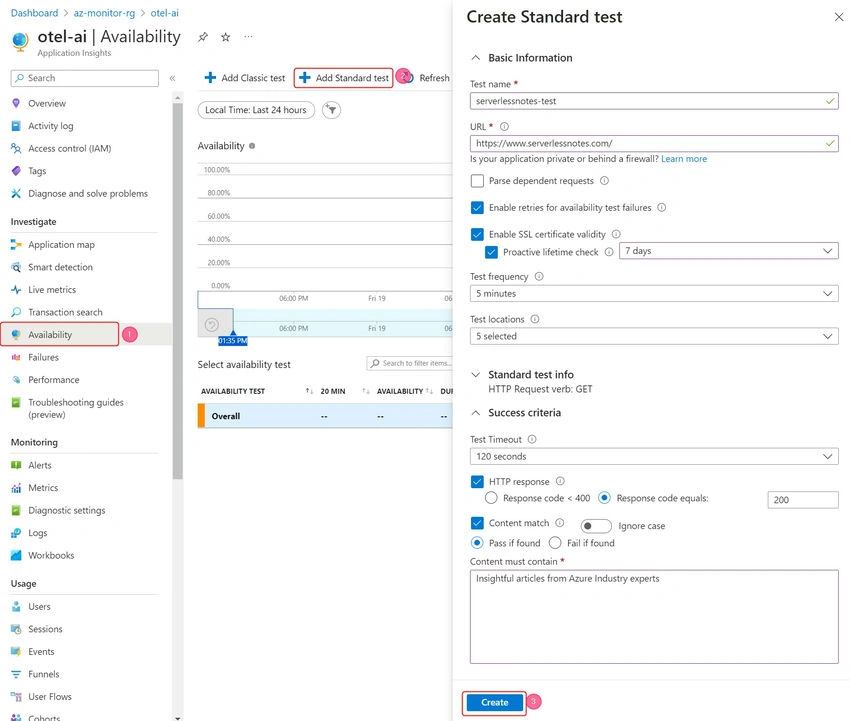
- Finally, click on the Create button to create the test.
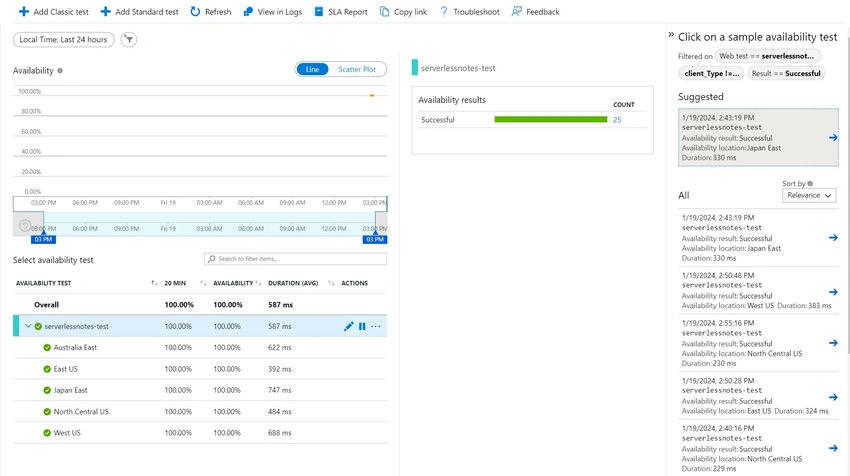
Once the test has been created, you can view the results of the test by navigating to the Availability tab and clicking on the test. The following screenshot shows the results of the test that we created earlier.
To explore the various features of Application Insights Availability Tests, please refer to the official documentation.
Join the conversation! Your thoughts help the community grow.