

Introduction
Testing of Web APIs is always a challenge because it exposes the end-point rather than the UI. Testing such things may have a dependency on third-party tools, such as Fiddler and Post-Man, to Web API endpoints. Swagger can resolve this issue. It provides the UI representation of the RESTful APIs without any implementation logic. It allows the users to understand the capabilities of a service without any code access and it also reduces the amount of time to create a service document.
Swagger generates the UI using the Swagger specification file (swagger.json) that is generated by the Swagger tool based on the service code. This file describes the capabilities of the service; i.e., how many methods are supported by the service, and provides information about method parameters. Using this file, Swagger UI generates client code. Following is an example of a swagger.json file.
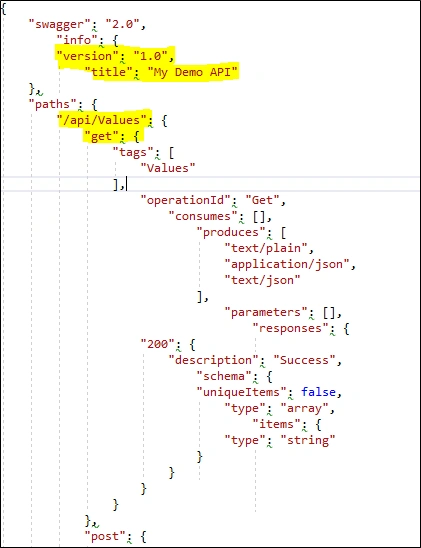
Swagger can be implemented in ASP.net core web API using Swashbuckle.AspNetCore and NSwag package. Both are open-source projects to generate Swagger documents for ASP.NET Core Web API. Additionally, NSwag also provides the approaches to generate TypeScript client code as well as C# servercode for API.
Configure Swagger in ASP.net Core Web API using Swashbuckle.AspNetCore
Following are the steps to configure Swagger in ASP.net Core Web API using Swashbuckle.AspNetCore.
Step 1. Install package Swashbuckle.AspNetCore
Using the following command, we can install a Swashbuckle.AspNetCore package.
PM> Install-Package Swashbuckle.AspNetCore
Step 2. Configure Swagger middleware
To add Swagger middle to the request pipeline, we need to AddSwaggerGen method in the ConfigureService method of the startup class. Here, we can define one or more Swagger documents.
Startup. cs
public void ConfigureServices(IServiceCollection services)
{
    services.AddMvc().SetCompatibilityVersion(CompatibilityVersion.Version_2_1);
    services.AddSwaggerGen(c =>
    {
        c.SwaggerDoc("v1.0", new Info { Title = "My Demo API", Version = "1.0" });
    });
}
If we want to enable this middleware, we need to call the UseSwagger method in the configure method of the startup class. Here also we need to configure SwaggerEndpoint to generate UI. The UseSwaggerUI is adding a static file middleware to load the swagger.json file.
public void Configure(IApplicationBuilder app, IHostingEnvironment env)
{
    if (env.IsDevelopment())
    {
        app.UseDeveloperExceptionPage();
    }
    else
    {
        app.UseHsts();
    }

    app.UseHttpsRedirection();

    app.UseSwagger();
    app.UseSwaggerUI(c =>
    {
        c.SwaggerEndpoint("/swagger/v1.0/swagger.json", "My Demo API (V 1.0)");
    });
    app.UseMvc();
}
The above steps are required to set up Swagger. If we want to launch Swagger in a development environment using Visual Studio, one more change is required. To set Swagger UI, go to the project property - debug tab and change Launch Browser value to "swagger".
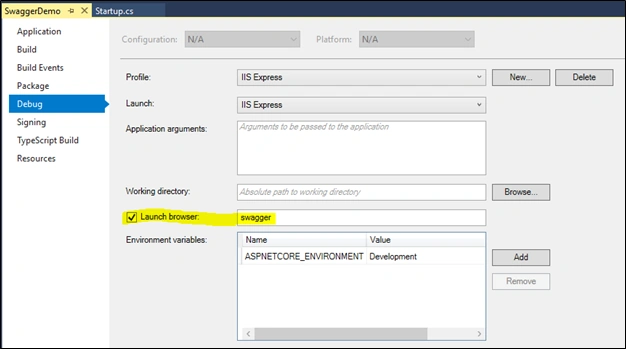
When we run the application, we can see the following Swagger UI for ValuesContoller.
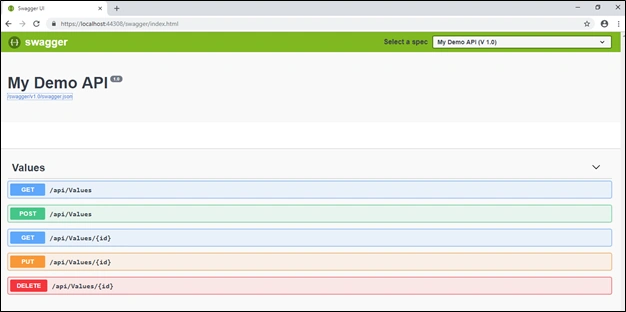
As we see here, it uses a different color code for each HTTP verb. When we click on any action method it will ask for parameter details and when we click on the execute button it will send a request to the web API.
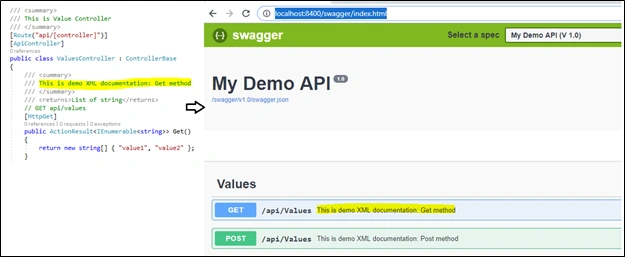
The Swagger requires minimum configuration to test our web API. It also shows XML comments when generating UI but that requires some configuration.
The .net /.net core framework provides a way to write XML comments for the documentation. In .net core, we can enable XML comments by setting up the "XML documentation file" property under the build tab of project property windows.
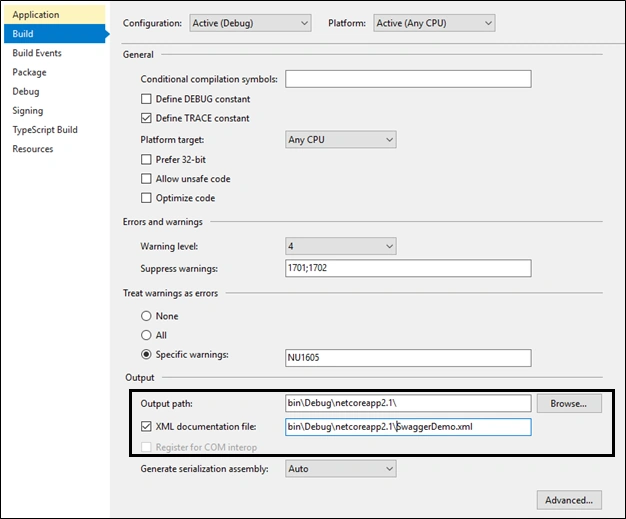
Swagger UI does not show this documentation by default. We need to pass the path to IncludeXMLComments.
public void ConfigureServices(IServiceCollection services)
{
    services.AddMvc().SetCompatibilityVersion(CompatibilityVersion.Version_2_1);
    services.AddSwaggerGen(c =>
    {
        c.SwaggerDoc("v1.0", new Info { Title = "My Demo API", Version = "1.0" });
        c.IncludeXmlComments(System.IO.Path.Combine(System.AppContext.BaseDirectory, "SwaggerDemo.xml"));
    });
}
Configure Swagger in ASP.net Core Web API using NSwag
Following are the steps to configure Swagger in ASP.net Core Web API using NSwag.AspNetCore.
Step 1. Install-Package NSwag.AspNetCore
Using the following command, we can install a package of NSwag.AspNetCore.
PM> Install-Package NSwag.AspNetCore
Step 2. Configure Swagger middleware
To add a Swagger middle to the request pipeline, we need to theSwaggerDocument method in the ConfigureService method of the startup class. This method adds a default document with the name "V1". If we want to add more than one document, call this method multiple times with a different document name.
Startup. cs
public void ConfigureServices(IServiceCollection services)
{
    services.AddMvc().SetCompatibilityVersion(CompatibilityVersion.Version_2_1);
    services.AddSwaggerDocument();
}
If want to enable this middleware, we need to call the UseSwagger method in the configure method of the startup class. This method adds the default route as "/swagger/{documentName}/swagger.json" Also we need to call the UseSwaggerUi3 method to add the Swagger UI to the request pipeline.
public void Configure(IApplicationBuilder app, IHostingEnvironment env)
{
    if (env.IsDevelopment())
    {
        app.UseDeveloperExceptionPage();
    }
    else
    {
        app.UseHsts();
    }

    app.UseHttpsRedirection();

    app.UseSwagger();
    app.UseSwaggerUi3();

    app.UseMvc();
}
The above steps are required to set up Swagger. If we want to launch Swagger in a development environment using Visual Studio, one more change is required. To set Swagger UI, go to the project property - debug tab and change Launch Browser value to "swagger".
Summary
Swagger helps us to test our web API without any third-party tool and custom code. In this article, I have explained how to configure Swagger using Swashbuckle and NSwag.
You can view or download the source code from the GitHub link here.
Sumesh EsPosted Oct 24, 2019, 7:38 AM
Thank you. Its super cool.
shrey shahPosted Aug 12, 2019, 6:56 AM
How to send authenticated request using swashbuckle ?
Koteswara RaoPosted Jul 22, 2019, 12:33 PM
How to generate server side dotnet core api code using visual studio code from yaml file?
Ron ZhongPosted Jul 13, 2019, 8:03 PM
Thank you. This helps a lot.
Mushtaq M APosted Jun 5, 2019, 5:51 AM
Facing the following issue "HTTP ERROR 404" while accessing "https://localhost:44347/swagger"
Hamid KhanPosted Mar 7, 2019, 1:47 AM
Good example.......Thanks
Nelson GiraldoPosted Feb 26, 2019, 1:42 PM
Great tutorial.
Sagar SinhaPosted Feb 21, 2019, 10:33 AM
Hi Jignesh, Is there any way by which we can monitor(check whether API is up or down) our ASP.NET web API's using swagger without using any third party tools? Swagger provides a tool called AlertSite which help in monitoring API's but I cannot use a third party tool. Is there anything which Nuget can help with?
Manish PatelPosted Feb 5, 2019, 7:04 AM
Excellent usefull article...
Rushi MehtaPosted Dec 10, 2018, 10:02 PM
Very good concept explain... Thanks Jignesh