

Here’s something I keep noticing in the teams I talk to. AI tools can now write code faster than anyone expected, and yet projects still take just as long to ship. Why?
Because writing code was never the only slow thing. It was just the most visible one. Now that it’s quick, everything around it suddenly looks painfully slow.
In this article I’ll walk through what an “AI-native SDLC” means, why traditional processes struggle with AI-written code, and what each stage of software development looks like when AI is part of the loop. No jargon walls, I promise.
First, what is an SDLC?
SDLC stands for Software Development Life Cycle. It’s simply the journey a piece of software takes from “we should build this” to “it’s live and people are using it.”
Most companies follow the same six stages:
• Plan: decide what to build and why
• Design: work out how it should look and behave
• Build: write the code and tests
• Test: check that it actually works
• Deploy: release it to real users
• Maintain: keep it healthy after launch
Traditionally, each stage belongs to a different group. Product managers write requirements, designers and architects shape them, engineers build, QA tests, a release team ships, and operations watches over it. The work moves between them through documents, tickets and sign-offs.
So where’s the problem?
Think of a restaurant kitchen. Imagine you hire a chef who cooks ten times faster than anyone before. Great, right? But the waiters still take orders at the old speed. The manager still approves every dish by hand. Plates still wait at the counter for someone to carry them out. Your super-fast chef is now standing around, and customers don’t get their food any sooner.
That’s what’s happening in software. Our old process was built for a world where writing code took weeks or months, so we added lots of checkpoints: requirement documents, estimation meetings, manual reviews, approval committees. Those made sense when code was the expensive part.
Once AI handles the building quickly, three things happen:
• The slowdown moves. Planning, reviewing, testing and deploying are now the bottleneck, because they still run at human speed.
• The old checks stop working. Reading every line of code by hand made sense when a person wrote it. It doesn’t scale when an AI produces most of the changes.
• Governance gets expensive. If every exception needs a weekly or monthly committee meeting, things pile up fast.
Take security as an example. A security team is sized for human output. If AI multiplies the code being written, either the review queue explodes or code ships without proper review. Neither is acceptable, especially in banks, insurance or healthcare.
So what is an “AI-native” SDLC?
It means redesigning the whole process around what AI can do now, while keeping humans responsible for the decisions that need judgment. You might also hear it called the agentic SDLC or AI SDLC. Same thing, different names.
Two big ideas make it work.
1. It’s a loop, not a straight line. In the old model, work flows one way: plan, then design, then build, and so on. In the AI-native version, the end of one stage automatically kicks off the next, and what happens in production can start a brand new cycle.
2. Every stage leaves a file behind. Each stage finishes by saving a written record (in the same place the code lives, usually Git), and the next stage starts by reading it. These records are:
• intent.md: what we want and why
• spec.md: the requirements and design
• plan.md: how the engineer or AI will build it
• the code changes, with their tests and review notes
• the incident record, if something goes wrong
The nice side effect is that this chain of files doubles as an audit trail. You can see who asked for what, what the AI produced, and who approved it. And because these are plain text files, a product owner and an AI can both read and act on the same thing.
The old way vs the new way, at a glance
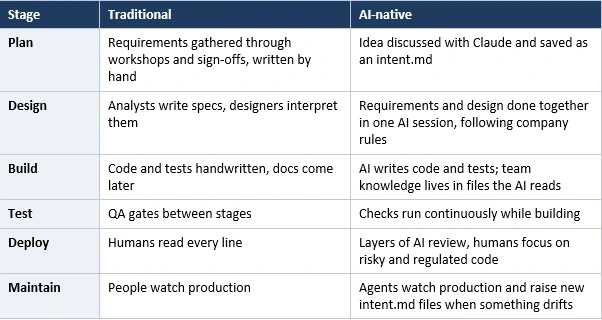
Most companies sit somewhere between the two columns, and that’s fine.
Stage 1: Plan, ideas stop waiting in line
In the old way, an idea travels through backlog entries, user stories, story points and refinement meetings. By the time engineering sees it, it’s been retold so many times that it barely resembles the original thought.
In the AI-native way, the person with the idea simply talks to Claude in their own words. What can’t they do today? Who is affected? What would better look like? Claude asks the questions an analyst would ask, then writes it all up as a short intent.md covering the problem, the outcome wanted, who’s affected, constraints and open questions. The person corrects anything Claude got wrong, and it gets saved. Done in hours, not weeks.
Stage 2: Design, requirements and design in one go
Once the product owner accepts the intent, Claude turns it into a requirements-and-design spec. The key here is that company rules about brand, security, compliance and user experience are written down as skills (reusable instruction sets), so Claude applies them while writing the spec instead of someone discovering a violation weeks later.
The product owner doesn’t write the spec. They review it, starting with the concerns Claude flagged, like places where two company policies contradict each other. A human still decides whether it moves forward.
Stage 3: Build, plan first, then code
This is where most people expect the magic, but notice that it starts with a plan, not code.
Plan mode. The engineer gives Claude the spec, and Claude reads the codebase without changing anything. It proposes which files will change, in what order, and which tests will prove it works. The engineer questions it (“what could this break?”), fixes the plan, and saves it as plan.md. Only then does coding start. Changing a document is far cheaper than changing finished code.
CLAUDE.md. Think of this as the onboarding note you’d give a new joiner: how to build and test, team conventions, and the mistakes people keep making. Claude reads it at the start of every session. A good habit is that if Claude makes the same mistake twice, the fix goes into this file.
Skills and hooks. A skill is like a strong suggestion (“follow our API security standard”). A hook is a hard rule that runs automatically, such as blocking edits to protected files, running the formatter, or keeping passwords out of the code. Skills make mistakes rare; hooks make them close to impossible.
Parallel sessions and subagents. One engineer can run several Claude sessions at once, each on its own task, in its own separate copy of the code. Smaller helper agents handle repeat jobs, like one that runs the app to check the change actually works. The engineer’s role shifts from typing everything to steering and reviewing.
Stage 4: Test, the AI checks its own homework
The simplest and most powerful rule here: always give Claude a way to verify its own work, whether that’s running tests, a build or a screenshot comparison. It iterates until the check passes, so what reaches the human has already been tested.
For bug fixes, there’s a clever trick. First write a test that proves the bug exists, then ask Claude to fix the code without touching that test. That way the AI can’t “pass” by quietly weakening the check.
There’s also something called evals. Since your instructions to the AI (CLAUDE.md, skills, hooks) steer its behavior, they deserve testing just like code. Teams collect a set of real past tasks and re-run them whenever those instructions change or a new model is swapped in, to confirm the quality hasn’t dropped.
Stage 5: Deploy, review in both directions
Claude reviews incoming code changes against the company’s written policy, and it also fixes comments left on its own changes. Findings are ranked by severity, so humans can spend their attention on the bigger questions: does this do what we intended, and is the risk acceptable?
Two safety rules matter here:
• The AI that wrote the code cannot approve it. A human code owner still signs off.
• For anything touching production, hooks act as approval gates. A deploy command simply won’t run until a named person has authorized the release.
The guiding principle is easy to remember: the agent can do everything up to the production gate, and nothing beyond it. It can also help inside the pipeline with judgment-type chores, like explaining why a build failed or drafting a changelog, but it works in a sandbox with no permanent access to production, and rolling back is a well-rehearsed, one-command job.
Stage 6: Maintain, where the loop closes
This is my favorite part. Normally, maintenance is reactive: an alert fires at 3 a.m., somebody misses it, or a ticket sits in a backlog for weeks.
In the AI-native approach, a plain, non-AI script watches production metrics, such as error rates or test failures, against their normal baseline. How far a metric strays decides what happens next:
• Small drift: just log it
• Bigger drift: Claude investigates, read-only
• Serious drift: Claude may act, but only by opening a change for review or running a pre-approved rollback
Whatever Claude finds is written up as a fresh intent.md, and the whole cycle begins again. Humans triage the findings and approve fixes, but they no longer have to start everything from scratch.
Two more ideas live here. Security scans can run on a schedule instead of once before a release, since both your code and the AI models keep changing. And chat tools like Slack can have Claude sitting in the incident channel as a first responder, with the whole conversation staying there as a record.
What about the tools we already use, like Jira?
Fair question, and the answer is: nobody expects you to throw them out. Auditors already trust those systems. The advice is simply to pick one source of truth for each type of record, and link the rest to it. Even a basic link between a ticket and the matching file is a perfectly good start.
How do you know it’s working?
Each stage suggests a few easy-to-track numbers, mostly readable straight from Git history. For example:
• Time from first conversation to a saved intent.md
• How often AI-written changes pass automated checks on the first try
• How long code reviews take
• How quickly a production issue turns into a permanent test
If those are improving, you’re on the right track.
Where should you start?
You don’t need to transform everything at once. Each stage can be adopted separately. If I had to pick a first step, I’d start with a CLAUDE.md file in one project, since it needs nothing else and pays off immediately. Then add plan mode, then a feedback loop so Claude can test itself. The rest builds naturally from there.
Wrapping up
The takeaway is not “let AI do everything.” It’s almost the opposite. AI speeds up the doing, but people remain accountable for the deciding: what to build, whether the design is right, whether the risk is acceptable, when to release.
For years we built our processes around the slowness of writing code. That slowness is mostly gone, so the processes around it need to catch up. Teams that make that shift will move faster and, if they set up the guardrails properly, more safely too.
If you’ve tried parts of this in your own team, I’d love to hear what worked and what didn’t in the comments.
Join the conversation! Your thoughts help the community grow.