

As AI transitions from simple prompt-and-response chains to autonomous, multi-step agents, the biggest engineering challenge is no longer just the LLM it is State Management.
When building complex agentic workflows using LangGraph, the state model is the central nervous system of your application. Below is a deep dive into the state model I use when architecting LangGraph applications, the engineering rationale behind this design, and a complete, end-to-end real-world implementation.
Part 1: The LangGraph State Model
In LangGraph, the state model is defined as a Strictly Typed Schema (usually a Python TypedDict or a Pydantic BaseModel) that acts as the single source of truth for the entire graph.
Here is the foundational design pattern I use:
from typing import Annotated, TypedDict, Literal
from langgraph.graph.message import add_messages
from langchain_core.messages import BaseMessage

class AgentState(TypedDict):
    # 1. The Message History (using a Reducer)
    messages: Annotated[list[BaseMessage], add_messages]

    # 2. Domain-Specific Variables (Overwritten by default)
    order_id: str | None
    refund_amount: float | None
    requires_human_approval: bool
Key Components of this Model:
TypedDict/ Pydantic: Enforces a strict contract. Every node in the graph knows exactly what keys exist, what their types are, and what to expect.Annotatedwith Reducers (add_messages): This is the magic of LangGraph. Instead of nodes blindly overwriting themessageslist, theadd_messagesreducer tells LangGraph to append new messages to the existing list, handling deduplication and tool-call pairing automatically.Flat, Domain-Specific Keys: Variables like
order_idorrequires_human_approvalare kept at the root level. Because they lack a custom reducer, LangGraph defaults to an overwrite reducer. If Node A writesrefund_amount: 50.0, it overwrites whatever was there before.
Part 2: Why Choose This Design?
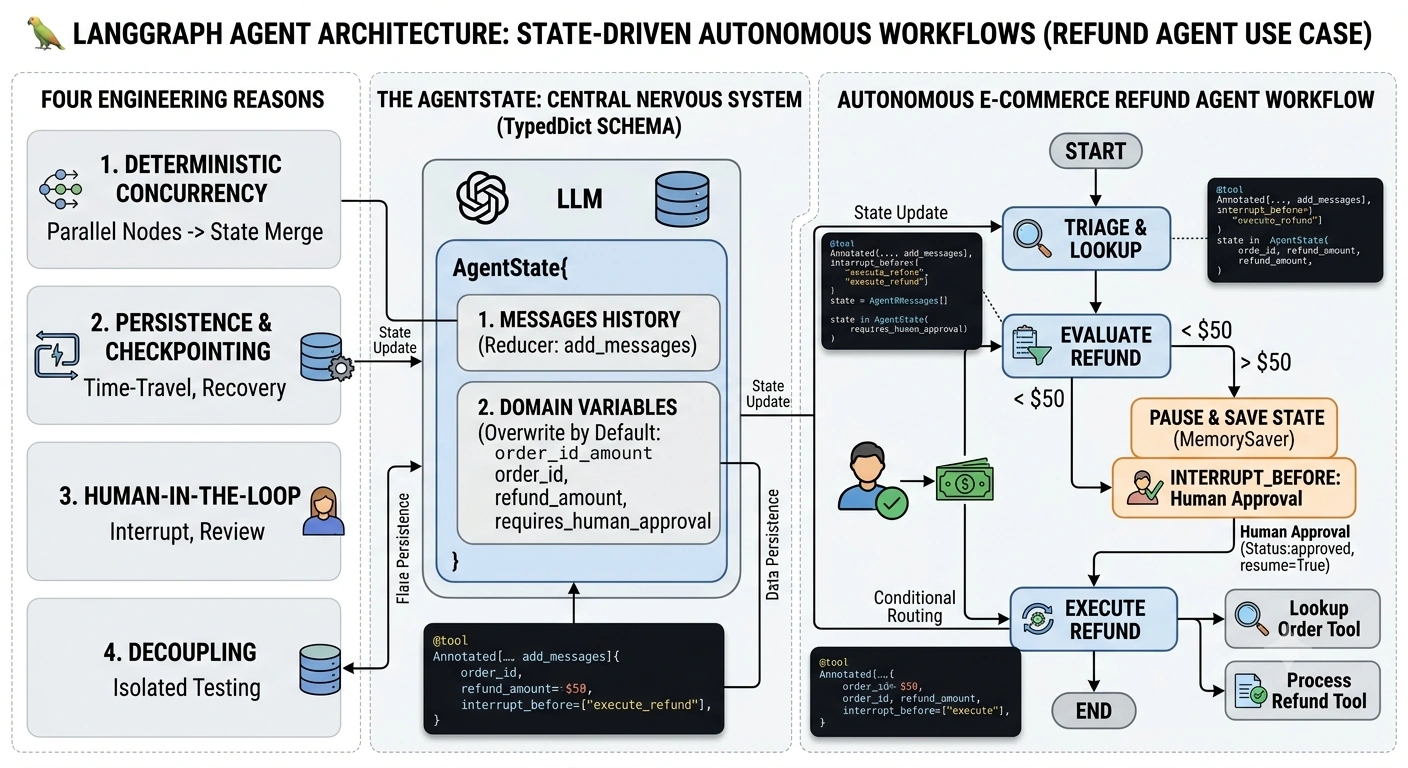
When architecting agentic systems, I choose this specific state design for four critical engineering reasons:
1. Deterministic Concurrency (The Reducer Pattern)
In complex graphs, multiple nodes might run in parallel (e.g., searching a database while simultaneously querying an API). If both nodes try to update a shared list of messages, a race condition occurs. By using Annotated[..., add_messages], LangGraph safely merges the outputs of parallel nodes into the state without data loss.
2. Seamless Persistence & Checkpointing
Because the state is a serializable dictionary, LangGraph can automatically serialize it to a database (like PostgreSQL or SQLite) at every single node transition. This enables Time-Travel Debugging and Crash Recovery. If the app crashes on step 4, it can resume exactly from step 4 using the persisted state.
3. Human-in-the-Loop (HITL) Architecture
By including boolean flags or specific status enums in the state (e.g., requires_human_approval), we can use LangGraph’s interrupt_before compilation feature. The graph will pause, save the state to a database, and wait for a human to review and approve the state before mutating it further.
4. Microservice-like Decoupling
Nodes don't need to know about the entire graph; they only need to know about the slice of the state they care about. This makes testing individual nodes in isolation trivial.
Part 3: Real-World Use Case — Autonomous E-Commerce Refund Agent
Let’s apply this to a real-time use case: An Autonomous Customer Support Agent that handles order inquiries and processes refunds, requiring Human-in-the-Loop approval for high-value refunds.
The Scenario
A user asks for a refund.
The agent looks up the order.
If the refund is under $50, the agent processes it automatically.
If the refund is over $50, the agent pauses, saves the state, and waits for a human manager to approve it.
Once approved, the agent executes the refund and replies to the user.
Step 1: Define the State and Tools
import os
from typing import Annotated, TypedDict, Literal
from langchain_core.tools import tool
from langchain_core.messages import BaseMessage
from langgraph.graph.message import add_messages
from langgraph.graph import StateGraph, START, END
from langgraph.checkpoint.memory import MemorySaver
from langchain_openai import ChatOpenAI

# 1. Define the State
class SupportState(TypedDict):
    messages: Annotated[list[BaseMessage], add_messages]
    order_id: str | None
    refund_amount: float | None
    status: Literal["pending", "awaiting_approval", "approved", "completed"]

# 2. Define the Tools (Simulated)
@tool
def lookup_order(order_id: str) -> dict:
    """Looks up order details by ID."""
    # Simulated DB call
    return {"order_id": order_id, "amount": 120.50, "status": "delivered"}

@tool
def process_refund(order_id: str, amount: float) -> str:
    """Processes the refund in the payment gateway."""
    return f"Success: Refund of ${amount} issued for order {order_id}."

# Initialize LLM and bind tools
llm = ChatOpenAI(model="gpt-4o").bind_tools([lookup_order, process_refund])
Step 2: Define the Nodes (The Logic)
Nodes read from the state, perform logic, and return a dictionary to update the state.
def triage_and_lookup(state: SupportState):
    """Routes to tool calling and executes the lookup."""
    response = llm.invoke(state["messages"])
    return {"messages": [response]}

def evaluate_refund(state: SupportState):
    """Evaluates if the refund requires human approval."""
    last_message = state["messages"][-1]

    # Extract tool call data (simplified for example)
    # In reality, you parse the ToolMessage from the lookup_order
    amount = 120.50 # Parsed from tool response
    order_id = "ORD-999"

    requires_approval = amount > 50.0

    return {
        "order_id": order_id,
        "refund_amount": amount,
        "status": "awaiting_approval" if requires_approval else "approved",
        "messages": [{"role": "assistant", "content": f"Refund of ${amount} evaluated."}]
    }

def execute_refund(state: SupportState):
    """Executes the refund (Only runs after human approval if required)."""
    order_id = state["order_id"]
    amount = state["refund_amount"]

    # Call the actual tool
    result = process_refund.invoke({"order_id": order_id, "amount": amount})

    return {
        "status": "completed",
        "messages": [{"role": "assistant", "content": f"Your refund is complete! {result}"}]
    }
Step 3: Build and Compile the Graph
Here is where the state model shines. We define the flow and use interrupt_before to leverage our state for Human-in-the-Loop.
# Define Conditional Routing
def should_continue(state: SupportState) -> Literal["execute_refund", "triage_and_lookup"]:
    last_message = state["messages"][-1]

    # If the LLM called the lookup tool, we evaluate next
    if hasattr(last_message, "tool_calls") and last_message.tool_calls:
        return "triage_and_lookup" # Simplified: in reality, a ToolNode handles this

    # If status is approved (either automatically or by human), execute
    if state.get("status") == "approved":
        return "execute_refund"

    return END

# Build the Graph
workflow = StateGraph(SupportState)

# Add Nodes
workflow.add_node("triage_and_lookup", triage_and_lookup)
workflow.add_node("evaluate_refund", evaluate_refund)
workflow.add_node("execute_refund", execute_refund)

# Add Edges
workflow.add_edge(START, "triage_and_lookup")
workflow.add_edge("triage_and_lookup", "evaluate_refund")
workflow.add_conditional_edges("evaluate_refund", should_continue)
workflow.add_edge("execute_refund", END)

# Compile with Memory and Interrupts
# The magic happens here: The graph will PAUSE before execute_refund
# if the status is "awaiting_approval", saving the state to memory.
checkpointer = MemorySaver()

app = workflow.compile(
    checkpointer=checkpointer,
    interrupt_before=["execute_refund"] # Pauses here to allow HITL
)
Step 4: Execution and Human-in-the-Loop
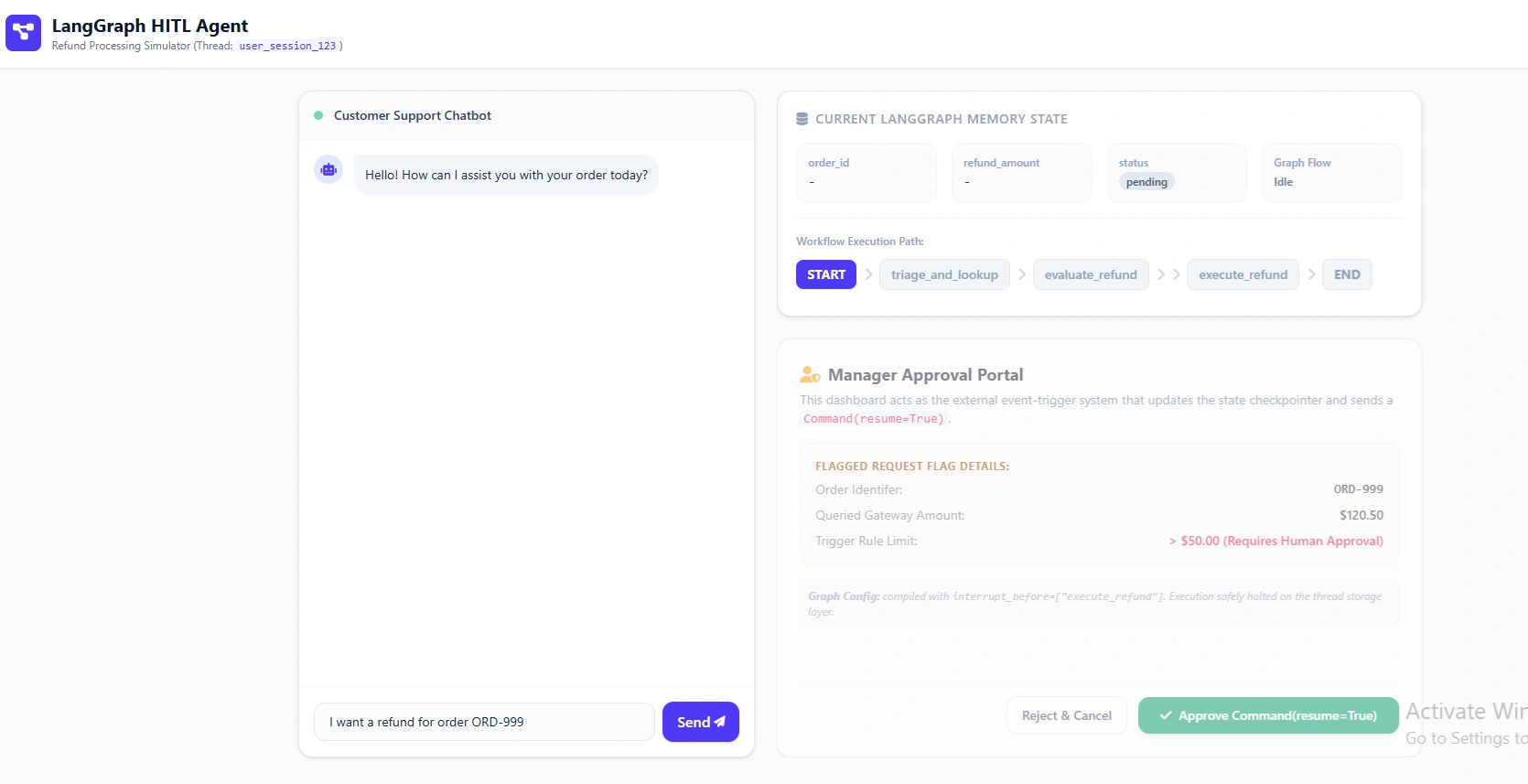
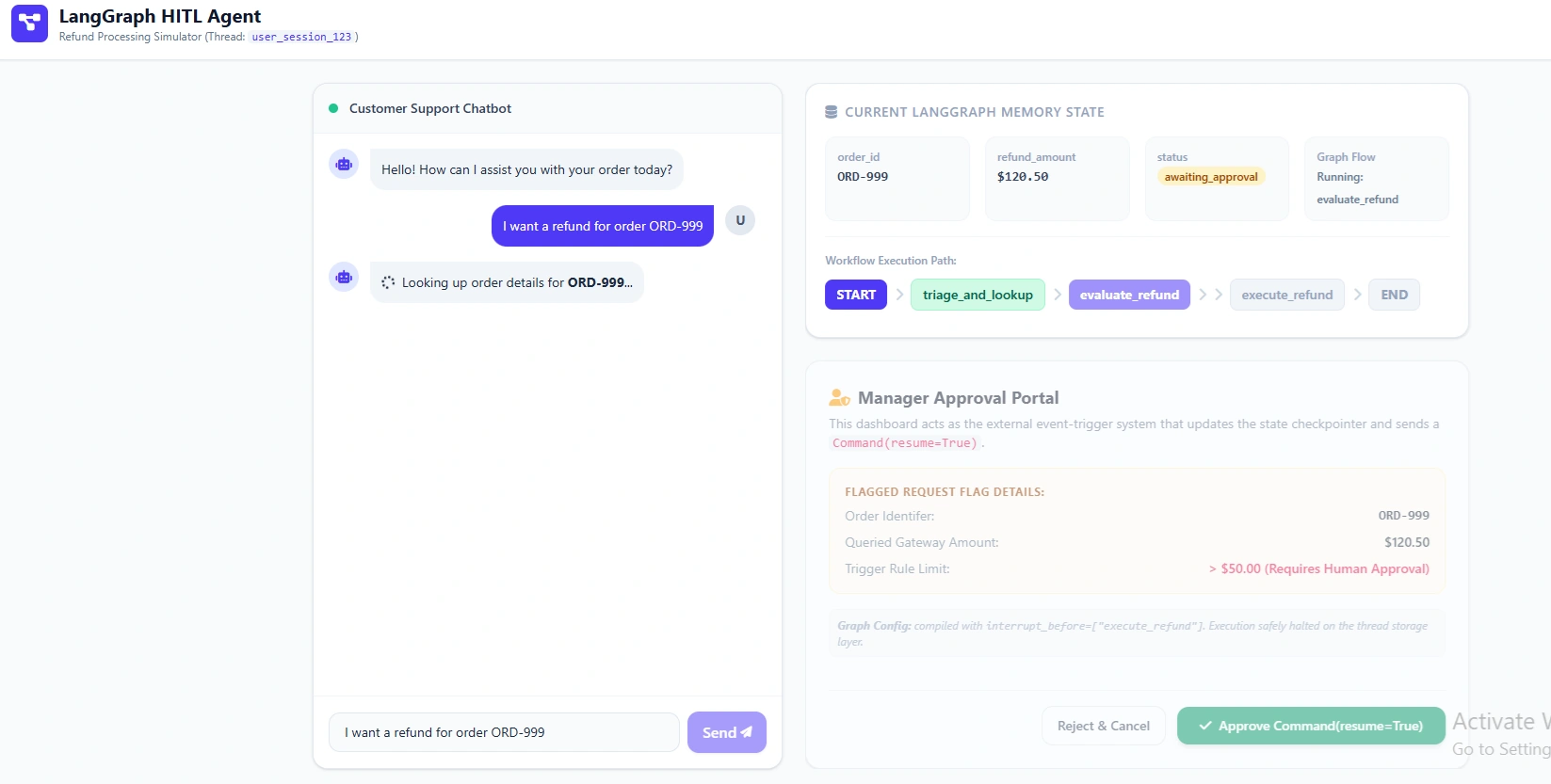
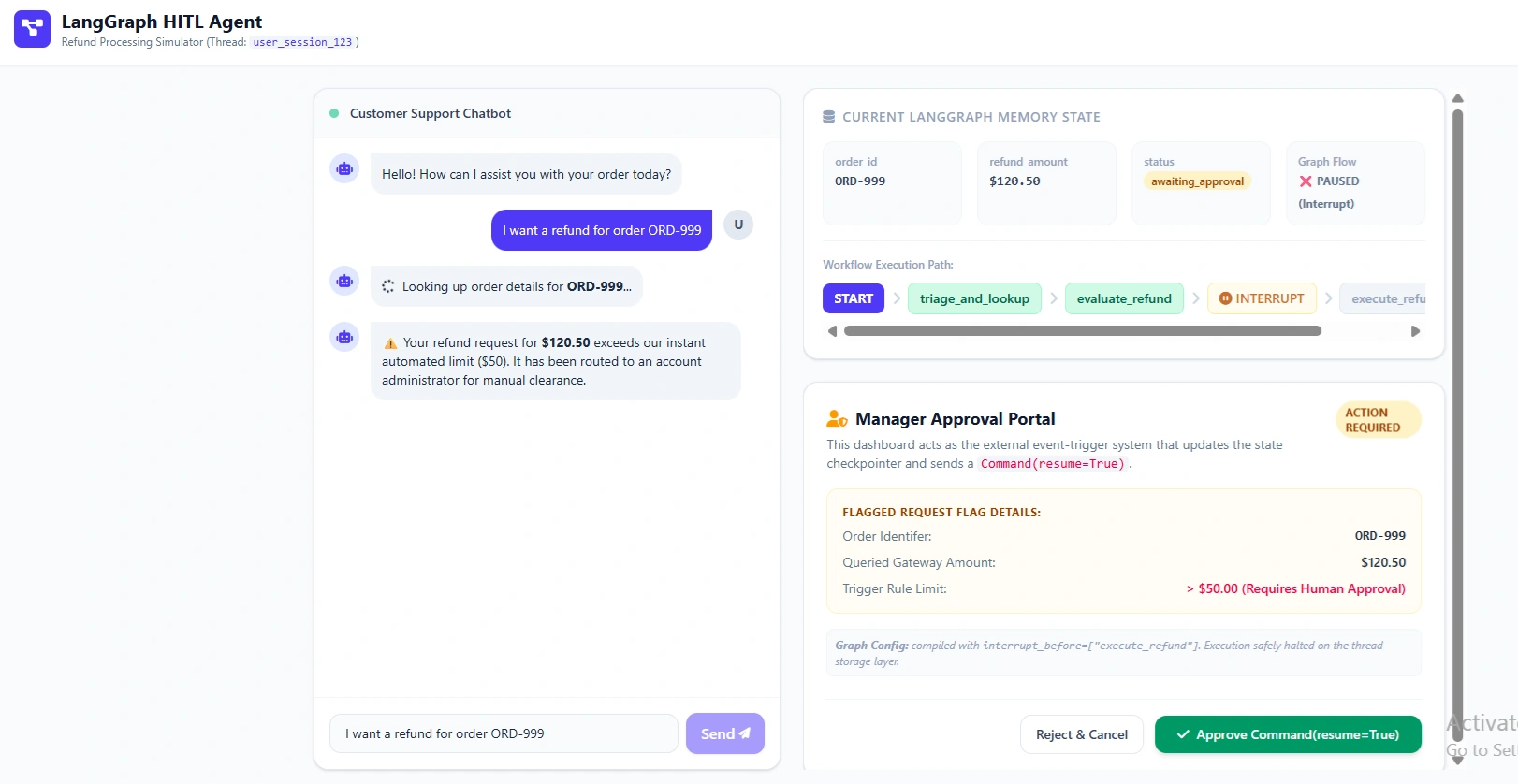
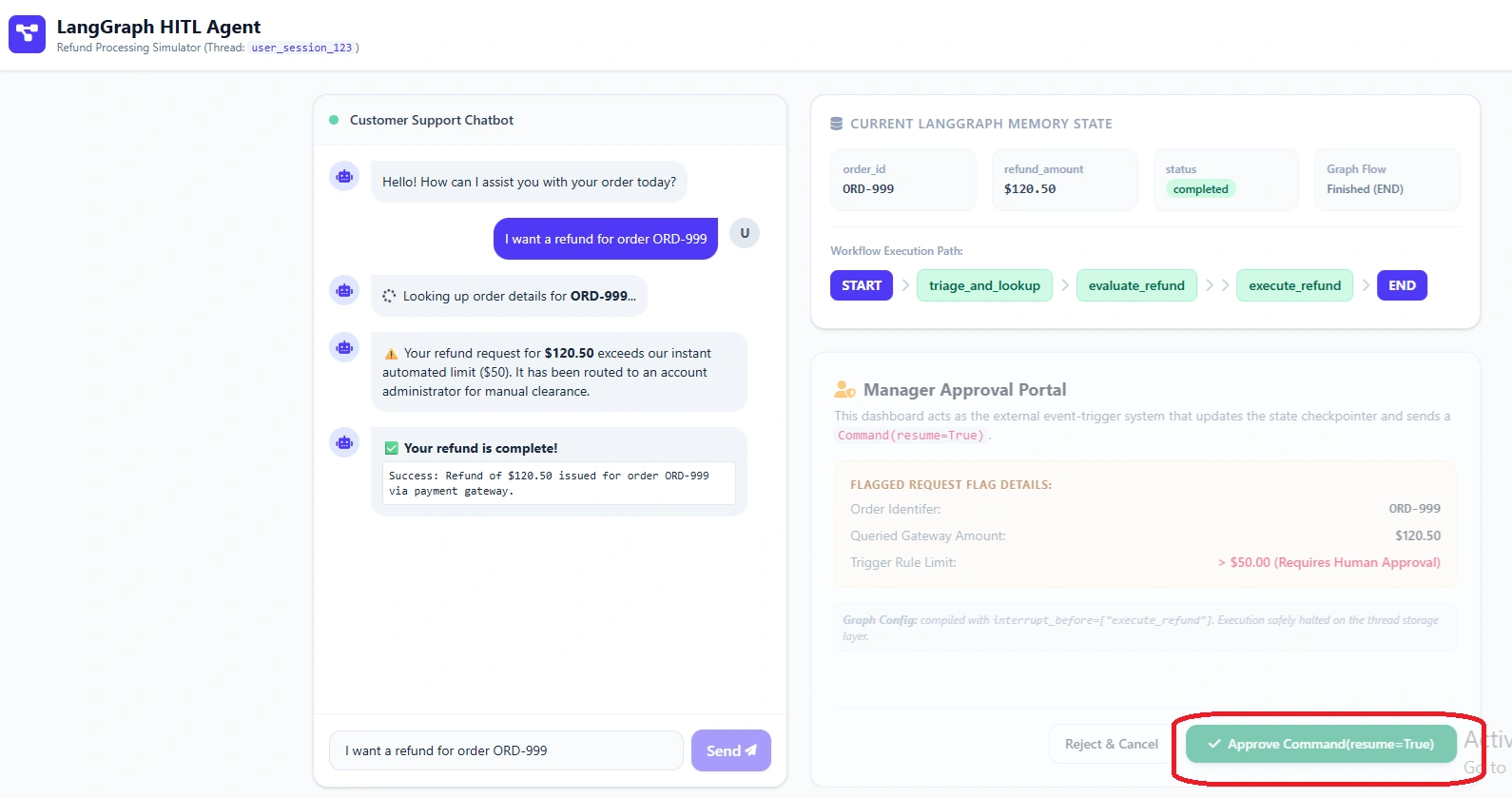
Let's run the graph. Because the simulated order is $120.50 (which is > $50), the graph will pause.
# 1. Initial User Input
config = {"configurable": {"thread_id": "user_session_123"}}
initial_input = {"messages": [{"role": "user", "content": "I want a refund for order ORD-999"}]}

# Run the graph
result = app.invoke(initial_input, config)

print("--- GRAPH PAUSED ---")
print(f"Current Status: {result['status']}")
print(f"Refund Amount: ${result['refund_amount']}")
# Output: Current Status: awaiting_approval
# Output: Refund Amount: $120.5
The Human Intervention:
In a real app, a frontend UI would show a "Approve Refund" button. When the manager clicks it, the backend resumes the graph by passing an updated state.
# 2. Human Manager Approves (Updating the State)
# We pass a command or simply update the state to bypass the interrupt
from langgraph.types import Command

human_approval_update = Command(
    update={"status": "approved"}, # Overwrites the state key
    resume=True # Tells LangGraph to continue past the interrupt
)

# Resume the graph
final_result = app.invoke(human_approval_update, config)

print("\n--- FINAL RESULT ---")
for msg in final_result["messages"]:
    print(f"{msg.type}: {msg.content}")
Output
Conclusion
By utilizing LangGraph's TypedDict state model with Annotated reducers, we achieved the following in our E-Commerce Agent:
Safety: The
statusflag in the state guaranteed that theexecute_refundnode could never run without passing through the evaluation logic or human approval.Persistence: By using
MemorySaver(which can easily be swapped forPostgresSaverin production), the user's session and the manager's pending approval queue are safely stored. If the server restarts, the manager can still approve the refund hours later.Clean Code: The nodes remain completely decoupled.
evaluate_refunddoesn't need to know howexecute_refundworks; it only needs to update the sharedSupportStatedictionary.
When building agents, treat your State Schema like a Database Schema. Design it strictly, use reducers to handle concurrency, and let LangGraph handle the complex routing and persistence around it.
Join the conversation! Your thoughts help the community grow.