

The word buffer implies something that works directly on memory. In the C# language, buffering is basically a manipulation of unmanaged memory that is represented as arrays of bytes. Table 21.14 describes some members of the Buffer class. Let's look at an example of a program where we copy one array of data into another using the Array class, and then we will compare that with a Buffer class example doing the same thing.
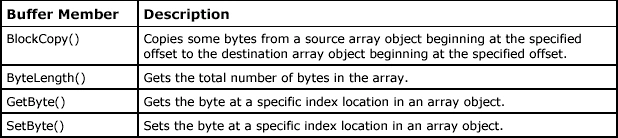
Table 21.14: Buffer Class Members
In the System.Array class the Copy() member allows us to copy from one array to another. Let's take an array of five elements, Myarr1[5], initialized with the data 1, 2, 3, 4, 5 and another array of 10 elements, Myarr2[10], with the data 0, 0, 0, 0, 0, 6, 7, 8, 9, 10. In arrays, length refers to the number of elements in the array. In our example, Myarr1 has five elements, so the array length is 5, and Myarr2 has 10 elements, so the array length is 10. The Array class includes the Copy() method, which copies the contents of one array into another. It copies a range of elements from an array starting at the specified source index and pastes it to another array starting at the specified destination index. The Copy() method takes five parameters: source array, source index, destination array, destination index, and number of elements to copy.
The method Array.Copy(Array sourceArray, int sourceIndex, Array destinationArray, int destinationIndex, int length) takes five parameters: first, the array that contains the data to copy; second, the index in the sourceArray at which copying begins; third, the array that receives the data; fourth, DestinationIndex, the index in the destinationArray at which storing begins; and, fifth, the number of elements to copy.
Listing 21.32 demonstrates the use of the Array.Copy() method. In the listing we perform Array.Copy(myarr1, 0, myarr2, 0, 5) for the following arrays:
int[] myarr1 = new int[5] { 1, 2, 3, 4, 5 };
int[] myarr2 = new int[10] { 0, 0, 0, 0, 0, 6, 7, 8, 9, 10 };
Listing 21.32: Using Array.Copy (array1buffer.cs)
using System;

public class Array1
{
    public static void Main(string[] args)
    {
        int[] myarr1 = new int[5] { 1, 2, 3, 4, 5 };
        int[] myarr2 = new int[10] { 0, 0, 0, 0, 0, 6, 7, 8, 9, 10 };
        Console.Write("Before Array copy operation\n");
        Console.Write("Myarr1 and Byte Length{0}\n", myarr1.Length);

        foreach (int i in myarr1)
            Console.Write("{0} \t", i);
        Console.WriteLine("\nMyarr2 and Byte Length:{0} \n", myarr2.Length);

        foreach (int i in myarr2)
            Console.Write("{0} \t", i);

        Array.Copy(myarr1, 0, myarr2, 0, 5);
        Console.Write("After Array copy operation\n");
        Console.Write("Myarr1 :\n");

        foreach (int i in myarr1)
            Console.Write("{0} \t", i);

        Console.WriteLine("\nMyarr2: \n");

        foreach (int i in myarr2)
            Console.Write("{0} \t", i);
        Console.ReadLine();
    }
}
Listing 21.32 outputs the following:
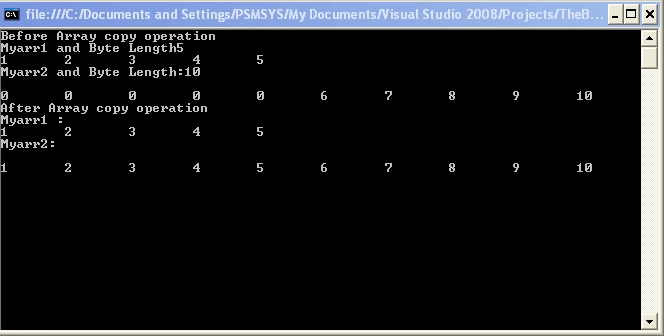
Now let's see how the same thing is done using the BlockCopy() method of the System.Buffer class. The major difference between the two types of copying, Array.Copy and BlockCopy, is that the copy made in the Buffer class is not an index-to-index copy. It is from offset to offset in memory. The Buffer class copies a specified number of bytes from a source array starting at a particular offset to a destination array starting at a particular offset in memory. In our example, we are using arrays of integers, and we know that each integer occupies four bytes. Therefore, the offset values will be the addition of four bytes from the starting offset value.
Let's look at an example of copying using BlockCopy with an array of five elements, Myarr1[5], initialized with the data 1, 2, 3, 4, 5 and another array of 10 elements, Myarr2[10], with the data 0, 0, 0, 0, 0, 6, 7, 8, 9, 10.
In the Buffer class the length refers to the number of bytes in the array. In our example, Myarr1 has five elements, so the byte length is 5 (elements) X 4 (number of bytes in an integer) = 20 bytes. Myarr2 has 10 elements, so the byte length is 10 (elements) XX 4 = 40 bytes. Note that you can get the byte length of the entire array by using Buffer.ByteLength(Myarr1).
The BlockCopy method in the Buffer class copies a range of elements from an array starting at the specified source offset value to another array starting at the specified destination offset value. The BlockCopy() method takes five parameters: source array, source offset value, destination array, destination offset value, and the number of bytes to copy. In our example, we need to copy five elements, so 5 X 4 = 20 bytes is the number of bytes to copy.
The BlockCopy(Array src, int srcOffset, Array dst, int dstOffset, int count) method takes five parameters. The first is the source buffer, the second is the byte offset into src, the third is the destination buffer, the fourth is the byte offset into dst, and the fifth is the number of bytes to copy. Listing 21.33 demonstrates the use of the Buffer.BlockCopy() method.
Listing 21.33: Using Buffer.BlockCopy (buffer1.cs)
using System;

public class buffer1
{
    public static void Main(string[] args)
    {
        int[] myarr1 = new int[5] { 1, 2, 3, 4, 5 };
        int[] myarr2 = new int[10] { 0, 0, 0, 0, 0, 6, 7, 8, 9, 10 };
        Console.Write("Before Block copy operation\n");
        Console.Write("Myarr1 and Byte Length :{0}\n", Buffer.ByteLength(myarr1));

        foreach (int i in myarr1)
            Console.Write("{0} \t", i);
        Console.WriteLine("\nMyarr2 and Byte Length:{0} \n", Buffer.ByteLength(myarr2));

        foreach (int i in myarr2)
            Console.Write("{0} \t", i);
        Buffer.BlockCopy(myarr1, 0, myarr2, 0, 20);
        Console.Write("After Block copy operation\n");
        Console.Write("Myarr1 :\n");

        foreach (int i in myarr1)
            Console.Write("{0} \t", i);
        Console.WriteLine("\nMyarr2: \n");

        foreach (int i in myarr2)
            Console.Write("{0} \t", i);
        Console.ReadLine();
    }
}
Listing 21.33 ouputs the following:
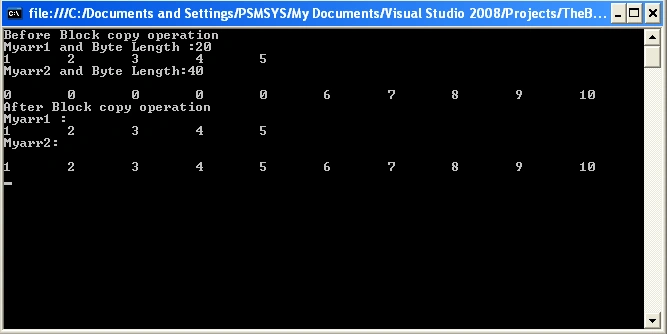
Conclusion
Hope this article would have helped you in understanding the Buffer Class in C#. See other articles on the website on .NET and C#.
Join the conversation! Your thoughts help the community grow.