

In this article you will see how to resolve "The Business Data Connectivity Metadata Store is currently unavailable" when trying to create an external content type using SharePoint Designer 2013.
Problem
In SharePoint Designer 2013, when I clicked on "External Content Types" under the left navigation I was getting an error as shown in Figure 1.
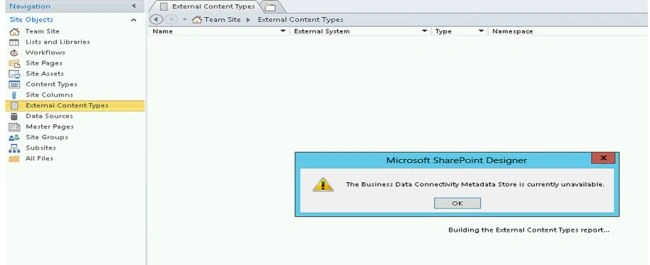
Figure 1: Create external content type using SharePoint Designer 2013
This is because either the BCS service application is not created or it is not associated with the web application.
How to resolve:
- Open "Central Administration".
- Click on "Manage web applications" which is available in the "Web Applications" section.
- Select the web application and then click on "Service Connections" which is available in the ribbon interface as shown in Figure 2.
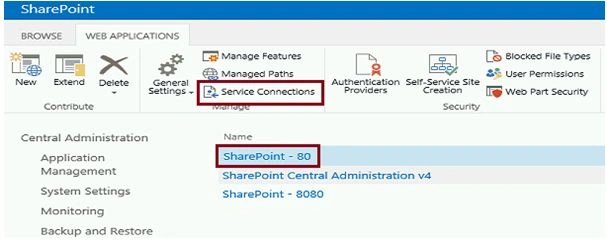
Figure 2: Associate the service application
- Select the BCS service application and then click on Ok.
- Now you will be able to create an external content type in SharePoint Designer successfully.
Summary
Thus in this article you have seen how to resolve "The Business Data Connectivity Metadata Store is currently unavailable" when trying to create an external content type using SharePoint Designer 2013.
Vinod RPosted May 18, 2016, 9:20 AM
Also make sure you have created a Service Application for Business Data Connectivity under Manage Service Applications in Central Admin.
Rakesh NayakPosted Nov 12, 2015, 1:47 AM
Do an IIS reset.. should work for you
Rupali ShindePosted Oct 8, 2015, 3:20 AM
hi, i am also facing same issue. when i click on Sharepoint-80 link & then service connection, it is showing BDC attached to it still i am getting same error. can you please help me out ??? it is urgent