

******************
This experiment has been successful!
Now with the upcoming WP8 SDK, you can use C#,VB and VC++ to build awesome Windows Phone applications.
Thank you Microsoft!
******************
We all like to build WP7 applications, don't we? Even though I haven't been able to publish it to the ZUNE Marketplace (because of supported countries issue), I like to develop Windows Phone 7 games and applications.
Have you ever felt "limited" while using XNA or Silverlight? I have! That's why I've gone on a deep trip into the development of Windows Phone 7's inner sanctuary. There are so many wonders waiting for us there. Even looking at what I've done until this time, I feel like I don't even know the development on Windows Phone 7 very well. There are some mysterious things going on inside this architecture. And people are telling us very few of these mysteries. Then we'll have to discover them for ourselves. Oh Well!
What are our options while building an application? XNA and Silverlight. Yes they are. And you can use 2 programming languages with them: C# (primary) and VB.NET (added later).
You can build either XNA or Silverlight applications using C#. With the release of Visual Basic for Windows Phone 7 RTW, now you are now able to build Silverlight applications. You can't build XNA applications using VB.NET for Windows Phone 7, though. It's not supported. Really! Believe me when I say that.
I have already tested an XNA game using VB.NET and ported it to Windows Phone 7. I was nearly successful for 2-3 seconds. :)
Before debugging and thinking it would actually run my XNA game built with VB.NET, I had told myself that somehow VB.NET would be a nice choice for the second officially supported language by Microsoft for the XNA Platform. Then it quit the application.
What a mess it was! It supports VB for Silverlight in Windows Phone 7 but no support of VB for XNA. That was something I didn't like so I worked on this experiment to make it work for XNA too. But I failed in that.
I don't like proving things but I shall do my best - because I'm a god damn stubborn developer - that VB.NET isn't supported in Windows Phone 7 XNA game projects. :) Why? I will tell you in the end of the article!
But before all of these coding rituals started, I will tell you something: It's funny. And it's a good one. Since XNA 1.0, we're waiting for VB.NET support for XNA officially. And we're still. None of Microsoft employees or MVPs told us that, though; we actually wait for it. How many years have passed while we were waiting for it. Even I got a piece of white in my hair. I'm getting rather old.
Enough with the humour! Let's return to the real world, shall we?
To increase the popularity of the C# language, VB.NET was left to die on a forsaken island just like Robinson Crusoe - Truth hurts, ouchh!
I don't have any problem with C# language nor Microsoft Strategies; I use C# frequently. But VB.NET must absolutely be supported for XNA platform. Alongside Visual C++ .NET, too. :)
Do I want too much?
Let me tell you why they must be supported, too:
You can't imagine how easy to use these programming languages are, that aren't supported officially for XNA, except in Windows Game Projects. You can use them without XNA GS.
The first experiment of mine was about testing a Visual C++ .NET application using the XNA platform. It failed just like the later VB.NET experiment. But it failed much faster when running my application.
So I figured this out: Generally there is no C++/CLI support for Windows Phone 7.
It would be nice to see running Visual C++ .NET applications in Windows Phone 7. Besides it was the closest thing to a Native Code; much closer than C#, that's for sure.
And it would help C++ developers to migrate their applications in Visual C++ .NET which would help Microsoft to get more developers on it's side and additionally there would be many more applications built for Windows Phone 7.
Even developers from Android, Bada and iPhone would use this platform and move their applications to Windows Phone 7.
But it didn't happen. Instead Microsoft supported only 1 programming language C# for XNA and Silverlight.
And instead, the Marketplace has less than 10,000 applications.
Is it a success? For the short term, Yes.
But do you think Microsoft can have more than 250,000 applications in their marketplace, in a long period of time (lets say a year or two)? Honestly, I don't think they could catch this count of total applications. At least not with C#.
Well I'm a developer. I tell you what I see. Sorry for making some people furious. :) Besides that's not so important for me. I like C# and XNA. :)
And now lets get back to our topic. Before I got assassinated. :p (joke)
The latest mystery I have found about Windows Phone 7 Development using XNA was that: XNA Projects built for Windows Phone 7 are nothing more than Windows Games built as a Class Library Project.
They're the same! Well not everything is the same like Windows-based objects can again not be used in Windows Phone 7. Rather shocking, yes.
THE ERSOY EXPERIMENT
This Experiment has 3 Theories:
- A C#-based Class Library using XNA namespaces can work in WP7
- A C++/CLI-based Class Library using XNA namespaces can work in WP7
- A VB.NET-based Class Library using XNA namespaces can work in WP7
This experiment will try to prove these theories.
So then, lets get started!
THE RELATIONSHIP OF XAP and DLL
Want to know what I'm talking about? Let me give you an example:
Sometimes I work with the Reflector application to get source codes from my applications that I don't have. Today I got an idea, and tried to dive deep inside XAP files.
For a simple XNA application, XAP file consists of 5 files:
- 1. AppManifest.xaml
- 2. Background.png
- 3. GameThumbnail.png
- 4. WMAppManifest.xml
- 5. [YourProjectName].dll
I have opened .dll file with Reflector and saw the exact source codes from my application. I had expected much more like code specific to Windows Phone 7 implemented after constructing the XAP file. But I was wrong. So from that moment, I've considered Windows Phone 7 XNA games as Windows Games built as Class Libraries. Well not everything is the same! Still, you can't use Windows-specific things such as Windows Forms in Windows Phone.
So as an experiment I have built an XNA Windows Game project but then debugged it as a Class Library. So now we'll be starting to prove our theories.
THEORY #1 : A C#-based Class Library using XNA namespaces can work (Proven)
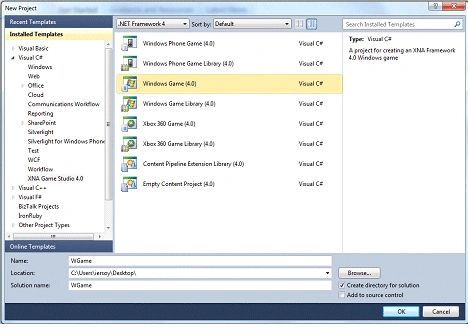
Let me build it again to prove it:
using System;
using System.Collections.Generic;
using System.Linq;
using Microsoft.Xna.Framework;
using Microsoft.Xna.Framework.Audio;
using Microsoft.Xna.Framework.Content;
using Microsoft.Xna.Framework.GamerServices;
using Microsoft.Xna.Framework.Graphics;
using Microsoft.Xna.Framework.Input;
using Microsoft.Xna.Framework.Media;
namespace WGame
{
public class Game1 : Microsoft.Xna.Framework.Game
{
GraphicsDeviceManager graphics;
SpriteBatch spriteBatch;
public Game1()
{
graphics = new GraphicsDeviceManager(this);
Content.RootDirectory = "Content";
}
protected override void Initialize()
{
base.Initialize();
}
protected override void LoadContent()
{
spriteBatch = new SpriteBatch(GraphicsDevice);
}
protected override void UnloadContent()
{
}
protected override void Update(GameTime gameTime)
{
base.Update(gameTime);
}
protected override void Draw(GameTime gameTime)
{
GraphicsDevice.Clear(Color.CornflowerBlue);
base.Draw(gameTime);
}
}
}
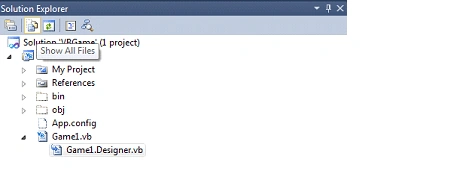
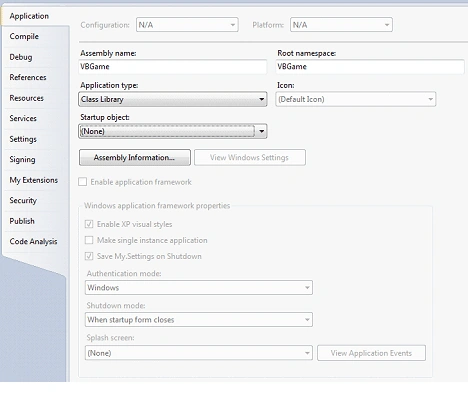
This is just a demo showing you a CornFlowerBlue screen. Now get to the Project Properties and choose the Application tab. There select Class Library as an Output Type:
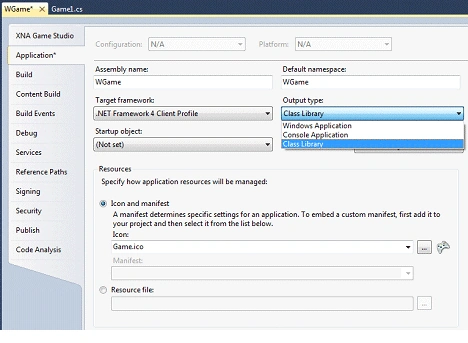
Then save it and debug. It will create a .dll file in the Debug folder.

Exactly!
Now copy this WGame.dll file to a place where you can access it easily.
Let's continue. We shall create a Windows Phone 7 Application, debug it and then copy the xap file to a location where we can access it easily.
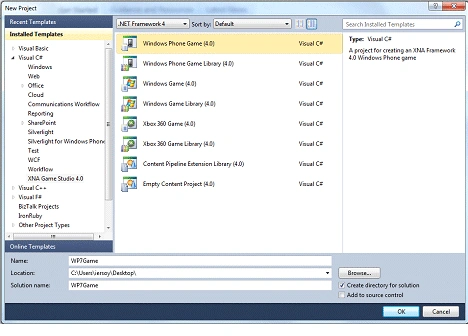
I have built the same application. With the same codes.
using System;
using System.Collections.Generic;
using System.Linq;
using Microsoft.Xna.Framework;
using Microsoft.Xna.Framework.Audio;
using Microsoft.Xna.Framework.Content;
using Microsoft.Xna.Framework.GamerServices;
using Microsoft.Xna.Framework.Graphics;
using Microsoft.Xna.Framework.Input;
using Microsoft.Xna.Framework.Input.Touch;
using Microsoft.Xna.Framework.Media;
namespace WP7Game
{
public class Game1 : Microsoft.Xna.Framework.Game
{
GraphicsDeviceManager graphics;
SpriteBatch spriteBatch;
public Game1()
{
graphics = new GraphicsDeviceManager(this);
Content.RootDirectory = "Content";
TargetElapsedTime = TimeSpan.FromTicks(333333);
}
protected override void Initialize()
{
base.Initialize();
}
protected override void LoadContent()
{
spriteBatch = new SpriteBatch(GraphicsDevice);
}
protected override void UnloadContent()
{
}
protected override void Update(GameTime gameTime)
{
base.Update(gameTime);
}
protected override void Draw(GameTime gameTime)
{
GraphicsDevice.Clear(Color.CornflowerBlue);
base.Draw(gameTime);
}
}
}
Now Debug this application and then get to the XAP location.
Since XAP files are archives, they can be opened via Winrar or another zip application. Ok. After we've opened this archive file, we'll be displaying 5 files again:

Now we'll have to edit AppManifest.xaml and WMAppManifest.xml file according to the previously built Class Library application. It would be better if you extract these 2 files.
First open AppManifest.xaml and change this line:
<Deployment xmlns="http://schemas.microsoft.com/client/2007/deployment" xmlns:x="http://schemas.microsoft.com/winfx/2006/xaml" EntryPointAssembly="WP7Game" EntryPointType="WP7Game.Game1" RuntimeVersion="3.0">
<Deployment.Parts>
<AssemblyPart x:Name="WP7Game" Source="WP7Game.dll" />
</Deployment.Parts>
</Deployment>
To:
<Deployment xmlns="http://schemas.microsoft.com/client/2007/deployment" xmlns:x="http://schemas.microsoft.com/winfx/2006/xaml" EntryPointAssembly="WGame" EntryPointType="WGame.Game1" RuntimeVersion="3.0">
<Deployment.Parts>
<AssemblyPart x:Name="WGame" Source="WGame.dll" />
</Deployment.Parts>
</Deployment>
And now open WMAppManifest.xml and change these lines:
<App xmlns="" ProductID="{5bfd23d2-dde3-4d3a-b02c-21a5e0fade64}" Title="WP7Game" RuntimeType="XNA" Version="1.0.0.0" Genre="Apps.Normal" Author="" Description="" Publisher="">
And this line:
<PrimaryToken TokenID="WP7GameToken" TaskName="_default">
<TemplateType5>
<BackgroundImageURI IsRelative="true" IsResource="false">Background.png</BackgroundImageURI>
<Count>0</Count>
<Title>WP7Game</Title>
</TemplateType5>
</PrimaryToken>
To:
<App xmlns="" ProductID="{5bfd23d2-dde3-4d3a-b02c-21a5e0fade64}" Title="WGame" RuntimeType="XNA" Version="1.0.0.0" Genre="Apps.Normal" Author="" Description="" Publisher="">
And:
<PrimaryToken TokenID="WGameToken" TaskName="_default">
<TemplateType5>
<BackgroundImageURI IsRelative="true" IsResource="false">Background.png</BackgroundImageURI>
<Count>0</Count>
<Title>WGame</Title>
</TemplateType5>
</PrimaryToken>
Now re-add these files in the archive alongside with the WGame.dll file that we first created.
Don't forget to delete the WP7Game.dll file. It's not needed.
The new archive should look like this one:

And now start the "Application Deployment" utility, to deploy this package to a WP7 emulator.

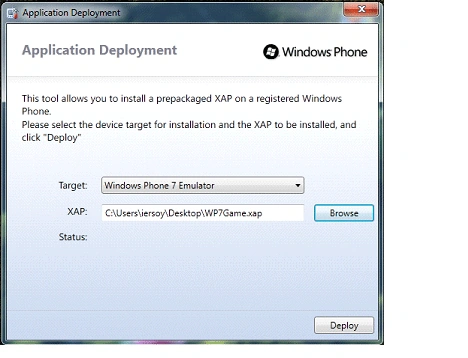
Click Deploy and it will ultimately succeed. :)
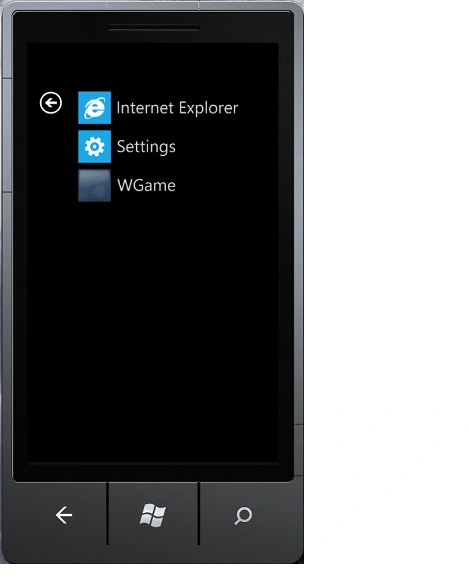
Run WGame application. And you shall see CornFlowerBlue screen.
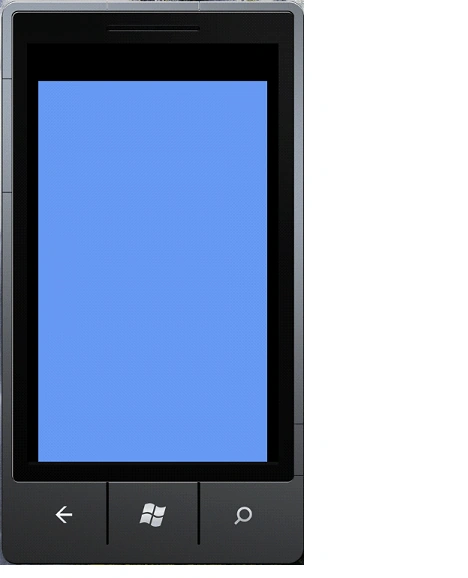
Now that we know Class Libraries and WP7 applications can be the same, it's time to dive even deeper.
Since discovering this method, I have come up with a few ideas.
- Why not use Visual C++.NET?
- Why not use VB.NET?
You know how it will end; just like in the Star Wars series. :) But I would like to show it anyway. It's exciting for me to share my experiments with you. Even the failures!
THEORY #2 : A C++/CLI-based Class Library using XNA namespaces can work in WP7(Unproven)
So let's start with the first one: Visual C++.Net!
First of all we'll be creating a CLR-Class Library project while working with Visual C++.NET. Why? Because when you create a Windows Forms Application and then convert it to a Class Library, you'll be facing some parameter problems about /clr. So it would be wise to develop a class library to save time. Let's create a CLR-Class Library Project:
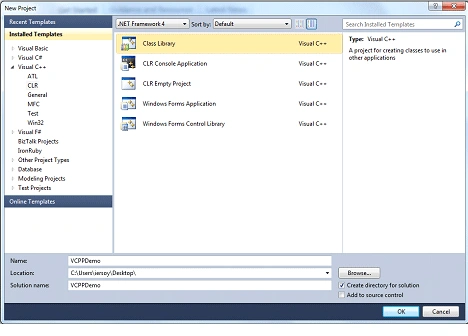
I named it VCPPDemo.
Our VCPPDemo.h file will look like this:
#pragma once
using namespace System;
namespace VCPPDemo {
public ref class Class1
{
};
}
Change class name into Game1:
#pragma once
using namespace System;
namespace VCPPDemo {
public ref class Game1
{
};
}
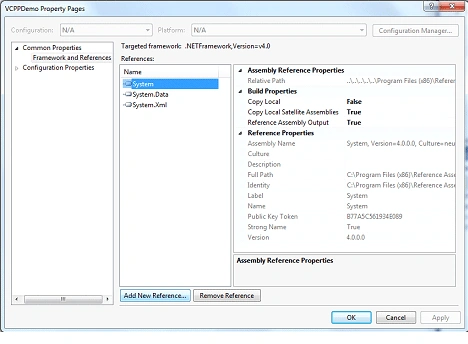
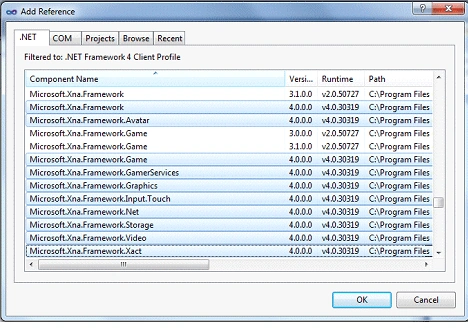
Then add a reference to XNA dlls. First right click to your project and choose References.
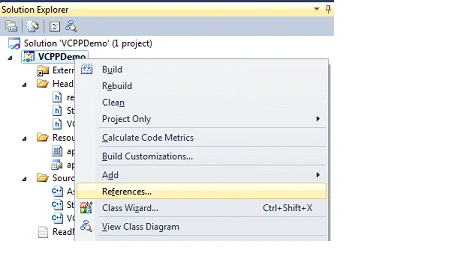
Then find XNA dlls by clicking Add New Reference.
Find these dlls:
Microsoft.XNA.Framework(4.0)
Microsoft.XNA.Framework.Avatar(4.0)
Microsoft.XNA.Framework.Content.Pipeline(4.0)
Microsoft.XNA.Framework.Game(4.0)
Microsoft.XNA.Framework.GamerServices(4.0)
Microsoft.XNA.Framework.Graphics(4.0)
Microsoft.XNA.Framework.Input.Touch(4.0)
Microsoft.XNA.Framework.Net(4.0)
Microsoft.XNA.Framework.Storage(4.0)
Microsoft.XNA.Framework.Video(4.0)
Microsoft.XNA.Framework.XACT(4.0)
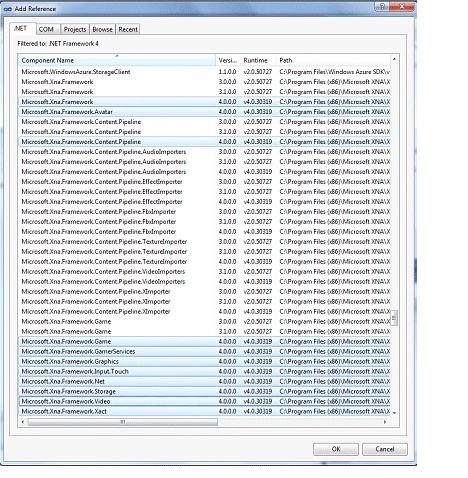
As seen above.
Click OK-> OK then we will be finishing adding our references.
Now it's time to introduce these namespaces to our application.
I have bad news for you. Intellisense is not supported for C++/CLI any longer. It was supported back in VS 2008. But for VS 2010 they wanted to eliminate this feature.
Here is a very detailed blog post from Visual C++ Team why it was removed: http://blogs.msdn.com/b/vcblog/archive/2009/05/27/rebuilding-intellisense.aspx
Now lets add the namespaces to our project:
using namespace System;
using namespace System::Collections;
using namespace Microsoft::Xna::Framework;
using namespace Microsoft::Xna::Framework::Audio;
using namespace Microsoft::Xna::Framework::Content;
using namespace Microsoft::Xna::Framework::GamerServices;
using namespace Microsoft::Xna::Framework::Graphics;
using namespace Microsoft::Xna::Framework::Input;
using namespace Microsoft::Xna::Framework::Input::Touch;
using namespace Microsoft::Xna::Framework::Media;
By default the System namespace has already been added. These namespaces are taken from the previously built C# Class library project as both of them use the same namespaces and it was wise that we've added them too.
Now we need to inherit Game object in Game1.
To do that change your class:
namespace VCPPDemo {
public ref class Game1
{
};
}
As this one:
namespace VCPPDemo {
public ref class Game1 : public Microsoft::Xna::Framework::Game
{
};
}
Now let's add two variables (GraphicsDeviceManager and SpriteBatch) which will be needed for our project:
GraphicsDeviceManager ^graphics;
SpriteBatch ^spriteBatch;
Let's create our constructor now and set some start values:
public:
Game1(void)
{
graphics=gcnew GraphicsDeviceManager(this);
Content->RootDirectory="Content";
TimeSpan TargetElapsedTime=TimeSpan::FromTicks(333333);
}
If you are familiar with XNA you're also familiar with functions used for generating game projects. What are those functions?
Let's list:
- Initialize
- LoadContent
- UnloadContent
- Update(GameTime ^gameTime)
- Draw(GameTime ^gameTime)
Now we shall create them.
Remember one thing. These functions are protected with overridable so we will code it according to this information.
protected:
virtual void Initialize() override
{
__super::Initialize();
}
virtual void LoadContent() override
{
spriteBatch=gcnew SpriteBatch(GraphicsDevice);
}
virtual void UnloadContent() override
{
}
virtual void Update(GameTime ^gameTime) override
{
__super::Update(gameTime);
}

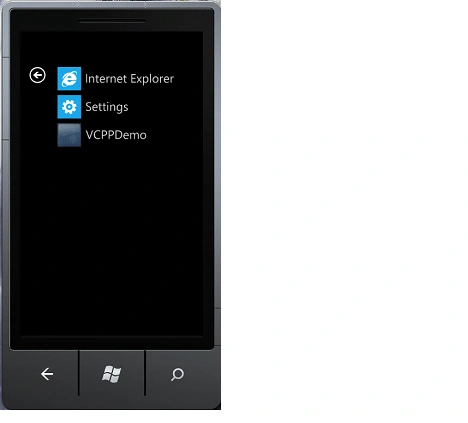
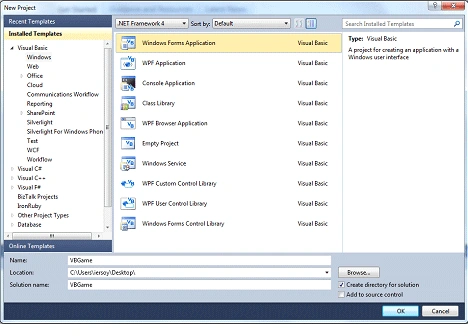
Marcus GroebereditedPosted Mar 21, 2011, 9:55 AMEdited Aug 8, 2011, 5:43 AM
This discussion at stackoverflow http://stackoverflow.com/questions/2455372/windows-phone-7-and-c-cli suggests that the key to making C++/CLI code run under WP7 could be the use of the "clr:safe" option when compiling, to create so-called "verifiable" code. This probably adds further limitations to the type of language features that can be used, as described here http://msdn.microsoft.com/en-us/library/ykbbt679(VS.80).aspx but this might be an useful thing to try. Perhaps it would be interesting to check this, and see if changes the outcome of the second part of your experiment in any way? ciao marcus
Mahesh ChandPosted Mar 4, 2011, 7:36 AM
I like the title. Didn't get a chance to ready the article yet.