

Unit testing is an essential part of modern software development. It focuses on testing individual components (or "units") of a program in isolation to verify that each part works as intended. In the realm of .NET applications, unit testing is vital for improving code quality, minimizing bugs, and boosting the overall maintainability of applications.
This article will delve into the significance of unit testing in .NET applications, its advantages, and how to effectively implement unit tests using tools like NUnit and MSTest. We’ll also provide practical code examples to clarify key concepts.

What is Unit Testing?
Unit testing refers to testing the smallest units of code (usually individual methods or functions) in isolation from the rest of the system. It makes sure each unit functions as intended in its own way. In the case of .NET, we would do this with the help of xUnit, NUnit, or MSTest frameworks probably.
Why is Unit Testing important?
- Early Bug Detection: We're talking about unit tests here; they help catch bugs early. Unit tests focus on test cases of small, isolated code units, making it easier for the developer to locate bugs and resolve them before they become larger issues.
- Code Refactoring: Developers need to refactor code from time to time as projects grow. Unit tests provide a safety net that allows developers to confidently modify code and be notified via green/red test results if they break something.
- Documentation: Good unit tests act as documentation for the code. They define explicitly the external behavior of each unit of code and thereby help other developers understand and use the code more easily.
- Improved Code Quality: Unit testing requires developers to reflect more on their code's design. It promotes better, modular code that is more manageable and extensible.
- Faster Development: Having a strong unit testing strategy allows developers to implement changes and roll out new features at a faster pace. Automated tests help maintain the application's integrity even as new modifications are made.
Tools for Unit Testing in .NET
There are multiple tools available for unit testing by .NET developers. Some of the popular frameworks are,
- NUnit: NUnit is a popular unit testing framework in .NET. It is simple to use and provides built-in features for assertions and organizing tests.
- MSTest: MS Unit test Gen is an extension that generates unit tests for existing code. NET applications.
- xUnit: Another widely used testing framework that tends to be preferred for its simplicity and community-driven improvements.
We will be using NUnit for this article.
Example. Simple Calculator Class
Let’s consider a simple calculator class with basic arithmetic operations. We will write unit tests to ensure that the calculator methods behave as expected.
Setting Up NUnit: To get started, you need to install the NUnit and NUnit3TestAdapter packages. You can do this via NuGet or through the .NET CLI.
dotnet add package NUnit
dotnet add package NUnit3TestAdapter
dotnet add package Microsoft.NET.Test.Sdk
Step 1. Implement the Calculator Class.
public class Calculator
{
    public int Add(int a, int b)
    {
        return a + b;
    }

    public int Subtract(int a, int b)
    {
        return a - b;
    }

    public int Multiply(int a, int b)
    {
        return a * b;
    }

    public int Divide(int a, int b)
    {
        if (b == 0)
            throw new ArgumentException("Cannot divide by zero.");

        return a / b;
    }
}
Step 2. Create Unit Tests for the Calculator Class.
using NUnit.Framework;

[TestFixture]
public class CalculatorTests
{
    private Calculator _calculator;

    [SetUp]
    public void SetUp()
    {
        _calculator = new Calculator();
    }

    [Test]
    public void Add_TwoNumbers_ReturnsCorrectSum()
    {
        int result = _calculator.Add(3, 5);
        ClassicAssert.AreEqual(8, result);
    }

    [Test]
    public void Subtract_TwoNumbers_ReturnsCorrectDifference()
    {
        int result = _calculator.Subtract(10, 5);
        ClassicAssert.AreEqual(5, result);
    }

    [Test]
    public void Multiply_TwoNumbers_ReturnsCorrectProduct()
    {
        int result = _calculator.Multiply(3, 5);
        ClassicAssert.AreEqual(15, result);
    }

    [Test]
    public void Divide_TwoNumbers_ReturnsCorrectQuotient()
    {
        int result = _calculator.Divide(10, 2);
        ClassicAssert.AreEqual(5, result);
    }

    [Test]
    public void Divide_ByZero_ThrowsArgumentException()
    {
        ClassicAssert.Throws<ArgumentException>(() => _calculator.Divide(10, 0));
    }
}
Explanation
- [TestFixture]: This is an attribute used to indicate that the class contains tests and is a test fixture.
- [SetUp]: This characteristic defines a method that is going to run before each test. In this case, it initializes the Calculator object before each test is run.
- [Test]: This attribute marks methods as test methods.
- ClassicAssert.AreEqual(): This is an assertion that checks if the actual result matches the expected result.
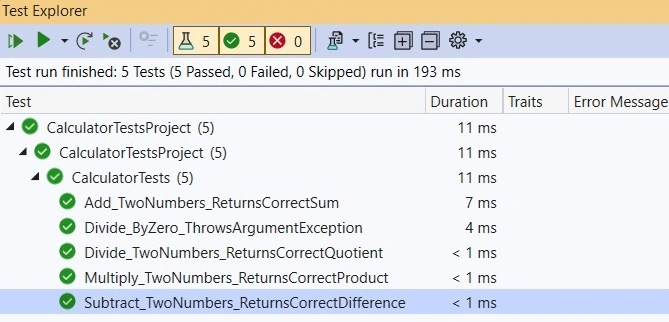
We can run the tests using the dotnet test command in the terminal or using an IDE like Visual Studio. The test runner will execute the tests and report any failures or successes.
Best Practices for Unit Testing in .NET
- Test One Thing at a Time: A unit test should verify only one behavior or condition. Avoid testing multiple behaviors within a single test.
- Use Mocks and Stubs: In complex applications, we might need to isolate the unit from dependencies like databases or external services. We can use mocking frameworks like Moq to create mocks and stubs for these dependencies.
- Write Readable Tests: Tests should be easy to read and understand. Use descriptive names for test methods that clearly state what behavior is being tested.
- Test Edge Cases: Not only the expected behavior but also edge cases and error conditions (like dividing by zero, null values, etc.) should be tested.
- Keep Tests Independent: Each unit test should be independent of others, so changes in one test shouldn't affect the results of another.
Conclusion
Unit tests are instrumental in writing software with high quality for any modern .NET application. This extremely valuable practice helps to spot bugs as early as possible, thereby directly impacting the maintainability of long-running software projects. By including unit tests in your development workflow, you create a safety net that allows you to confidently change things, refactor without fear, and guarantee that your application really works the way it should. By keeping your tests clean, explicit, and independent, you can enormously boost the quality and maintainability of your software. Recall that unit tests are not information-heavy but rather light text in terms of volume.
Emmmanuel FIADUFEPosted Jan 7, 2025, 10:59 AM
Great write up, thank so much Mr. Amit