

This article has been
excerpted from book "The Complete Visual C# Programmer's Guide" from the Authors
of C# Corner.
A trace switch is a way to control tracing and debugging output at runtime using
various settings. The Switch class is the parent of the BooleanSwitch and
TraceSwitch classes. Despite our being able to derive and create custom
switches, the BooleanSwitch and TraceSwitch classes will be satisfactory for our
debugging and tracing needs. Table 21.4 describes two members of the Switch
class.

Table 21.4: Switch Class Members
The TraceSwitch class provides per assembly, per module, or per class tracing.
This is more powerful and easier than the single-trace options because it lets
you specify various output options at once. Therefore, the extreme debugging or
tracing outputs do not overwhelm us with the various options that we have
specified when we don't want them. Table 21.5 describes members of the TraceSwitch class. The TraceSwitch constructor takes two parameters: the
descriptive display name ("descriptive trace switch name") and the switch name.
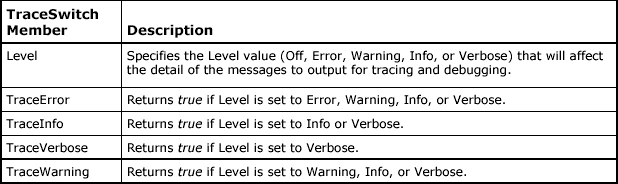
Table 21.5: TraceSwitch Class Members
We generally define the switches for the executable in the EXE.CONFIG
configuration file (see Listing 21.10). The application configuration file name
is <program>. Inside switch elements of the XML file, the "name" attribute
refers to the switch name and the "value" attribute is the numerical value the
corresponding trace level is set to. Note that we can also define the autoflush
and the indent size parameters in the configuration file.
Listing 21.10: Switches defined in the EXE.CONFIG file
<?xml
version="1.0"
encoding="UTF-8"
?>
<configuration>
<system.diagnostics>
<switches>
<add
name="Switch1"
value="3"
/>
<add
name="Switch2"
value="2"
/>
</switches>
<!—additional
diagnostics
-->
<trace
autoflush="true"
indentsize="3"
/>
</system.diagnostics>
</configuration>
Each assembly should have its own trace switch.
Possible TraceSwitch tracing levels are as follows:

Join the conversation! Your thoughts help the community grow.