

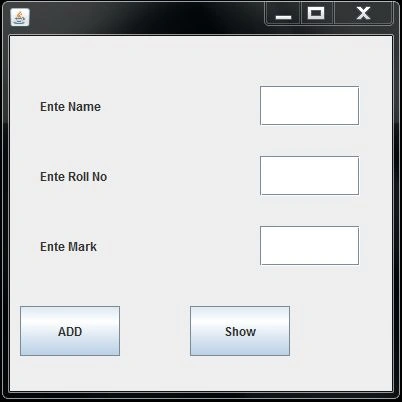
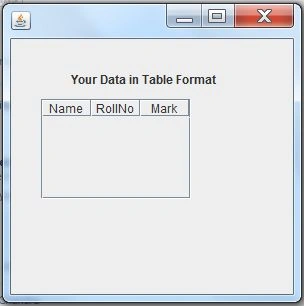
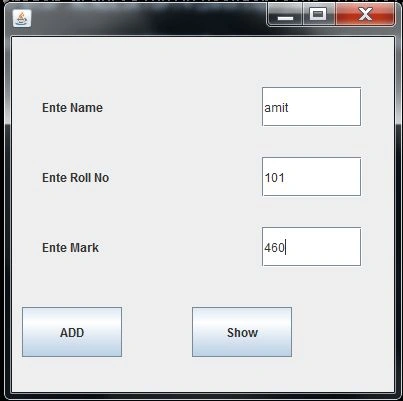
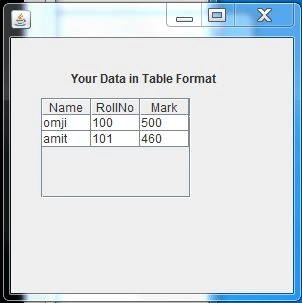
This article describes Java Swing and makes a frame containing three labels, three text fields and two buttons. When you enter the data and click on the add button, then click on the show button then a new frame is opened and the frame contains a table. And the table has three fields named Name, Roll No and Marks for better understanding.
Step 1: Import necessary packages
Step 2: Define the data members of components to be used
Step 3: Create a frames object and set the layout to null.
Step 4: Create the Labels, Buttons and TextFields objects and call setBounds for them to set the position in the frame.
- import javax.swing.*;// for uesing the swing coponet like JButton,JTextField JScrollPane etc
- import java.awt.event.*;//for performing event handling
- import javax.swing.table.*;// for creating a DefaultTableModel
- JFrame fr1,fr2;
- JScrollPane sb;
- JTextField tfName,tfRollNo,tfMark;
- JButton bAdd,bShow;
- JTable tb;
- DefaultTableModel model;
- JLabel jl1,jl2,jl3,jl4;
- fr1=new JFrame();
- fr2=new JFrame();
- fr1.setLayout(null);
- fr2.setLayout(null);
- jl1=new JLabel("Ente Name");
- jl2=new JLabel("Ente Roll No");
- jl3=new JLabel("Ente Mark");
- jl4=new JLabel("Your Data in Table Format");
- jl1.setBounds(30,50,100,40);
- jl2.setBounds(30,120,100,40);
- jl3.setBounds(30,190,100,40);
- jl4.setBounds(60,30,200,20);
- tfName=new JTextField();
- tfRollNo=new JTextField();
- tfMark=new JTextField();
- tfName.setBounds(250,50,100,40);
- tfRollNo.setBounds(250,120,100,40);
- tfMark.setBounds(250,190,100,40);
- bAdd=new JButton("ADD");
- bShow=new JButton("Show");
- bAdd.setBounds(10,270,100,50);
- bShow.setBounds(180,270,100,50);
- tb=new JTable();
- sb=new JScrollPane(tb);
- sb.setBounds(30,60,150,100);
- fr1.add(tfName);
- fr1.add(tfRollNo);
- fr1.add(tfMark);
- fr1.add(bAdd);
- fr1.add(bShow);
- fr1.add(jl1);
- fr1.add(jl2);
- fr1.add(jl3);
- fr2.add(jl4);
- fr2.add(sb);
- bAdd.addActionListener(this);
- bShow.addActionListener(this);
- fr1.setSize(400,400);
- fr2.setSize(300,300);
- fr1.setVisible(true);
- model=new DefaultTableModel();
- model.addColumn("Name");
- model.addColumn("RollNo");
- model.addColumn("Mark");
- tb.setModel(model);
- public void actionPerformed(ActionEvent ae)
- {
- if (ae.getSource() == bAdd)
- {
- String r[] = new String[5];
- r[0] = tfName.getText();
- r[1] = tfRollNo.getText();
- r[2] = tfMark.getText();
- tfName.setText("");
- tfRollNo.setText("");
- tfMark.setText("");
- model.addRow(r);
- }
- if (ae.getSource() == bShow)
- {
- fr2.setVisible(true);
- }
- }
Join the conversation! Your thoughts help the community grow.