

When architecting an enterprise-grade Retrieval-Augmented Generation (RAG) system, the choice of Vector Database is one of the most critical decisions you will make. It dictates your scalability, your operational overhead, and your ability to perform complex hybrid searches. The two most common contenders in the enterprise space are pgvector (an extension for PostgreSQL) and Milvus (a standalone, distributed vector database).
Choosing the wrong one can lead to either crippling operational complexity or a system that collapses under the weight of your data. In this end-to-end guide, we will break down the trade-offs and build a Dual-Brain Multi-Agent LangGraph System that leverages the strengths of both.
The Core Trade-Offs: pgvector vs. Milvus
1. pgvector: The Pragmatist’s Choice
pgvector turns your existing PostgreSQL database into a vector store.
The Pros:
Single Source of Truth: Your relational data and vector embeddings live in the same database. No complex ETL pipelines to keep them in sync.
ACID Compliance: Inherits PostgreSQL’s strict transactional guarantees.
Hybrid Search: You can seamlessly combine SQL filtering (e.g.,
WHERE department = 'HR' AND created_at > '2024-01-01') with vector similarity search in a single query.Low Operational Overhead: If you already manage Postgres, you already know how to manage pgvector.
The Cons:
Scale Limits: Performance degrades significantly when you exceed 10–50 million vectors. It is not designed for billion-scale datasets.
Lacks Specialized Vector Features: Missing advanced out-of-the-box features like GPU acceleration or highly specialized quantization algorithms found in dedicated vector DBs.
2. Milvus: The Hyperscaler’s Choice
Milvus is a cloud-native, distributed database built from the ground up specifically for vector similarity search.
The Pros:
Massive Scale: Easily handles billions of vectors with sub-second latency.
High Performance: Supports advanced indexing algorithms (HNSW, DiskANN, IVF_PQ) and GPU acceleration.
Distributed Architecture: Built-in sharding, replication, and high availability.
The Cons:
Operational Complexity: It is a distributed system requiring the management of multiple components (etcd for metadata, MinIO/S3 for storage, Pulsar/Kafka for logging).
Data Synchronization: If your relational data lives in Postgres, you must build and maintain a pipeline to sync metadata and embeddings to Milvus.
Weaker Hybrid Search: While it supports scalar filtering, it is not as mature or flexible as PostgreSQL’s SQL engine.
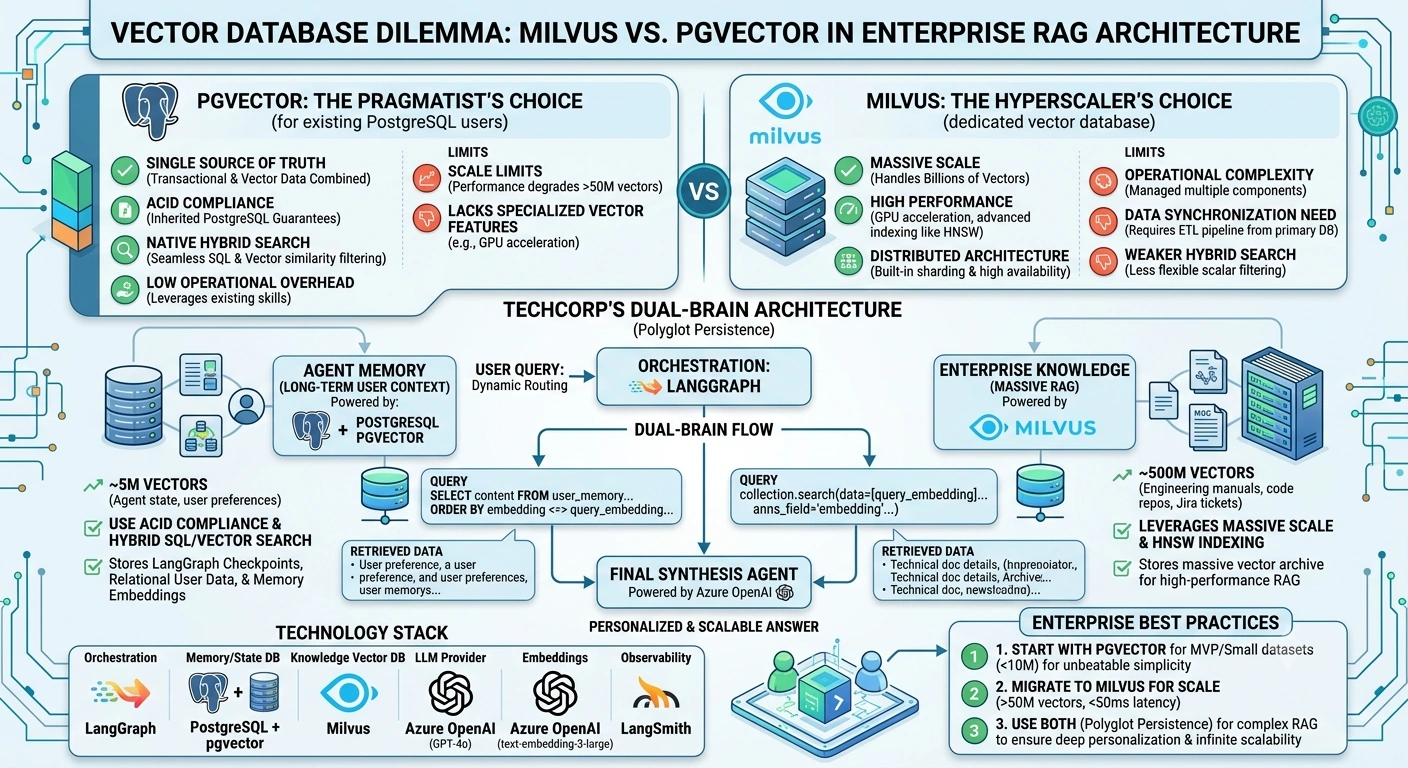
The Real-World Use Case: TechCorp’s "Dual-Brain" Assistant
Imagine you are building an AI assistant for TechCorp. The system has two distinct data requirements:
Agent Memory (Long-term User Context): The system needs to remember past interactions, user preferences, and specific project details for 50,000 employees. This requires strict relational metadata (User ID, Timestamps, Session IDs) combined with semantic search. Scale: ~5 Million vectors.
Enterprise Knowledge (RAG): The system needs to answer complex technical questions by searching the company’s entire 20-year archive of engineering manuals, code repositories, and Jira tickets. Scale: ~500 Million vectors.
The Architectural Decision
We will not choose just one. We will use Polyglot Persistence.
We will use pgvector for the Memory Agent, leveraging ACID compliance and hybrid SQL/Vector search to manage user context.
We will use Milvus for the Knowledge Agent, leveraging its massive scale and HNSW indexing to search the 500-million-document archive.
Technology Stack
| Component | Technology | Role in Architecture |
|---|---|---|
| Orchestration | LangGraph | Manages the multi-agent workflow, state, and routing. |
| Memory & State DB | PostgreSQL + pgvector | Stores LangGraph checkpoints, relational user data, and agent memory embeddings. |
| Knowledge Vector DB | Milvus | Stores the massive 500M vector archive for high-performance RAG. |
| LLM Provider | Azure OpenAI (GPT-4o) | Powers the agents' reasoning and synthesis. |
| Embeddings | Azure OpenAI (text-embedding-3-large) | Generates embeddings for both memory and knowledge. |
| Observability | LangSmith | Traces the routing and retrieval latency of both databases. |
End-to-End Implementation
Let's build the LangGraph multi-agent system that dynamically routes queries to the appropriate vector database based on the user's intent.
Step 1: Define the Enterprise State
Our state needs to track the conversation, the retrieved memory context, the retrieved knowledge context, and the final synthesized answer.
from typing import TypedDict, List, Annotated, Optionalimport operator
from langgraph.graph import StateGraph, END
from langgraph.checkpoint.postgres import PostgresSaver

class DualBrainState(TypedDict):
    # LangGraph Memory: Conversation history
    messages: Annotated[List[str], operator.add]

    # User Input
    user_query: str

    # Routing Decision
    target_brain: str # "memory", "knowledge", or "both"

    # Retrieved Contexts
    memory_context: List[str]
    knowledge_context: List[str]

    # Final Output
    final_response: str
Step 2: Build the Agent Nodes
Node 1: The Router
This agent analyzes the query and decides which database to query.
def router_agent(state: DualBrainState) -> DualBrainState:
    print("🧠 [Router] Analyzing query intent...")
    query = state["user_query"].lower()

    # Simple heuristic routing (In production, use an LLM classifier)
    if "my previous" in query or "what did we decide" in query:
        target = "memory"
    elif "how does the" in query or "architecture for" in query:
        target = "knowledge"
    else:
        target = "both"

    return {
        "target_brain": target,
        "messages": [f"Router: Identified target brain as '{target}'."]
    }
Node 2: The Memory Agent (pgvector)
This agent queries pgvector. Notice how we use Hybrid Search, combining a SQL WHERE clause with the vector similarity search. This is pgvector's superpower.
def memory_agent_pgvector(state: DualBrainState) -> DualBrainState:
    print("💾 [Memory Agent] Querying pgvector for user context...")

    # Simulating a pgvector Hybrid Query
    # SQL: SELECT content FROM user_memory WHERE user_id = 'user_123' ORDER BY embedding <-> query_embedding LIMIT 3;
    mock_sql_vector_query = """
    SELECT content FROM user_memory
    WHERE user_id = 'user_123' AND project_id = 'proj_alpha'
    ORDER BY embedding <=> '[0.1, 0.2, ...]'
    LIMIT 3;
    """
    print(f"Executing pgvector hybrid query: {mock_sql_vector_query}")

    retrieved_memories = [
        "Memory: User prefers Python over Java for backend scripts.",
        "Memory: User previously decided to use AWS Lambda for the notification service."
    ]

    return {
        "memory_context": retrieved_memories,
        "messages": ["Memory Agent: Retrieved 2 relevant user memories via pgvector."]
    }
Node 3: The Knowledge Agent (Milvus)
This agent queries Milvus. It doesn't need complex SQL filtering; it needs raw, blazing-fast Approximate Nearest Neighbor (ANN) search over hundreds of millions of vectors using an HNSW index.
def knowledge_agent_milvus(state: DualBrainState) -> DualBrainState:
    print("📚 [Knowledge Agent] Querying Milvus for enterprise documentation...")

    # Simulating a Milvus Search Query
    # Using HNSW index for high-recall, low-latency search over 500M vectors
    mock_milvus_query = """
    collection.search(
        data=[query_embedding],
        anns_field="embedding",
        param={"metric_type": "COSINE", "params": {"ef": 100}},
        limit=5
    )
    """
    print(f"Executing Milvus ANN query: {mock_milvus_query}")

    retrieved_docs = [
        "Doc: TechCorp standard for notification services requires AWS SNS, not Lambda.",
        "Doc: Python is the approved language for all new backend microservices."
    ]

    return {
        "knowledge_context": retrieved_docs,
        "messages": ["Knowledge Agent: Retrieved 2 technical docs via Milvus HNSW index."]
    }
Node 4: The Conditional Router (Graph Flow Control)
We use conditional edges to ensure we only query the databases that are needed, saving latency and compute.
def route_to_brains(state: DualBrainState) -> List[str]:
    target = state["target_brain"]
    if target == "memory":
        return ["memory_agent"]
    elif target == "knowledge":
        return ["knowledge_agent"]
    else:
        # In LangGraph, returning a list from a conditional edge sends the state to both nodes in parallel!
        return ["memory_agent", "knowledge_agent"]
Node 5: The Synthesizer
This agent takes the context from whichever database(s) were queried and generates the final answer.
def synthesizer_agent(state: DualBrainState) -> DualBrainState:
    print("✍️ [Synthesizer] Generating final response...")

    context_parts = []
    if state.get("memory_context"):
        context_parts.append(f"User Context: {', '.join(state['memory_context'])}")
    if state.get("knowledge_context"):
        context_parts.append(f"Tech Docs: {', '.join(state['knowledge_context'])}")

    full_context = "\n".join(context_parts)

    response = f"Based on the retrieved data ({full_context}), here is the synthesized answer for the user."

    return {
        "final_response": response,
        "messages": ["Synthesizer: Final response generated."]
    }
Step 3: Compile the Graph
def build_dual_brain_graph():
    workflow = StateGraph(DualBrainState)

    workflow.add_node("router", router_agent)
    workflow.add_node("memory_agent", memory_agent_pgvector)
    workflow.add_node("knowledge_agent", knowledge_agent_milvus)
    workflow.add_node("synthesizer", synthesizer_agent)

    workflow.set_entry_point("router")

    # The router dynamically decides which agents run
    workflow.add_conditional_edges(
        "router",
        route_to_brains,
        ["memory_agent", "knowledge_agent"]
    )

    # Both agents converge at the synthesizer
    workflow.add_edge("memory_agent", "synthesizer")
    workflow.add_edge("knowledge_agent", "synthesizer")
    workflow.add_edge("synthesizer", END)

    # Compile with Postgres Checkpointer for LangGraph state persistence
    # checkpointer = PostgresSaver.from_conn_string("postgresql://...")
    # return workflow.compile(checkpointer=checkpointer)

    return workflow.compile() # Using memory for this example

app = build_dual_brain_graph()
Running the System
Let's test a query that requires both brains. The user is asking about a past decision regarding a specific technology.
initial_state = {
    "messages": [],
    "user_query": "What did we previously decide about the notification service architecture?",
    "target_brain": "",
    "memory_context": [],
    "knowledge_context": [],
    "final_response": ""
}

result = app.invoke(initial_state)

print("\n--- Agent Execution Log ---")
for msg in result["messages"]:
    print(f"• {msg}")

print("\n--- Final Response ---")
print(result["final_response"])
Output Trace:
🧠 [Router] Analyzing query intent...
💾 [Memory Agent] Querying pgvector for user context...
Executing pgvector hybrid query: SELECT content FROM user_memory...
📚 [Knowledge Agent] Querying Milvus for enterprise documentation...
Executing Milvus ANN query: collection.search...
✍️ [Synthesizer] Generating final response...

--- Agent Execution Log ---
• Router: Identified target brain as 'both'.
• Memory Agent: Retrieved 2 relevant user memories via pgvector.
• Knowledge Agent: Retrieved 2 technical docs via Milvus HNSW index.
• Synthesizer: Final response generated.

--- Final Response ---
Based on the retrieved data (User Context: User previously decided to use AWS Lambda... Tech Docs: TechCorp standard requires AWS SNS...), here is the synthesized answer for the user.
Notice how the system seamlessly queried pgvector for the relational/hybrid memory, and Milvus for the massive-scale technical documentation, all orchestrated by LangGraph.
Enterprise Best Practices: How to Choose
Start with pgvector: If you are building an MVP, or your dataset is under 10 million vectors, and you already use PostgreSQL, use pgvector. The operational simplicity is unbeatable.
Migrate to Milvus for Scale: When your vector count crosses 50 million, or your latency requirements drop below 50ms for high-QPS (Queries Per Second) workloads, introduce Milvus.
Use Both (Polyglot Persistence): As shown in the code, they are not mutually exclusive. Use pgvector for LangGraph Checkpointing and Agent Memory (where ACID and hybrid SQL are critical), and use Milvus for Massive RAG Retrieval (where raw vector scale and speed are critical).
Watch the ETL Cost: If you use both, remember that you must embed the data twice (or at least store it in two places). Ensure your ingestion pipeline is robust enough to keep pgvector and Milvus in sync.
Conclusion
The choice between Milvus and pgvector is not about which database is "better"; it is about matching the database's strengths to your specific enterprise workload. By leveraging LangGraph's multi-agent architecture, you don't have to make a binary choice. You can build a "Dual-Brain" system that uses pgvector for its ACID-compliant, hybrid-search memory, and Milvus for its hyperscale, high-performance knowledge retrieval. This ensures your RAG application is both deeply personalized and infinitely scalable.
Join the conversation! Your thoughts help the community grow.