

Create a Thumbnail
The BitmapImage class is used to create a thumbnail in WPF. The DecodePixelWidth and DecodePixelHeight properties are used to set the size of the bitmap from an image and this bitmap can be displayed in an Image control.
The BitmapImage element in XAML represents a Bitmap Image control at design-time. The following code snippet creates a BitmapImage element and sets its DecodePixelWidth and DecodePixelHeight attributes.
- <Image Width="120" Height="120" HorizontalAlignment="Center">
- <Image.Source>
- <BitmapImage DecodePixelWidth="100" DecodePixelHeight="100" UriSource="Garden.jpg" />
- </Image.Source>
- </Image>
Listing 40 shows a Window with two Image controls. The first Image control displays an image in its original size and the second control displays its thumbnail size.
- <Window x:Class="ThumbnailSample.MainWindow" xmlns="http://schemas.microsoft.com/winfx/2006/xaml/presentation" xmlns:x="http://schemas.microsoft.com/winfx/2006/xaml" Title="MainWindow" Height="350" Width="625">
- <Grid Margin="10,10,10,10" Name="LayoutRoot">
- <Image Source="Garden.jpg" HorizontalAlignment="Left" />
- <Border BorderBrush="Gray" BorderThickness="2" HorizontalAlignment="Right" Width="130" Height="130">
- <Image Width="120" Height="120" HorizontalAlignment="Center">
- <Image.Source>
- <BitmapImage DecodePixelWidth="100" DecodePixelHeight="100" UriSource="Garden.jpg" />
- </Image.Source>
- </Image>
- </Border>
- </Grid>
- </Window>
Listing 40
The output of Listing 40 generates Figure 44 where the left side image is the original image and right side image is the thumbnail preview of the image.
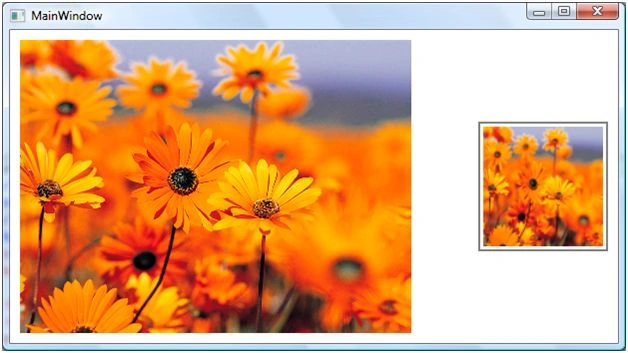
The code listed in Listing 41 creates a thumbnail at run-time by creating a BitmapImage object and setting its DecodePixelWidth and DecodePixelHeight properties.
- privatevoid CreateATyhumbnail() {
- // Create an Image control
- Image thumbnailImage = newImage();
- thumbnailImage.Width = 130;
- // Create a BitmapImage and sets its DecodePixelWidth and DecodePixelHeight
- BitmapImage bmpImage = newBitmapImage();
- bmpImage.BeginInit();
- bmpImage.UriSource = newUri(@ "Garden.jpg", UriKind.RelativeOrAbsolute);
- bmpImage.DecodePixelWidth = 120;
- bmpImage.DecodePixelHeight = 120;
- bmpImage.EndInit();
- // Set Source property of Image
- thumbnailImage.Source = bmpImage;
- LayoutRoot.Children.Add(thumbnailImage);
- }
Listing 41
BetsyPosted May 11, 2011, 6:41 PM
Thanks for the great explanation. Could you PLEASE tell me how to drag and drop images. I am using Visual Studio 2008,C#,WPF. I have an image control where the user needs to drag and drop a photo into.I have looked all over for help with this!!!! I would really be greatful for any help. Thanks,Betsy