

In this post, we will try to create a time zone calculator. We will be calculating the timezone in two ways.
- Using normal jQuery functions
- Using Google API
We will be using Visual Studio as our IDE. For jQuery implementation, we will be creating some prototypes. I hope you will like this.
Download Source Code
You can always download the source code from here: Time Zone Calculator
Background
In one of my projects, we were saving some date values in UTC format in the Server. When we returned the data, we were not doing any calculation like converting the same date values to the user's location time. If it is India (UTC – IST), I was asked to get the time zone values from the client side and pass the same value to the Server in each request. I had done this and here, I will show you how. As I explained above, we can do this in two ways.
- Using normal jQuery functions
- Using Google API
We will be explaining these two methods one by one.
Using the code
First of all, create a new project in Visual Studio, install jQuery and bootstrap from NuGet package manager. Once your project is ready, we will start implementing our first method.
Using jQuery functions
The first thing you need to do here is adding the needed elements to UI.
- <div class="col-sm-6">
- <h3>Using jQuery prototype function</h3>
- <p>Here we are going to use prototype functions we created</p>
- <div class="form-group"> <label class="label label-primary">Please select date:</label> <br /> <br /> <input class="form-control" type="text" id="txtTimeZone" /> <br /> <br /> <input type="button" value="Submit" id="btnSubmit" class="btn btn-primary btn-block" /> <br />
- <div class="panel panel-default">
- <div id="placeholder" class="panel-body"></div>
- </div>
- </div>
- </div>
- <link href="Content/themes/base/all.css" rel="stylesheet" />
- <link href="Content/bootstrap.min.css" rel="stylesheet" />
- <link href="Content/Index.css" rel="stylesheet" />
- <script src="Scripts/jquery-2.2.3.min.js"></script>
- <script src="Scripts/jquery-ui-1.11.4.min.js"></script>
- Date.prototype.dst = function()
- {
- return this.getTimezoneOffset() < this.stdTimezoneOffset();
- }
- Date.prototype.stdTimezoneOffset = function()
- {
- var jan = new Date(this.getFullYear(), 0, 1);
- var jul = new Date(this.getFullYear(), 6, 1);
- return (Math.max(jan.getTimezoneOffset(), jul.getTimezoneOffset()) * -1);
- }
- Date.prototype.stdTimezoneOnset = function ()
- {
- var jan = new Date(this.getFullYear(), 0, 1);
- var jul = new Date(this.getFullYear(), 6, 1);
- return (Math.min(jan.getTimezoneOffset(), jul.getTimezoneOffset()) * -1);
- }
Now, we have created all the prototypes required. Shall we go and use these now?
- $(document).ready(function()
- {
- $("#txtTimeZone").datepicker();
- $('#btnSubmit').click(function()
- {
- var dayLight = new Date();
- dayLight = new Date($('#txtTimeZone').val());
- if (dayLight.dst())
- {
- timeZoneValue = dayLight.stdTimezoneOffset(); // Day light time is OFF
- } else
- {
- timeZoneValue = dayLight.stdTimezoneOnset(); // Day light time is ON
- }
- $("#placeholder").text('The time zone value for ' + dayLight + ' is ' + timeZoneValue);
- });
- });
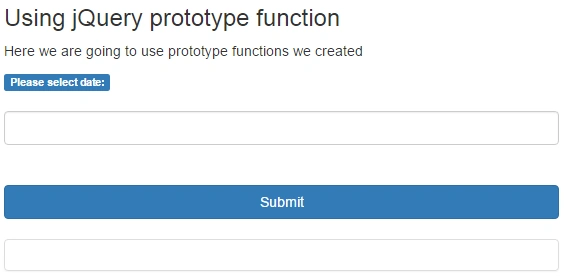
Time zone calculation, using jQuery
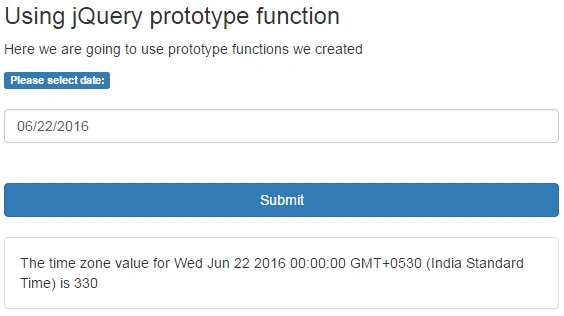
Time zone calculation, using jQuery output
Now, we will implement the second method. Is that fine?
Using Google API
Before we start, please get your own map API key from Google. You can follow this link to get one.
I hope you have your own key now. If yes, you are ready to go. Please add some controls, given below:
- <div class="col-sm-6">
- <h3>Using Google API</h3>
- <p>Here we are going to use Google API</p>
- <div class="form-group"> <input id="pac-input" class="controls" type="text" placeholder="Search Box">
- <div id="map"></div>
- <script async defer src="https://maps.googleapis.com/maps/api/js?key=yourkey&libraries=places&callback=initAutocomplete" type="text/javascript"></script>
- <div class="panel panel-default">
- <div id="latlon" class="panel-body"></div>
- </div>
- </div>
- </div>
- function initAutocomplete()
- {
- var map = new google.maps.Map(document.getElementById('map'),
- {
- center:
- {
- lat: -33.8688,
- lng: 151.2195
- },
- zoom: 13,
- mapTypeId: google.maps.MapTypeId.ROADMAP
- });
- // Create the search box and link it to the UI element.
- var input = document.getElementById('pac-input');
- var searchBox = new google.maps.places.SearchBox(input);
- map.controls[google.maps.ControlPosition.TOP_LEFT].push(input);
- // Bias the SearchBox results towards current map's viewport.
- map.addListener('bounds_changed', function()
- {
- searchBox.setBounds(map.getBounds());
- });
- var markers = [];
- // Listen for the event fired when the user selects a prediction and retrieve
- // more details for that place.
- searchBox.addListener('places_changed', function()\
- {
- var places = searchBox.getPlaces();
- debugger;
- if (places.length == 0)
- {
- return;
- }
- // Clear out the old markers.
- markers.forEach(function(marker)
- {
- marker.setMap(null);
- });
- markers = [];
- // For each place, get the icon, name and location.
- var bounds = new google.maps.LatLngBounds();
- places.forEach(function(place)
- {
- var icon =
- {
- url: place.icon,
- size: new google.maps.Size(71, 71),
- origin: new google.maps.Point(0, 0),
- anchor: new google.maps.Point(17, 34),
- scaledSize: new google.maps.Size(25, 25)
- };
- // Create a marker for each place.
- markers.push(new google.maps.Marker
- ({
- map: map,
- icon: icon,
- title: place.name,
- position: place.geometry.location
- }));
- $('#latlon').text(place.geometry.location.lat() + ',' + place.geometry.location.lng() + ', The time zone value is ' + place.utc_offset);
- if (place.geometry.viewport)
- {
- // Only geocodes have viewport.
- bounds.union(place.geometry.viewport);
- } else {
- bounds.extend(place.geometry.location);
- }
- });
- map.fitBounds(bounds);
- });
- }
- $('#latlon').text(place.geometry.location.lat() + ',' + place.geometry.location.lng() + ', The time zone value is ' + place.utc_offset);
- #map {
- width: 100 % ;
- height: 200 px;
- background - color: #CCC;
- }.controls {
- margin - top: 10 px;
- border: 1 px solid transparent;
- border - radius: 2 px 0 0 2 px;
- box - sizing: border - box; - moz - box - sizing: border - box;
- height: 32 px;
- outline: none;
- box - shadow: 0 2 px 6 px rgba(0, 0, 0, 0.3);
- }#pac - input {
- background - color: #fff;
- font - family: Roboto;
- font - size: 15 px;
- font - weight: 300;
- margin - left: 12 px;
- padding: 0 11 px 0 13 px;
- text - overflow: ellipsis;
- width: 300 px;
- }#pac - input: focus {
- border - color: #4d90fe;
- }
- .pac-container {
- font-family: Roboto;
- }
- #type - selector {
- color: #fff;
- background - color: #4d90fe;
- padding: 5px 11px 0px 11px;
- }
- #type - selector label {
- font - family: Roboto;
- font - size: 13 px;
- font - weight: 300;
- }#target {
- width: 345 px;
- }
- #map {
- width: 100%;
- height: 200px;
- background-color: #CCC;
- }
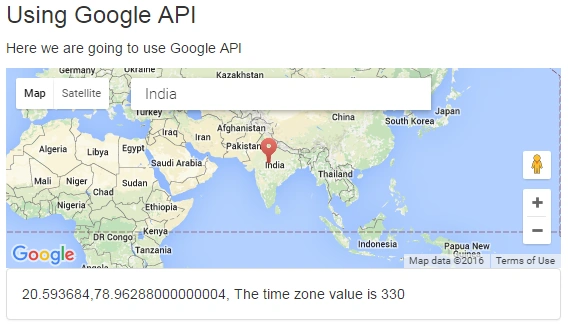
Time zone calculation, using Google API
Please make sure that the value you get from both methods is the same.
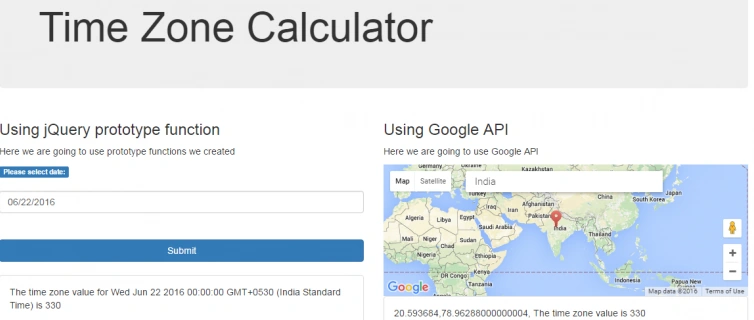
Time zone calculation
That’s all -- happy coding!.
Conclusion
Did I miss anything that you may think is required? Did you find this post useful? I hope,you liked this article. Please share with me your valuable suggestions and feedback.
Your turn. What do you think?
A blog isn’t a blog without the comments, but try to stay on the topic. If you have a question unrelated to this post, you’re better off, posting it on C# Corner, Code Project, Stack Overflow, ASP.NET Forum instead of commenting here. Tweet or Email me a link to your question there and I’ll definitely try to help, if I can.
Please see this article in my blog here.
Sibeesh VenuPosted Oct 24, 2016, 12:34 AM
Hussain Patel Thanks much.
Hussain PatelPosted Oct 23, 2016, 8:54 PM
Nice Article and Congrats on article getting selected as "Article of the Day"
Sibeesh VenuPosted Jul 7, 2016, 12:30 PM
Sr Karthiga Thanks
Sr KarthigaPosted Jul 7, 2016, 8:06 AM
Good one
Sibeesh VenuPosted Jul 7, 2016, 3:37 AM
Vignesh Mani Thanks
Vignesh ManiPosted Jul 6, 2016, 4:21 PM
Good one
Sibeesh VenuPosted Jul 6, 2016, 3:52 AM
Debendra Dash Thanks
Debendra DashPosted Jul 6, 2016, 2:00 AM
Good one..
Sibeesh VenuPosted Jul 6, 2016, 1:01 AM
Raja Ganapathy Thanks
Sibeesh VenuPosted Jul 6, 2016, 1:00 AM
Prasanna M Thanks
RajaPosted Jul 6, 2016, 12:11 AM
Great..
Prasanna MuraliPosted Jul 5, 2016, 12:14 PM
Nice one...
Sibeesh VenuPosted Jul 5, 2016, 7:38 AM
Aqib Shehzad Thanks
Muhammad Aqib ShehzadPosted Jul 5, 2016, 7:02 AM
Nice share dear
Sibeesh VenuPosted Jul 5, 2016, 5:36 AM
Upendra Pratap Shahi Thanks
Sibeesh VenuPosted Jul 5, 2016, 5:36 AM
kalu singh rao Thanks
Upendra Pratap ShahiPosted Jul 5, 2016, 5:01 AM
Nice one sir...
kalu singh raoPosted Jul 5, 2016, 4:38 AM
Nice...