
Introduction
Ajax (Asynchronous JavaScript and XML) is a new web development technique for the interactive websites. With AJAX to help we can develop web applications and retrieve small amounts of data from a web server. AJAX consists of a different type of technology.
- JavaScript
- XML
- Asynchronous Call to the server
Timer Control
Timer controls allow you to do postbacks at certain intervals. If used together with UpdatePanels, which is the most common approach, it allows for timed partial updates of your page, but it can be used for posting back the entire page as well. The Timer control uses the interval attribute to define the number of milliseconds to occur before firing the Tick event.
Step 1 : Open Visual Studio 2010.
- Go to File->New->WebSite
- Select ASP.NET Empty WebSite
Step 2 : Go to Solution Explorer and right-click.
- Select Add->New Item
- Select WebForm
- Default.aspx page open
Step 3 : Go to the Default.aspx page and click on the [Design] option and drag the control from the Toolbox.
- Drag a ScriptManager, UpdatePanel, Image and Label
Step 4 : Go to the Toolbox and drag a TimerControl.
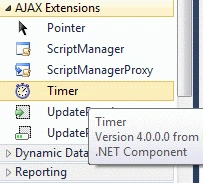
Step 5 : Now define the Timer control property.
Code
<asp:Timer ID="Timer1" runat="server" Interval="2000" OnTick="Timer1_Tick">
</asp:Timer>
ContentTemplate
Step 6 : We can use the UpdatePanel for the Timer control. Inside the UpdatePanel create a <ContentTemplate>.
Code
<asp:UpdatePanel ID="UpdatePanel1" runat="server" UpdateMode="Conditional"
ViewStateMode="Enabled">
<ContentTemplate>
<asp:Label ID="Label1" runat="server" Font-Size="14pt">AJAX in Action</asp:Label>
<br />
<br />
<asp:Image ID="Image1" runat="server" ImageUrl="~/img/Desert.jpg" Width="200px" />
</ContentTemplate>
AsyncPostBackTrigger
Step 7 : Now go to the Default.aspx[Source] option and define an AsyncPostBackTrigger.
Code
<Triggers>
<asp:AsyncPostBackTrigger ControlID="Timer1" EventName="Tick" />
</Triggers>
Step 8 : Go to the Default.aspx[Source] option and click on the UpdatePanel.
- Go to property option and define ViewStateMode.
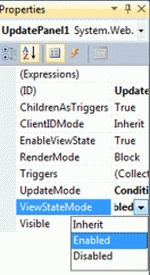
Step 9 : Go to Default.aspx.cs file and write some code.


Shraddha KotadiaPosted Nov 3, 2015, 5:16 PM
Thanks Davin Martyn..
Davin MartynPosted Sep 2, 2015, 6:43 AM
Thanks Susanta
Susanta RoutPosted Aug 26, 2015, 5:19 AM
good one davin martyan