

In this article, we are going to go through the entire Timesheet Project process in detail, step by step.
Link to download the source code here.

Note
This Project is for only learning purposes. It cannot be summited to any College or High School.
Process
This project focuses completely on the timesheet process in which there are three roles:
Let’s start with “Super Admin” Role. “Super Admin” has access to create a New “Admin” and “User”. First, “Super Admin” creates “Admin” and after creating the “Admin”, “Super Admin” creates a “User” and then assigns User to a particular “Admin”.
After assigning a user to particular “Admin”, the “Admin” has right to view User Profile and has rights to “Approve” or “Reject” the Timesheet and Expenses which the User has submitted. “Admin” can export the Timesheet according to the Date and Users and in a similar way, the expense can be exported according to the date.
Next, let’s have a look at “User” Role. User has a right to fill in and submit Timesheet and Expenses. After submitting it can be viewed by Admin who can then “Approve” or “Reject” Timesheet and Expense.
About the Platform Used
I had developed the entire application using Microsoft Visual Studio 2015 with SQL Server 2008 R2.
Frame work used is ASP.NET MVC 5 and the language is C# and Dapper, Entity Framework as ORM and Repository Pattern.
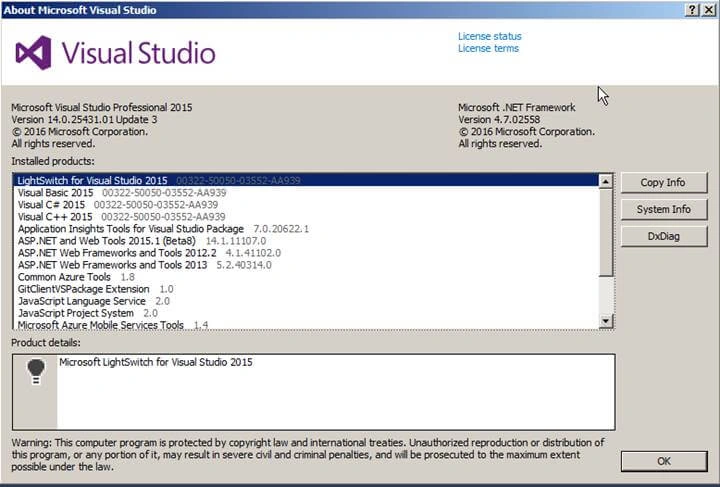
Microsoft Visual Studio 2015 with Update 3
Link to download here,
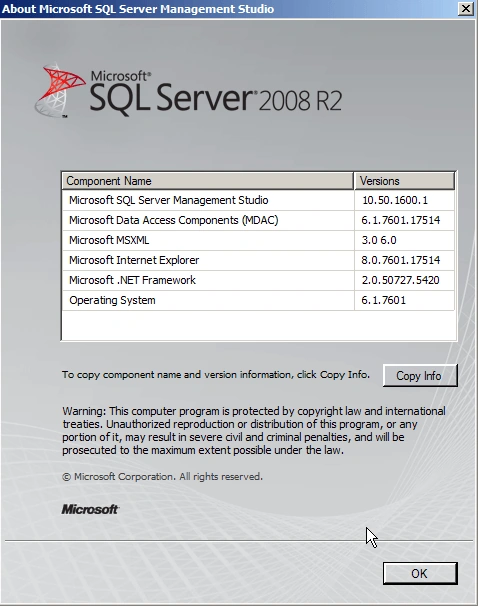
Microsoft SQL Server 2008 R2.
Link to download here,
Database Details
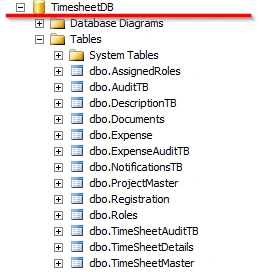
For this application, I have created a database with the name “Timesheet”.
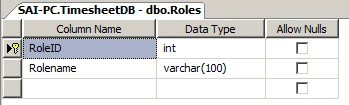
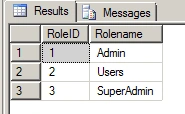
Roles
This table contains Roles.
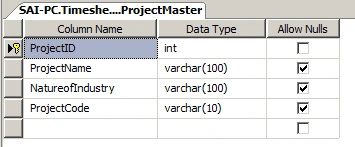
ProjectMaster
This Table contains all Project Names and Project Code.
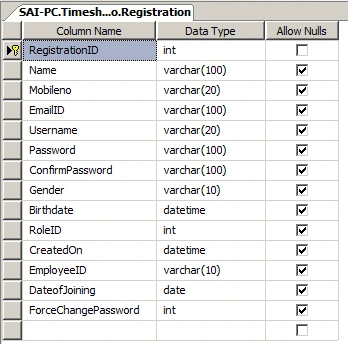
Registration
This table contains Registration Details of Users, Admin, and SuperAdmin.
Contains RoleID which is Foreign Key
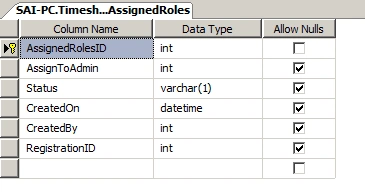
AssignedRoles
This table contains Assigned Roles.
Super Admin can assign Users to a particular Admin. All mapping is stored in this table.
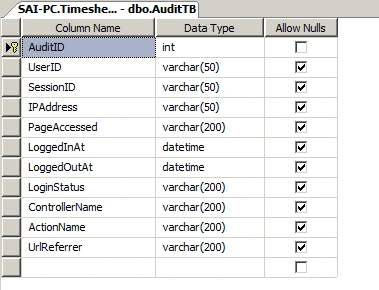
AuditTB
This Table contains all detailed logs of page access by User, Admin and SuperAdmin
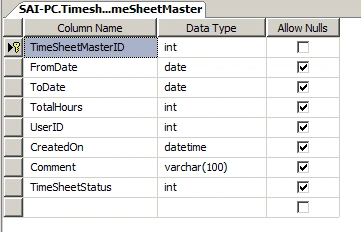
TimeSheetMaster
This Table contains all Summary Timesheet data which the User fills in.
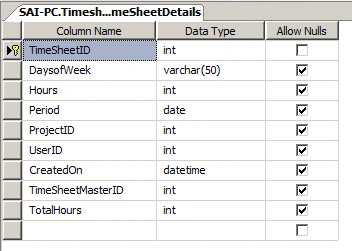
TimeSheetDetails
This Table contains all Details of the Timesheet data which User fills in.
This TimeSheetDetails table has Foreign key TimeSheetMasterID.
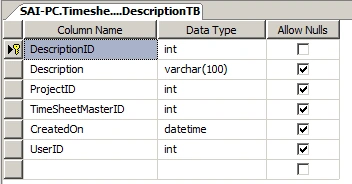
DescriptionTB
This Table contains all descriptions which the user enters while filling in the timesheet data.
This DescriptionTB table has Foreign key TimeSheetMasterID.
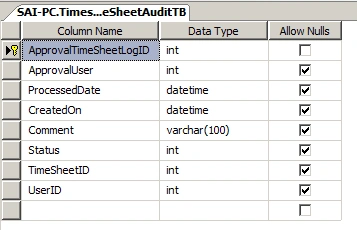
TimeSheetAuditTB
This Table contains all Approval, Submitted and Rejection details for Timesheet.
If Admin has rejected Data then Status will be “3”, if User has Submitted Timesheet then Status will be ”1”, finally if Timesheet has been Approved then its Status is “2”.
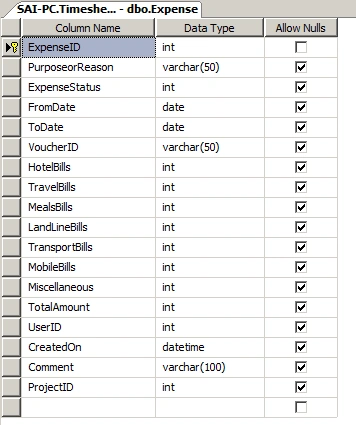
Expense
This Table contains Expense Details.
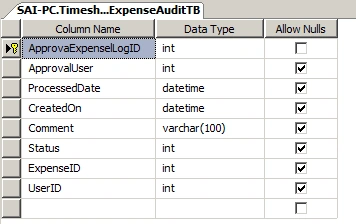
ExpenseAuditTB
This Table contains all Approval, Submitted and Rejection Details for Expenses.
If Admin has to reject Expenses then Status will be “3”, if User has submitted Expenses then Status will be ”1”, finally if Expenses have been Approved then its Status is “2”.
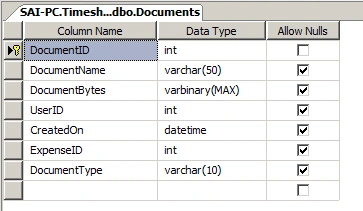
Documents
This Table contains all Documents Related to Expenses.
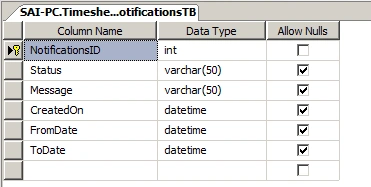
NotificationsTB
This Table contains all Notifications which SuperAdmin wants to send to Users.
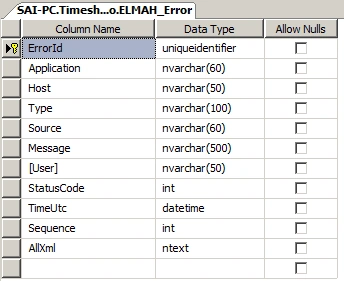
ELMAH_Error
This Table contains all Errors that have occurred in the application.
After completing database details now let’s have a look at the project structure in Visual Studio.
Project structure
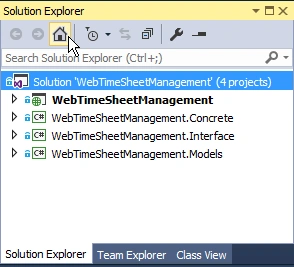
Project Contains a Main ASP.NET MVC Web Application along with 3 Class Libraries.
- Concrete
- Interface
- Model
External packages which are used in this Project
I have also added some packages from NuGet, here is the list:
- CaptchaMvc
- ClosedXML
- Dapper
- ELMAH
Design Templates
- SB Admin 2
A Bootstrap admin theme, dashboard, or web app UI featuring powerful jQuery plugins for extended functionality.
Link: - https://startbootstrap.com/template-overviews/sb-admin-2/
JavaScript Libraries
- Toastr
Link: - http://www.toastrjs.com/
- DateTimePicker
Link: - https://xdsoft.net/jqplugins/datetimepicker/
- Datatables
Link: - https://datatables.net/
Encryption Library
- AES 256
Structure Details
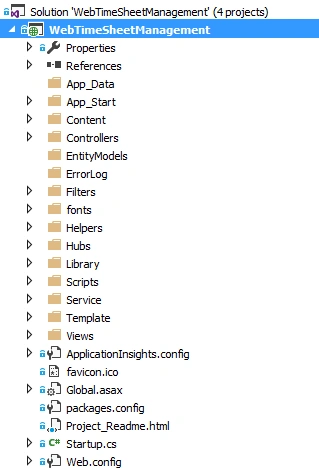
Note: - It is a half Snapshot of Folder Structure.
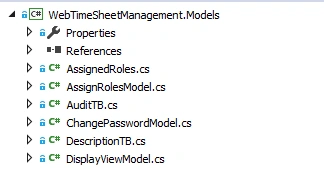
Models Class
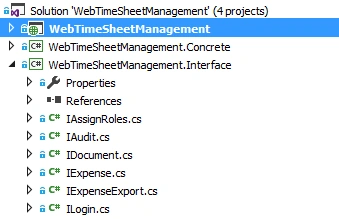
Interfaces
Concrete
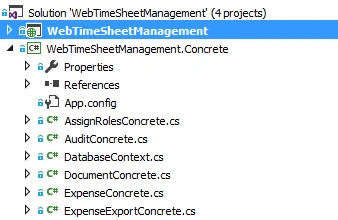
The above shows how the directory and folder structure look, now let’s check out the application screens.
Application Screens
- SuperAdmin screens
- User screens
- Admin screens
All Super Admin Screens
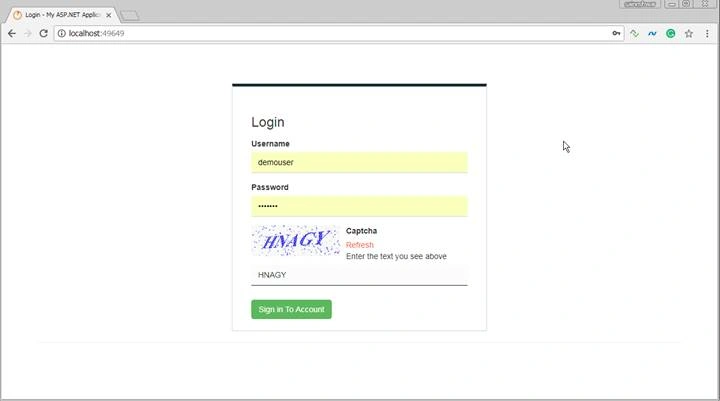
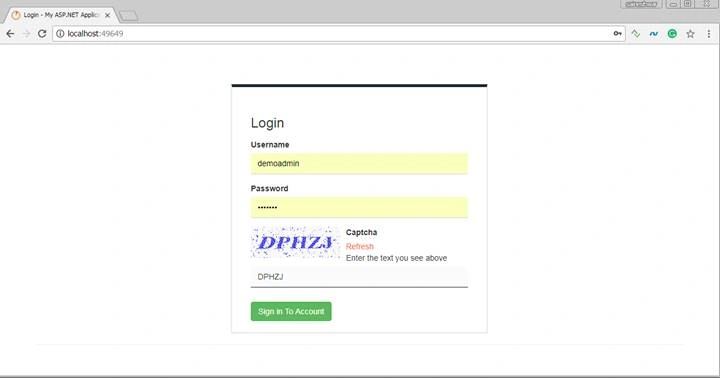
Login Screens
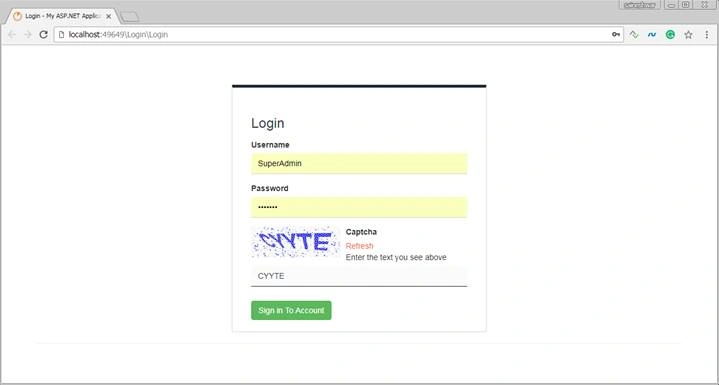
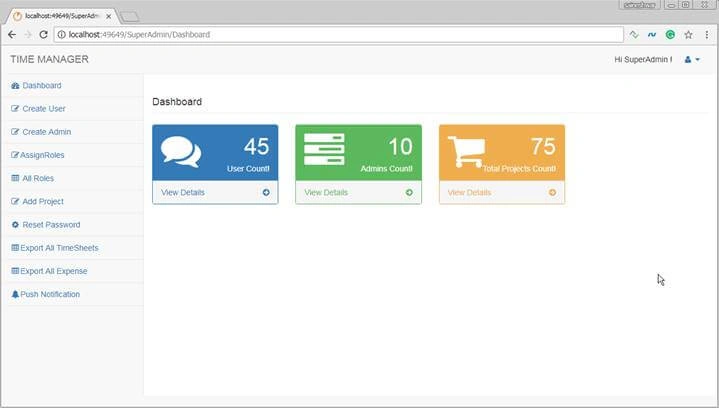
After Login we are first going to see Super Admin Dashboard.
Super Admin Dashboard
After that, we are going to create a New User.
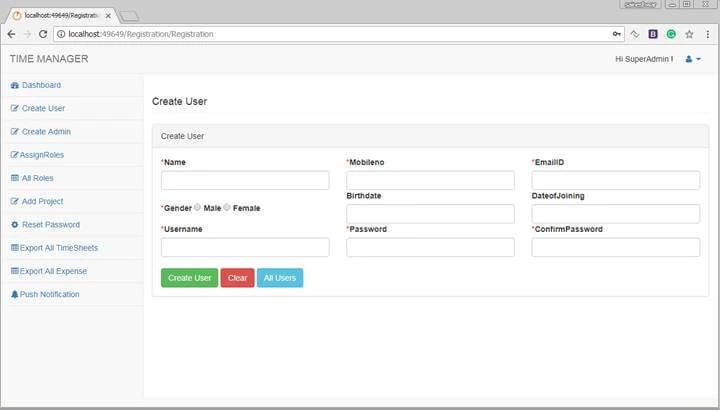
Create Users
In this part, a Super Admin can create a new User.
After creating a New User, next, we are going to create Admin User.
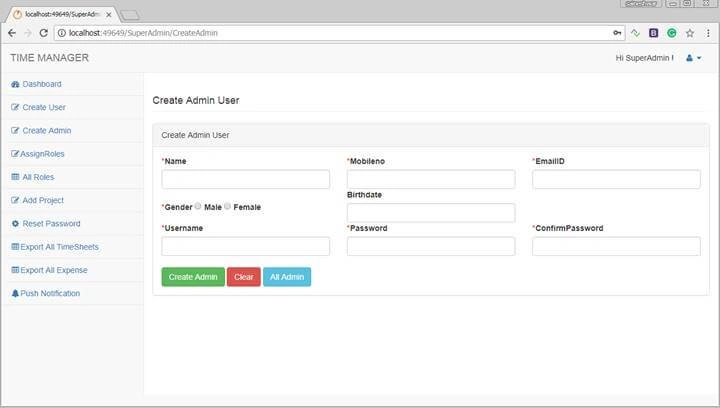
Create Admin User
In this part, a Super Admin can create a new Admin.
After creating a New Admin User, next, we are going to assign an Admin to Users.
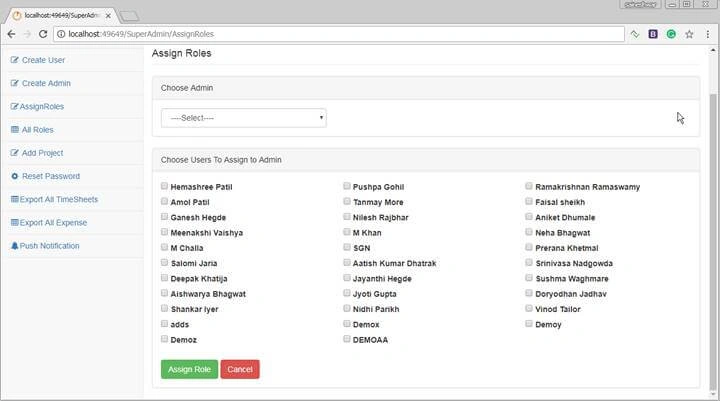
Assign Admin to Users
After creating User, we can see all users in the below Users checklist and you will see Admin Dropdown list which contains all admins. To assign role to User just choose Admin from Admin dropdown and from a checklist, choose User and click on Assign Role Button.
After assigning Admin to Users, next, we are going to assign Roles to User.
Roles Assigned to Users
If you want to remove the role of the user and reassign again to another admin then you can click on “Remove Role” button.
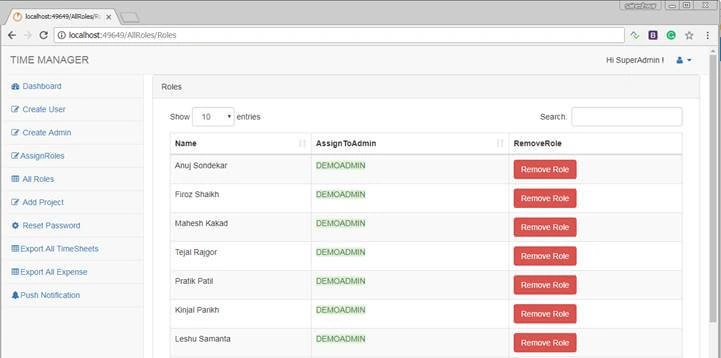
After assigning Roles, next, we are going to have a look at how to add a Project.
Add Project
In this part, we can add a new Project.
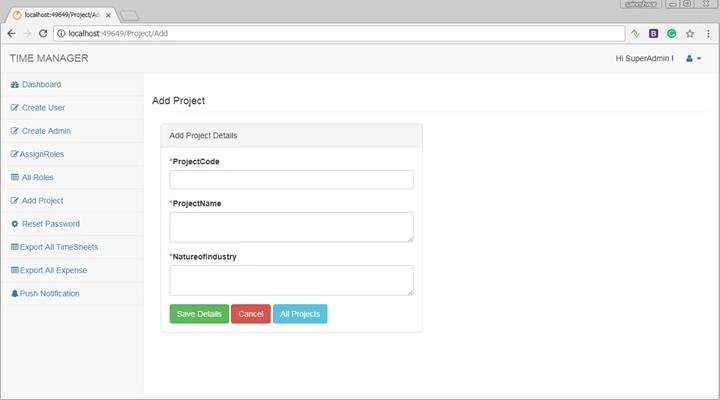
After adding a Project, next, we are going to see how to reset the password.
Reset Password
In this part, Super Admin has the right to Reset Password of All Users.
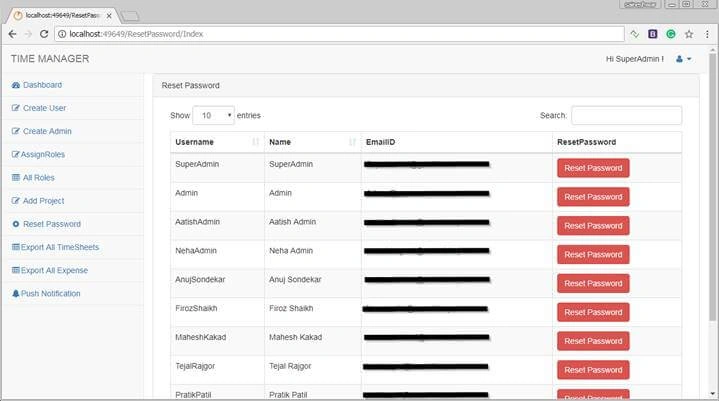
After resetting password, next, we are going to have a look at how to export all Timesheets.
Export All Timesheets
In this part, Super Admin has the right to download Timesheets of all Users according to date.
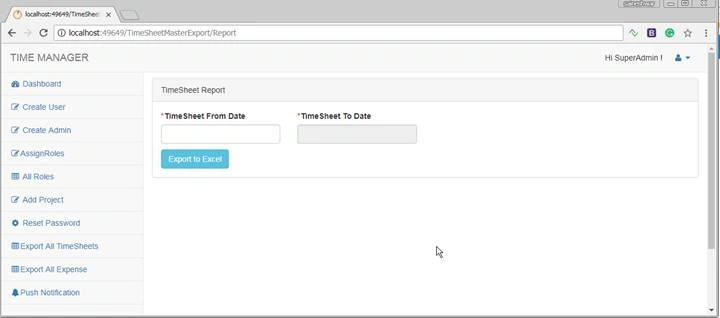
After exporting all Timesheets, next, let’s see how to export all Expenses.
Export All Expenses
In this part, Super Admin has the right to download Expenses of all Users according to date.
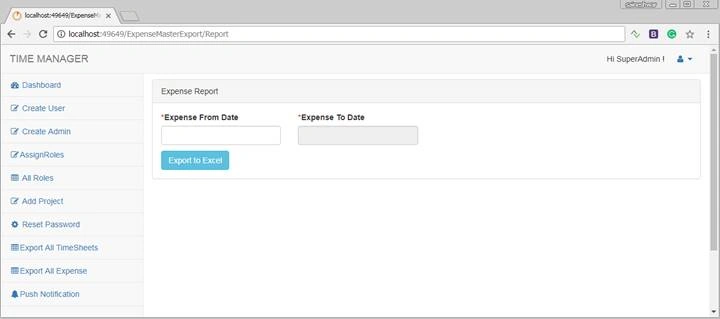
After exporting all Expenses, next, let’s see how to set Notifications.
Setting Notifications
In this part, Super Admin has the right to send Notifications to all Users.
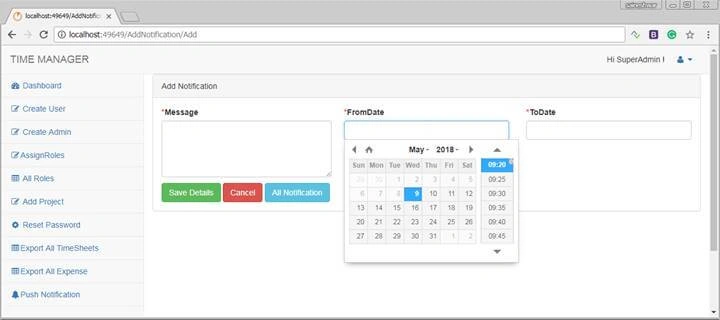
All User Screens
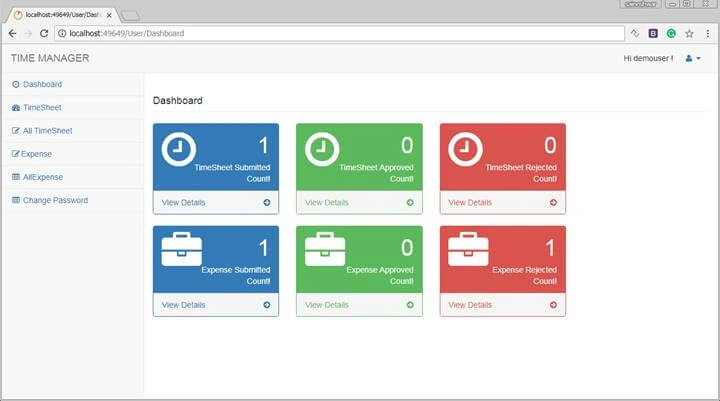
User Dashboard
Its shows a summary of submitted timesheets and expenses to the User.
Timesheet
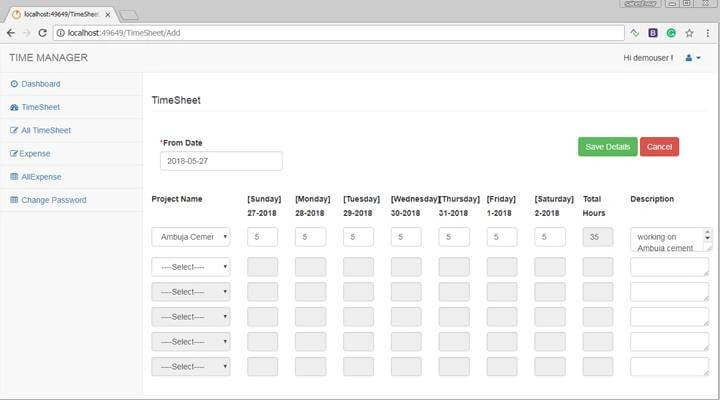
In this part, we are going to choose Project Name and fill in the hours according to days and click on Save Details button to save Timesheet.
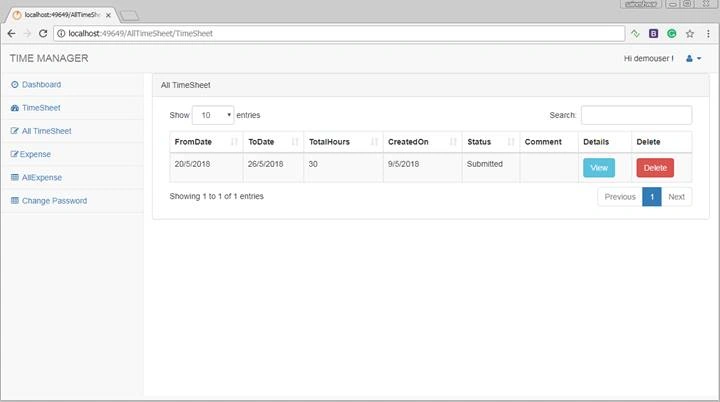
All Timesheet
After filling in the timesheet, all details will be displayed in this view.
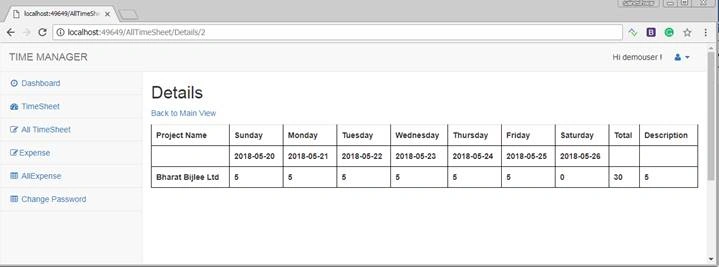
After clicking on View, you will see details of Timesheet which you had filled in.
Expense
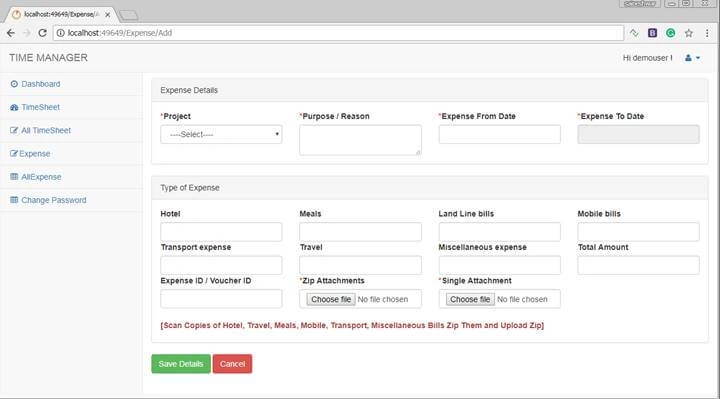
In this part, User is going to fill in all his Expenses, along with this, he is going to attach documents such as bills from restaurants and cabs.
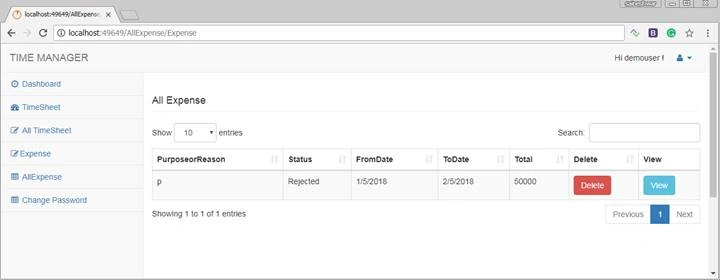
After filling in Expenses all details will be displayed in this view.
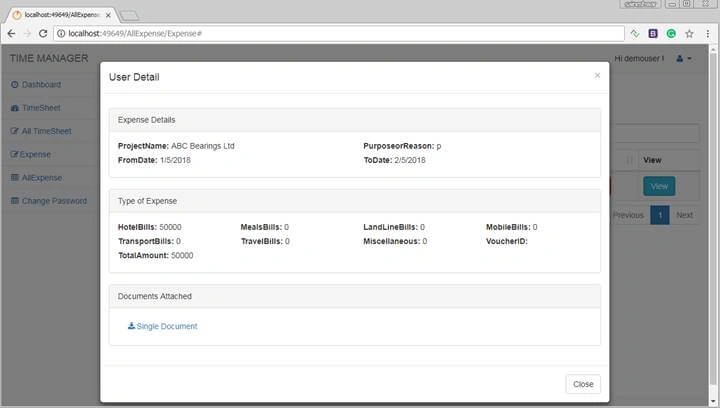
After clicking on View, you will see details of Expenses which you had filled in.
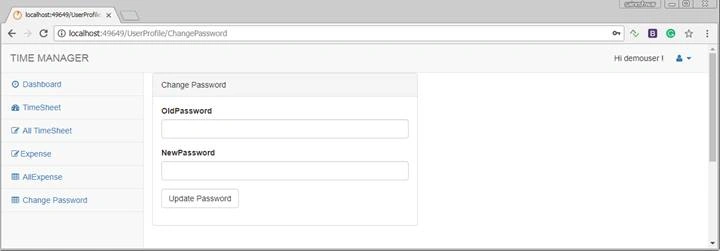
Change Password
Admin Screens
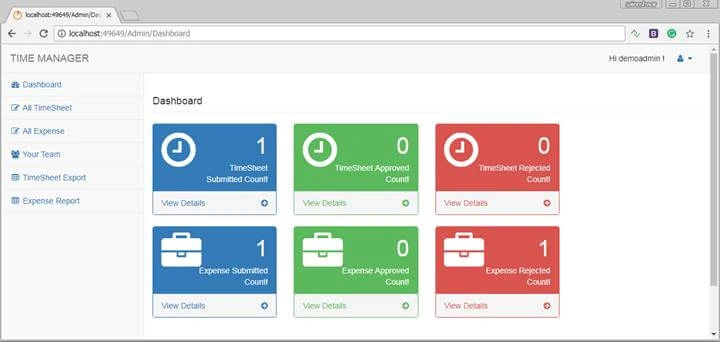
Admin Dashboard
Its shows a summary of timesheets and expenses to Admin which have been submitted by Users.
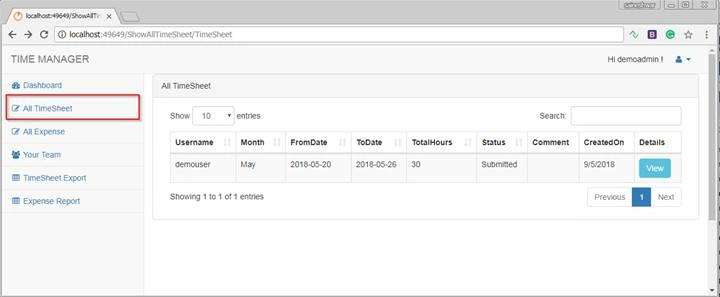
All Timesheets Submitted by Users
Will show all timesheets submitted by Users to a particular Admin.
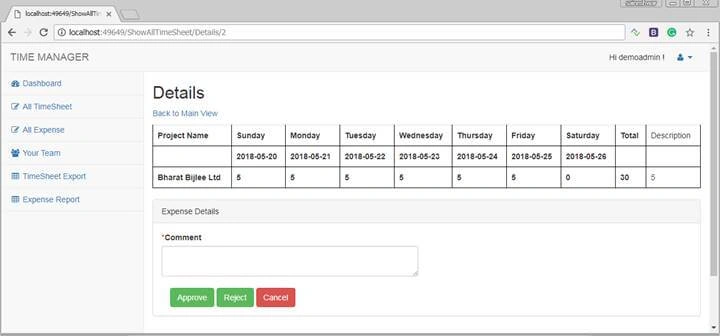
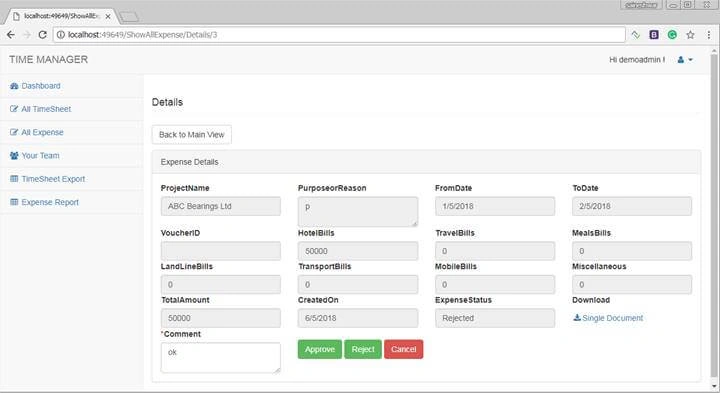
Now to approve or reject timesheets, admin needs to click on View button which will display details of timesheets along with buttons to approve or reject timesheets, and along which that Admin needs to enter Comment for completing the process.
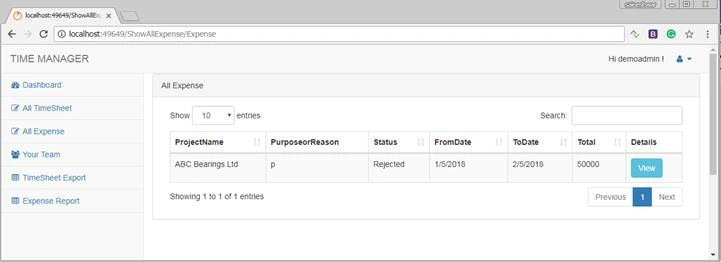
All Expenses Submitted by Users
Will show all expenses submitted by Users to a particular Admin.
Now to approve or reject expenses admin needs to click on View button which will display details of expenses along with buttons to approve or reject timesheets, and along which that Admin needs to enter Comments for completing the process.
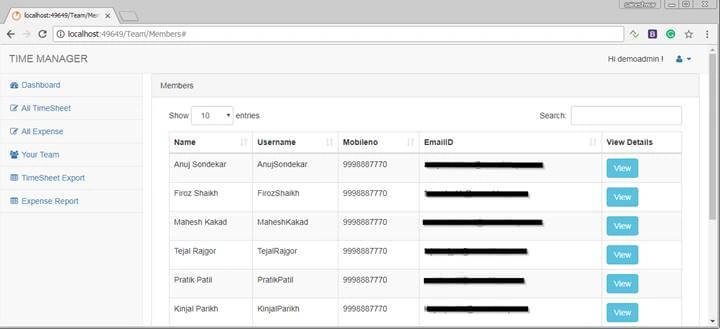
Team Members
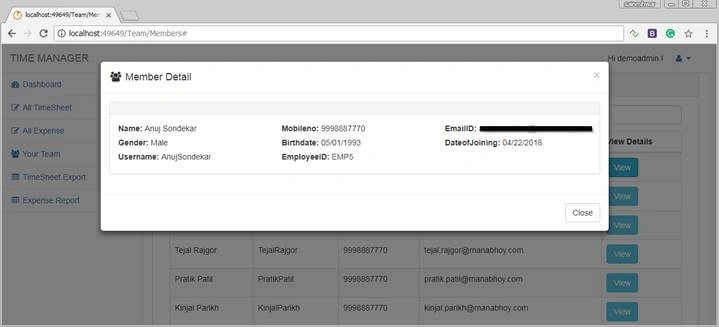
In this part if the admin wants to see the team under him then admin user can choose this menu. It will display all team members and their details.
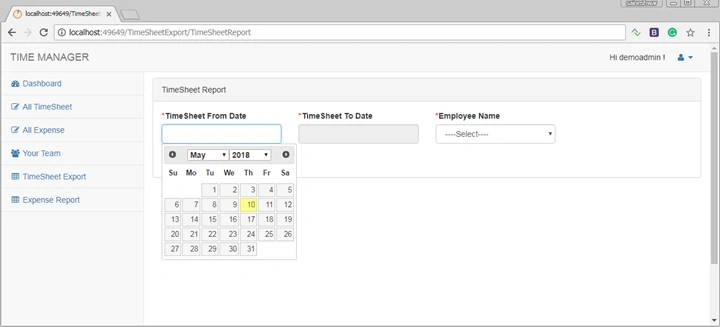
Export Timesheet
In this part, admin can export data of a particular user's Timesheet according to the date he chooses.
Finally, after completing View, now let’s move to the report.
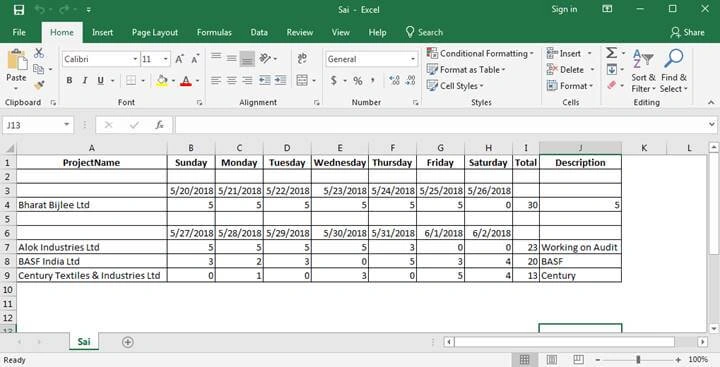
Exported Timesheet Report
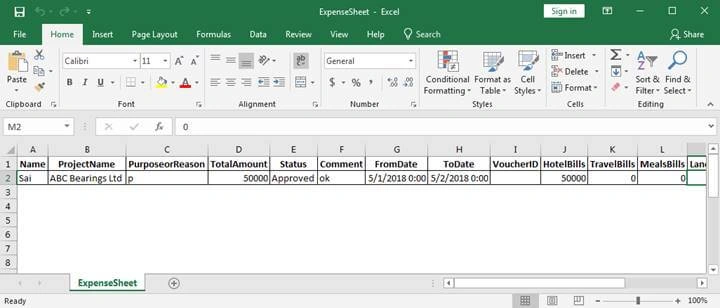
Exported Expense Report
Finally, we have completed the project successfully and I believe that people who are new to MVC have learned a lot from this project.
Chris ThorntonPosted Mar 6, 2025, 10:13 PM
Thank you, Sai! This time management system is awesome!
Noob devPosted Mar 3, 2025, 3:33 PM
Hi, can someone tell me how do I update the tables for this project and use them? I do not see any sql file associated for the tables.
vamsee krishnaPosted Sep 15, 2022, 10:48 PM
Some one hlp me to run this code in my system
mukesh kumarPosted Aug 4, 2022, 12:31 PM
Column not available in table
mukesh kumarPosted Aug 4, 2022, 12:31 PM
Msg 207, Level 16, State 1, Procedure Usp_UpdateAssignToUser, Line 1118Invalid column name 'AssignTo'. Msg 207, Level 16, State 1, Procedure Usp_GetReportofTimeSheet, Line 1304 Invalid column name 'AssignTo'. Msg 207, Level 16, State 1, Procedure Usp_GetListofUsers, Line 1405 Invalid column name 'AssignTo'. Msg 207, Level 16, State 1, Procedure Usp_GetListofUsers, Line 1406 Invalid column name 'AssignTo'. Msg 207, Level 16, State 1, Procedure Usp_GetListofUsers, Line 1402 Invalid column name 'AssignTo'.
sonia rathiPosted Mar 30, 2022, 7:52 AM
WHAT IS THE PASSWORD FOR sUPERaDMIN
RajaPosted Oct 16, 2021, 2:55 PM
Did i get db package please
Sandeep CharyPosted May 7, 2021, 6:40 PM
Sir could you please give us the back up file?
Sasi RavichandiranPosted May 7, 2021, 3:34 PM
Some one please help me to run the application.
Pranay KhadatkarPosted Apr 23, 2021, 10:29 AM
Thank You Sir
gerard flynnPosted Apr 13, 2021, 4:14 PM
Hi Bageri, can you edit the time sheets if make a mistake?
nilesh narwarePosted Apr 11, 2021, 2:08 PM
Thank you Saineshwar Greate job Will also learn from it
Nagarjun RajagopalPosted Mar 16, 2021, 9:32 AM
Db backup file?
Sachin GPosted Jan 4, 2021, 8:15 AM
Thanks Saineshwar its really very helpful for me.
james resmerosPosted Jan 3, 2021, 4:29 PM
What needs to be changed in web config?
Balaji BaluPosted Dec 27, 2020, 3:33 AM
Can you give database backup file for this project?
ramPosted Dec 30, 2019, 10:50 AM
What is the user name, password man?
Shyam SainiPosted Dec 21, 2019, 11:32 AM
Please tell me user id or password ?
Rahul DakePosted Nov 13, 2019, 1:22 AM
Very good project...
Joe WilsonPosted Oct 14, 2019, 10:15 PM
Hi Bageri... Thanks for this project.. I'm so appreciate it. One thing I wanna ask is why Export menu (TimeSheet & Expense Report) did not work? Should I customizing something for this? Or what? Thanks a bunch
Praneet RanePosted Oct 13, 2019, 8:55 AM
Very nice project to refer while learning MVC. Great explanation on project structure and functionality.
biswa nayakPosted Oct 11, 2019, 12:23 PM
What is the user name and password for this application?
JosephsPosted Oct 11, 2019, 8:14 AM
Hi sachi gandhi run the script then change the config file then run your project you can see the output.
Sachin GandhiPosted Oct 10, 2019, 10:26 AM
Hi, I am new to Asp.net MVC. I have downloaded source code & have also configured database. I am unable to view login page. I tried access application using various URL http://localhost:49649/Login/Login/.. but still no luck. Can someone please help me
JosephsPosted Sep 17, 2019, 7:39 AM
Hi sachin sboa first execute script then run project if you struggle share snapshot also orherwise mail me : i ill help you : [email protected]
Sachin SboaPosted Aug 12, 2019, 2:39 AM
Saineswar sir, please keep a look on that issue and did not get any reply from your side yet
Sachin SboaPosted Aug 1, 2019, 12:39 PM
Saineshwar Bageri, sir your page initially is not working. As i mentioned the issue earlier , check it please....
Sachin SboaPosted Jul 28, 2019, 11:15 AM
Saineshwar Bageri, PLEASE REPLY ON THIS ISSUE
Sachin SboaPosted Jul 27, 2019, 11:26 AM
Hello sir, i face an issue during registration of new user. It goes to error or session time out page every time. That is in your application registration controller is not working. I think you take a look on that issue. Please reply a useful suggestion that can help me and my team. thanks
Tên Họ VàPosted Jul 20, 2019, 9:23 AM
Thansk ser
Puneet KumarPosted Jun 6, 2019, 12:01 AM
I just wanted to ask one thing that where are the stored procedures of insert in the different tables. Because in file Timesheet.sql ,you have inserted data with the hardcoded data.
Mark TaborPosted May 1, 2019, 2:12 AM
I am not able to use the credentials to login can someone help me ?
sainath sagarPosted Apr 19, 2019, 11:40 AM
Super admin password ??
Winsgk WinsgkPosted Apr 18, 2019, 2:18 PM
Hi Sainesh...I am developing a Time sheet project and my idea is the same as your project. I am new to .net..I am just wondering from where i should start from. Any tutorial or videos to understand the basics and start developing the project. Appreciate your advice in this.
Marco vanPosted Apr 8, 2019, 6:05 AM
Hi, nice project. One question, currently the solutions is not able to run in Azure, because of database incompatibility. What part of the application depends on SQL server settings that are not supported by sql azure? And why is this needed?
kris amigoPosted Mar 27, 2019, 10:39 AM
Registration table missing the column called "AssignTo" due to this database scripts are failed to create few stored procedures.
The 404Posted Mar 13, 2019, 1:24 PM
Sir please help me out asap.
The 404Posted Mar 13, 2019, 1:24 PM
Where is the entry page of time sheet entry .?
Evelyn CorderoPosted Feb 13, 2019, 12:45 PM
Hello would you be able to explain how to open and launch the app.
Asif ZaffarPosted Feb 10, 2019, 3:06 AM
Hi Sai, you have given 3 connection strings in web.config file......I'm a bit confused their. Need help! Could you please share me the UML or Architecture diagram at [email protected], if possible. "Thanks"
Alice NguyenPosted Jan 29, 2019, 3:00 AM
Very nice thank you so much.
Lodhi SohilkhanPosted Jan 28, 2019, 5:16 AM
Your Project Timesheet Can not Run in my Computer i used visual studio 2015 and sql server 2012. when i run login page then this type error on web page This site can’t be reached localhost refused to connect.Search Google for localhost 49649 LoginERR_CONNECTION_REFUSED. i try change webconfig but not run plz give me solution ....
Samiya FayazPosted Jan 9, 2019, 5:46 AM
Hey. I was developing a similar application but Web-form based. Can i please know how to add the panels you have added and call a function from code behind to display the count when the user logs in. It would be great if you could help. Thankyou.
Hamid KhanPosted Dec 28, 2018, 11:38 AM
Great work. For time Sheet project Thanks a lot of...................
Priya SriPosted Dec 27, 2018, 9:26 AM
Nice work. i have running this application local host . i am enter timesheet after that delete it . again trying to insert same date alert saying timesheet You have already filled Details for Choosen Date .
saroj kumarPosted Nov 18, 2018, 1:22 AM
Nice one sir.........
Ankit KumarPosted Nov 7, 2018, 4:47 AM
Dear Sai, I have hosted the SQL Db in SSMS and change the connection string, but still I am getting the error. When I search for Login/Login url, it shows the Error screen rather then Login Page.
Lokesh kolliPosted Nov 2, 2018, 6:55 AM
HI sir ,when iam trying to export the timesheet details it is getting error
sumit bohraPosted Oct 21, 2018, 10:07 PM
Dear Saineshwar, Thank you for sharing this article. I am also working on similar project. Can you please share architecture diagram for this? My email id is [email protected].
Ramzanali MominPosted Oct 15, 2018, 5:41 AM
Plz send architecture diagram 0f this project
Khorshed AlamPosted Oct 11, 2018, 9:03 AM
Nice project
JosephsPosted Sep 19, 2018, 4:42 AM
Just download and extract then open visual studio 2015 open this project change your connection string as you like finally built project put Username :- demouser Password :- 1234567
Swathi GajjalaPosted Sep 18, 2018, 8:12 PM
Hi, could you please tell me where to login to access the application
Dinesh ChintalapudiPosted Sep 14, 2018, 10:02 AM
Hi, When running the website, demo logins are not working. When I looked into tables, all empty. Is there no seeding of data records for demo/admin users at the time of application startup?
JosephsPosted Sep 5, 2018, 4:52 AM
You can use restrict Duplicate in your insert part
sunil TPosted Sep 4, 2018, 3:38 PM
I see a design problem.. a user can submit 'n' number of times for the same week..there is no restriction....Also before submission there is no way in saving the data..anyways.. good work and use ful
JosephsPosted Aug 30, 2018, 9:13 PM
CHECK YOUR tables records relevant data then change your connection string
Darko MilicPosted Aug 30, 2018, 9:33 AM
Hello Sai, there is error when I want to login as SuperAdmin. (Invalid Username and Password).
JosephsPosted Aug 29, 2018, 1:30 AM
Hello Sai, How to Implemented Master and Details page in WebTimeSheetManagement?
Nissar EbrahimPosted Aug 15, 2018, 4:50 AM
Hello Sai, I was checking this app and found few things . 1 . Time Sheet delete process was only deleting from timesheet master ,but not from timesheet details .. your sp is passing Timesheet ID to details table instead of timesheetMasterID ... 2 .. Admin can approve a time sheet n number of times. Is that made intentionally .. 3 .. Lots of controllers are found unused ..
Ace BPosted Aug 11, 2018, 9:45 AM
Nice application. If I want to add more rows dynamically in the Timesheet entry page (say thru an "Add Rows" button), how can I do? Currently it allows 6 rows, but we need to add more rows based on the resource allocation and want to be dynamic.
Nissar EbrahimPosted Aug 9, 2018, 8:05 AM
What is the superAdmin password to login into
Abdurahman Yusuf AbdiPosted Aug 8, 2018, 11:42 AM
I am try to launch the project but he say the IIS error my IIS it workes even when i am using my projects
So SoPosted Aug 8, 2018, 5:53 AM
How I can change the connection string in web confri what exactly and how I can know my server info
Ano MepaniPosted Aug 7, 2018, 1:23 AM
Wonderful project. Very helpful for real-world application
uvaisPosted Aug 1, 2018, 2:58 AM
There are files missing from the downloaded file. I havent got the entire structure. files such as controllers and views missing from github.
alhanouf albalwiPosted Jul 31, 2018, 11:18 AM
How i can change connection string
First LastPosted Jun 20, 2018, 7:25 PM
Can you explain to me how the dropdownlist for the projects gets populated? The Timesheet add.cshtml, it has; @Html.DropDownListFor(m => m.ProjectID1, new SelectList(string.Empty, "ProjectID", "ProjectName"), new { @class = "form-control" }).It uses the TimeSheetModel. Where/how does it gets the data for the list. How/where did it get in the model?
prashant sharmaPosted Jun 15, 2018, 2:02 AM
Nice article sir . i have download and change connection string and build sucessfully but when i run its not run on browser localhost redirected you too many times this error getting please tell me about this and its redirect to error page
First LastPosted Jun 12, 2018, 6:45 PM
Nice job..but you left out the "step details" about how you actually used Visual studio and the steps you took in creating the controllers and the like. That would be nice to see that thought and step process as you created the application.
amit guptaPosted Jun 6, 2018, 8:51 AM
Awesome work dear. its all most real time mini project. very good for professional level too. i need to know how to use charts and pdf report in mvc project. Thank you so much for your effort.
Ravindra KumarPosted May 23, 2018, 11:12 PM
Please share db script . its damaged not opening
Abdul NasirPosted May 19, 2018, 12:56 AM
I really appreciate your efforts for beginners as well professionals thanks sir
Abdul NasirPosted May 19, 2018, 12:53 AM
I facing issue regarding encryption... While super admin password hasencrypted please sir share your views
Saineshwar BageriPosted May 18, 2018, 11:10 PM
Any One Getting Issues related to "AssignTo" then || DROP PROCEDURE Usp_UpdateAssignToUser || DROP PROCEDURE Usp_GetListofUsers || DROP PROCEDURE Usp_GetReportofTimeSheet
Ravi MaheshwariPosted May 18, 2018, 12:34 PM
There is one SP :- Usp_GetListofUsers in that error is coming on (Registration.AssignTo..) should I create this column in table Registration with datatype bigint ?
Manish PandeyPosted May 16, 2018, 12:56 PM
Nice Article Sir, just downloading .. it is very helpful for me as i m new in Web & MVC World. Thanks Sir.....
Ravi MaheshwariPosted May 16, 2018, 12:29 PM
Useful application in real world.
rtrtr rtrtrPosted May 15, 2018, 11:01 AM
Hi ,Great work but Time Sheet master seems to be missing from the solution folder , was it intentional? and also in the sql queries there seems to be an error when creating procedures where you have referenced "AssignTo" column in registration table but there is no "AssignTo" column in the table.
Ibrahim SiddiquePosted May 14, 2018, 7:40 AM
Nice Project thanks for sharing. !!! People like you are blessing for community.
Tridip BhattacharjeePosted May 14, 2018, 3:36 AM
Very nice one. thanks
Abdurahman Yusuf AbdiPosted May 13, 2018, 8:51 AM
I am from somalia and i love programming particular C# Programming i am happy to see important article like this thank Sir @Saineshwar