

Recently, I got an email on how to change color of chart items (bars) in Crystal Reports. As usual, instead of replying the individual email, I am adding this Tip to the Crystal Reports section.
If you want to change the default color of a chart bars in Crystal Reports, you can do in Crystal Report designer by selecting a chart bar (make sure the bar is selected) and right click and select Chat Options -> Selected Item from the menu. See Figure 1.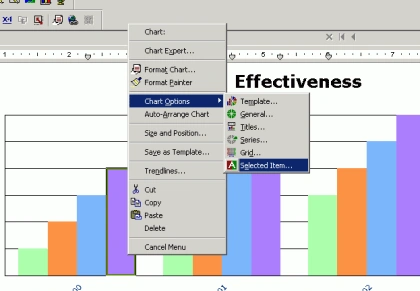
Figure 1.
On next dialog, you can select a color, gradient, texture, and a picture. See Figure 2.
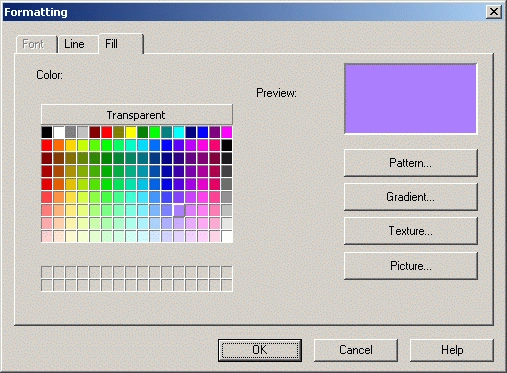
Figure 2.
However, if you are using Visual Studio .NET/2003, you may not see this option. I guess the way you do is, buy the licensed version of Crystal Reports? If you know how to do the same in Visual Studio, do not forget to share with us.
Al SamuelsonPosted Jan 8, 2012, 4:35 PM
I found this instruction helpful but appears a little different in XI outside of .NET: After selecting the Bar and right clicking, I see menu options - - Chart; Format Series Riser Chart Options Series Options Trendlines The second option got me to a dialoge box "Format Series Riser ..." with a drop down box "Foreground Color" that displayed the current color of the bar riser that I had selected. The down arrow in the drop down displays a color pallet but just selecting a different color seems to have no effect. There is a command button "Pattern" just below the drop down. Clicking that button reveals some selectors for BackGround color and ForeGround color. Choosing a new color for both was the only way I was able to succeed.
kumaravel rPosted Jan 11, 2008, 5:47 AM
i have bar chart in my CR. i have to display color in my chart based on the DB value. When i am seeing CR preview i can see the chart color .But i was trying to see it through ASP.NET web application,I could not able to see the colored chart instead it was displaying gray color in my system but not in others system. note : i have used crystal report version10.0
sree deviPosted Sep 12, 2007, 4:28 AM
i am using CR 10 .NET version.The report contains a pie chart which will represents Safe,High,Medium and Low values.The color corresponding to each values is stored in the DB.How can i configure the color of the pie chart from the DB value. Please help.
siri yPosted Jun 21, 2007, 11:39 AM
How can i display the Data label text vertically, in bar chart, in crystal reports.
siri yPosted Jun 21, 2007, 11:29 AM
How to display thetext of a datalabel vertically
nadeem sattarPosted Jun 21, 2007, 3:28 AM
Ihave a problem in crystal report .i hv 5 to 6 subreports in Main report.and i adjust their height and width.and some time one of the subreport do not show any result and due to that reason their is gap between subreports.i try to access the crystal report objects programmicaticlly and i succeed in accessing the normal objects like Text Box through this line of code. crp.ReportDefinition.Sections("ReportHeaderSection1").ReportObjects.Item("Text2").Left = 8000 This line work and i m able to change its left ,width and etc. but when i access the cross tab or subreport through the same line of code crp.ReportDefinition.Sections("ReportHeaderSection1").ReportObjects.Item("Crosstab").Left = 8000 i get arror message Add or chnage this type of Report Object is not allowed. Kindly help me in that Regard.I am waiting
Ruhul AminPosted Jun 4, 2007, 3:03 AM
Hi mahesh, Thx for ur post. I have Five bar in my chart. The crystal report 10 show only four bar in design view. But in report there is no problem at all. I can change the color of the four bar. Now I want to chagne the color of fifth bar of the chart. How to change the color of fifth Bars in Crystal Reports?
Ruhul AminPosted Jun 4, 2007, 3:03 AM
Hi mahesh, Thx for ur post. I have Five bar in my chart. The crystal report 10 show only four bar in design view. But in report there is no problem at all. I can change the color of the four bar. Now I want to chagne the color of fifth bar of the chart. How to change the color of fifth Bars in Crystal Reports?
mohammed alkaffPosted Feb 5, 2007, 10:52 AM
hello How cAn I Change The Format of Date in Chart when the Date is Group Axis