

Before I say any thing, I have to admit, Crystal Reports is the suckiest (I'd to find a unique word) product in my list of sucky products I have ever used. I do not have any words to describe the SUCKER LEVEL for this product. BTW I am using version CR 10.
Any way, in this article let's see how to change the color of a Chart bars based on certain conditions. For example, if the value of the chart is > 100, the color would be green otherwise it would be red.
Let's talk about changing the color of the chart.
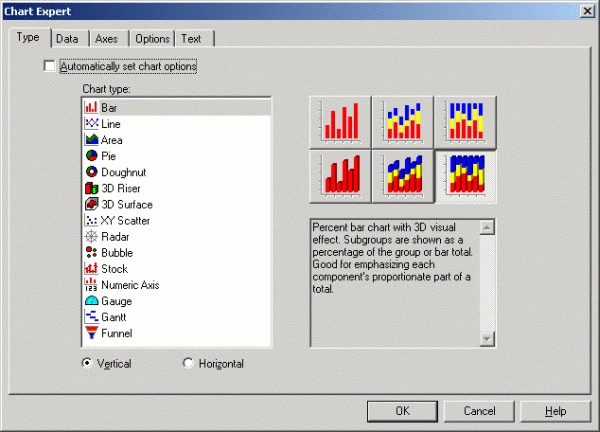
- Right-click on the chart and select Chart Expert
- Click on the Options tab. Guess what, if you have default Automatically set chart options selected, you will not see Options tab. So first, clear Automatically set chart options as following:
- Verify that the Color radio button is selected in the Chart Color group. See following figure:
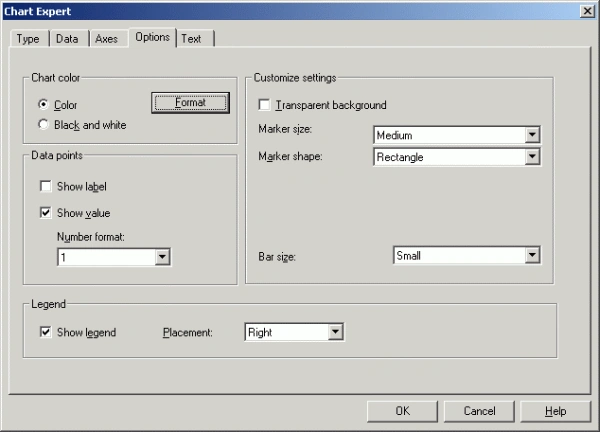
- Click the Format button in the Chart Color group
- The Chart Color Format Expert appears. For each bar that you want to color:
a. Click New to add a new item to the Item List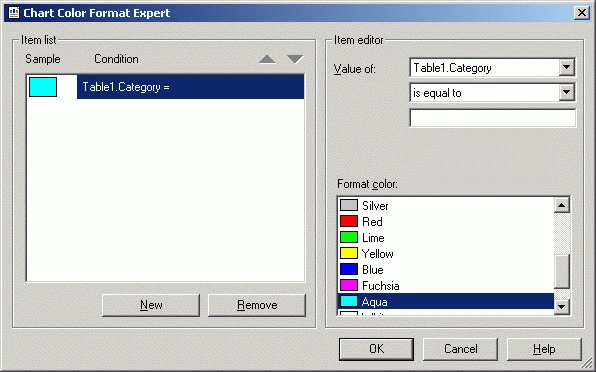
b. From the Item Editor select the field that you want to check (from the first dropdown list), the condition (from the second dropdown list) and the value to check against (from the third dropdown list).
c. Select the custom color to apply if the conditions set. When you have entered all of the custom colors, click OK
- Preview the report.
Also do not forget the following :
- Right-click on the chart and select Chart Options >> General
- Click the Look tab
- Set the Color Mode drop down list to Color by Groups and click OK.
prarthanaPosted May 30, 2013, 11:28 AM
Question: We have a table that can have upto 50 values. Depending on the time period for the report and per user, the SUM of the values used are displayed as stacked bar graph. Pain point: We want to maintain the same color for value at each position across all the graphs. We have not found a simple solution of doing so. Any help / pointers are greatly appreciated. Thanks.
Pankaj NavlekareditedPosted May 1, 2013, 6:53 PMEdited May 1, 2013, 6:59 PM
HI, I am using CR 2008 and I'm not getting the "Format" button before the Color radio button? Any idea how to do it in CR 2008?