

Sharing some good collective information on Toast Notifications in Universal Windows Apps.
- Types:
Glance(Consume) : Toast is like "Update Available" or "New features available".
Act (Chase or take action) :
Toast invites you to begin or complete the task.
The toast is the app's door by chasing (clicking) it.
Additional actions enable the users to perform a simple task without context switching.
- Toast Templates
All the templates are available, which are for Windows phone and store apps. Now, they have merged together. If existing legacy templates don't fulfill your needs, new templates are also available.
Adaptive Templates
- Sending Toasts:
Scheduled : Set the template and tile with "ScheduledToastNotification", toast can also be set to recurring.
Local : Send from the foreground/background app.
Push : Use Push services.
- void SendToast()
- {
- //Make toast
- var toastTemplate = ToastTemplateType.ToastText01;
- var xml = ToastNotificationManager.GetTemplateContent(toastTemplate);
- xml.DocumentElement.SetAttribute("launch", "Args");
- //setting up value
- var toastText = xml.CreateTextNode("This is Notification Message");
- var elements = xml.GetElementsByTagName("text");
- elements[0].AppendChild(toastText);
- //Showing toast
- var toast = new ToastNotification(xml);
- var toastNotifier = ToastNotificationManager.CreateToastNotifier();
- toastNotifier.Show(toast);
- }
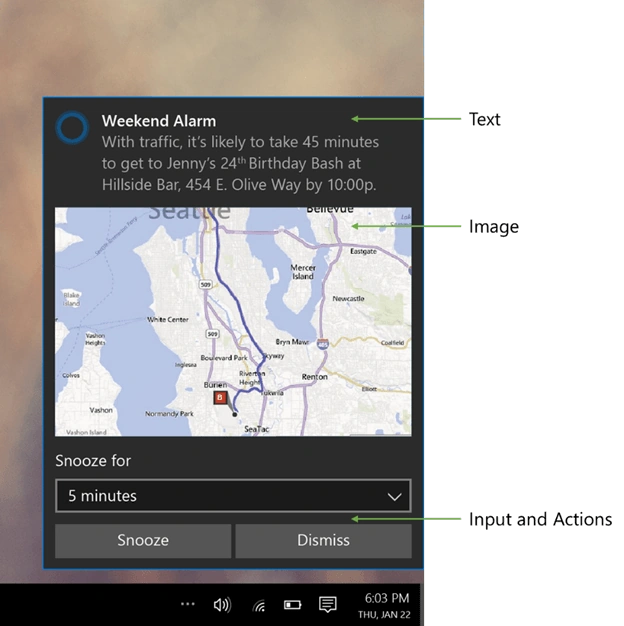
- Adaptive and Interactive toast
Create flexible toast notifications with more content and optional inline images without being limited to the previous “toast template catalog”.
Create interactive toast notifications, which enables user interaction.
XML
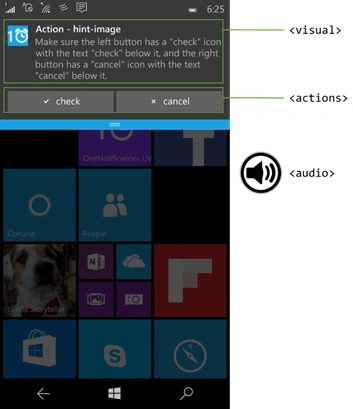
- <toast launch="app-defined-string">
- <visual>
- <binding template="ToastGeneric"> <text>Sample</text> <text>This is a simple toast notification example</text>
- <image placement="AppLogoOverride" src="oneAlarm.png" /> </binding>
- </visual>
- <actions>
- <action content="check" arguments="check" imageUri="check.png" />
- <action content="cancel" arguments="cancel" /> </actions> <audio src="ms-winsoundevent:Notification.Reminder" />
- </toast>
<actions>: Buttons/inputs the developer wants to add inside the notification.
<audio>: The sound played, when the notification pops.
New Functionalities
- Expanding the toasts on the mobile.
- More types of activations through actions.
- No more ToastCapable : Now, there is no need to declare the capability of whether app is toast capable or not.
- Toasts and Tiles can now get in Synchronization : In Windows 10, we added the ability for an app to be notified, when the app’s collection of the notifications is changed in any way and is not caused by the app’s local client.
- New Notification Setting behaviour : In Windows 10, only after an app sends a first toast notification, it will be added to the Notifications & Actions section of System Settings, from which the user can disable or enable the toast notifications for your app at any time.
Interactive toast
Various activation types can be set.
- Activation type=foreground
Tap button>app launches>retrieve args>take actions.
- Activation type =background
Tap>Task launches>retrieve args>Take actions.
- Activation type = protocol
Tap>Protocol activates>Web/app(as per uri match).
- Activation type = system
Tap>system handles(reminder/alarm).
Special Toast Scenarios: scenario="senario name".
- Alarm
- Reminder
- Incomming call
Notification Types
- Tile
- Badge
- Toast
- Raw(background Task)
WNS
- One Service across all the devices.
- One process to register an app for push.
- One tile template to push to Windows & phone apps.
- Request Channel URL>Register with your Cloud Service >Authenticate & Push notification.
References : PushTestServer and Sample Code.
Developers Can do,
- Remove one or many notifications.
- Tag and group the notifications.
- Replace a notification with a new one.
- Set an expiration on the notifications.
- Send "Ghost Toast" notifications (only show up in notification center).
Ramesh PalaniappanPosted Aug 9, 2016, 9:27 AM
Good Article :)
Kashif AsifPosted Aug 7, 2016, 10:08 PM
good
Vignesh ManiPosted Aug 7, 2016, 2:12 PM
Good one