

Introduction
The Open Web Interface for .NET (OWIN) defines a standard interface between .NET web servers and web applications. Katana is open-source components for building and hosting OWIN-based web applications. It provides the implementation of the OWIN specification. The OAuth authorization framework enables a third-party application to obtain limited access to a HTTP service.
Currently the preferred approach to authenticate the users is to use a signed token and this token is sent to the server with each request. The following are the benefits for using this approach.
- Scalability of Servers
the token itself contains all the information of the user that is needed for authentication, so Web Farm extension is an easy task. There is no dependence on shared session stores. - Loosely Coupling
Our front-end application is not coupled with a specific authentication mechanism. The token is generated from the server and our web API has a built-in way to understand this token and perform authentication. - Mobile Friendly
This type of authentication does not require cookies, so this authentication type can be used with mobile applications.
Example
In the following demo application, the OAuth authorization server and the Web API endpoints will be hosted inside the same host.
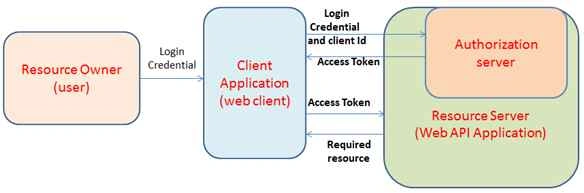
The following is the procedure to do Token Based Authentication using ASP.NET Web API, OWIN and Identity.
Step 1 - Create and configure a Web API project
Create an empty solution for the project template "ASP.NET Web Application" and add a core reference of the Web API and set the authentication to “No Authentication”.

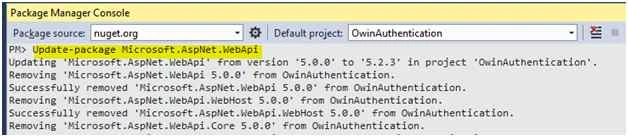
Update the current version of the Web API using the Nuget package with the following command.
PM> Update-package Microsoft.AspNet.WebApi
Step 2 - Install the required OWIN component using Nuget Packages
In this step, we need to install Nuget packages that are required to set up our OWIN server and configure the Web API to be hosted within the OWIN server. The "Microsoft.AspNet.Identity.Owin" package provides many useful extensions and we will use this while working with ASP.Net Identity on top of OWIN. It also downloads some other dependency packages. One of those dependency packages is "Microsoft.Owin.Security.OAuth". This is a core package required to support any standard OAuth 2.0 authentication workflow. The “Microsoft.Owin.Host.SystemWeb” namespace contains the types related to handling OWIN requests. It helps us to run OWIN-based applications on IIS using the ASP.NET request pipeline. Use the following commands to instal the OWIN server.
PM> Install-Package Microsoft.AspNet.Identity.Owin
PM> Install-Package Microsoft.Owin.Host.SystemWeb
ASP.NET Identity also supports the Entity Framework. Here we will use ASP.Net identity with Entity Framework, so we need to install this via Nuget packages.
PM> Install-Package Microsoft.AspNet.Identity.EntityFramework
This will also install the Entity Framework as a dependency.
Step 3 - Create a DbContext class
Create a DbContext class. The IdentityDbContext Class uses the default entity types for ASP.NET Identity Users, Roles, Claims and Logins. We can overload this to add our own entity types.
public class OwinAuthDbContext : IdentityDbContext
{
    public OwinAuthDbContext()
        : base("OwinAuthDbContext")
    {
    }
}
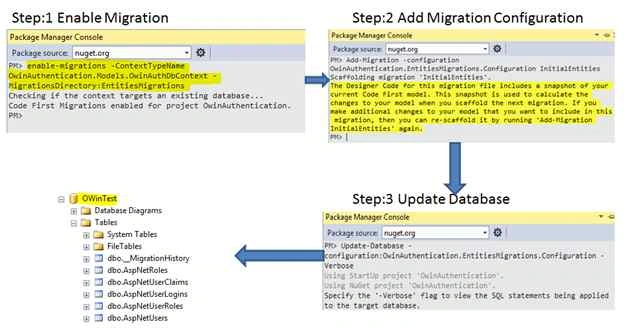
Step 4 - Do the migrations (optional step)
Entity Framework supports the database migration to create the database and insert some initial values. Migration commands can be executed from the Package Manager Console.
Step 4 - Define an OWIN Startup Class
Every OWIN application has a startup class in which we specify components for the application pipeline. Here we are using the OwinStartup Attribute to connect to the startup class with the hosting runtime.
using Microsoft.Owin;
using Owin;

[assembly: OwinStartup(typeof(OwinAuthentication.Startup))]
namespace OwinAuthentication
{
    public class Startup
    {
        public void Configuration(IAppBuilder app)
        {

        }
    }
}
Step 5 - Configure the OAuth Authorization Server
AppBuilderExtensions has the method "CreatePerOwinContext<T>" that registers a callback that will be invoked to create an instance of type T and it will be stored in the OwinContext. Later on we can retrieve it using the context.Get method. This method creates one instance of the given type per request. Here we are using ASP.Net Identity with Entity Framework, so we must create the instance of our DbContext class and to do this we use this extension method. The Microsoft.AspNet.Identity namespace has the class UserManager that exposes the use related to the API that automatically saves the changes to the UserStore. Here we will interact with our database using the UserManager class.
The following code is required to use the UserManager class inside our OWIN component efficiently.
private void ConfigureOAuth(IAppBuilder app)
{
    app.CreatePerOwinContext<OwinAuthDbContext>(() => new OwinAuthDbContext());
    app.CreatePerOwinContext<UserManager<IdentityUser>>(CreateManager);
}

private static UserManager<IdentityUser> CreateManager (IdentityFactoryOptions<UserManager<IdentityUser>> options, IOwinContext context)
{
    var userStore = new UserStore<IdentityUser>(context.Get<OwinAuthDbContext>());
    var owinManager = new UserManager<IdentityUser>(userStore);
    return owinManager;
}
The ConfigureOAuth method will be called inside the Configuration method of the OWIN startup class.
The UseOAuthAuthorizationServer extension method of OWIN is used to setup the authorization server. Following are the setup options:
- TokenEndpointPath
requests the path on which the client application directly communicates to obtain the access token. It must begin with a leading slash, for example "/oauth/token". - AuthorizeEndpointPath
It is the request path where the client application will redirect the user-agent to obtain the user's consent to issue a token or code. It must begin with a leading slash (the same as TokenEndpointPath). - AllowInsecureHttp
Set to true to allow authorize and token requests to arrive on HTTP URI addresses. - Provider
the object provided by the application to process events raised by the Authorization Server. It may the instance of OAuthAuthorizationServerProvider and assign delegates necessary for the OAuth flow. - AuthorizationCodeProvider
produces a single-use authorization code to return to the client application. It is required where the token is produced by the OnCreate/OnCreateAsync event. - RefreshTokenProvider
produces a refresh token that may produce a new access token when required. If this option is not provided then the authorization server will not return refresh tokens from the Token endpoint. - ApplicationCanDisplayErrors
Set to true when the web application is able to render error messages on the Authorize endpoint. This is required only in cases where the browser is not redirected back to the client application. - AccessTokenExpireTimeSpan
The time period the access token remains valid after it was generated. The default value is 20 minutes. - AccessTokenFormat
The data format used to protect the information contained by the access token. If it is not provided then the application will use the default data protection provider depending on the host server. - AccessTokenProvider
It produces a bearer token. - AuthorizationCodeExpireTimeSpan
The time period the authorization code remains valid after it was generated. The default value is 5 minutes - AuthorizationCodeFormat
The data format used to protect and unprotect the information contained in the authorization code. - RefreshTokenFormat
The data format used to protect and unprotect the information contained in the refresh token. - SystemClock
Used to know what the current clock time is when calculating or validating token expiration. The default value is DateTimeOffset.UtcNow.
private void ConfigureOAuth(IAppBuilder app)
{
    ...
    ...
    app.UseOAuthAuthorizationServer(new OAuthAuthorizationServerOptions
    {
        TokenEndpointPath = new PathString("/oauth/token"),
        Provider = new AuthorizationServerProvider(),
        AccessTokenExpireTimeSpan = TimeSpan.FromMinutes(30),
        AllowInsecureHttp = true,

    });
    app.UseOAuthBearerAuthentication(new OAuthBearerAuthenticationOptions());
}
An Authorization Server uses a default implementation of IOAuthAuthorizationServerProvider to communicate with a web application while processing the request. OAuthAuthorizationServerProvider provides some default behavior like as used as a virtual base class and offers delegate properties that may be used to handle individual calls without creating the instance.
Here I just override the methods that I need here: ValidateClientAuthentication and GrantResourceOwnerCredentials.
ValidateClientAuthentication
It is called to validate that the requester (origin of the request) is a registered client_id and the correct credentials for that client are present on the request.
"OAuthValidateClientAuthenticationContext.TryGetBasicCredentials" may be able to retrieve the values of the client credential request header if the web application accepts basic authentication credentials. If the web application accepts a client id and secret as form-encoded POST parameters, "OAuthValidateClientAuthenticationContext.TryGetFormCredentials" can be used to retrieve this value. Finally, if "OAuthValidateClientAuthenticationContext.Validated” is not called then the request will not proceed further.
GrantResourceOwnerCredentials
It is called when the request to the token endpoint arrives with a "grant_type" of "password". This occurs when the user provides a user id and password directly to the client application using the client application user interface. If the web application supports the resource owner credentials grant type, it must validate the username and password property of context. To issue the access token, the request must end with the “OAuthGrantResourceOwnerCredentialsContext.Validated" method. The default behavior is to reject this grant type.
public class AuthorizationServerProvider : OAuthAuthorizationServerProvider
{
    public override async Task ValidateClientAuthentication(OAuthValidateClientAuthenticationContext context)
    {
    }
    public override async Task GrantResourceOwnerCredentials(OAuthGrantResourceOwnerCredentialsContext context)
    {
    }
}
The following is a probable implementation of the ValidateClientAuthentication method.
public override async Task ValidateClientAuthentication(OAuthValidateClientAuthenticationContext context)
{
    string clientId;
    string clientSecret;

    if (context.TryGetBasicCredentials(out clientId, out clientSecret))
    {
        // validate the client Id and secret against database or from configuration file.
        context.Validated();
    }
    else
    {
        context.SetError("invalid_client", "Client credentials could not be retrieved from the Authorization header");
        context.Rejected();
    }
}
The following is an implementation of the GrantResourceOwnerCredentials method.
public override async Task GrantResourceOwnerCredentials(OAuthGrantResourceOwnerCredentialsContext context)
{
    UserManager<IdentityUser> userManager = context.OwinContext.GetUserManager<UserManager<IdentityUser>>();
    IdentityUser user;
    try
    {
        user = await userManager.FindAsync(context.UserName, context.Password);
    }
    catch
    {
        // Could not retrieve the user due to error.
        context.SetError("server_error");
        context.Rejected();
        return;
    }
    if (user != null)
    {
        ClaimsIdentity identity = await userManager.CreateIdentityAsync(
                                                user,
                                                DefaultAuthenticationTypes.ExternalBearer);
        context.Validated(identity);
    }
    else
    {
        context.SetError("invalid_grant", "Invalid User Id or password'");
        context.Rejected();
    }
}
An HTTP POST request is made to the URL "/oauth/token" endpoint with grant_type parameter "password"; it will first arrive at the ValidateClientAuthentication method. In this place we can retrieve the client credentials and validate it. If the client credential is invalid, we need to return an unauthorized request using the context.Rejected method. If we grant the request in the ValidateClientAuthentication method, the request will arrive at the GrantResourceOwnerCredentials method. Inside this method, we need to validate that the user is using resource-owner credentials.
Step 6 - Test the Project
To test the preceding approach I created a console project in my solution. Create the following Token class within the console application.
using Newtonsoft.Json;

namespace OWINTest
{
    public class Token
    {
        [JsonProperty("access_token")]
        public string AccessToken { get; set; }
        [JsonProperty("token_type")]
        public string TokenType { get; set; }
        [JsonProperty("expires_in")]
        public int ExpiresIn { get; set; }
        [JsonProperty("refresh_token")]
        public string RefreshToken { get; set; }
        [JsonProperty("error")]
       public string Error { get; set; }
    }
}
Program.cs code
using System;
using System.Collections.Generic;
using System.Net.Http;
using System.Net.Http.Formatting;

namespace OWINTest
{
    class Program
    {
        static void Main(string[] args)
        {
            string baseAddress = "http://localhost:4312";
            using (var client = new HttpClient())
            {
                var form = new Dictionary<string, string>
               {
                   {"grant_type", "password"},
                   {"username", "jignesh"},
                   {"password", "user123456"},
               };
                var tokenResponse = client.PostAsync(baseAddress + "/oauth/token", new FormUrlEncodedContent(form)).Result;
                //var token = tokenResponse.Content.ReadAsStringAsync().Result;
                var token = tokenResponse.Content.ReadAsAsync<Token>(new[] { new JsonMediaTypeFormatter() }).Result;
                if (string.IsNullOrEmpty(token.Error))
                {
                    Console.WriteLine("Token issued is: {0}", token.AccessToken);
                }
                else
                {
                    Console.WriteLine("Error : {0}", token.Error);
                }
                Console.Read();
            }
        }
    }
}
Using the following script, insert some dummy data into the AspNetUser table. Here I have encrypted my password using Abstraction for the password hashing methods of the Microsoft.AspNet.Identity namespace available with the UserManger class.
INSERT [dbo].[AspNetUsers] ([Id], [Email], [EmailConfirmed], [PasswordHash], [SecurityStamp],
[PhoneNumber], [PhoneNumberConfirmed], [TwoFactorEnabled], [LockoutEndDateUtc], [LockoutEnabled],
[AccessFailedCount], [UserName])
VALUES (N'9f15bdd0fcd5423190c2e877ba0228ee', N'[email protected]', 1,
N'ALkHGax/i5KBYWJ7q4jhJmMKmm2quBtnnqS8KcmLWd2kQpN6FaGVulDmmX12s7YAyQ==',
N'a7bc5c5c-6169-4911-b935-6fc4df01d313', NULL, 0, 0, NULL, 0, 0, N'Jignesh')
Output
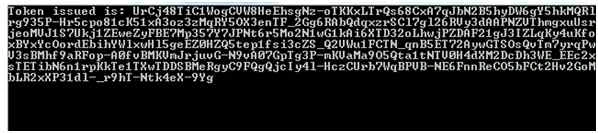
We receive the response in the form of JSON and we convert it into our Token class using the Content.ReadAsAsync method. The Result Token class contains either the access token or an error. If we pass the wrong credentials, the system will generate the error:

In the next request we use this token for the authentication and the token will be sent in the request header. The Token is valid up to its expiry time.
To test it, I added a controller to my Web API project and created a test method as in the following.
using System.Web.Http;

namespace OwinAuthentication.Controllers
{
    [Authorize]
    public class POCController : ApiController
    {
        [HttpGet]
        [Route("api/TestMethod")]
        public string TestMethod()
        {
            return "Hello, C# Corner Member. ";
        }
    }
}
Here we must mark our controller or action method with the Authorize attribute to check whether the request has a valid token.
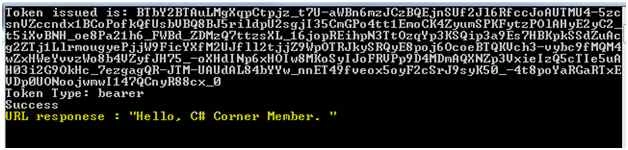
The following is needed to append in a client application (console application in our case). First of all we need to get the token using the code described in the preceding section and then use this token to process the request.
using (HttpClient httpClient1 = new HttpClient())
{
    httpClient1.BaseAddress = new Uri(baseAddress);
    httpClient1.DefaultRequestHeaders.Authorization = new AuthenticationHeaderValue("bearer", token.AccessToken);
    HttpResponseMessage response = httpClient1.GetAsync("api/TestMethod").Result;
    if (response.IsSuccessStatusCode)
    {
        System.Console.WriteLine("Success");
    }
    string message = response.Content.ReadAsStringAsync().Result;
    System.Console.WriteLine("URL responese : " + message);
}
Output
Summary
Using this article we can set up our authorization server and we have a working OAuth 2.0 token endpoint that only supports "Resource Owner Password Credentials Grant" as of now.
sravan kumarPosted Jun 3, 2024, 3:08 PM
Hi sir,Its working fine but when I deployed in server the token expiry time not working, so I mentioned AccessTokenExpireTimeSpan = TimeSpan.FromDays(2) after generating token it will shows expiry time for 2 days but it token will be expired in 20 min,Please givr ay idea how to hold the access token for 2 days. Thanks in advance
Paresh GodambePosted Aug 18, 2023, 6:50 AM
Not working
Mohammad ImranPosted Aug 6, 2023, 11:20 AM
When i call context.SetError("invalid_grant", "Passcode is invalid."); api returns Bad request(status code-400). Not Passcode is invalid.
Ankit SrivastavaPosted Sep 15, 2021, 11:23 AM
Does not seem to work, can you please attach a sample code
Muhammad JanPosted Jul 10, 2021, 1:53 AM
Can you provide an example please, by grant type code?
JayPosted Jul 8, 2021, 3:56 PM
What is the difference between this type of token and jwt
Tim WheelerPosted May 5, 2021, 2:44 AM
I would love to be able to read the migration text - possibly add the text below the pictures?
Vikas GauravPosted Mar 24, 2021, 3:51 AM
Nice POST Jignesh. can you please tell when client sent a request with token , how server validates that this is authentic token or not?
Ramakrishna MelamPosted Mar 19, 2021, 6:11 AM
Hi Jignesh, Can you please send a post same for .Net core?
MoinPosted Feb 14, 2021, 8:16 AM
Nice and helpful article !! is it possible to share password hashing mechanism? I need to insert more user in db.
Rovid KashyapPosted Jan 12, 2021, 8:29 AM
How to implement Role Based Authentication in this Article, Please Guide me?
Alex BrunnerPosted Dec 8, 2020, 11:56 AM
How can one implement the same by using .NET 5?
mahir osmanPosted May 6, 2020, 6:42 PM
How to sending user data with access token
rakesh SPosted Mar 23, 2020, 1:36 AM
How to handle if the token expires after 1 hour, with reissue token
MN AmbaliyaPosted Mar 19, 2020, 8:08 AM
Nice article! is it possible to pass the grant_type by default?
keyur SolankiPosted Mar 1, 2020, 11:50 AM
How can we redirect to login after Timespan expires?
Cesar GuevaraPosted Nov 28, 2019, 3:25 PM
Good, thank for this article, I found it very useful.
vijay saxenaPosted Nov 5, 2019, 2:07 AM
Good Article , Thanks for this article, I was searching for some issue , I landed up here,Issue: When I try to get token from postman this is not calling the GrantResourceOwnerCredentials or ValidateClientAuthentication. Any Particular reason Please help me var myProvider = new AuthorizationServerProvider(); OAuthAuthorizationServerOptions options = new OAuthAuthorizationServerOptions { TokenEndpointPath = new PathString(“/Token”), Provider = new AuthorizationServerProvider(), AccessTokenExpireTimeSpan = TimeSpan.FromDays(AppSettingValues.OwinTokenValidDurationInDays), AllowInsecureHttp = true }; app.UseOAuthAuthorizationServer(options); app.UseOAuthBearerAuthentication(new OAuthBearerAuthenticationOptions());
Dinesh GabhanePosted Sep 8, 2019, 9:26 AM
I am trying to run the project. It is getting compiled successfully, However everytime I am getting "invalid_grant" error. My http://localhost:4312 is in running state. Can you please help me?
Amol JadhaoPosted Jul 22, 2019, 10:49 AM
I have some questions.after getting token..suppose i want to call 10 different webapi methods.Do i have call each time token and send to token in header for each web api call?
Amol JadhaoPosted Jul 22, 2019, 10:47 AM
Jignesh Thanks for article.
Anirudha DeshmukhPosted Jun 24, 2019, 2:50 AM
How can we keep generated access token in server session for long duration, so we can use same token after few days for successful authorization?
Vaibhav AgarwalPosted Jun 11, 2019, 5:52 AM
This article is useless for me as my company does not use entity framework. this example is extremely tightly coupled with an inefficient entity framework. I prefer to use my own DataLayer or use some micro ORM like Dapper for performance and scalibility reasons.
Ravi Kant SinghPosted Feb 8, 2019, 12:59 AM
Can we generate token without migration method. if yes please share some examples. thanks.
Dorababu MekaPosted Oct 13, 2018, 11:32 AM
How to achieve the same with mvc?
Ajay GuptaPosted Sep 18, 2018, 6:19 AM
Hi where you token as a header or param?
Sándor HatvaniPosted Aug 22, 2018, 5:10 AM
Dear Jignesh, The ValidateClientAuthentication and GrantResourceOwnerCredentials methods return code 400, "Bad request" in case of invalid username\password or authorization error. I would like to set 401 or 403 error codes dependig on the validation error. I have set these value in context.SatusCode but they return just the error code 400. Can you help me in this problem, please?
Ahmet BilgicPosted Jul 15, 2018, 8:27 AM
Hi Jignesh. The program gives an error in this line. what would be the reason. token = tokenResponse.Content.ReadAsAsync<Token>(new[] { new JsonMediaTypeFormatter() }).Result; System.InvalidOperationException: 'No MediaTypeFormatter is available to read an object of type 'Token' from content with media type 'text/html'.' thanks
Ba dadPosted Jun 27, 2018, 5:42 AM
This is my current architecture, but i'm wondering, now that i'm authenticated server side and got back the token in the website (frontside). How can i handle authentication in the website ? for example, i'd like to allow access to a specific controller in the website only if the user is an Administrator.
suhag patelPosted Jun 18, 2018, 3:33 AM
Sir,please Upoad Crud in mvc without using EntityFramework in three tier and not using Scafolder .
Karan SinghPosted Jun 14, 2018, 1:20 AM
Hi sir i'm getting an error on this line: token = tokenResponse.Content.ReadAsAsync<Token>(new[] { new JsonMediaTypeFormatter() }).Result; error is:Additional information: No MediaTypeFormatter is available to read an object of type 'Token' from content with media type 'text/html'.please help me asap.
Devesh AwasthiPosted May 29, 2018, 4:16 AM
Sir how to check login table in DB..
Tridip BhattacharjeePosted May 18, 2018, 4:28 AM
After generating token at server side do you save it in db along with user id?
Tridip BhattacharjeePosted May 18, 2018, 4:27 AM
Please discuss how to implement refresh token when access token will be expired. thanks
Md Syahir Md SaidPosted May 17, 2018, 10:32 PM
Hi, i have one issue. I created another controller but the data can be access without token. Do you have any idea? I am new in web api, owin etc..
ankit dixitPosted Apr 29, 2018, 1:32 PM
Hello sir, i question in mind during create database i was writing command in package manager it dint ask me user id password direct created database(OwinAuthDbContext) and table how.?
pratap nayakPosted Apr 14, 2018, 7:45 AM
1. In server side (API) , who is responsible to store the token information? 2. How to validate token in owin when i send though client-side wither token is right or not ?
Tridip BhattacharjeePosted Apr 11, 2018, 4:36 AM
Please tell me how could i post the uid, pwd to web api token endpoint with jquery the way you did it in this post from console application. thanks
Tridip BhattacharjeePosted Apr 11, 2018, 4:35 AM
Vert nice article. what is the meaning of grant_type == password ? what other option we can pass for grant_type instead of password?
sanjha jhaPosted Mar 14, 2018, 1:48 AM
Hi, Have read the blog but unable to understand who is the Auth provider. in Step 5 "Configure the OAuth Authorization Server." can you please explain it.
Chandhu VutukuruPosted Mar 8, 2018, 8:04 AM
How can i check user role in owin authentication?
charanjot singhPosted Mar 5, 2018, 11:16 PM
I am having an issue in time zone ,my api is hosted in Us server and if i try to run it in indian time zone or from india it gives me error all though in us time zone it is working correctly plz help .
Swapnil BhosalePosted Jan 22, 2018, 4:16 AM
Does not Work. It shows me "Authorization has been denied for this request"
Hamid KhanPosted Oct 16, 2017, 12:45 AM
Nice explanation.................
V GPosted Jul 21, 2017, 7:46 PM
Very nice article. Did not download the code, just followed the article. Worked like a charm.
Former memberPosted May 23, 2017, 7:58 AM
Very Nice article. :)
kumar reddyPosted May 2, 2017, 2:19 AM
How to implement the above token authentication with the custom database, where all my user ,roles table exist. Didn't find any example with custom database. Can you share the info
VJ xyzPosted Apr 21, 2017, 5:42 AM
Hi, I have implemented in my project but there were some issues. As we have separate DB for user management so I have skipped steps 3 and 4. I am able to get the token from Web API but when I called web API without passing token then it does not give me any error message. As I know we have to pass the valid token to access Web API method. Can you please tell me what is the issue and how can I make it working properly.
HardikPosted Apr 18, 2017, 2:07 PM
I tried this but every time I received invalid_client error why this?
dilip chopraPosted Dec 7, 2016, 5:57 AM
Thanks! for nice article i have followed all the steps and was able to get token back, but when i use this token and call api it was giving the error which is as follow:{ "Message": "Authorization has been denied for this request." }
ChinniKrishna VPosted Oct 11, 2016, 6:04 AM
Hello, I followed all the steps you have give, but i am not able to get default API page at my execution, the same i found, at your downloaded project. could you please help.
Senthil JPosted Aug 23, 2016, 9:20 AM
I have done all steps given, except the last API part. I am now running my console project and it always shows error on var tokenResponse in program.cs. " An unhandled exception of type 'System.AggregateException' occurred in mscorlib.dll ". I also tried installing the nuget package of Microsoft.Bcl 1.1.8 but it didn't give me a hand.
Ravi KandelPosted Aug 14, 2016, 3:05 AM
Thanks
JyotiPosted Aug 5, 2016, 6:59 AM
I have already try by executing the script on db server and set the db name in connection string but that not work..
JyotiPosted Aug 4, 2016, 5:32 AM
I have a SQL management studio so the database creation fail. Is it not possible by creating the same db script on different database server
Humayun Kabir MamunPosted Jul 24, 2016, 2:00 AM
Thnaks...
Bhavik PatelPosted Jul 23, 2016, 9:31 AM
Nice
Johnny LIUPosted Jul 21, 2016, 11:28 AM
Hi Jugnesh, the download link is not working. Could you please upload it again?
Naibedya KarPosted Jul 20, 2016, 3:02 AM
Not able to download the source code :(
Thiruppathi RPosted Jun 6, 2016, 11:16 PM
can we use to any different way of owin auth..
Omkar MhaiskarPosted Jun 6, 2016, 6:02 AM
Hello All,I have tried above step but the following line given me error. context.OwinContext.GetUserManager<UserManager<IdentityUser>>(); Can you tell me how to resolve this. Thanks Omkar
bhautik patelPosted Jan 26, 2016, 10:53 AM
Source code not available on given download location. if possible update it to make article more valuable.
dinkar mehtaPosted Jan 9, 2016, 2:01 AM
anyone tell me that how to get real password in OWIN
Aya LubanyanaPosted Jan 4, 2016, 8:05 PM
Great article, please update download link, does not work, thanks.
shoaib shaikhPosted Nov 28, 2015, 5:55 AM
Hi, Jignesh. You linked to above zip file does not exist... so please can u update the link... its very important for me... and thank for great work...
Hernan DurantePosted Nov 2, 2015, 4:54 PM
Source code is not available :( , great article!
balram bhardwajPosted Oct 27, 2015, 3:16 AM
are bhai mai isko download kaise karu
SharadPosted Jul 22, 2015, 12:44 AM
good one
Diego AciolyPosted Jul 8, 2015, 2:37 PM
cant download !!!!
Max bytePosted Jul 7, 2015, 3:01 AM
can't dowmload
Sibeesh VenuPosted Jun 21, 2015, 12:52 PM
Good one.
Santhakumar MunuswamyPosted Jun 21, 2015, 2:13 AM
Thanks for nice article:)