

Let's see how it works.
1. Click the database backup.
2. Then Database (this form shows the data of the corresponding databases and tables).
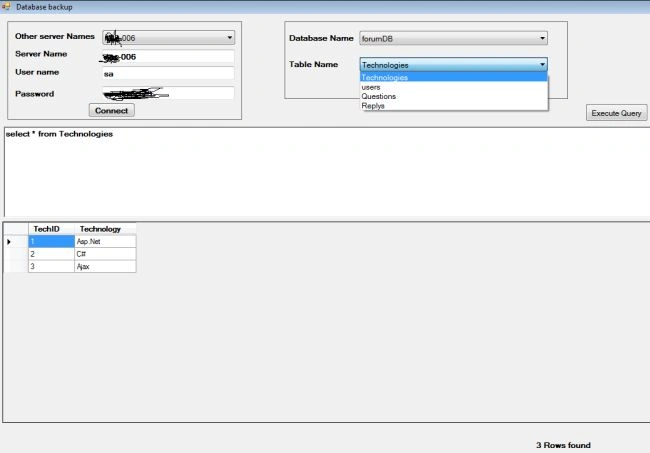
First we get the connection of the SQL Server instance, so we give the host name, user name and password. This gets the instance of the corresponding host name.
Note: If we want to list all of the SQL Server host names then we can use the following SQL query.
- select * from sysservers where srvproduct='SQL Server'
Here we add the 3 columns of the result of query in the other server name.
- private void btnConnect_Click(object sender, EventArgs e)
- {
- try
- {
- string constring = "Data source="+txtServerName.Text+"; uid=" + username + "; pwd=" + password;
- string query = "select * from sysservers where srvproduct='SQL Server'";
- SqlDataReader dr;
- using (SqlConnection con = new SqlConnection(constring))
- {
- con.Open();
- using (SqlCommand cmd = new SqlCommand(query, con))
- {
- dr = cmd.ExecuteReader();
- while (dr.Read())
- {
- cmbServer.Items.Add(dr[2]);
- }
- }
- }
- dr.Close();
- if (cmbServer.Items.Count > 0)
- {
- cmbServer.SelectedIndex = 0;
- }
- }
- catch (Exception ex)
- {
- MessageBox.Show("Please check username and password... :) ","Login error",MessageBoxButtons.OK,MessageBoxIcon.Information);
- cmbDatabase.Items.Clear();
- cmbTable.Items.Clear();
- TxtQuery.Text = "";
- GvTable.DataSource = null;
- }
- }
After successful login we list the database using the following method.
- select * from sysdatabases .
Here we get the connection of the master database, because this database has a sysdatabases table with the details of all the other databases.
Respectively we add the table of the database using database cmbDatabase_SelectedIndexChanged.- private void cmbServer_SelectedIndexChanged(object sender, EventArgs e)
- {
- SqlDataReader dr;
- using (SqlConnection con = new SqlConnection("Data Source=" + txtServerName.Text + ";Database=Master; uid=" + username + "; pwd=" + password))
- {
- con.Open();
- string query = "select * from sysdatabases";
- using (SqlCommand cmd = new SqlCommand(query,con))
- {
- dr = cmd.ExecuteReader();
- while (dr.Read())
- {
- cmbDatabase.Items.Add(dr[0]);
- }
- }
- if (cmbDatabase.Items.Count > 0)
- {
- cmbDatabase.SelectedIndex = 0;
- }
- }
- }
Here we need the table name of the corresponding databases.
The following is the procedure.
Respectively we add the table of the database using the database cmbDatabase_SelectedIndexChanged.
Here we need the table name of the corresponding databases.
The following is the procedure.
Respectively we add the table of the database using the database cmbDatabase_SelectedIndexChanged.
Here we need the table name of the corresponding databases.
The following is the procedure.
- Getting the connection of the database. using Data Source=" + txtServerName.Text + ";uid=" + username + "; pwd=" + password.
- "use " + cmbDatabase.Text + "; select * from sys.tables;";
above query like
use databasename;
select * from tablename.
- We add the table names in cmbTable.
- private void cmbDatabase_SelectedIndexChanged(object sender, EventArgs e)
- {
- cmbTable.Items.Clear();
- try
- {
- SqlDataReader dr;
- using (SqlConnection con = new SqlConnection("Data Source=" + txtServerName.Text + ";uid=" + username + "; pwd=" + password))
- {
- con.Open();
- string query = "use " + cmbDatabase.Text + "; select * from sys.tables;";
- using (SqlCommand cmd = new SqlCommand(query, con))
- {
- dr = cmd.ExecuteReader();
- while (dr.Read())
- {
- cmbTable.Items.Add(dr[0]);
- }
- }
- if (cmbTable.Items.Count > 0)
- {
- cmbTable.SelectedIndex = 0;
- }
- }
- }
- catch (Exception ex)
- {
- MessageBox.Show(ex.Message);
- }
- }
- private void cmbTable_SelectedIndexChanged(object sender, EventArgs e)
- {
- lblrows.Text = "";
- using (SqlConnection con = new SqlConnection("Data Source="+txtServerName.Text+";Database=" + cmbDatabase.Text + ";uid=" + username + "; pwd=" + password))
- {
- con.Open();
- string query = "select * from " + cmbTable.Text;
- DataTable dt = new DataTable();
- using (SqlCommand cmd = new SqlCommand(query,con))
- {
- SqlDataAdapter da = new SqlDataAdapter(cmd);
- da.Fill(dt);
- GvTable.DataSource = dt;
- }
- TxtQuery.Text = query;
- if (dt.Rows.Count > 0)
- {
- lblrows.Text = dt.Rows.Count + " Rows found";
- }
- else
- {
- lblrows.Text = " ";
- }
- }
- }
You can also save the data grid to Excel
Backup the database.
- private void btnBackup_Click(object sender, EventArgs e)
- {
- string path="";
- DialogResult result=folderBrowserDialog1.ShowDialog();
- if (result == DialogResult.OK)
- {
- path = folderBrowserDialog1.SelectedPath.ToString();
- string backup = "backup database " + cmbDatabase.Text + " to disk='" + path + "\\" + cmbDatabase.Text + ".bak'";
- ExecuteQuery(backup);
- MessageBox.Show("Database Bacukup taken");
- }
- }
I hope this utility to use full for you.
Udaya kumarPosted Nov 3, 2014, 11:35 PM
Thanks friends.... :- )
Dinesh BeniwalPosted Nov 2, 2014, 1:57 AM
Good start Udaya.
Vithal WadjePosted Nov 2, 2014, 1:22 AM
good one keep it up