

Phase 01 — System Design Fundamentals | Topic 08
Imagine you are asked to design an e-commerce application.
The business tells you:
“We expect around 10,000 users.”
Is that enough information to design the system?
Not really.
The number of users alone does not tell us how much traffic the application will receive.
Those 10,000 users may generate hundreds of thousands of API requests every day.
Some users may be active at the same time, and traffic may increase significantly during peak hours.
This is why traffic estimation is an important part of System Design.
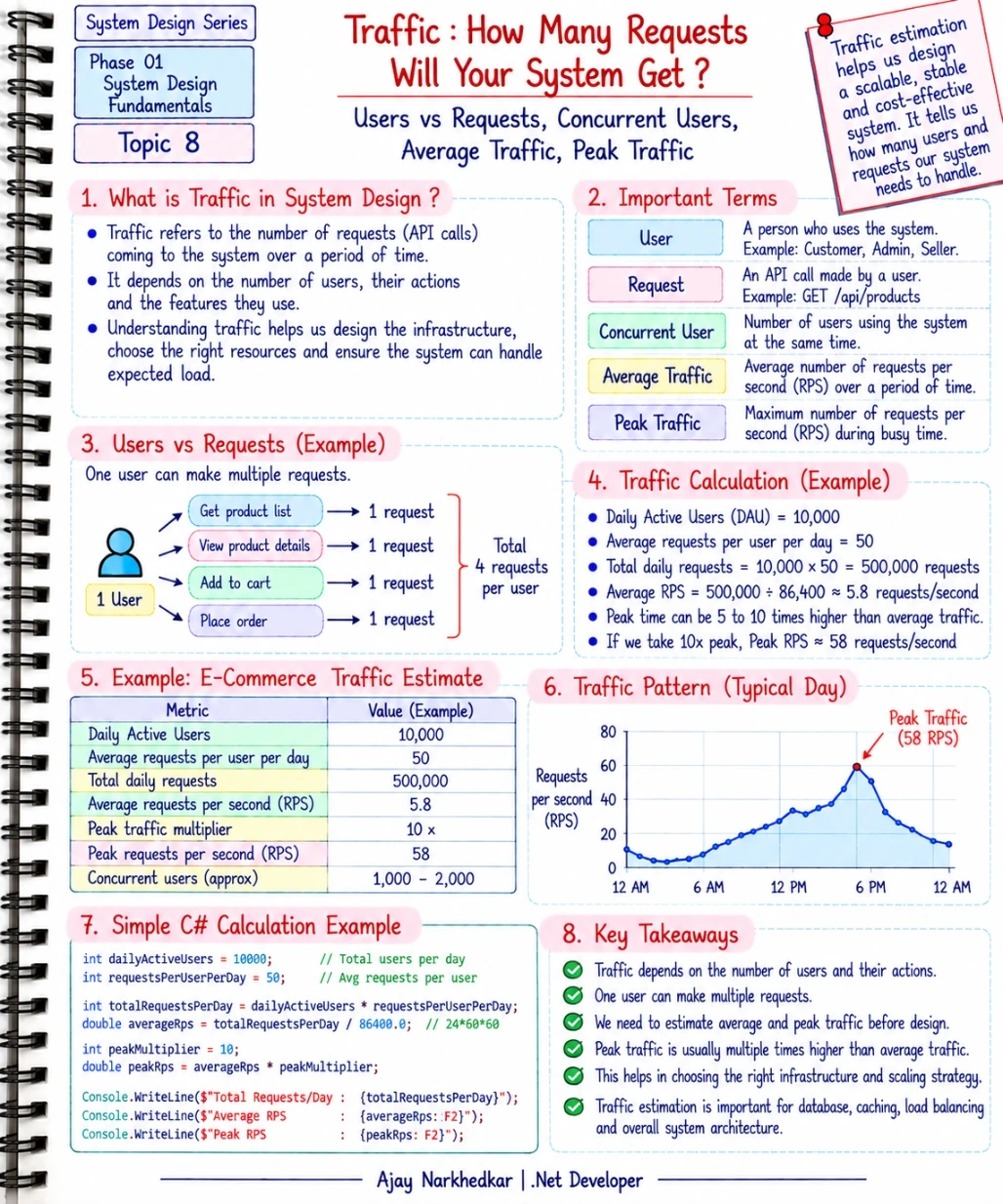
What Is Traffic in System Design?
In System Design, traffic generally refers to the number of requests that reach your system over a period of time.
For a web application, these requests may come from:
Web applications
Mobile applications
Other backend services
External integrations
Background processes
For example, when a customer opens a product page, the application may make an API request such as:
GET /api/products/25When the customer places an order, another request may be generated:
POST /api/ordersOne user can therefore generate many requests during a single session.
This is why:
Users are not the same as requests.
Users vs Requests
Suppose an e-commerce application has 10,000 daily active users.
A customer might perform several actions during a typical visit:
Browse Products
View Product Details
Add Product to Cart
View Cart
Place Order
Each action may result in one or more API requests.
Therefore, saying:
“We have 10,000 users.”
does not tell us whether the system receives 10,000 requests, 100,000 requests, or 1 million requests.
We need to estimate the actual request volume.
What Is Average Traffic?
Average traffic tells us approximately how many requests the system receives per second over a period of time.
A common measurement is:
Requests Per Second (RPS)
Let's take a simple example.
Suppose we have:
10,000 daily active users
and each user generates:
50 requests per day
The total number of requests per day is:
10,000 × 50 = 500,000 requests/day
There are:
86,400 seconds in a day
So the average traffic is:
500,000 ÷ 86,400 ≈ 5.8 requests/second
Therefore, the average traffic is approximately:
5.8 RPS
This is a simple estimate, but it gives us a starting point for architecture decisions.
Average Traffic Is Not Enough
Here is where System Design becomes more interesting.
Imagine your application receives an average of 6 requests per second.
Does that mean the application only needs to handle 6 requests per second?
No.
Real applications rarely receive traffic at a perfectly constant rate.
Traffic can change throughout the day.
For example, an e-commerce application might receive:
Low traffic during the night
Increasing traffic during working hours
High traffic during the evening
Very high traffic during a sale
This is called peak traffic.
What Is Peak Traffic?
Peak traffic is the amount of traffic the system receives during its busiest period.
For example, suppose our average traffic is:
5.8 RPS
During a busy period, traffic might become:
50–60 RPS
Now our architecture needs to be prepared for the higher load.
This is important because designing only for average traffic can cause problems when the system experiences a sudden increase in requests.
A simple way to estimate peak traffic is to use a peak multiplier.
For example:
Average traffic × Peak multiplier
If average traffic is 5.8 RPS and we assume a 10× peak:
5.8 × 10 = 58 RPS
This does not mean every real system should use 10×.
The multiplier should come from actual business patterns, historical data, expected events, or reasonable assumptions.
What Are Concurrent Users?
Another important concept is concurrent users.
Concurrent users are users who are actively using the system at approximately the same time.
Suppose your application has:
10,000 daily active users
That does not mean all 10,000 users are using the application simultaneously.
You might have only a portion of them active at a particular moment.
For example:
1,000 users may be active during a particular period.
Those users may generate requests simultaneously.
This is why we need to consider both:
How many users use the system?
and:
How many users are using it at the same time?
A Practical E-Commerce Example
Let's put these concepts together.
Suppose an e-commerce application has:
10,000 daily active users
50 requests per user per day
A 10× peak traffic assumption
First, calculate the daily requests:
10,000 × 50 = 500,000 requests/day
Now calculate average RPS:
500,000 ÷ 86,400 ≈ 5.8 RPS
Now estimate peak RPS:
5.8 × 10 ≈ 58 RPS
So our basic estimate becomes:
Metric | Example |
|---|---|
Daily Active Users | 10,000 |
Requests per User per Day | 50 |
Total Requests per Day | 500,000 |
Average Traffic | ~5.8 RPS |
Peak Multiplier | 10× |
Estimated Peak Traffic | ~58 RPS |
This simple calculation gives us a much better understanding of the expected system load.
A Small C# Calculation
We can represent the same calculation using simple C# code:
int dailyActiveUsers = 10_000;
int requestsPerUserPerDay = 50;

int totalRequestsPerDay =
    dailyActiveUsers * requestsPerUserPerDay;

double averageRps =
    (double)totalRequestsPerDay / 86_400;

int peakMultiplier = 10;

double peakRps =
    averageRps * peakMultiplier;

Console.WriteLine(
    $"Total Requests/Day: {totalRequestsPerDay}");

Console.WriteLine(
    $"Average RPS: {averageRps:F2}");

Console.WriteLine(
    $"Peak RPS: {peakRps:F2}");
The output would be approximately:
Total Requests/Day: 500000
Average RPS: 5.79
Peak RPS: 57.87
The code itself is simple.
The important part is understanding why we are calculating these numbers.
Why Does Traffic Estimation Matter?
Traffic estimation helps us make better architecture decisions.
For example, if the expected traffic is relatively small, a simple ASP.NET Core application with SQL Server may be sufficient.
If traffic is expected to grow significantly, we may need to consider additional architectural components such as:
Load balancing
Caching
Database optimization
Multiple application instances
Auto-scaling
Background processing
Message queues
Traffic estimation therefore connects business expectations with technical architecture.
Traffic Also Helps With Database Design
Suppose most of the requests in your application are read operations.
For example:
Users frequently browse products.
The database may receive a large number of read queries.
That could lead us to consider:
Proper database indexes
Query optimization
Pagination
Caching
Read replicas for larger systems
Now imagine the application receives a large number of write operations instead.
For example:
Thousands of users are placing orders simultaneously.
Now database writes, transactions, locking, and concurrency become much more important.
Therefore, knowing the amount of traffic is useful, but understanding the type of traffic is also important.
Traffic Is Not Always the Same Throughout the Day
A common mistake is to assume that traffic is constant.
Real systems usually have traffic patterns.
For example:
Low Traffic
     ↓
Morning Increase
     ↓
Normal Traffic
     ↓
Evening Peak
     ↓
Traffic Decreases
An e-commerce application may also experience unusual spikes during:
Major sales
Product launches
Promotional campaigns
Festivals
Special events
A system that works perfectly on a normal day may struggle during a sudden traffic spike.
This is why peak traffic should be considered during System Design.
Don't Guess Everything
Traffic estimation often starts with assumptions.
That's normal.
But whenever possible, replace assumptions with real data.
For an existing application, you can investigate:
Application logs
API metrics
Request counts
Server monitoring
Database metrics
Historical traffic
Peak-hour traffic
For a new application, you may need to work with business teams to estimate:
Expected users
Expected daily activity
Expected requests per user
Expected peak periods
Expected growth
The goal is not to predict the future perfectly.
The goal is to make a reasonable, documented estimate that can guide the initial design.
Important: Average Traffic vs Peak Traffic
This is one of the most important concepts to remember.
Average traffic tells you what normal usage looks like.
Peak traffic tells you what the system may need to handle during its busiest period.
If you design only for average traffic, the system may struggle when demand suddenly increases.
A better approach is to understand both.
A Simple Traffic Estimation Process
When you start designing a system, you can follow this process:
Step 1: Estimate Users
Determine how many daily or monthly active users the system may have.
Step 2: Estimate Requests
Estimate how many API requests one user may generate.
Step 3: Calculate Daily Requests
Multiply users by requests per user.
Step 4: Calculate Average RPS
Divide the daily requests by the number of seconds in a day.
Step 5: Estimate Peak Traffic
Use historical data or a reasonable peak multiplier to estimate busy-period traffic.
Step 6: Consider Growth
Think about how the traffic may change as the business grows.
These numbers don't need to be perfect.
They need to be reasonable enough to support your architecture decisions.
IMPORTANT Takeaway
When someone tells you:
“Our application will have 100,000 users.”
Don't immediately start designing the servers.
Ask more questions.
How many of those users are active every day?
How many requests does each user generate?
How many users are active simultaneously?
What is the average traffic?
What is the peak traffic?
When does the peak happen?
How quickly is the user base expected to grow?
These answers help turn a vague statement like:
“We have 100,000 users.”
into something much more useful:
“We expect approximately X requests per second on average and Y requests per second during peak traffic.”
That is information a system designer can actually use.
Final Thoughts
System Design starts with understanding the load your system needs to handle.
Users are important, but users alone do not tell the complete story.
You need to understand:
Users → Requests → Average Traffic → Concurrent Users → Peak Traffic
Once you have a reasonable traffic estimate, you can make more informed decisions about APIs, databases, caching, load balancing, infrastructure, and scalability.
You don't need perfect numbers.
You need reasonable assumptions and a clear understanding of how those assumptions affect your design.
What's Next?
Now that we understand overall traffic, the next question is:
Are all requests the same?
They are not.
Some systems receive mostly read requests, while others receive a much larger number of write requests.
Phase 01 — System Design Fundamentals | Topic 09 — Read Traffic vs Write Traffic
We will understand why the ratio between reads and writes can significantly influence database design, caching, API architecture, and system performance.
Join the conversation! Your thoughts help the community grow.