

Introduction
Azure Machine Learning (Azure ML) has evolved significantly with the release of v2 of its SDK and platform capabilities. While Azure ML v1 provided a solid foundation for machine learning workflows, v2 introduces a more streamlined, scalable, and efficient approach. Organizations and developers using v1 must adapt to the new paradigms and workflows to take full advantage of the enhanced capabilities.
In this guide, we’ll explore the key differences between Azure ML v1 and v2, the advantages of v2, and a step-by-step approach to migrating existing workflows. Whether you’re an experienced Azure ML user or just starting, this article will help you navigate the transition smoothly.
Key Differences Between Azure ML v1 and v2
1. Unified Workflow and Simplified SDK
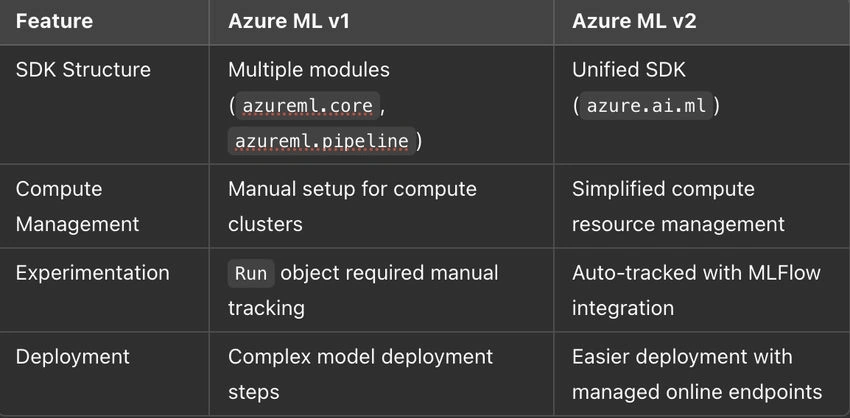
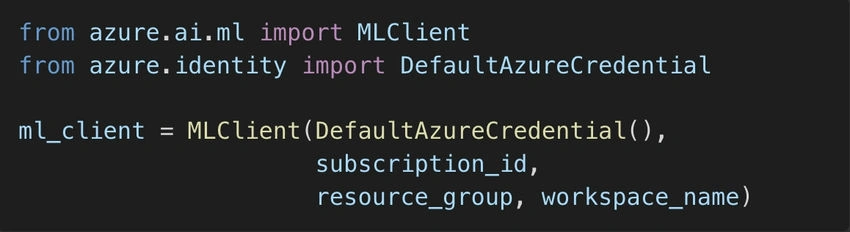
Azure ML v2 consolidates multiple APIs and services into a single, consistent SDK (azure.ai.ml). Unlike v1, where various functionalities were fragmented across different namespaces (azureml.core, azureml.pipeline, etc.), v2 simplifies the experience with a unified structure.
2. Enhanced Model Training & Pipelines
- v1 required manually defining individual steps in a pipeline, making the process cumbersome.
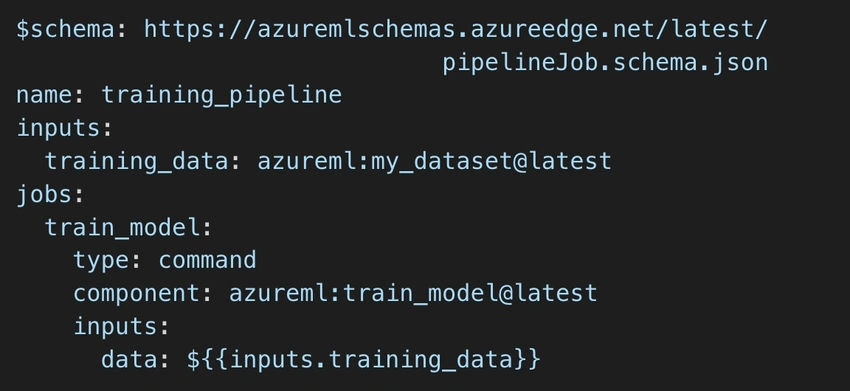
- v2 introduces a more intuitive way of building pipelines using YAML-based configuration or Python SDK.
- AutoML is now more integrated and requires fewer configurations.
3. Improved Model Deployment & Endpoints
- v2 allows deploying models as managed online endpoints, reducing infrastructure management.
- Supports batch inference, enabling cost-efficient model execution.
- Custom environments can now be directly attached to deployments.
4. Stronger MLOps and CI/CD Integration
- v2 natively integrates with Azure DevOps and GitHub Actions, enabling smoother automation of model lifecycle management.
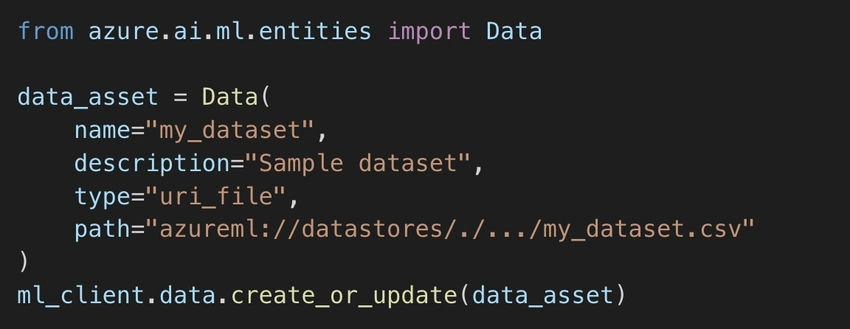
- Improved versioning for datasets, models, and endpoints simplifies tracking of changes.
Why Upgrade to Azure ML v2?
- ✅ Simplified Development: Unified SDK eliminates unnecessary complexities.
- ✅ Faster Deployment: Easier model serving and endpoint management.
- ✅ Better Experiment Tracking: MLFlow-powered logging ensures robust tracking.
- ✅ Scalability & Cost Efficiency: Improved batch processing and compute management reduce costs.
- ✅ Better MLOps Support: Seamless integration with CI/CD pipelines.

Join the conversation! Your thoughts help the community grow.