


Introduction
You might have noticed that in many Android apps, you need to tap the back button twice to exit. When you tap it once, a message pops up. But if you tap it twice at the same time, you can close the app.
Before Android 13 (which is like the newest version), we used to make this work by changing how the back button behaves in the main part of the app (we call it "MainActivity"). But now, with Android 13, the way we used to do this is not recommended anymore. They have a new method that's better.
Table of content
- Project Setup
- Implementation
- Full Code
- Download Code
Project Setup
- Launch Visual Studio 2022, and in the start window, click Create a new project to create a new project.
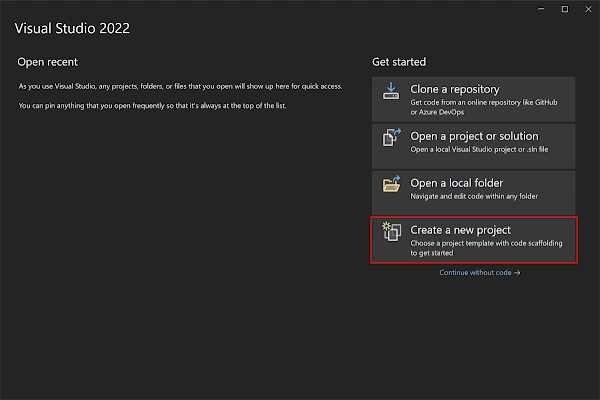
- In the Create a new project window, select MAUI in the All project types drop-down, select the .NET MAUI App template, and click the Next button:

- In the Configure your new project window, name your project, choose a suitable location for it, and click the Next button:

- In the Additional information window, click the Create button:
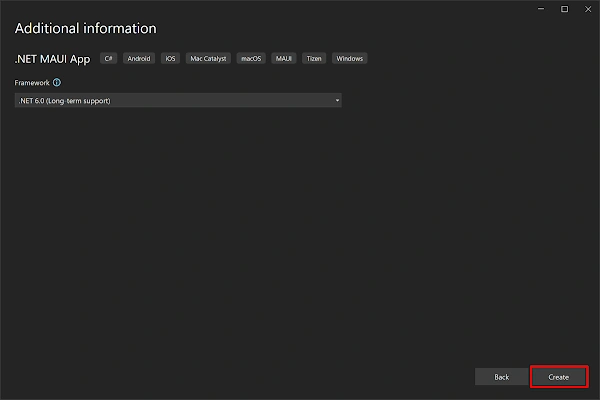
- Once the project is created, we can able to see the Android, iOS, Windows and other running options in the toolbar. Press the emulator or run button to build and run the app.

Implementation
class BackPress : OnBackPressedCallback
{
	private readonly Activity activity;
	private long backPressed;

	public BackPress(Activity activity) : base(true)
	{
		this.activity = activity;
	}

	public override void HandleOnBackPressed()
	{
		var navigation = Microsoft.Maui.Controls.Application.Current?.MainPage?.Navigation;
		if (navigation is not null && navigation.NavigationStack.Count <= 1 && navigation.ModalStack.Count <= 0)
		{
			const int delay = 2000;
			if (backPressed + delay > DateTimeOffset.UtcNow.ToUnixTimeMilliseconds())
			{
				activity.FinishAndRemoveTask();
				Process.KillProcess(Process.MyPid());
			}
			else
			{
				Toast.MakeText(activity, "Close", ToastLength.Long)?.Show();
				backPressed = DateTimeOffset.UtcNow.ToUnixTimeMilliseconds();
			}
		}
	}
}
- This new method lets you see what will happen if you press the back button before you actually do it. This helps you decide if you want to go back or not. For example, you might choose to stay in the app, go back to the Home screen, or return to a previous page in a web browser.
- To use this new method, Android 13 has added something called the "OnBackInvokedCallback". This is like a tool that helps you do this new back button behavior. It takes the place of the old way we used to change the back button behavior.
- Now, instead of using the old way, we have the "OnBackPressedDispatcher" which takes care of handling when you press the back button. It works with the new method we just talked about.
- You'll want to take charge by overriding the HandleOnBackPressed method. The code inside this method closely resembles what you previously had in OnBackPressed.
- In the last lap of this process, we're going to slot in this callback. You can achieve this by extending the OnCreate method of your MainActivity:
protected override void OnCreate(Bundle? savedInstanceState)
{
	base.OnCreate(savedInstanceState);
    OnBackPressedDispatcher.AddCallback(this, new BackPress(this));
}
Full Code
using Android.App;
using Android.Content.PM;
using Android.OS;
using Android.Widget;
using AndroidX.Activity;

namespace MauiOnBackPressed;

[Activity(Theme = "@style/Maui.SplashTheme", MainLauncher = true, ConfigurationChanges = ConfigChanges.ScreenSize | ConfigChanges.Orientation | ConfigChanges.UiMode | ConfigChanges.ScreenLayout | ConfigChanges.SmallestScreenSize | ConfigChanges.Density)]
public class MainActivity: MauiAppCompatActivity
{
    protected override void OnCreate(Bundle? savedInstanceState)
    {
        base.OnCreate(savedInstanceState);
        OnBackPressedDispatcher.AddCallback(this, new BackPress(this));
    }
}
class BackPress : OnBackPressedCallback
{
    private readonly Activity activity;
    private long backPressed;

    public BackPress(Activity activity) : base(true)
    {
        this.activity = activity;
    }

    public override void HandleOnBackPressed()
    {
        var navigation = Microsoft.Maui.Controls.Application.Current?.MainPage?.Navigation;
        if (navigation is not null && navigation.NavigationStack.Count <= 1 && navigation.ModalStack.Count <= 0)
        {
            const int delay = 2000;
            if (backPressed + delay > DateTimeOffset.UtcNow.ToUnixTimeMilliseconds())
            {
                activity.FinishAndRemoveTask();
                Process.KillProcess(Process.MyPid());
            }
            else
            {
                Toast.MakeText(activity, "Close", ToastLength.Long)?.Show();
                backPressed = DateTimeOffset.UtcNow.ToUnixTimeMilliseconds();
            }
        }
    }
}
Download Code
You can download the code from GitHub. If you have any doubts, feel free to post a comment. If you liked this article and it is useful to you, do like, share the article & star the repository on GitHub.
Reference
Jeff TimsonPosted Dec 22, 2023, 3:35 PM
Thanks Mushtaq