Introduction
This article describes an easy approach to providing site translation using
Google Translation services; it takes only a few minutes to set it up. There are
other methods available for providing site translation but in terms of ease of
implementation, it is hard to beat Google's offering. The best part is that it
does not cost a thing to pull it off.
As with any translation service, the translations provided are a best effort
based upon the rules applied. If you need a more professional translation you
may wish to follow more traditional approaches to site translation to be certain
that the translations are correct, adhere to language rules, and apply idiomatic
expressions correctly.
Still and all, if you just want to have a little fun with simple translations
this is a pretty nice feature to add and again, it only takes a few minutes to
pull it off.
Getting Started
The first thing you will need to do is visit the Google Translation website:
http://translate.google.com/. You
will need a Google account (Gmail) to get the mark-up you will need to add
translation services to you website.
Once you have logged into your Google account, look to the bottom of page and
find the link for Website Translator.
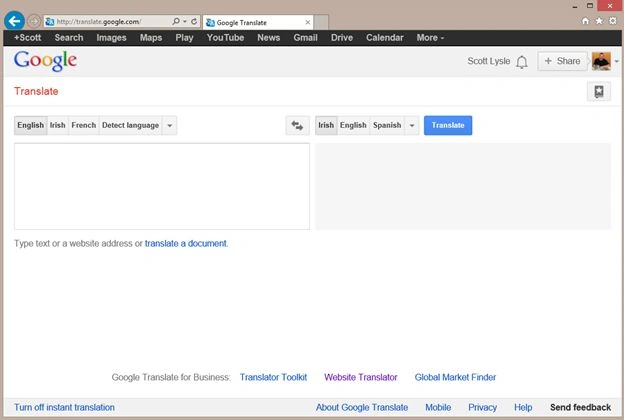
Figure 1 - Google Translation Website
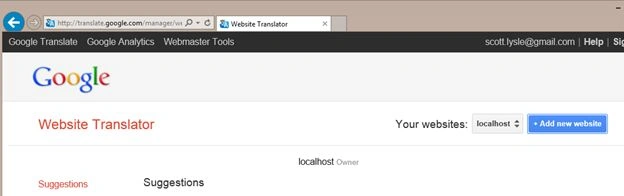
After clicking the link, you will be presented with an option to add a new
website; Google will allow you to set one up for localhost if you are working
in development and have not provisioned a site yet.
Click the option to add a new website.
Figure 2 - Add New Website
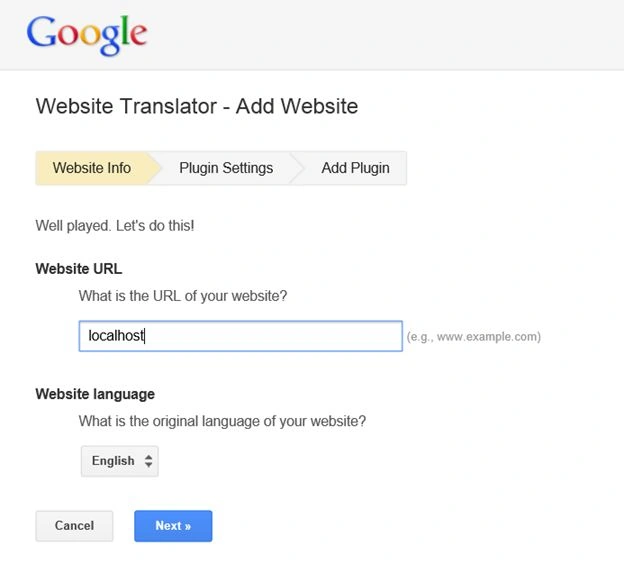
After clicking the Add new website button, you will be presented with a screen
that will allow you to key in your site details. For now just use localhost as
your site unless you have a site in mind to use; also set the site language for
the original site. Once done, click the Next button at the bottom of the page.
Figure 3 - Setting up a website
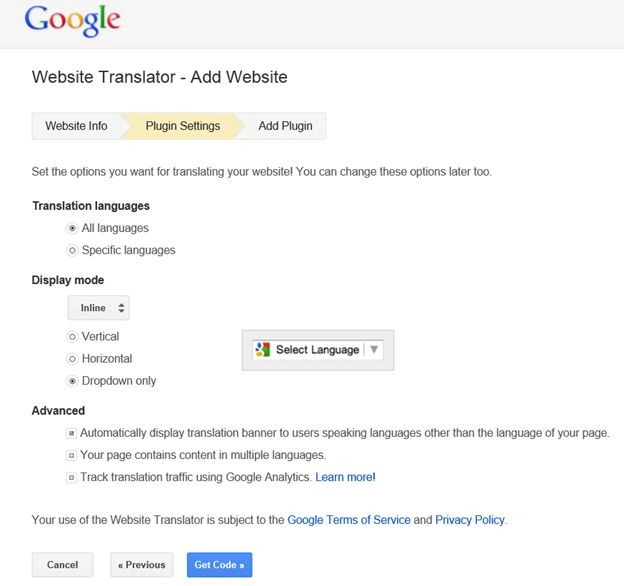
After clicking Next, Google will present you some more options. The first
will be to define which languages to provide translations for; you can pick all
languages (71 at the time of writing) or specific languages if you would rather
pick and choose. You can also define what style of widget you want to place on
the page; there are three options and you can select the radio buttons shown to
see what each looks like.
Figure 4 - Setting up a website continued
After making your selections, click the Get Code button at the bottom of the
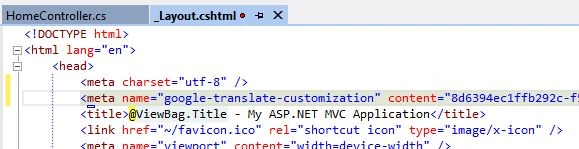
page. Once done, you will be provided with two bits of mark-up. The first is a
meta tag that you will need to place into the head section of your page. If you
are using one or more master pages, place the meta tag into each master page
used.
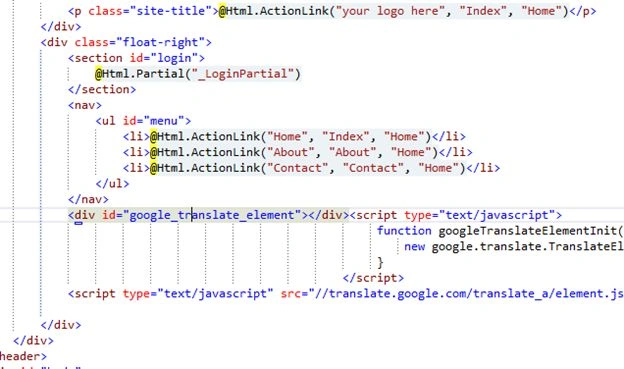
The second item is the script reference and widget; you can cut and paste that
code anywhere you want the translation widget to appear on the page. So at this
point fire up Visual Studio, open your project, and place the mark-up.
Figure 5 - Place the meta tag into the layout page in an MVC project
Figure 6 - Place the Widget and Script Reference
In this example I have an internet application using the MVC 4 template; I place
the mark-up in with the navigation on the layout page so that it will appear on
each of the pages in the site.
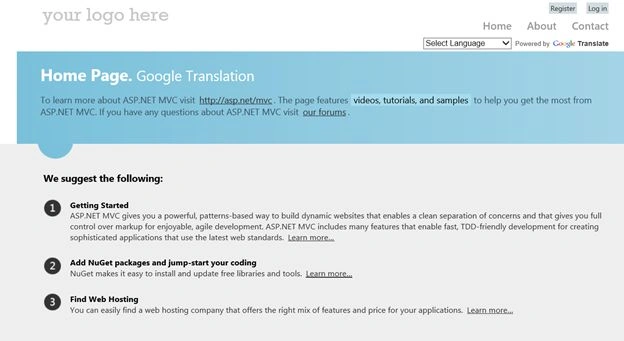
That is all there is to it. Now run the application and try it out.
Figure 7 - Running the site with Widget Loaded
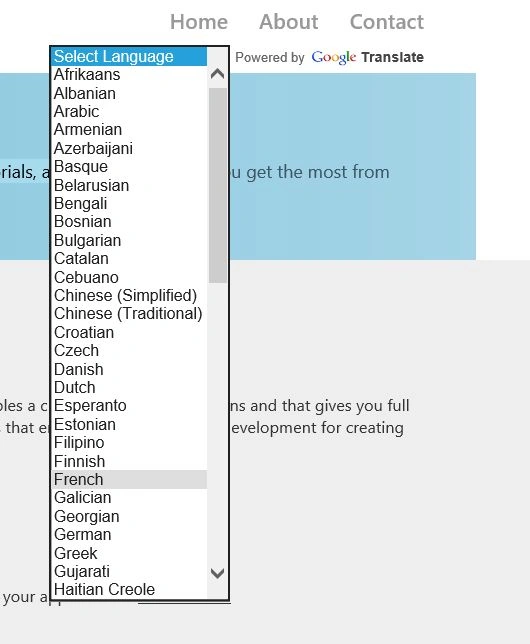
With the site running the Select Language drop down is loaded on the page and
the page is displayed in the original language (English). Clicking the drop down
will display a list of languages available for translation purposes.
Figure 8 - Translation Language Dropdown
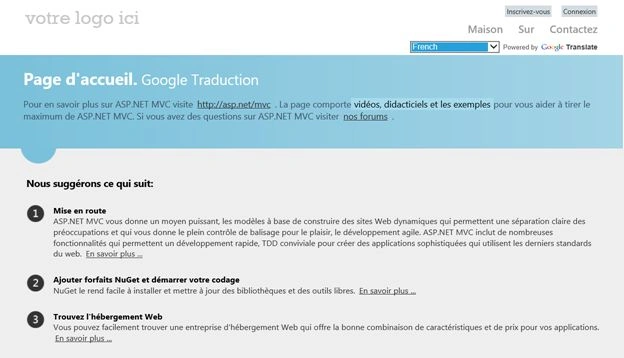
I'll pick French as a language and hold for the translation.
Figure 9 - Page Translated
And Bob's your uncle; now my page speaks French (and quite a few other
language). Of course I don't guarantee the quality of the translations but for
five minutes on my part (and likely thousands of hours on someone else's part)
it is pretty spiffy. Passez une bonne journée tout le monde !


Bharathi RajaPosted Jun 21, 2018, 12:14 AM
Thanks for sharing this information..
vidya dhariPosted Oct 7, 2017, 12:23 AM
Meta tag was missing in the given markup
Praveen Raveendran PillaiPosted May 13, 2014, 4:54 AM
Excellent!!!
Anupam SinghPosted May 10, 2014, 6:52 AM
superb....
Lakshmanan Sethu SankaranarayanPosted May 9, 2014, 4:46 AM
Fantastic one
Nimit JoshiPosted May 9, 2014, 4:21 AM
Great One..
Sandeep Singh ShekhawatPosted Apr 30, 2014, 4:30 AM
Finally I got a solution using css so you got this issue then you try this css: body{ top: 0px !important; } .goog-te-banner-frame.skiptranslate { display: none !important; }
Sandeep Singh ShekhawatPosted Apr 30, 2014, 1:35 AM
Its nice with in 5 minutes but each time its added a google translate in header. Is it possible to translate a site in another language with google translate without adding extra design on header by google. Thats shows loading panels and languages with email id etc. but there are a cross icon (X) so we can close it but each time its added so its not good. Its added too much extra code on body that is not good for design. code like ===================================================== <body style="position: relative; min-height: 100%; top: 40px;"><html><head> <body class="goog-te-banner" dir="ltr" border="0" scroll="no" style="background-image: url('url(')"https://translate.googleapis.com/translate_static/img/te_bk.gif");"> </body> </html>
Sunny SharmaPosted Oct 24, 2013, 4:38 AM
thanks for sharing !!