

Introduction
This article describes an approach to displaying transparent forms in a Windows
application. Such may be useful to
anyone wishing to display an odd shaped form for a splash screen or possibly a
tool dialog with a transparent background.
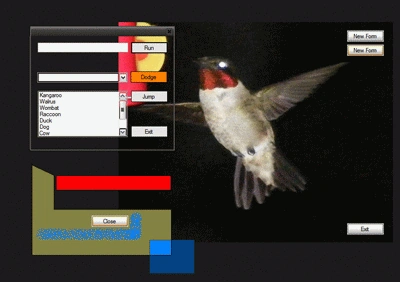
Figure 1: Transparent Forms
Getting Started
The solution contains three Windows Form classes; each shows something different
about a transparent form.
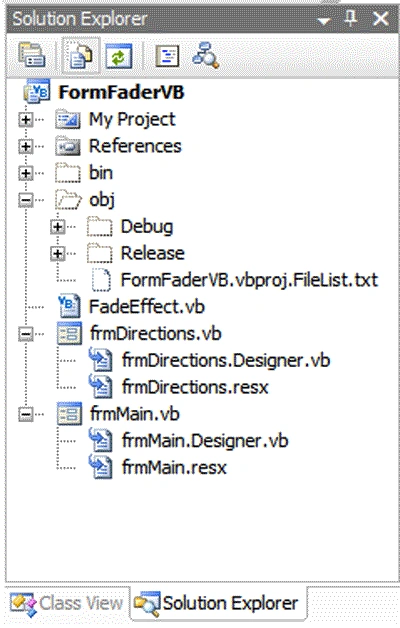
Figure 2: Solution
Explorer with the Project Visible
Code: Form 1 (Form1.vb)
There is nothing much to creating the transparent form; setting the forms back
color and transparency key property value to the same color is all that is
required. In form 1 the form back color and transparency key are both set to
lime green; this color does not occur within the image and so the image will not
appear to have holes in it; do not use a transparency color that occurs in your
images. That much takes care of making
the form transparent. Setting
the forms FormBorderStyle property to none removes the forms border and all that
will remain when the form is displayed is an image.
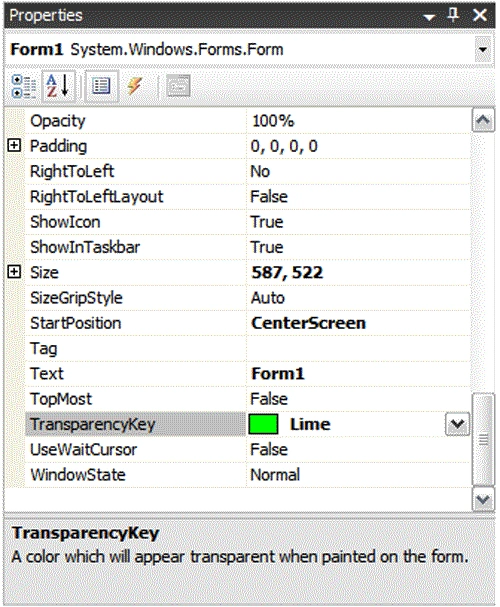
Figure 3: Forms Transparency Key Property
Of course having a transparent borderless form eliminates the ability to drag the form around the desktop; at least without doing a bit more work. In order to set up the form for dragging in this condition a couple of DLL call are needed. The following contains the code behind the Form1 class.
The following user32.DLL calls (SendMessage and ReleaseCapture) are required to support the dragging and dropping of the form in the absense of a caption bar on the form.
<summary>
The SendMessage function sends a message to a window or windows.
</summary>
<param name="hWnd"></param>
<param name="msg"></param>
<param name="wParam"></param>
<param name="lParam"></param>
<returns></returns>
<remarks></remarks>
Declare Auto Function SendMessage Lib "user32.dll" (ByVal hWnd As IntPtr, _
ByVal msg As Integer, ByVal wParam As IntPtr, ByVal lParam As IntPtr) As IntPtr
<summary>
ReleaseCapture releases a mouse capture
</summary>
<returns></returns>
<remarks></remarks>
Declare Function ReleaseCapture Lib "user32.dll" () As Boolean
/// <summary>
/// default constructor
/// </summary>
public Form1()
{
InitializeComponent();
}
The picturebox fills the entire draggable area of the form (those sections which are not visible cannot be used for a drag operation) and for that that reason the picture box controls mouse down event is used to support the borderless form dragging operations.
Join the conversation! Your thoughts help the community grow.