

This article demonstrates how to use a TreeView in WPF and how to program with it. As we all know, a TreeView basically is a control that displays data hierarchically. I'm not providing an extensive explanation. Let's move on towards our program.
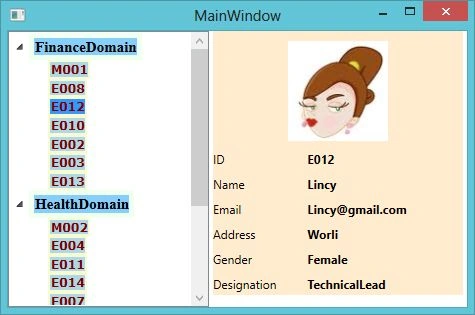
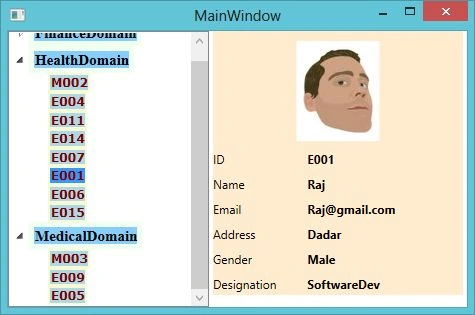
Here we are going to display the Id's of all employees working under different projects. Employees are categorized as per their roles into the 4 categories Manager, Software Developer, Associate Consultant, Technical Lead etc. Working under different projects. For every project there will be only one project manager and randomly we will be adding different categories i.e. for every project, a random number of Technical Leads, Software Developers or Associate Consultant are added to every project since I'm not using any database. But in your case if you are using a database then there is no need to display the data the way I did. The Order Of displaying ID of employee should be in this format (Manager, Technical Lead, Associate Consultant, Software Developer). After all the ID of all employees working for different projects gets displayed in a TreeView control, the next phase is to display the data of that particular employee whose ID is selected from the TreeView control. For displaying the data of the employee we have tried to create a WPF user control that will at runtime fetch the data and display it on the screen. The snapshot for that is the following.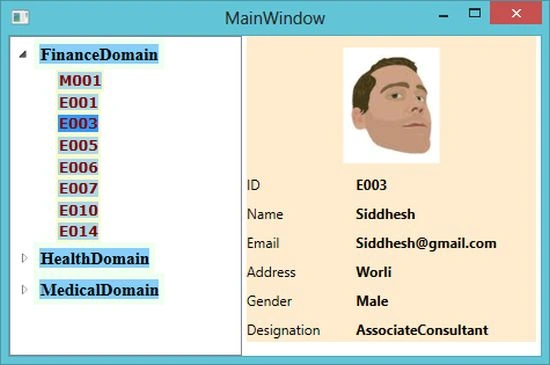
Note: kindly go through the code thoroughly. It might help you in your projects.
Ok now moving towards our source code.
Employee.cs (Database Of our program)
using System;
using System.Collections.Generic;
using System.Linq;
using System.Text;
using System.Collections.ObjectModel;
namespace WpfApplication3
{
internal class Employee
{
#region Enum Declaration
public enum Projects { FinanceDomain, HealthDomain, MedicalDomain };
public enum Roles { Manager = 0, SoftwareDev, TechnicalLead, AssociateConsultant };
public enum SexualCategory { Male, Female };
#endregion
#region Properties Declaration
public string ID { get; set; }
public string Name { get; set; }
public string Address { get; set; }
public SexualCategory Gender { get; set; }
public string Email { get; set; }
public Roles Designation { get; set; }
public Projects Project { get; set; }
public string ProfilePic { get; set; }
#endregion
public static ObservableCollection<Employee> GetAllEmployeeDetails()
{
//for randomly generate no's
Random rnd = new Random();
//Employee ID's of Employee
int[] ids = { 1, 2, 3, 4, 5, 6, 7, 8, 9, 10, 11, 12, 13, 14, 15 };
//Name Of Employee
string[] names = { "Raj", "Vivek", "Siddhesh", "Raksha", "Rahul", "Priya", "Neetu", "Santosh", "Ronny", "Punit", "Krishna", "Lincy", "Wasim", "Kailash", "Vishnav" };
//Address Of Employee
string[] adds = { "Andheri", "Worli", "Dadar", "Bandra", "Chinchpokli" };
//Profile Pic Of Employee
string[] profilePics = { "./img/h1.jpg", "./img/lady.jpg" };
//Index Position Of Lady Employee For Eg. At Index 3 Raksha, At 5 Priya or 6 Neetu.
int[] ladyIndex = { 3, 5, 6, 11 };
ObservableCollection<Employee> objEmployee = new ObservableCollection<Employee>();
objEmployee.Add(new Employee()
{
ID = "M001",
Name = "Prakansha",
Address = "Andheri",
Email = "[email protected]",
Gender = SexualCategory.Female,
ProfilePic = profilePics[1],
Designation = Roles.Manager,// or GetProjectType<Roles>(Enum.GetName(typeof(Roles), Roles.Manager)),
Project = Projects.FinanceDomain
});
objEmployee.Add(new Employee()
{
ID = "M002",
Name = "Vishal",
Address = "Andheri",
Gender = SexualCategory.Male,
Email = "[email protected]",
ProfilePic = profilePics[0],
Designation = Roles.Manager,// or GetProjectType<Roles>(Enum.GetName(typeof(Roles), Roles.Manager)),
Project = Projects.HealthDomain
});
objEmployee.Add(new Employee()
{
ID = "M003",
Name = "Kanan",
Address = "Dadar",
Gender = SexualCategory.Male,
Email = "[email protected]",
ProfilePic = profilePics[0],
Designation = Roles.Manager,// or GetProjectType<Roles>(Enum.GetName(typeof(Roles), Roles.Manager)),
Project = Projects.MedicalDomain
});
for (int i = 0; i < ids.Length; i++)
{
if (i < 9)
objEmployee.Add(new Employee()
{
ID = string.Concat("E00", ids[i]),
Name = names[i],
Address = adds[rnd.Next(0, adds.Length - 1)],
Email = string.Concat(names[i], "@gmail.com"),
Gender = ladyIndex.Contains(i) == true ? SexualCategory.Female : SexualCategory.Male,
ProfilePic = ladyIndex.Contains(i) == true ? profilePics[1] : profilePics[0],
Designation = GetProjectType<Roles>(Enum.GetName(typeof(Roles), rnd.Next(1, Enum.GetValues(typeof(Roles)).Length))),
Project = GetProjectType<Projects>(Enum.GetName(typeof(Projects), rnd.Next(0, Enum.GetValues(typeof(Projects)).Length)))
});
else
objEmployee.Add(new Employee()
{
ID = string.Concat("E0", ids[i]),
Name = names[i],
Address = adds[rnd.Next(0, adds.Length - 1)],
Gender = ladyIndex.Contains(i) == true ? SexualCategory.Female : SexualCategory.Male,
Email = string.Concat(names[i], "@gmail.com"),
ProfilePic = ladyIndex.Contains(i) == true ? profilePics[1] : profilePics[0],
Designation = GetProjectType<Roles>(Enum.GetName(typeof(Roles), rnd.Next(1, Enum.GetValues(typeof(Roles)).Length))),
Project = GetProjectType<Projects>(Enum.GetName(typeof(Projects), rnd.Next(0, Enum.GetValues(typeof(Projects)).Length)))
});
}
return objEmployee;
}
/// <summary>
/// This function returns the values of Enums (Projects And Roles). It is a Generic Function.
/// </summary>
/// <typeparam name="T">Value of T can either be Projects or Roles</typeparam>
/// <param name="enumValue">Enum Value</param>
/// <returns>Value of T. It may be Projects or Roles.</returns>
private static T GetProjectType<T>(string enumValue)
{
T str;
int len = Enum.GetValues(typeof(T)).Length;
str = (T)Enum.Parse(typeof(T), enumValue, true);
return str;
}
}
}
WPF User control
Details.xaml
<UserControl x:Class="WpfApplication3.Details"
xmlns="http://schemas.microsoft.com/winfx/2006/xaml/presentation"
xmlns:x="http://schemas.microsoft.com/winfx/2006/xaml"
xmlns:mc="http://schemas.openxmlformats.org/markup-compatibility/2006"
xmlns:d="http://schemas.microsoft.com/expression/blend/2008"
mc:Ignorable="d" Height="270" Width="250" Loaded="UserControl_Loaded" Background="BlanchedAlmond">
<Grid Name="myGrid" Background="BlanchedAlmond">
<Grid.ColumnDefinitions>
<ColumnDefinition Width="97*" />
<ColumnDefinition Width="160*" />
</Grid.ColumnDefinitions>
</Grid>
</UserControl>
Details.xaml.cs
using System;
using System.Collections.Generic;
using System.Linq;
using System.Text;
using System.Windows;
using System.Windows.Controls;
using System.Windows.Data;
using System.Windows.Documents;
using System.Windows.Input;
using System.Windows.Media;
using System.Windows.Media.Imaging;
using System.Windows.Navigation;
using System.Windows.Shapes;
using System.Collections.ObjectModel;
namespace WpfApplication3
{
/// <summary>
/// Interaction logic for Details.xaml
/// </summary>
public partial class Details : UserControl
{
public Details()
{
InitializeComponent();
Kiran Kumar TalikotiPosted Oct 4, 2013, 1:34 AM
Nice article :)