

In this article, we will learn about Database Triggers in SQL Server. We also will learn the concept of Magic Tables in SQL Server. This is the fourth part of T/SQL series. You can check the previous articles of this series from these links.
Introduction
Database Trigger is a special type of procedure that is used to provide a restriction on the tables and database when an SQL command is executed.
- DML Triggers
- DDL Triggers

DML Triggers
DML Triggers execute when the user tries to change the data through manipulation language events. Those are insert, update, and delete stints on the table.
DML Triggers can be used to enforce the business rules and data integrity. With the help of DML Triggers, we can enforce integrity which cannot be done with constraints.
Syntax
Create Trigger<Trigger Name> on <Table Name>
After /For <Insert/Update/Delete>
As
Begin
<Trigger Body/SQL statement>
End
Note
- Triggers are parameter-less objects.
- There is no syntax to call in a trigger object because whenever the user executes the DML operations, then a related trigger is invoked automatically.
Example
Create a trigger which will restrict the insert operation on City Table.
- create trigger Tri_cities on city
- after insert
- as
- begin
- Print 'Cannot Perform insert Operation in City Table'
- rollback transaction
- end
- insert into city values('David','Bangalore','JayaNagar')
Result

Syntax to Drop a DML Trigger
Drop Trigger <Trigger Name>
DDL Triggers
DDL Triggers are used to restrict the DDL Operation like Create, After, and Drop commands.
These triggers are working on a particular database.
Syntax
Create trigger <Trigger name> on database
After/for(create table,alter table,drop table>)
As
Begin
<Trigger body/Query>
End
Create a trigger to restrict creating a table in a database.
- create trigger tri_user on database
- after create_table
- as
- begin
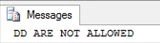
- Print 'Create ARE NOT ALLOWED'
- rollback transaction
- end
Now, create a table in this database and see.
- create table t11(id int,name varchar(50))
Drop trigger<TriggerName>
Magic Table in SQL Server
SQL Server allows us to define Magic Table. Magic Tables are invisible tables or virtual tables. We can see them only with the help of triggers in SQL Server. Magic Tables are those tables which allow you to hold inserted, deleted, and updated values during Insert, Delete, and Update DML operation on a table in SQL Server.
Basically, there are two types of Magic Tables in SQL Server - Inserted and Deleted. Magic Table updates can be performed with the help of these two.
Inserted Magic Tables
When we insert the values into the tables, then those values can be seen in the Inserted Magic Table.
Example
- create trigger t_com on company
- for insert
- as
- begin
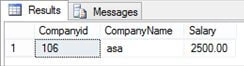
- select * from inserted
- end
Now, insert some value in the table.
- insert into company values(106,'asa',2500)
Result
When we delete the data from the Table, the deleted data can see in the Deleted Magic Table.
Example
- create trigger Tr_delete on company
- for delete
- as
- begin
- select * from deleted
- end
Now, delete a value from the table.
- delete from company where Companyid=106
Result
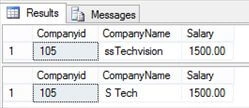
When we updated the values in the Table, then the old value can be seen in the Deleted Magic Table and a new value can be seen in the Inserted Magic Table.
- create trigger tr_update on company
- for update
- as
- begin
- select * from inserted
- select * from deleted
- end
- update company set CompanyName='ssTechvision' where Companyid=105
Some important queries for triggers -
Disable a Trigger in SQL Server
- disable trigger tri_user on database
Enable a Trigger in SQL Server
- enable trigger tri_user on database
We can find all the Triggers in a Database by using:
- SELECT * FROM sys.triggers
Result

In this article, we learned about the Triggers in SQL Server and Magic Tables with some examples.
Rajesh KumarPosted Sep 19, 2018, 12:21 AM
Nice article, Thanks for sharing.............