

The Problem Nobody Talks About
Here's something almost every engineering team has quietly run into over the last year: you've got AI agents everywhere now - chatbots, copilots, autonomous assistants - and everyone wants them to actually do things, not just talk. Check an order status, look up inventory, trigger a workflow. The catch? All that useful stuff already lives behind REST APIs your company-built years ago. The AI agent has no idea they exist.
So, what do most teams do? They build a whole new server just to translate between "what the AI understands" (MCP, or Model Context Protocol) and "what your API understands" (plain old REST). That means duplicating your authentication logic, your rate limits, your logging - basically rebuilding the plumbing you already have, except now you've got two copies of it to maintain.
Google Cloud just made this problem mostly disappear.
So, What Exactly Is MCP, in Plain English?
Think of MCP (Model Context Protocol) as a common language that lets AI agents discover and call "tools" - functions they can invoke to get real work done. It's quickly become the standard way frameworks like Google's Agent Development Kit (ADK) and Gemini Enterprise let AI models reach out and interact with the real world instead of just generating text.
The problem is, your REST APIs don't naturally speak MCP. Somebody has to sit in the middle and translate.
Enter API Gateway, Wearing a New Hat
Google Cloud's API Gateway has always been the simple, no-fuss way to expose and secure REST APIs - the friendly bouncer standing in front of your backend services, checking IDs (authentication), managing the guest list (quotas), and keeping a log of who came and went.
Now, in Public Preview, that same bouncer has learned a second language: MCP. You annotate the OpenAPI spec you already have, deploy it, and your existing REST operations instantly become tools an AI agent can call - without spinning up a single new server.
How It Actually Works, Without the Jargon
When your AI agent sends an MCP request, API Gateway quietly converts it into a regular REST request behind the scenes, runs it through the same security and quota rules you've already set up, then translates the response back into MCP format. Same door, same lock - just two different ways of knocking.
Step 1: Annotate Your OpenAPI Spec
This is the actual heart of the whole setup. A couple of things to note before writing this: MCP only works with OpenAPI 3.0.x or 3.1.x - if you're still on 2.0, upgrade that first. Also, every operation you want exposed needs a backend and a proper description, since that description is what the AI model reads to decide when to use the tool.
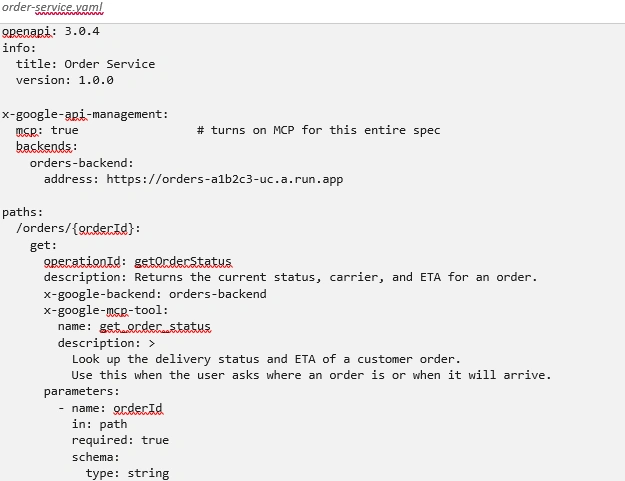
A quick tip here: write the description field like you're explaining the tool to a new teammate, not like you're writing API documentation. "Use this when the user asks where an order is" is far more useful to an AI model than a generic one-liner.
Step 2: Deploy Like You Always Do
Nothing dramatic - deploy the updated config the same way you deploy any API Gateway config:
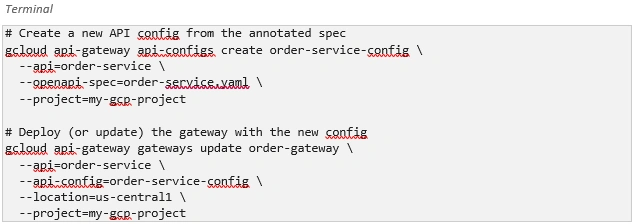
API Gateway automatically detects the MCP annotations and starts serving requests on a new /mcp path - no separate deployment step needed for that.
Step 3: Lock Down Who Can "Window Shop"
By default, anyone can ask your gateway what tools it offers (a request called tools/list). Fine for testing, risky for production. Secure it with a JWT requirement:

Actually calling a tool (tools/call) always enforces whatever security the underlying REST operation already requires - so even with discovery wide open, nobody can invoke a protected operation without proper credentials.
You can test the raw MCP call directly with curl to see exactly what's happening under the hood:
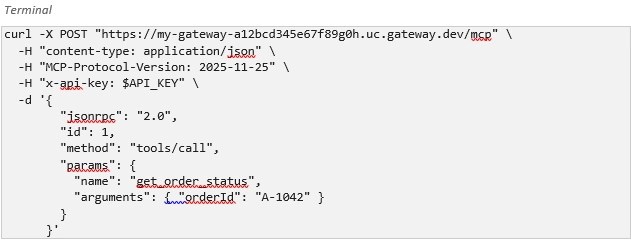
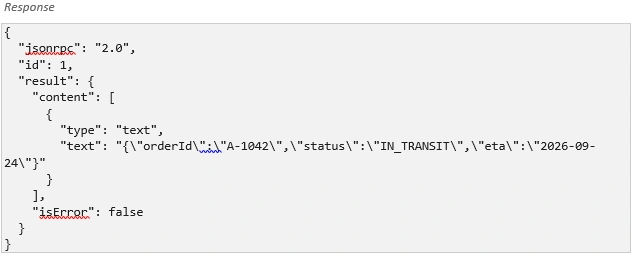
A typical response looks like this - notice it's really just your REST API's data, wrapped in MCP's envelope:
Step 4: Connect Your Agent
Once deployed, any MCP-compatible agent can connect straight to your gateway's endpoint. Here's what that looks like with Google's Agent Development Kit (ADK) in Python:
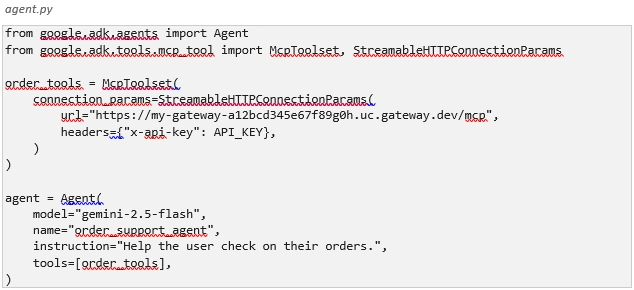
From the agent's point of view, get_order_status is just another tool it can reach for - it has no idea it's really just calling your existing REST endpoint behind the scenes.
Why This Actually Matters
Strip away the technical details, and this solves two very human problems:
• You don't have to build and maintain a second system - your gateway, auth, quotas, and logs just keep working for both REST and MCP traffic.
• Your APIs become genuinely discoverable by AI agents through things like Google's Agent Registry, with no extra manual wiring.
A Few Honest Limitations
Being a Public Preview, it's not flawless yet. Worth knowing before you plan something at scale:
• Operations that return an empty response (like an HTTP 204) can't be exposed this way.
• Deeply nested data structures might not render fully when an agent asks for the tool list.
• There's a practical cap of around 1,000 tools per gateway.
• Response streaming and built-in payload safety inspection are still on the roadmap.
The Bigger Picture
As AI agents become regular consumers of enterprise systems, the tools that manage and secure APIs need to speak both languages fluently. Google Cloud closing this gap for API Gateway means smaller teams - without dedicated platform engineering resources - can make their APIs "AI-ready" in an afternoon instead of a quarter.
If you've been putting off connecting your services to AI agents because it felt like a big infrastructure project, this is probably the easiest on-ramp you'll find right now.
Join the conversation! Your thoughts help the community grow.