

Introduction
Tween animations are a specific type of animation related to rotation, sliding, and movement of an object. This article explains some common Tween animations.
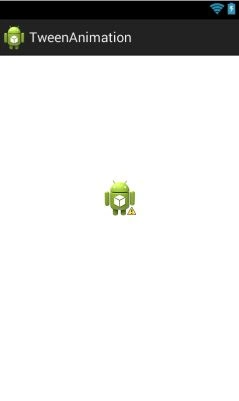
Now we move to the code part of this article. In this article, we will use a single Activity_main.xml.
Code
The following is the code of Activity_main.xml,
- <RelativeLayout
- xmlns:android="http://schemas.android.com/apk/res/android"
- xmlns:tools="http://schemas.android.com/tools"
- android:layout_width="match_parent"
- android:layout_height="match_parent"
- android:gravity="top"
- android:paddingBottom="@dimen/activity_vertical_margin"
- android:paddingLeft="@dimen/activity_horizontal_margin"
- android:paddingRight="@dimen/activity_horizontal_margin"
- android:paddingTop="@dimen/activity_vertical_margin"
- tools:context=".MainActivity" >
- <ImageView
- android:id="@+id/imageView1"
- android:layout_width="wrap_content"
- android:layout_height="wrap_content"
- android:layout_alignParentTop="true"
- android:layout_centerHorizontal="true"
- android:layout_marginTop="149dp"
- android:src="@drawable/ic_launcher" />
- </RelativeLayout>
- <menu
- xmlns:android="http://schemas.android.com/apk/res/android" >
- <item
- android:id="@+id/fadeInOut"
- android:orderInCategory="100"
- android:title="@string/fade_String"/>
- <item
- android:id="@+id/Move"
- android:orderInCategory="100"
- android:title="@string/Move"/>
- <item
- android:id="@+id/slideUp"
- android:orderInCategory="100"
- android:title="@string/Slide"/>
- <item
- android:id="@+id/rotate360"
- android:orderInCategory="100"
- android:showAsAction="never"
- android:title="@string/rotate_String"/>
- <item
- android:id="@+id/zoomInOut"
- android:orderInCategory="100"
- android:title="@string/zoom_In_Out"/>
- <item
- android:id="@+id/sequential"
- android:orderInCategory="100"
- android:title="@string/Sequential"/>
- </menu>
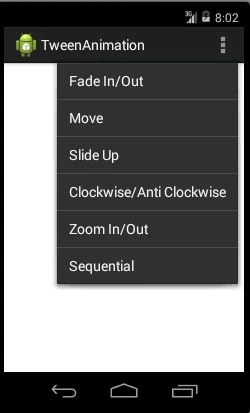
In the preceding code we provide all the options of animation that will be visible in the Menu list of our project. The Android:orderInCategory attribute dictates the order in which the menu items will appear within the menu when it is displayed. The menu items are arranged from left to right in ascending order of integer value. Now we move to the source code of this project.
MainActivity.java file
The following is the source code of the MainActivity.java file of this project,
- package com.example.tweenanimation;
- import android.os.Bundle;
- import android.app.Activity;
- import android.view.Menu;
- import android.view.MenuItem;
- import android.view.animation.Animation;
- import android.view.animation.AnimationUtils;
- import android.widget.ImageView;
- public class MainActivity extends Activity {
- @Override
- protected void onCreate(Bundle savedInstanceState) {
- super.onCreate(savedInstanceState);
- setContentView(R.layout.activity_main);
- }
- @Override
- public boolean onCreateOptionsMenu(Menu menu) {
- // Inflate the menu; this adds items to the action bar if it is present.
- getMenuInflater().inflate(R.menu.main, menu);
- return true;
- }
- public boolean onOptionsItemSelected(MenuItem item) {
- super.onOptionsItemSelected(item);
- ImageView image = (ImageView) findViewById(R.id.imageView1);
- Animation animation;
- switch (item.getItemId()) {
- case R.id.Move:
- animation = AnimationUtils.loadAnimation(getApplicationContext(), R.anim.move);
- image.startAnimation(animation);
- return true;
- case R.id.slideUp:
- animation = AnimationUtils.loadAnimation(getApplicationContext(), R.anim.slide_up);
- image.startAnimation(animation);
- return true;
- case R.id.sequential:
- animation = AnimationUtils.loadAnimation(getApplicationContext(), R.anim.sequential);
- image.startAnimation(animation);
- return true;
- case R.id.zoomInOut:
- animation = AnimationUtils.loadAnimation(getApplicationContext(), R.anim.myanimation);
- image.startAnimation(animation);
- return true;
- case R.id.rotate360:
- animation = AnimationUtils.loadAnimation(getApplicationContext(), R.anim.clockwise);
- image.startAnimation(animation);
- return true;
- case R.id.fadeInOut:
- animation = AnimationUtils.loadAnimation(getApplicationContext(), R.anim.fade);
- image.startAnimation(animation);
- return true;
- }
- return false;
- }
- }
Code Section 1
- public boolean onCreateOptionsMenu(Menu menu) {
- // Inflate the menu; this adds items to the action bar if it is present.
- getMenuInflater().inflate(R.menu.main, menu);
- return true;
- }
In preceding code we created a Menu and inserted the items into the menu in the menu.main file. The getMenuInflater class adds the item into the menu using the inflate method. After insertion of the item present in the main.xml file our menu will look like the following:
- public boolean onOptionsItemSelected(MenuItem item);
In this code we created an onOptionsItemSelected event for the menu. This event will awake when someone selects an item from the Menu list. When someone selects an option from the Menu list then that item will be saved into the item variable of the MenuItem (item).
- ImageView image = (ImageView)findViewById(R.id.imageView1);
In the preceding line of code we took the reference of ImageView1 into the image object of the imageview type. Now we will apply all the animation on this object. We will also create an object of Animation Class (animation) and use this object in a code section later.
- case R.id.Move:
- animation = AnimationUtils.loadAnimation(getApplicationContext(), R.anim.move);
- image.startAnimation(animation);
- return true;

- case R.id.slideUp:
- animation = AnimationUtils.loadAnimation(getApplicationContext(), R.anim.slide_up);
- image.startAnimation(animation);
- return true;

Code Section 4
- case R.id.sequential:
- animation = AnimationUtils.loadAnimation(getApplicationContext(), R.anim.sequential);
- image.startAnimation(animation);
- return true;
This code will execute when someone selects the Sequential option from the menu. In the preceding code we selected sequential animation from the animation list (anim) and inserted all the information into an animation object and finally we applied this animation on the image using the startAnimation method. Sequential animation is a combination of various types of animation (in other words move and rotation).

Code Section 5

- case R.id.rotate360:
- animation = AnimationUtils.loadAnimation(getApplicationContext(), R.anim.clockwise);
- image.startAnimation(animation);
- return true;
- case R.id.fadeInOut:
- animation = AnimationUtils.loadAnimation(getApplicationContext(), R.anim.fade);
- image.startAnimation(animation);
- return true;
RakeshPosted Jul 30, 2015, 12:25 PM
Good one
Nilesh JadavPosted Jul 30, 2015, 9:39 AM
Nice one sir
Pankaj Kumar ChoudharyPosted Jul 30, 2015, 9:31 AM
Thanks Sibeesh Sir.......
Sibeesh VenuPosted Jul 30, 2015, 4:59 AM
Nice Share
Yashwant VishwakarmaPosted Jul 30, 2015, 4:55 AM
Nice one , Keep it up !!!
Pankaj Kumar ChoudharyPosted Jul 30, 2015, 4:42 AM
Thanks Rajeesh Sir............
Rajeesh MenothPosted Jul 30, 2015, 3:17 AM
Good One Pankaj Kumar Choudhary
Pankaj Kumar ChoudharyPosted Jul 30, 2015, 3:04 AM
Thanks Santhakumar Sir......
Santhakumar MunuswamyPosted Jul 30, 2015, 2:57 AM
Thanks for nice article