

UDP Programing
In this article we are going to describe the major differences between TCP and UDP protocols. We will also describe the difference in programming terms of which type of method is used in UDP client/server programming and also make a simple example of a UDP client and UDP server.
UDP (User Datagram Protocol)
UDP is one of the core members of the Internet Protocol Suites. This protocol is stateless. Its very usefull for servers answering small queries for a large number of clients. UDP uses a simple transmission model without implicit dialogues for providing reliability, ordering, or data integrity. Thus, UDP provides an unreliable service and datagrams may arrive out of order, appear duplicated, or go missing without notice.
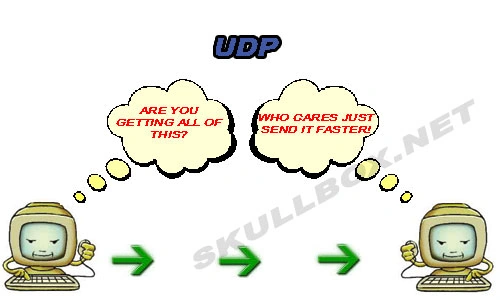
Difference Between TCP/IP and UDP
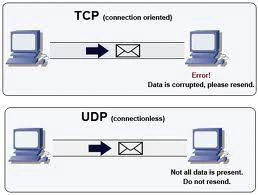
The main difference between TCP/IP is listed in following table in different terms
| In Terms | TCP | UDP |
| Reliability | TCP is connection-oriented protocol. When a file or message sent it will be delivered unless the connection fails. If the connection is lost, the server will request the lost part. There is no corruption while transferring a message. | UDP is connectionless protocol. When you a send a data or message, you don't know if it'll get there, it could get lost on the way. There may be corruption while transferring a message. |
| Ordered | When the low level parts of the TCP "stream" arrive in the wrong order, resend requests have to be sent, and all the out of sequence parts have to be put back together, so requires a bit of work to piece together. | If you send two messages out, you don't know what order they'll arrive in i.e. not ordered |
| Weight | Heavyweight: when the low level parts of the TCP "stream" arrive in the wrong order, resend requests have to be sent, and all the out of sequence parts have to be put back together, so requires a bit of work to piece together. | Lightweight: No ordering of messages, no tracking connections, etc. It's just fire and forget! This means it's a lot quicker, and the network card / OS has to do very little work to translate the data back from the packets. |
| Streaming | It uses the stream with nothing distinguishing where one packet ends and another packet starts for reading data. | UDP does not use streaming and it uses datagrams instead of streams |
| Examples | World Wide Web (Apache TCP port 80), e-mail (SMTP TCP port 25 Postfix MTA), File Transfer Protocol (FTP port 21) and Secure Shell (OpenSSH port 22) etc. | Domain Name System (DNS UDP port 53), streaming media applications such as IPTV or movies, Voice over IP (VoIP), Trivial File Transfer Protocol (TFTP) and online multiplayer games etc |
UDP Client and Server
The UDP client and server are created with the help of DatagramSocket and Datagram packet classes. If the UDP protocol is used at transport, then the unit of data at the transport layer is called a datagram and and not a segment. In UDP, no connection is established. It is the responsibility of an application to encapsulate data in datagrams (using Datagram classes) before sending it. If TCP is used for sending data, then the data is written directly to the socket (client or server) and reaches there as a connection exists between them. The datagram sent by the application using UDP may or may not reach the UDP receiver.
UDP client
- import java.io.*;
- import java.net.*;
- public class MyUDPClient
- {
- public static void main(String[] args)
- {
- try
- {
- // InetAddress class is used to getting local address
- InetAddress ia = InetAddress.getLocalHost();
- //DatagramSocket class is used creating UDP socket
- DatagramSocket ds=new DatagramSocket(1236,ia);
- // this is message string passes to the server
- String y="Hell srver i am client";
- //converting this string in to byte array with help of getBytes() method
- byte [] b=y.getBytes();
- //creating DatagramPacket of byte array
- DatagramPacket dp =new DatagramPacket(b,b.length,ia,8);
- // send to the server socket
- ds.send(dp);
- System.out.println("sending String :"+(new String(b)));
- //b1 is a byte array is created because its use in DatagramPacket
- byte[] b1=new byte[50];
- //now the DatagramPacket object is created with byte array
- DatagramPacket in = new DatagramPacket(b1,b1.length);
- //recieve() method of datagram socket objectis used to recive data from put in the byte array
- ds.receive(in);
- System.out.println("message from server :"+(new String(b1)));
- //closing the connection
- ds.close();
- }
- catch(SocketException se)
- {
- System.out.println(se);
- }
- catch(Exception e)
- {
- System.out.println(e);
- }
- }
- }
- import java.io.*;
- import java.net.*;
- public class MyUDPServer
- {
- public static void main(String[] args)
- {
- try {
- //creating a UDP socket(datagramsocket) class object where 8 is port number
- DatagramSocket ds = new DatagramSocket(8);
- //b1 is a byte array is created because its use in DatagramPacket
- byte[] b1 = new byte[50];
- //now the DatagramPacket object is created with byte array
- DatagramPacket in = new DatagramPacket(b1, b1.length);
- //recieve() method of datagram socket objectis used to recive data from put in the byte array
- ds.receive( in );
- System.out.println("recieving String :" + (new String(b1)));
- String y = "Hello client i am server";
- byte[] b = y.getBytes();
- DatagramPacket out = new DatagramPacket(b, b.length, in .getAddress(), in .getPort());
- // send method of DatagramPacket is used to sending the data to client socket
- ds.send(out);
- ds.close();
- } catch (SocketException se)
- {
- System.out.println(se);
- } catch (Exception e)
- {
- System.out.println(e);
- }
- }
- }
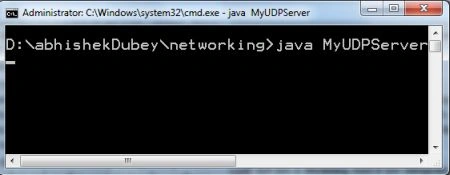
First run the server program; than you can see it wait for client addresses.
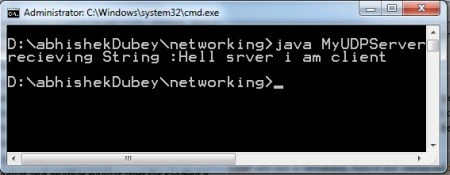
Now run the client program; then you will get the following output.
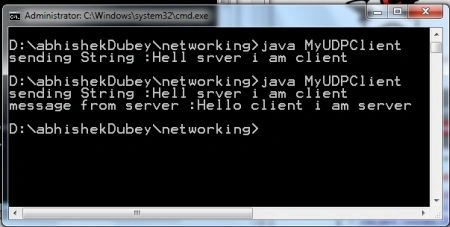
The server will show the message sent by the client.
Resources
Join the conversation! Your thoughts help the community grow.