

When we consume business objects in UI, the logic can become pretty complex for activities like setting the business object value, getting the object value and setting the user interface from the object value. We can minimize the complexity of UI interaction with the business object using mediator pattern.
I have been writing and recording a lot of architecture related videos on design patterns, UML, FPA estimation, C# projects, etc. You can watch my videos here.
The Problem
In almost all projects, we have the basic three tier architecture as shown in the below figure. So the UI creates the business object, sets the values or gets the values and flourishes the UI.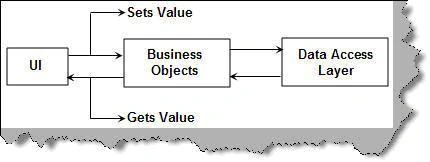
The three big things we need to do on the UI are stated below:
-
Setting the business object values from the user interface:
public void setObjectFromUI(clsInvoice objInvoice)
{
objInvoice.CustomerName = txtCustomerName.Text;
objInvoice.CustomerAddress = txtCustomerAddress.Text;
objInvoice.Amount = Convert.ToDouble(lblTotalAmountToBePaid.Text);
objInvoice.PaidAmount = Convert.ToDouble(txtAmountPaid.Text);
objInvoice.InvoiceDate = Convert.ToDateTime(txtInvoiceDate.Text);
objInvoice.InvoiceComments = txtComments.Text;
objInvoice.InvoiceReference = txtInvoiceNumber.Text;
objInvoice.Quantity = Convert.ToInt16(TxtQuantity.Text);
objInvoice.TaxAmount = Convert.ToDouble(txtTaxAmount.Text);
}
-
Getting the values from the objects and displaying the same in the UI:
txtCustomerName.Text = objInvoice.CustomerName;
txtCustomerAddress.Text = objInvoice.CustomerAddress;
lblTotalAmountToBePaid.Text = objInvoice.Amount.ToString();
txtAmountPaid.Text = objInvoice.PaidAmount.ToString();
txtInvoiceDate.Text = objInvoice.InvoiceDate.ToString();
txtComments.Text = objInvoice.InvoiceComments.ToString();
txtInvoiceNumber.Text = objInvoice.InvoiceReference.ToString();
TxtQuantity.Text = objInvoice.Quantity.ToString();
txtTaxAmount.Text = objInvoice.TaxAmount.ToString();
-
Clearing the UI values for fresh and new inputs:
public void clearText()
{
txtInvoiceNumber.Text = "";
txtComments.Text = "";
txtInvoiceDate.Text = "";
TxtQuantity.Text = "";
lblTotalAmountToBePaid.Text = "";
txtTaxAmount.Text = "";
txtAmountPaid.Text = "";
txtCustomerName.Text = "";
txtCustomerAddress.Text = "";
}
All the above things can clutter your UI. The most important thing is that the UI is tied up with the business object for various reasons.
Solution
The answer to this is if we can make a mediator who takes care of which UI objects map which object property that will solve our problem. So what we need to do is implement a simple UI object connector which takes the values from UI and sets to the object. This can be easily implemented by using mediator pattern. In case you are not aware of it, you watch this video to understand the concept.
UI Object Connector Implementation
Below is our simple class which will be used in a simple UI:
public class clsSampleClass
{
private string strProperty1 = "Default1";
private string strProperty2 = "Default2";
public string Property1
{
set
{
strProperty1 = value;
}
get
{
return strProperty1;
Join the conversation! Your thoughts help the community grow.