

Introduction
Do you want to measure distance without touching things? An ultrasonic sensor (HC-SR04) can do that. It sends sound waves that we cannot hear, and measures how long they take to bounce back.
In this guide, we will connect the ultrasonic sensor to an Arduino UNO using Tinkercad.com. We will also write simple code to show the distance on the Serial Monitor.
What You Need
In Tinkercad, add these parts:
Arduino UNO
Ultrasonic Sensor (HC-SR04)
Some wires
(Optional) Breadboard
Circuit Setup
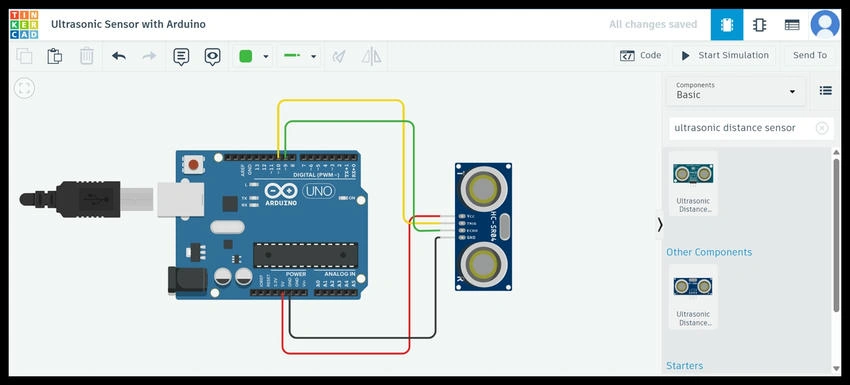
Connect the parts like this:
VCC → 5V on Arduino
GND → GND on Arduino
TRIG → Pin 7 on Arduino
ECHO → Pin 6 on Arduino
Arduino Code
Paste this code into Arduino in Tinkercad:
#define TRIG_PIN 7
#define ECHO_PIN 6

long duration;
int distance;

void setup() {
  pinMode(TRIG_PIN, OUTPUT);
  pinMode(ECHO_PIN, INPUT);
  Serial.begin(9600);
}

void loop() {
  // Clear trigger
  digitalWrite(TRIG_PIN, LOW);
  delayMicroseconds(2);

  // Send 10 microsecond pulse
  digitalWrite(TRIG_PIN, HIGH);
  delayMicroseconds(10);
  digitalWrite(TRIG_PIN, LOW);

  // Read echo time
  duration = pulseIn(ECHO_PIN, HIGH);

  // Convert to distance (cm)
  distance = duration * 0.034 / 2;

  // Show result
  Serial.print("Distance: ");
  Serial.print(distance);
  Serial.println(" cm");

  delay(500); // wait half a second
}
How It Works
The Arduino tells the sensor to send a sound wave.
The wave hits an object and bounces back.
The sensor measures how long it takes.
Arduino calculates the distance using the speed of sound.
The result is shown on the Serial Monitor.
Test in Tinkercad
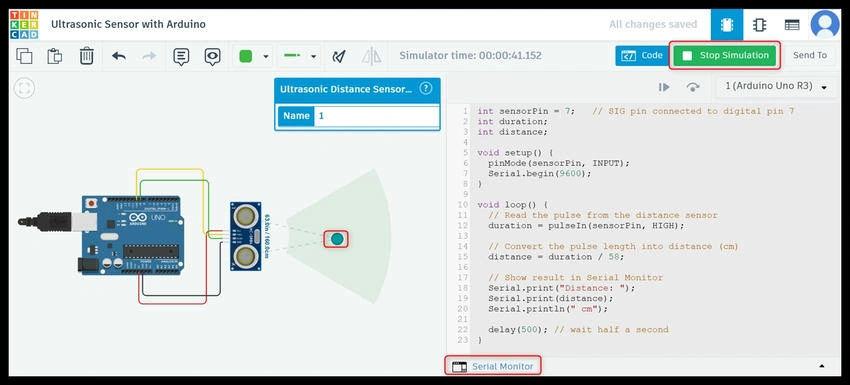
Click Start Simulation.
Open the Serial Monitor.
You will see distance values.
Move the virtual obstacle in Tinkercad and see how the numbers change.
Uses
Robots that avoid objects
Car parking sensors
Smart measuring tools
Security alarms
Conclusion
Using Tinkercad, you can learn how an ultrasonic sensor works without real hardware. This is a fun and easy way to start with Arduino projects.
Join the conversation! Your thoughts help the community grow.