

In this article, we will try to understand Anti-forgery Token in ASP.NET MVC.
Anti-forgery stands for “Act of copying or imitating things like a signature on a check, an official document to deceive the authority source for financial gains”.
Now, in the case of web applications, it is termed as CSRF. CSRF is a method of attacking website where attackers imitate a trusted source sending the data to the site.
[Here attacker acts like a trusted source and sends data to site and website processes the data by trusting the request.]
Now, let’s take an example.
- Now we have created a new MVCWebapplication project by File- New Project- WebApplication MVC.
- Now add TransferAmt action method which will fetch the value of amount as amt and act as the account from Request.Form as shown below.
public ActionResult TransferAmt() { // Money transfer logic goes here return Content(Request.Form["amt"] + " has been transferred to account " + Request.Form["act"]); } - Now, in add TransferAmt View, add the below code.
<html>
<head>
    <title>Transfer money</title>
</head>

<body>
    <div> Transfer
        <form action="Home/TransferAmt" method="post"> Amount <input type="text" name="amount" value="" /><br /> Account No. <input type="text" name="account" value="" />
            <br />
            <input type="submit" value="Add Money" />
        </form>
    </div>
</body>
</html>
The above code has two textboxes, amt and act. Now formaction is has the action as TransferAmt.
- In Index action method, call TransferAmt View as shown below.
public ActionResult Index() { return View("TransferAmt"); } - Now, you can run in Index action method to call TransferAmt View, as shown below.
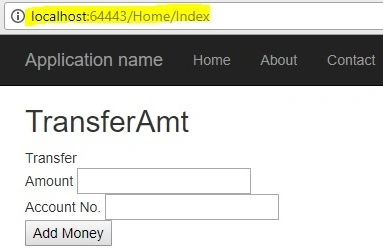
- Now, enter the values and click on Add Money button.
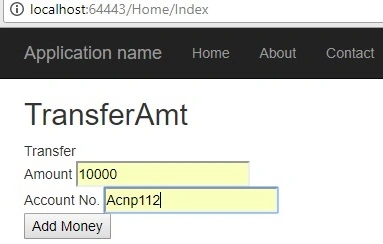
- You will get the below result.

- Now, add another MVC project and add the below code into about View.
<div> Win 1000000 US$ by playing ultimate game <form action="http://localhost:64443/Home/TransferAmt" method="post"> <input type="hidden" name="amount" value="30000" /> <input type="hidden" name="account" value="5005" /> @*@Html.AntiForgeryToken()*@ <input type="submit" value="Play the ultimate game" /> </form> </div> - Now run the application and click on Play the ultimate game

- You will get the below result

Now you can see even we are able to access TransferAmt from another application, which is security breach.
Now to overcome this we will use Antiforgery Token with the help of @Html.AntiForgeryToken() in view and [ValidateAntiForgeryToken()] on actionmethod.
- Now add [ValidateAntiForgeryToken()] to TransferAmt action method as shown below.
[ValidateAntiForgeryToken()] public ActionResult TransferAmt() { // Money transfer logic goes here return Content(Request.Form["amount"] + " has been transferred to account " + Request.Form["account"]); } - Now if you will run the application.

- Click on Add Money, you will get the below error for HttpAntiForgeryException.

In the above case it is expecting a verification token which not getting supplied.
- To fix this we need to use @Html.AntiForgeryToken() in view as shown below.
<html>
<head>
    <title>Transfer money</title>
</head>
<body>
    <div> Transfer
        <form action="Home/TransferAmt" method="post">
            Amount <input type="text" name="amount" value="" /><br />
            Account No. <input type="text" name="account" value="" /><br />
            @Html.AntiForgeryToken()
            <input type="submit" value="Add Money" />
        </form>
    </div>
</body>
</html>
- Now if you will run the application and click on Add money by entering values you will get the below result.
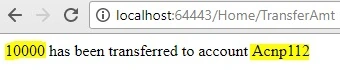
- Now run the application and click on Play the ultimate game and you will get an error which is protecting your website from unwanted anti-forgery requests.
IMAD AYOUBPosted Aug 9, 2021, 10:42 PM
Excellent explanation. Thanks a lot.
Mauricio MendozaPosted Aug 12, 2020, 9:24 AM
How I can customize the error, for the hackers' can't see that my site was created in asp
Shaikh SahadPosted Jun 8, 2020, 1:33 PM
@adnan -> When you use Anti-forgery two tokens gets generatede. One token is sent as a cookie. The other is placed in a hidden form fieldNow When the client submits the form, it must send both tokens back to the server. The client sends the cookie token as a cookie, and it sends the form token inside the form data The value from the input field (called Form Token) and from the cookie (called Cookie or Session Token) are correlated and both are required for a successful request validation Cookie Token is stored with the HttpOnly attribute set (so you can’t access it from JavaScript code)
Mohammad Adnan IdreesPosted Apr 25, 2020, 7:46 AM
But anti forgery token shows by inspect element in the webpage. So a hacker can get that from there. Is this a breach and how we can protect that. Please respond here and send me an email as well at [email protected] Thank you in advance. :)
Dhiren PatelPosted Aug 21, 2019, 1:34 AM
A good example, Appreciated
Laltu SenPosted Jun 12, 2019, 7:42 AM
I have a view with multiple form so where I can added @Html.AntiForgeryToken(). Is it added to each form or globally can you tell me where I can declared in view also in controller how it work
prom minuthPosted Jan 1, 2019, 1:43 AM
Why still can be attack if we just added @Html.AntiForgeryToken() in attack form?
Tridip BhattacharjeePosted Apr 30, 2018, 3:41 AM
Good explanation. thanks
Naveen K MPosted Apr 29, 2018, 6:14 AM
Pradeep Yadav hi.. if we add @Html.AntiForgeryToken() in the second form i.e., play game form then that is considered as valid form without any error.
Sahil SharmaPosted Apr 28, 2018, 12:11 AM
Great explanation about CSRF. (y)