The Windows Forms LinkLabel control is used to display hyperlinks. It is useful when you need to add a control in your application that allows users to visit your home page or any other Web sites. In this article, I will discuss some functionality related to the LinkLabel control and how to use it.
It seems like using a LinkLabel control is pretty simple but it could be tricky. When I first used this control, I thought the control should have a link property where I would add the URL of my Web site and it will work. But no. It doesn't work that way.
There are more than once class is involved in using a LinkLabel control. These classes are - LinkLabel.Link, LinkLabel.LinkCollection, LinkLabelLinkedClickEventArgs, and LinkLabelLinkedClickEventHandler.
Actually, a LinkLabel control can have a collection of hyperlinks and this collection is represented by LinkLabel.LinkCollection. Each hyperlink in this collection is represented by the LinkLabel.Link class. Using this class members, you can control each hyperlink of the control individual.
This class provides 5 properties as described in Table 1.
| Property |
Description |
|
Enabled |
Gets or sets a value indicating whether the link is enabled. |
|
Length |
Gets or sets the number of characters in the link text. |
|
LinkData |
Gets or sets the data associated with the link. |
|
Start |
Gets or sets the starting location of the link within the text of the LinkLabel. |
|
Visited |
Gets or sets a value indicating whether the user has visited the link. |
When you click a hyperlink within the control, the LinkClicked event is raised, and the LinkLabel.Link object representing the hyperlink that was clicked is passed as part of the LinkLabelLinkClickedEventArgs object that is passed as a parameter to the event handler. You can use this object to obtain the LinkLabel.Link object associated with the hyperlink that was clicked by the user. The signature of the LinkLabel click event handler looks like the following:
private
void linkLabel1_LinkClicked(object sender,System.Windows.Forms.LinkLabelLinkClickedEventArgs e)
{
}
You can specify the appearance of hyperlinks by using the LinkLabel class properties. These properties are described in Table 2.
| Property |
Description |
|
DisabledLinkColor |
Gets or sets the color used when displaying a disabled link. |
|
LinkArea |
Gets or sets the range in the text to treat as a link. |
|
LinkBehavior |
Gets or sets a value that represents the behavior of a link. |
|
LinkColor |
Gets or sets the color used when displaying a normal link. |
|
Links |
Gets the collection of links contained within the LinkLabel. |
|
LinkVisited |
Gets or sets a value indicating whether a link should be displayed as though it were visited. |
|
VisitedLinkColor |
Gets or sets the color used when displaying a link that that has been previously visited. |
The LinkLabel.LinkCollection represents the collection of hyperlinks available in the control. The Add, Remove, and Clear method of this class are used to add a new hyperlink, remove an existing hyperlink, and clear all hyperlinks respectively.
So how LinkLabel control opens the browser. Actually LinkLabel doesn't do any thing for you. You need to call the browser when the LinkLabel button is clicked. You write the following code on the LinkLabel button click event handler, which calls the browser automatically when you pass a URL in the Process.Start method:
System.Diagnostics.Process.Start(e.Link.LinkData.ToString());
MSDN documentation suggests the following way to add and open a hyperlink:
// Create a new LinkLabel control.
private LinkLabel linkLabel1 = new LinkLabel();
public void InitializeMyLinkLabel()
{
// Set the control to autosize based on the text content.
linkLabel1.AutoSize = true;
// Position and size the control on the form.
linkLabel1.Location = new System.Drawing.Point(8,16);
linkLabel1.Size = new System.Drawing.Size(135,13);
// Set the text to display in the label.
linkLabel1.Text = "Click here to get more info.";
// Create a new link using the Add method of the LinkCollection class.
linkLabel1.Links.Add(6,4,www.microsoft.com);
// Create an event handler for the LinkClicked event.
linkLabel1.LinkClicked += new System.Windows.Forms.LinkLabelLinkClickedEventHandler
(this.linkLabel1_LinkClicked);
// Add the control to the form.
this.Controls.Add(linkLabel1);
}
private void linkLabel1_LinkClicked(object sender, System.Windows.Forms.LinkLabelLinkClickedEventArgs e)
{
// Determine which link was clicked within the LinkLabel.
linkLabel1.Links[linkLabel1.Links.IndexOf(e.Link)].Visited = true;
// Display the appropriate link based on the value of the
// LinkData property of the Link object.
System.Diagnostics.Process.Start(e.Link.LinkData.ToString());
}
But I found in most of the cases, you will end up using only one URL. So why bother writing that much code. If you use Visual Studio .NET, here is the simplest way to use the LinkLabel control. You can find the LinkLabel control in Toolbox as you can see from the following figure:
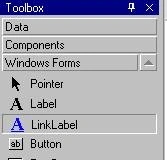
After adding a LinkLabel control to the Form, double click on the LinkLabel control that adds a LinkLabel click event handler. Now simply call the Process.Start method with your URL. For example, my code for opening www.kskin.net looks like following:
private
void linkLabel1_LinkClicked(object sender,System.Windows.Forms.LinkLabelLinkClickedEventArgs e)
{
System.Diagnostics.Process.Start(www.kskin.net);
}
Note: You can even write this code on a normal Button or any other control click event handler, if you don't want to use the LinkLabel control. 

Josh ParkinsoneditedPosted Jan 27, 2013, 9:19 AMEdited Jan 27, 2013, 9:19 AM
Anyone who is having issues making their link function and is getting errors, you must put speech marks around the link within the brackets, so your link would look like this :private void linkLabel1_LinkClicked(object sender,System.Windows.Forms.LinkLabelLinkClickedEventArgs e) { System.Diagnostics.Process.Start("www.kskin.net"); } Those speech marks will get rid of all your errors for you.
serkanPosted Sep 22, 2011, 11:00 AM
thnk
Gokul BalanPosted Feb 1, 2011, 4:46 AM
In C# using an Linklabel how to open an window ?
danny droreditedPosted May 30, 2009, 3:48 PMEdited May 30, 2009, 3:49 PM
thanks, thats just what i was looking for! --------------------------------- Danny, San Francisco Locksmith
samantha gonzalezPosted Aug 20, 2008, 1:21 PM
You saved me a TON of time with this posting. It worked like a charm! Thanks!
ron 0Posted Jan 22, 2008, 5:48 PM
System.Diagnostics.Process.Start(www.kskin.net); I am getting error on line above. The name www does not exist in current context Any reason why?
murali krishnaPosted Nov 5, 2007, 2:02 AM
give an idea how i can use link button .i,e show a form when i click button.
daminabo braidePosted Mar 29, 2007, 8:51 AM
Nice forum. but how do I send my problems in C#.Net programming to the forum for answer.