

Introduction
Events are one of the core and important concepts of the C# .Net Programming environment and frankly speaking, sometimes it's hard to understand them without a proper explanation and example.
So I thought of writing this article to make things easier for learners and beginners.
Our Topic
An event in very simple terms is an action or occurrence, such as clicks, key press, mouse movements, or system generated notifications. Applications can respond to events when they occur. Events are messages sent by the object to indicate the occurrence of the event. Events are an effective method of inter-process communication. They are useful for an object because they provide signal state changes that may be valuable to a client of the object.
If the preceding sentences were tough to understand then let's make it simpler. If a button on a form is clicked by a user then an event is fired. If a user types something into a TextBox then keys are pressed and hence an event is fired and so on.
The following figure is the generalized representation that explains events and event handling.
In C#, delegates are used with events to implement event handling. The .NET Framework event model uses delegates to bind notifications with methods known as event handlers. When an event is generated, the delegate calls the associated event handler.
Investigating .NET Windows Application Button Click Event
Just open your Visual Studio and create a Windows application. You'll get a form in your Windows application project named Form1.cs. Add a simple button to that form, just drag and drop. In the properties panel of that button, bind the onclick event of that button with an event in the code behind and show some text on its click. You can browse the attached source code for understanding.
Now when you run the application, your form will be shown with just one button, click that button and see what happens.
As we can see the button on the form was clicked by the user and hence the button click event was fired that was handled by the delegate that in turn called the button_click method (event handler method) that showed our Message Box.
In the preceding example of an event declaration, delegate declaration and event handler declaration, all is done by .NET. We just need to write code handle to our event. In this case the code to display the message box.
Behind the curtain
If we investigate Form1.Designer.cs and follow the step shown in the figure below we can easily determine the event keyword and delegate keyword and hence determine their definition.
Since we haven't seen the definition syntax it might look alien to you but we will get to it soon. For now just follow the procedure in the figure.
Step 1
Open Form1.Designer.Cs from Solution Explorer.
Step 2
In Form1.Designer.Cs Click event and EventHandler delegate.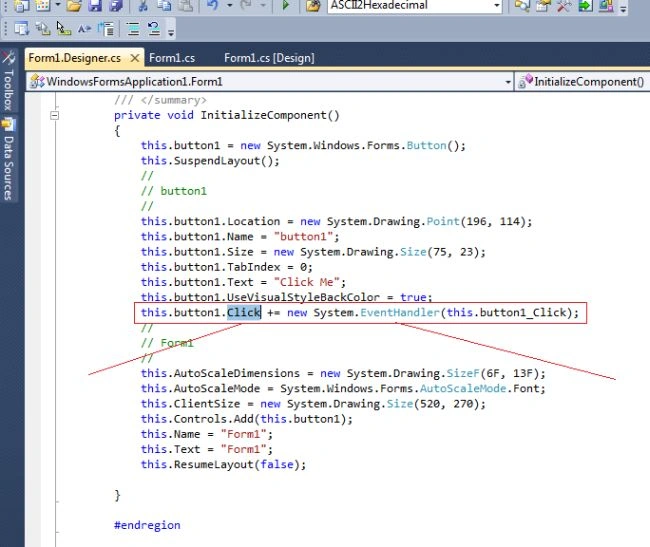
Step 3
Double-click this.button1. Click and press F12 to see the Click Event definition, similarly double-click System.EventHandler and Press F12 to see the EventHandler Delegate definition.
The following shows the event's definition: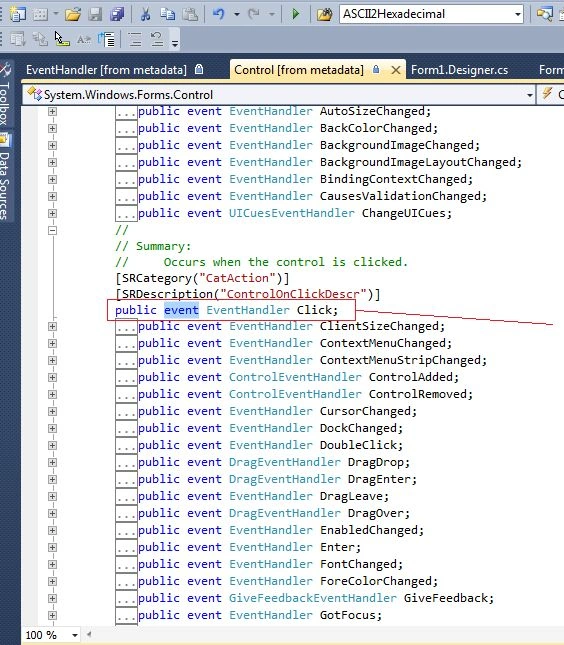
The following shows the delegate's definition: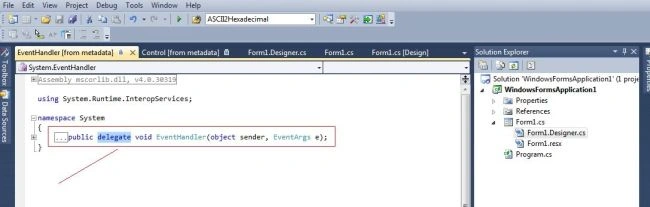
Publisher-Subscriber model
The events are declared and raised in a class and associated with the event handlers using delegates within the same class or other classes. Events are part of a class and the same class is used to publish its events. The other classes can, however, accept these events, or in other words can subscribe to these events. Events use the publisher and subscriber model.
A publisher is an object that contains the definition of the event and the delegate. The association of the event with the delegate is also specified in the publisher class. The object of the publisher class invokes the event that is notified to the other objects.
A subscriber is an object that wants to accept the event and provide a handler to the event. The delegate of the publisher class invokes the method of the subscriber class. This method in the subscriber class is the event handler. The publisher and subscriber model implementation can be defined by the same class.
The following figure shows the mechanism used by the publisher and subscriber objects.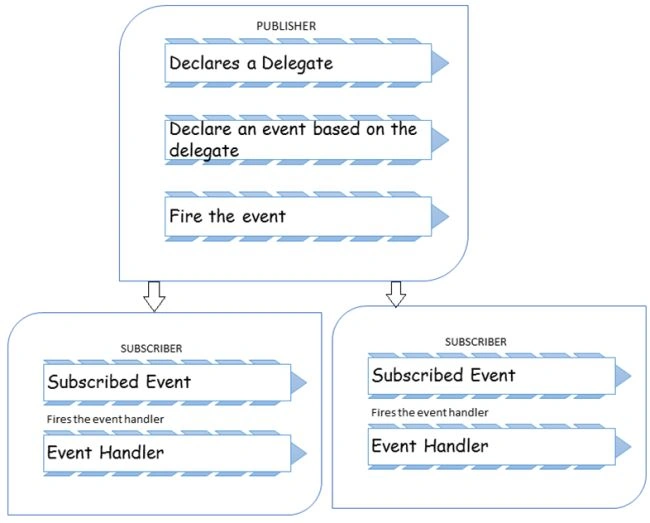
Getting your hand dirty
Let's get our hand dirty by building our own event handling example. In the example below we will see how to define our customized event and how to raise it and how to handle it by our own customized event handler.
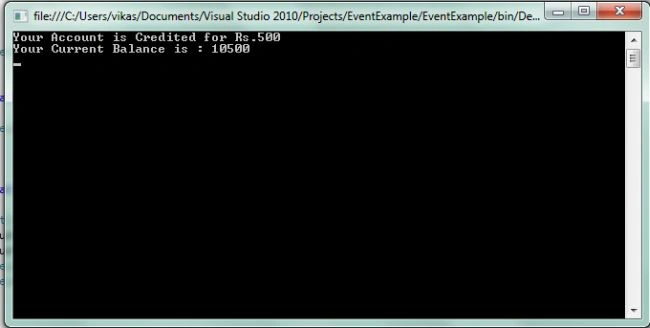
In our simple example we'll build a console application for a bank in which the event TransactionMade is raised whenever the customer makes a transaction and in response a notification is sent to him.
Let's do some serious coding now.
First we define our class Account.
We can add a constructor to initialize our variable int BalanceAmount that will hold the account balance in our class.
- public int BalanceAmount;
- public Account(int amount)
- {
- this.BalanceAmount = amount;
- }
The definition of the event in a publisher class (Account class ) includes the declaration of the delegate as well as the declaration of the event based on the delegate. The following code defines a delegate named TransactionHandler and an event TransactionMade that invokes the TransactionHandler delegate when it is raised:
- public delegate void TransactionHandler(object sender,TransactionEventArgs e);
- public event TransactionHandler TransactionMade;
When an event is raised, we some data to the subscriber in a class that is derived from. For example, in our example we want to provide the Transaction Amount and the Type of Transaction made. So we define a class TransactionEventArgs that will inherit EventArgs to data to the subscriber class. We have declared two private variables, one int _transactionAmount to the transaction amount information and the other is string _transactionType to the transaction type (credit/debit) information to the subscriber class.
And here is the class definition:
- public class TransactionEventArgs : EventArgs
- {
- private int _transactionAmount;
- private string _transactionType;
- public TransactionEventArgs(int amt,string type)
- {
- this._transactionAmount = amt;
- this._transactionType = type;
- }
- public int TranactionAmount
- {
- get
- {
- return _transactionAmount;
- }
- }
- public string TranactionType
- {
- get
- {
- return _transactionType;
- }
- }
- }
In the Debit method the balance amount will be deducted and the event will be raised to notify the subscriber that the balance amount has been changed, similarly in case of the Credit method the balance amount will be credited and notification will be sent to the subscriber class.
Debit Method
- public void Debit(int debitAmount)
- {
- if (debitAmount < BalanceAmount)
- {
- BalanceAmount = BalanceAmount - debitAmount;
- TransactionEventArgs e = new TransactionEventArgs(debitAmount,"Debited");
- OnTransactionMade(e); // Debit transaction made
- }
- }
- public void Credit(int creditAmount)
- {
- BalanceAmount = BalanceAmount + creditAmount;
- TransactionEventArgs e = new TransactionEventArgs(creditAmount,"Credited");
- OnTransactionMade(e); // Credit transaction made
- }
- protected virtual void OnTransactionMade(TransactionEventArgs e)
- {
- if (TransactionMade != null)
- {
- TransactionMade(this, e); // Raise the event
- }
- }
- namespace EventExample
- {
- public delegate void TransactionHandler(object sender,TransactionEventArgs e); // Delegate Definition
- class Account
- {
- public event TransactionHandler TransactionMade; // Event Definition
- public int BalanceAmount;
- public Account(int amount)
- {
- this.BalanceAmount = amount;
- }
- public void Debit(int debitAmount)
- {
- if (debitAmount < BalanceAmount)
- {
- BalanceAmount = BalanceAmount - debitAmount;
- TransactionEventArgs e = new TransactionEventArgs(debitAmount,"Debited");
- OnTransactionMade(e); // Debit transaction made
- }
- }
- public void Credit(int creditAmount)
- {
- BalanceAmount = BalanceAmount + creditAmount;
- TransactionEventArgs e = new TransactionEventArgs(creditAmount,"Credited");
- OnTransactionMade(e); // Credit transaction made
- }
- protected virtual void OnTransactionMade(TransactionEventArgs e)
- {
- if (TransactionMade != null)
- {
- TransactionMade(this, e); // Raise the event
- }
- }
- }
And this event will be handled by our event handler.
Now let's define our Subscriber class that will react to an event and process it accordingly using its own methods.
First create a class named TestMyEvent and define a method SendNotification, its return type and parameter should match our Delegate declared earlier in the publisher class. Basically this method will react on an event that is changed in our balance amount and informs the user (by writing this on the console).
The following is the definition:
- private static void SendNotification(object sender, TransactionEventArgs e)
- {
- Console.WriteLine("Your Account is {0} for Rs.{1} ", e.TranactionType, e.TranactionAmount);
- }
- private static void Main()
- {
- Account MyAccount = new Account(10000);
- MyAccount.TransactionMade += new TransactionHandler(SendNotification);
- MyAccount.Credit(500);
- Console.WriteLine("Your Current Balance is : " + MyAccount.BalanceAmount);
- Console.ReadLine();
- }
- class TestMyEvent
- {
- private static void SendNotification(object sender, TransactionEventArgs e)
- {
- Console.WriteLine("Your Account is {0} for Rs.{1} ", e.TranactionType, e.TranactionAmount);
- }
- private static void Main()
- {
- Account MyAccount = new Account(10000);
- MyAccount.TransactionMade += new TransactionHandler(SendNotification);
- MyAccount.Credit(500);
- Console.WriteLine("Your Current Balance is : " + MyAccount.BalanceAmount);
- Console.ReadLine();
- }
- }
Conclusion
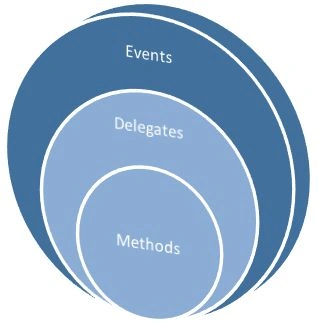
We investigated .NET events and built our own custom event and saw how events are raised and handled. So I wouldn't be wrong to say that events encapsulate delegates and delegates encapsulates methods. So the subscriber class doesn't need to know what's happening behind the curtain, it just requires notification from the publisher class that an event has been raised and it must respond accordingly.
I hope you are satisfied after reading the article and that most of have enjoyed reading and coding.
Ehsan SajjadPosted Jan 11, 2016, 10:22 AM
Good Explanation
Deepak BaluniPosted Jul 27, 2015, 3:23 AM
Nice one!
Aastha KharbandaPosted Jul 21, 2015, 2:14 AM
Nice!
Sandeep ChaudharyPosted Jul 16, 2015, 1:43 AM
Good dude .
Lakshya SinghalPosted Jul 14, 2015, 3:29 AM
Awesome article
Madhuri DPosted Jul 9, 2015, 12:06 PM
Nicely explained.
Neeraj KumarPosted Jun 25, 2015, 4:42 AM
nice
Debendra DashPosted Jun 25, 2015, 2:16 AM
Good one.....
Vikas SharmaPosted Jun 25, 2015, 1:29 AM
Thanks Akhil !!!
Akhil MittalPosted Jun 25, 2015, 1:24 AM
Great article Vikas.Very nice.keep it up and welcome to c# corner.
Manoj BhoirPosted Jun 25, 2015, 1:23 AM
Nice article. Good Start...
Kavitesh KambojPosted Jun 25, 2015, 1:21 AM
Good Article..
Debasis SahaPosted Jun 25, 2015, 12:42 AM
Good Article..
Vikas SharmaPosted Jun 25, 2015, 12:06 AM
Thanks for such a warm welcome!!
Vipul TehriPosted Jun 24, 2015, 11:53 PM
Its a great article on events in C#..
Prem KumarPosted Jun 24, 2015, 11:53 PM
Nice One......
Mansi GuptaPosted Jun 24, 2015, 11:49 PM
Good Article..
RinkuPosted Jun 24, 2015, 11:32 PM
Good One.
Santhakumar MunuswamyPosted Jun 24, 2015, 11:27 PM
Welcome
Santhakumar MunuswamyPosted Jun 24, 2015, 11:27 PM
Good Start
Gopi ChandPosted Jun 24, 2015, 11:25 PM
Great article...welcome to our community :)
Mayank YadavPosted Jun 24, 2015, 11:21 PM
Nice article....
Vikas SharmaPosted Jun 24, 2015, 10:54 PM
Thanks!
Pankaj Kumar ChoudharyPosted Jun 24, 2015, 8:08 PM
Nice Start Vikas and Good explain keep it up...........