

Introduction
HTML5 is evolving becoming better and richer to help improve customer experiences. It creates an opportunity for web developers to use standard-based web technologies to create graphically interactive sites and applications. HTML5 is helpful for designers because HTML5 tags are useful and easy to use instead of div tags. SVG and Canvas technologies can be used to address a range of graphic scenarios on the modern Web.
In HTML there are the following two types of graphics:
- Scalable Vector Graphics (SVG)
- Canvas
Scalable Vector Graphics (SVG)
2. Firefox 4+
3. Chrome 4+
4. Safari 4+
5. Opera 9.5
- Text-based.
- Vector technology.
- Uses XML and works within other language formats.
- Easily edited.
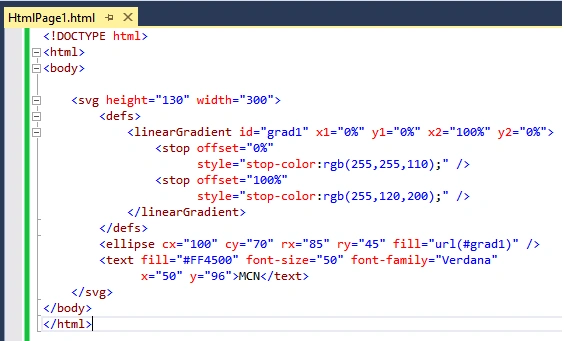
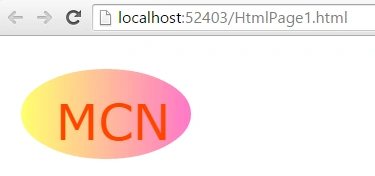
Figure 2: SVG Output
Canvas is a rectangular area on an HTML page for drawing graphics on the fly via JavaScript. The default size of the canvas is 300 px × 150 px (width × height). The HTML tag <canvas> is a container for Canvas graphics.
- <canvas width="300" height="225"></canvas>
- Used for fulfilling the need of web application.
- Used for the client-side database.
- Used for improving accessibility.
- Geolocation support.
For example, now we are drawing a rectangle using <canvas> tags.
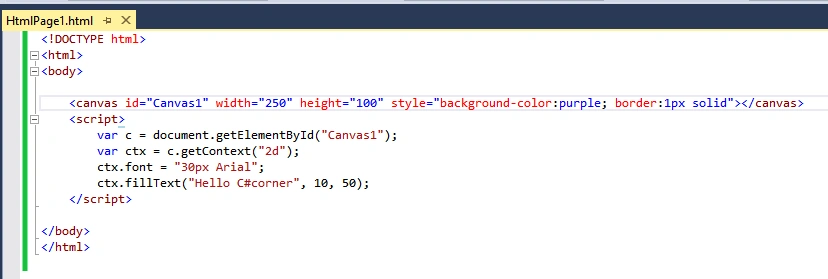
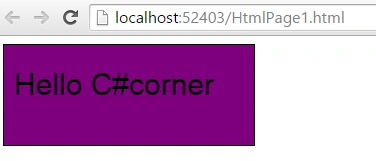
- SVG is scalable, provides the facility of the auto-scaling icon, logo, and chart.
- SVG is not supported by languages whereas canvas elements are manipulated using client-side JavaScript.
- DOM handling. It's easy to attach event handlers and manipulate elements like you would for another HTML block. To move an item you simply change its coordinates but this is not true for a canvas.
Sibeesh VenuPosted Jul 11, 2015, 8:23 AM
Nice share.
Santhakumar MunuswamyPosted Jul 11, 2015, 2:52 AM
Good article! Thanks for sharing
Gopi ChandPosted Jul 11, 2015, 2:29 AM
Good article to initiate with... :)
Neeraj KumarPosted Jul 10, 2015, 12:39 PM
Good
Sourabh SomaniPosted Jul 10, 2015, 10:49 AM
good keep it :)
Gareth BradleyPosted Jul 10, 2015, 10:04 AM
You can use SVG's for things like Wordles.
Dominique CejaPosted Jul 10, 2015, 9:57 AM
Thanks
Pankaj Kumar ChoudharyPosted Jul 10, 2015, 9:30 AM
Nice Start Mohit.....
Nilesh JadavPosted Jul 10, 2015, 8:33 AM
Nice one mohit sir