

In this lesson, we will learn about the main parts of OCI's physical setup — starting with regions, then availability domains, and finally fault domains.
What Is a Region?
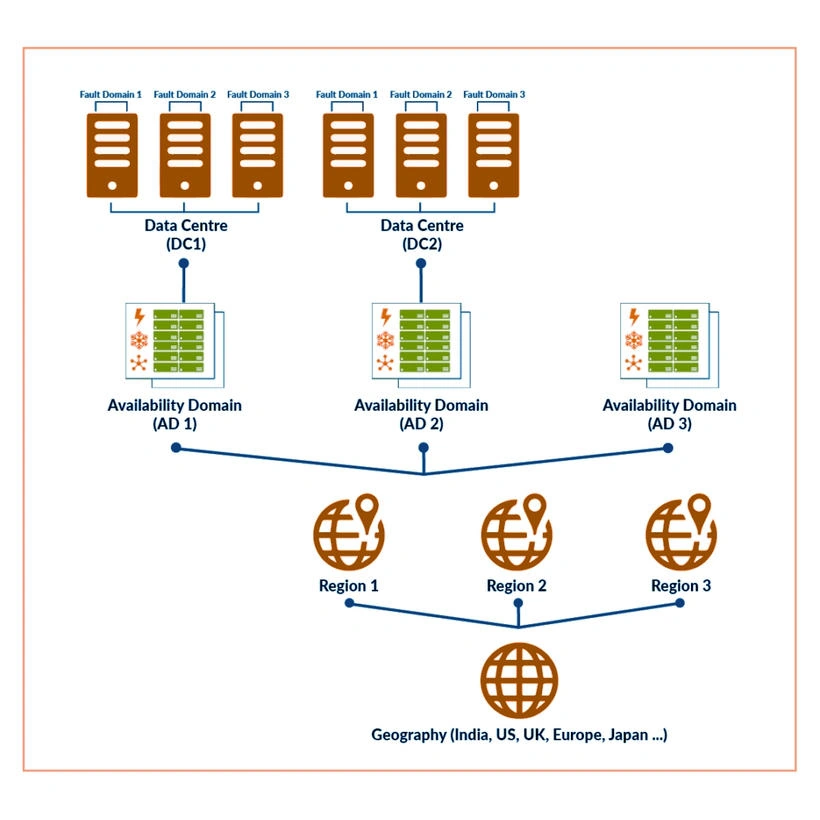
A region is an area in the world where Oracle has cloud data centers. Each region has one or more availability domains (ADs), which are large data centers that work together to keep services running smoothly and reliably.
OCI has a worldwide network of regions across many continents. This helps users run their work close to their customers. Oracle also gives special ways to set up, such as:
A partnership with Microsoft Azure that lets OCI and Azure work together smoothly.
A hybrid cloud service called Dedicated Region Cloud@Customer, which lets companies use OCI services in their own data centers.
How to Choose a Region
When you choose a region, keep these three things in mind
Distance from your users: Choose the region closest to your users. This helps your application work faster and reduces delay (latency).
Data laws and compliance: Some countries have strict rules about where data must stay. Pick a region that meets these legal rules.
Service availability: Not all regions have every OCI service. Some services are added later depending on demand or local laws.
Choosing the right region helps you get the best performance, follow rules, and use the right services.
What Is an Availability Domain?
An Availability Domain (AD) is one or more strong and safe data centers in a region. Each AD is separate to stop problems from spreading, but they are linked by a fast network. This lets users run their work in more than one AD to keep it running all the time.
ADs do not share power, cooling, or network systems.
If one AD has a problem, the other ADs in the same region usually keep working fine.
ADs are connected with high-speed, low-latency networks, so data moves quickly between them.
For example, if a region has three ADs and one goes down, the other two will still work.
What Is a Fault Domain?
Each Availability Domain has three Fault Domains (FDs). A fault domain is a small group of hardware, like some racks and servers. Fault domains keep your work safe if some hardware breaks. If you put your servers and databases in different FDs, they use different hardware. This means if one FD fails, your other resources can still work.
Benefits of fault domains
Protect your applications from hardware failures.
OCI updates only one fault domain at a time, so others keep running.
You can choose which fault domain to use when starting your compute or database instance.
How to Design for High Availability
Let's see how to use these ideas in your architecture
Each region has availability domains, and each AD has three fault domains.
You can spread your application across different fault domains.
You can also replicate your setup in another AD to increase protection.
To keep your databases in sync, you can use tools like Oracle Data Guard.
By doing this, your system stays online even if one part fails.
What If There's Only One Availability Domain?
Even in regions with only one Availability Domain, fault domains help keep work safe. By spreading your resources across different fault domains, you can avoid single points of failure and keep your systems running without interruptions.
Summary of What We Learned
Let's review
A Region is a geographic area (for example, Tokyo, London, or Mumbai).
Each region has one or more Availability Domains (ADs).
Each AD has three Fault Domains (FDs).
These parts protect your system at different levels:
Fault Domains protect against small hardware failures.
Availability Domains protect against big data center failures.
Regions can work in pairs for backup and disaster recovery.
Oracle also provides Service Level Agreements (SLAs) to guarantee high availability, performance, and reliability.
Conclusion
Oracle Cloud is designed with regions, availability domains, and fault domains to keep your applications safe and always running. By spreading your resources across these layers, you can avoid failures, reduce downtime, and follow data rules, making sure your cloud applications work well and reliably.
Join the conversation! Your thoughts help the community grow.