

As a .NET developer, I always assumed that AI already “knows everything” internally and directly gives answers. But while exploring Generative AI, I realized something very different:
AI does NOT directly know everything. It first searches relevant data and then generates a response
This process is known as RAG (Retrieval-Augmented Generation), and it works closely with LLMs (Large Language Models).
In this article, we will break this down in a very simple developer-friendly way with a .NET 8 example.
What You Will Learn in This Article
Before we start, here’s what you will understand by the end of this article:
What is LLM and its role in AI systems
What is RAG and why it is used
How AI retrieves data before generating answers
Why AI sometimes gives outdated or incorrect answers
Simple .NET 8 example of retrieval system
Step-by-step explanation of code flow
Key learning for real-world AI systems
Step 1: Understanding the role LLM (Large Language Model)
An LLM (Large Language Model) is the main engine behind AI tools like ChatGPT. In simple terms, it helps the system understand what we are asking in natural language and then generates a meaningful response based on patterns it has learned from a large amount of text data. It doesn’t “know” things like a database, but it is very good at predicting what the best response should look like based on the context of the question.
It mainly helps the system do a few important things:
Understand what the user is asking
Generate responses in a natural, human-like way
Write explanations, code snippets, or solutions
Summarize long information into simple and readable form
So instead of looking things up like a search engine, it tries to generate the best possible response based on context.
⚠️ One important limitation
Even though LLMs are powerful, they are not always updated with the latest or project-specific information.
For example, they may not have:
Real-time data
Latest framework or library updates
Company or project-specific knowledge
Information added after training
Because of this limitation, relying only on an LLM is not always enough for accurate answers in real-world applications.
Why this matters?
This is exactly where retrieval systems like RAG (Retrieval-Augmented Generation) come into the picture. Instead of depending only on what the model already knows, RAG helps bring in relevant and up-to-date information before generating the final response.
So the system becomes more practical and reliable for real-world use cases.
Step 2: Understanding RAG (Retrieval-Augmented Generation)
RAG stands for Retrieval-Augmented Generation. It is a simple technique that improves how AI responds by adding one extra step before the answer is generated. Instead of directly answering from its own memory, the system first looks for relevant information and then uses that information to form the final response.
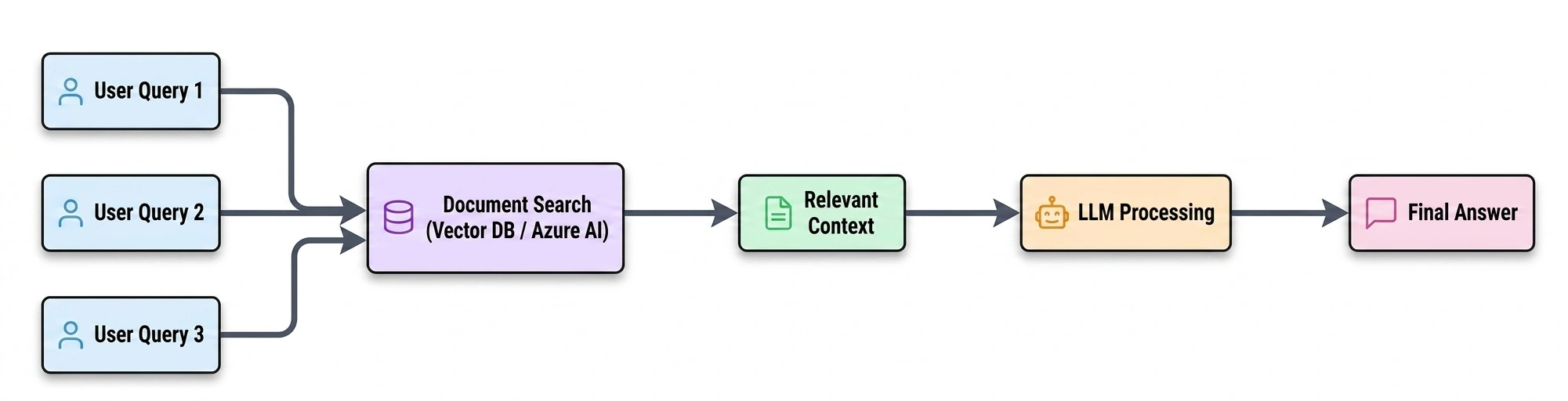
=> First, it searches for useful and related data from documents, APIs, or databases
=> Then, it sends that data to the LLM
=> Finally, the LLM uses that context to generate a proper answer
👉Simple Real-Life Example
Let’s say you ask an AI:
“How do I implement JWT authentication in ASP.NET Core 8?”
Now instead of directly answering, the system will first:
Search Microsoft documentation
Check existing project notes or articles
Look at related authentication examples
After collecting this information, it sends it to the LLM.
Then the LLM doesn’t guess from memory - it writes the answer using the retrieved information.
So the response becomes more accurate and relevant.
👉Simple Way to Understand
Think of it like this:
LLM alone => answering from memory
RAG => first checking notes, then answering properly
Simple Flow: Search => Context => Generate
Step 3: Real Developer Scenario (Important Concept)
Suppose I ask an AI:
“How do I implement JWT authentication in ASP.NET Core 8?”
Now imagine the system searches multiple sources:
Microsoft Learn documentation (latest .NET 8 approach)
Old StackOverflow answers using .NET Framework + OWIN
Blog posts with outdated authentication methods
⚠️ Important observation
Even if Microsoft documentation is correct, AI may still pick older content if:
It matches query wording better
It has higher similarity score
It appears more frequently in indexed data
👉 Because retrieval is based on relevance, not correctness
Step 4: Simple .NET 8 Implementation (Retrieval System)
Let’s simulate how a basic retrieval system works in a .NET 8 application. In real-world RAG systems, this step is responsible for searching relevant information from a knowledge source before sending it to an LLM. For simplicity, here we are using an in-memory list instead of a database or vector store.
👉 Code Example (Simple Retrieval Logic)
var builder = WebApplication.CreateBuilder(args);
 var app = builder.Build();

//  This acts like our small knowledge base (documents stored in system)
// In real applications, this data comes from:
// - SQL Server
// - APIs
// - PDFs
// - Azure AI Search / Vector DB
var documents = new List<string>
{
    "JWT authentication in ASP.NET Core 8 uses AddJwtBearer.",
    "OWIN middleware was used in older .NET authentication.",
    "RAG retrieves relevant information before LLM generation."
};

//  API endpoint to simulate user query
app.MapGet("/search", (string query) =>
{
    // Step 1: User sends a query
    // Example: "JWT"

    //  Step 2: System searches for matching content
    // It checks each document to see if it contains the keyword
    var result = documents
        .Where(doc =>
            doc.Contains(query, StringComparison.OrdinalIgnoreCase))
        .ToList();

    //  Step 3: Return matched documents
    // These results will later be passed to an LLM in real RAG systems
    return Results.Ok(result);
});

app.Run();
Code Behind Explanation (What is really happening?)
Let’s understand this step-by-step in a simple way.
1. Creating a knowledge base
var documents = new List<string>();This is a simple in-memory knowledge base.
👉 Think of it as a mini document store inside the application.
In real systems, this comes from:
Databases (SQL Server)
APIs
PDF documents
Azure AI Search / Vector Databases
2. Receiving user query
app.MapGet("/search", (string query))This endpoint accepts user input.
Example:
/search?query=JWT👉 It simulates a user asking a question in an AI system.
3. Retrieving relevant data
.Where(doc => doc.Contains(query))This is the retrieval step.
👉 It finds documents related to the user query.
In real RAG systems, this is replaced with:
Embeddings
Semantic search
Vector similarity search
4. Returning retrieved context
return Results.Ok(result);This returns the matched documents.
👉 In real RAG systems, this is not the final answer.
Instead, this data is sent to an LLM which:
Reads the context
Understands it
Generates the final response
Simple Mental Model
User asks a question
System retrieves relevant documents
Context is passed to AI
AI generates final answer
Key Takeaway
👉 Retrieval quality is very important
👉 If retrieval is wrong, AI response will also be wrong
👉 LLM depends fully on retrieved context
Workflow Summary
| Step | Stage | What Happens |
|---|---|---|
| 1 | User Query | User asks a question in natural language |
| 2 | Query Processing | System processes and understands the query |
| 3 | Document Retrieval | Relevant documents are fetched from sources |
| 4 | Context Selection | Only useful information is selected |
| 5 | LLM Processing | LLM reads and processes the context |
| 6 | Final Answer | AI generates the response |
The most important takeaway is:
👉 AI does NOT decide truth
👉 It only retrieves based on relevance
So:
Better retrieval = better output
Poor retrieval = incorrect response
Conclusion
Understanding RAG helped me realize that AI is not magic. It is simply a structured workflow of:
Retrieval
Context building
Response generation
The simplest way to remember it:
AI doesn’t always know the answer — it first searches, then responds.
What We Will Cover in the Next Article
In the next part of this series, we will go deeper into:
How Azure AI Search works in real applications
What vector databases and embeddings are
How .NET 8 integrates with Azure AI Search
Real-world RAG architecture used in production
LLM integration using Azure OpenAI
👉 We will also build a real working RAG system using .NET 8.
Final Note
AI is powerful but understanding how it works internally is what makes a developer truly future-ready.
Join the conversation! Your thoughts help the community grow.