

Introduction
ChromaDB is a modern, open-source vector database designed for storing and querying embeddings efficiently. Embeddings are numerical representations of data (such as text, images, or other modalities) that capture semantic meaning, enabling operations like similarity search, clustering, and recommendation systems.
One of the key aspects of ChromaDB is its default embedding mechanism, which simplifies the process for developers who want to store and retrieve semantic representations without implementing custom embeddings manually.
What Are Embeddings?
Embeddings transform complex data into vectors in a high-dimensional space. The proximity between vectors reflects the similarity of the underlying data. Examples include:
Text embeddings: Capture semantic similarity between sentences or documents.
Image embeddings: Capture visual similarity between images.
In ChromaDB, embeddings are used to perform vector searches efficiently, enabling features like semantic search, recommendations, and AI-powered data retrieval.
The Default Embedding Mechanism in ChromaDB
ChromaDB provides a DefaultEmbeddingFunction, designed for users who do not want to integrate an external embedding model. Here's how it works:
Text Input Handling:
Input is first normalized — text is stripped of extra whitespace, optionally converted to lowercase, and tokenized.Vector Generation:
ChromaDB internally converts the processed input into a numeric vector. Similar inputs produce vectors close together in vector space, enabling semantic similarity searches.Dimension and Storage:
The default embedding vector has a fixed dimension (typically 384) and is stored efficiently using memory-mapped structures, allowing high-speed searches over large datasets.Similarity Search:
Once vectors are stored, ChromaDB allows searches using distance metrics like cosine similarity or Euclidean distance. This lets you retrieve items semantically similar to a query without implementing your own vector operations.
Default Embedding Flow in ChromaDB
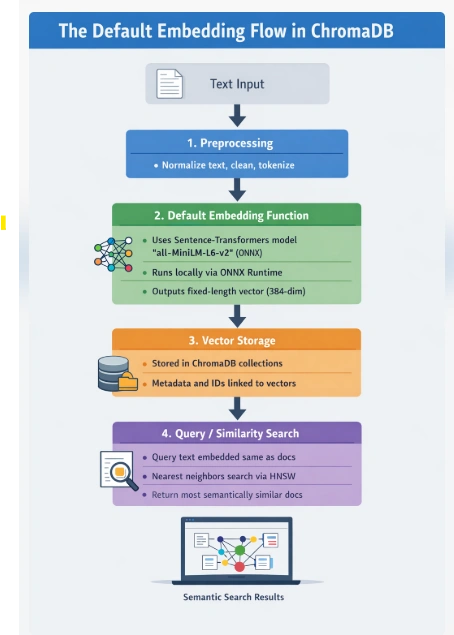
Which Embedding Model Does ChromaDB Use by Default?
ChromaDB's default embedding function uses the all-MiniLM-L6-v2 model from Sentence-Transformers:
Produces dense 384-dimensional vectors.
Captures semantic similarity between text inputs.
Runs locally via ONNX Runtime — no API keys or external calls required.
Efficient for CPU or GPU execution.
This default model is chosen for its speed, efficiency, and general-purpose semantic performance, making it ideal for prototyping and small-to-medium scale projects.
Example Usage of Default Embeddings in Python
import chromadb
from chromadb.utils import embedding_functions

# Initialize Chroma client
client = chromadb.Client()

# Use the default embedding function
embedding_function = embedding_functions.DefaultEmbeddingFunction()

# Create a collection
collection = client.create_collection(
    name="my_collection",
    embedding_function=embedding_function
)

# Add documents
documents = [
    "ChromaDB is a vector database for embeddings.",
    "Embeddings convert text into vectors for semantic search."
]
collection.add(documents=documents)

# Perform a similarity query
query_result = collection.query(
    query_texts=["What is ChromaDB used for?"],
    n_results=2
)
print(query_result)
Advantages of Using Default Embeddings
Simplicity: No need to manage external models or APIs.
Fast Setup: Ideal for prototypes or small projects.
Consistency: Works out-of-the-box for text-based data.
Integration: Seamlessly works with ChromaDB collections for storage, retrieval, and semantic search.
Limitations
Model Transparency: The internal embedding mechanism is abstracted.
Quality: For domain-specific applications (e.g., legal or medical text), default embeddings may underperform.
Multimodal Limitations: Primarily supports text; images or audio require custom embeddings.
When to Use Custom Embeddings
While the default function is convenient, external embeddings may be preferable when:
Large-scale, domain-specific semantic accuracy is required.
Working with multimodal data (images, audio).
You want embeddings from models like OpenAI, HuggingFace, or Ollama.
ChromaDB allows users to provide custom embedding functions to suit any scenario.
Query Workflow Recap
Query text → default embedding function → vector.
Vector searched against stored collection vectors.
Most semantically similar documents returned based on distance metrics.
Conclusion
ChromaDB's DefaultEmbeddingFunction is a simple, efficient way to enable semantic search and similarity operations without managing external models. Its use of the all-MiniLM-L6-v2 model ensures reasonable accuracy and performance for general-purpose tasks. For advanced or domain-specific requirements, ChromaDB also supports custom embedding functions to provide full flexibility.
Join the conversation! Your thoughts help the community grow.