

Azure app service is a popular HTTP-based service for hosting web application, REST APIs and mobile backends. It supports all major language like .NET, Java, .NET Core, Python, Node.js, Ruby, or PHP. The app service can run on both Windows and Linux environments, adding the power of Azure such as load balancing, security, autoscaling, ad automated management. One can also benefit the DevOps capabilities form azure like GitHub, Docker Hub, and continuous integrated / deployments. As well know, with app service you pay only for what you use, understanding the proven architecture for the same will be really helpful.
Following is the proven practice for a web application for Azure SQL Database and Azure App Service.
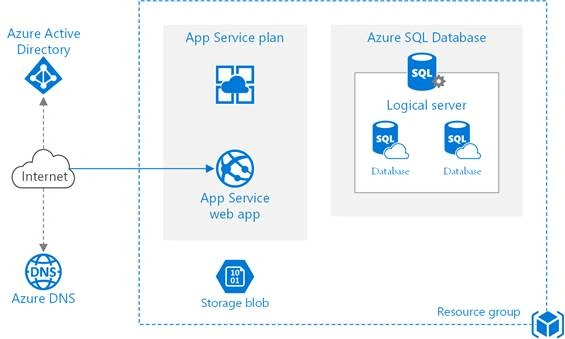
Source (https://docs.microsoft.com/en-us/azure/architecture/reference-architectures/app-service-web-app/images/basic-web-app.png)
Following are the components in the above architecture,
- Resource Group
It is the deployment and management service in Azure. It acts as the logical container for Azure resources.
- App Service App
It is a fully-managed platform for deploying and creating deploying cloud applications.
- App Service Plan
It defines the collection of compute resources for a web app to run.
- Deployment Slots
It is an effective way that helps to swap the production stage with development slots. In this way, one can avoid direct deployment into production.
- IP Address
The app service app has a domain name and a public IP address. The domain name is the subdomain name of azurewebsites.net for example azurewebsites.net
- Azure DNS
It is a hosting service for DNS domains that provide resolutions using Azure infrastructure. If the domains are hosted in Azure, then one can manage the DNS records using the same credentials, tools, APIs, and billing as other Azure services.
- Azure SQL Database
It is a relational database-as-a-service in the cloud. It shares its code base with the Microsoft SQL server database engine. Depending upon the application requirement, one can also use, Azure Database for PostgreSQL or Azure Database for MySQL. These are based on Postgres database and open-source MySQL respectively, which are fully managed database service.
- Logical Server
The logical server hosts the databases in Azure SQL Database. One can create multiple databases per logical server.
- Azure Storage
You can create a blob container in Azure storage to store diagnostic.
- Azure Active Directory
It is used for authentication.
Recommendations
App Service Plan
You can use Premium or Standard tiers, as both of them support auto-scale, scale-out and secure sockets layers. Both the tiers support instances sizes that differ by the number of memories and cores. Even after you create a plan you can change the tier or the instances sizes.
Charges apply even if the app is stopped for the instances on the App Service plan. To avoid this, make sure you delete the plans that you are not using.
SQL Database
Consider using the V12 version of the SQL database. SQL database supports Premium, Standard, and Basic with multiple performance levels within each tier.
Region
You must consider having the App service plan and the SQL database in the same region to minimize the network latency. The best practice is to choose the closest one.
Note
The above reference was not focused on application development and not on any particular application framework. The main objective was to understand how various Azure services fit together.
Dipa MehtaPosted Jul 18, 2019, 3:04 PM
It's really useful one.